
1. Introduction and Product Overview
Thank you for choosing the Septree ST-01 Commercial 10-Tray Food Dehydrator. This appliance is designed for efficient and consistent drying of various foods, including fruits, vegetables, herbs, meat, and pet treats. Please read this manual thoroughly before operation to ensure safe and optimal use.

Image 1.1: Front view of the Septree ST-01 Commercial 10-Tray Food Dehydrator.
Key Features:
- Large Capacity: Features 10 food-grade 304 stainless steel trays, each measuring 15.6 x 15.6 inches, providing approximately 17 square feet of drying space.
- Durable Construction: Made from food-grade stainless steel with a transparent glass front door for easy monitoring.
- Efficient Drying: Equipped with a rear-mounted drying fan and advanced airflow circulation technology for even dehydration. Upgraded double-row vents accelerate vapor discharge.
- Precise Control: Adjustable thermostat from 70℉ to 190℉ in 5℉ increments. Digital timer can be set for up to 24 hours in 30-minute increments.
- Safety Features: Includes automatic shut-off and overheat protection. Operates quietly with noise levels between 45dB and 50dB.
- Easy Maintenance: Detachable electric box for simplified cleaning. Removable trays and drip tray are dishwasher-safe.
2. What's in the Box
Upon unpacking, please verify that all components are present and undamaged. If any items are missing or damaged, contact customer service immediately.

Image 2.1: Visual representation of the Septree ST-01 Dehydrator and its included accessories.
- 1 x Septree ST-01 Food Dehydrator Unit
- 10 x Stainless Steel Drying Trays (15.6 x 15.6 inches)
- 2 x Non-stick Silicone Sheets
- 1 x Drip Tray
- 1 x Pair of Silicone Gloves
- 2 x Storage Containers
- 1 x User Manual (this document)
- 1 x Recipe Book
3. Safety Instructions
To reduce the risk of fire, electric shock, or injury, always follow these basic safety precautions:
- Read all instructions before using the appliance.
- Do not touch hot surfaces. Use handles or knobs. Always use the provided silicone gloves when handling hot trays or components.
- To protect against electrical hazards, do not immerse the cord, plugs, or the main unit (electric box) in water or other liquids.
- Close supervision is necessary when any appliance is used by or near children.
- Unplug from outlet when not in use and before cleaning. Allow to cool before putting on or taking off parts.
- Do not operate any appliance with a damaged cord or plug, or after the appliance malfunctions or has been damaged in any manner. Contact customer service for examination, repair, or adjustment.
- The use of accessory attachments not recommended by the appliance manufacturer may cause injuries.
- Do not use outdoors.
- Do not let the cord hang over the edge of a table or counter, or touch hot surfaces.
- Do not place on or near a hot gas or electric burner, or in a heated oven.
- Always attach the plug to the appliance first, then plug the cord into the wall outlet. To disconnect, turn any control to “off”, then remove the plug from the wall outlet.
- Do not use the appliance for other than intended use.
- Ensure the appliance is placed on a stable, heat-resistant surface with adequate ventilation around it.
4. Setup and Assembly
The Septree ST-01 dehydrator requires minimal assembly. Follow these steps to prepare your unit for first use:
- Unpack: Carefully remove all components from the packaging. Retain packaging for future storage or transport.
- Initial Cleaning: Before first use, wash the stainless steel trays, non-stick sheets, and drip tray with warm, soapy water. Rinse thoroughly and dry completely. Wipe the interior and exterior of the dehydrator unit with a damp cloth.
- Positioning: Place the dehydrator on a flat, stable, and heat-resistant surface. Ensure there is at least 6 inches of clearance on all sides for proper ventilation.
- Insert Drip Tray: Place the drip tray at the bottom of the dehydrator chamber.
- Insert Drying Trays: Slide the stainless steel drying trays into the designated slots within the dehydrator chamber.

Image 4.1: Overview of the simple 4-step process for using the dehydrator, from preparation to enjoying dried foods.
5. Operating Instructions
Digital Control Panel:
The dehydrator features an intuitive digital control panel for setting temperature and time.

Image 5.1: Digital control panel displaying temperature and time settings, alongside a quick dehydrating guide.
- TEMP Button: Press to adjust the drying temperature. Use the ▲ (Up) and ▼ (Down) arrows to set the desired temperature between 70℉ and 190℉ in 5℉ increments.
- TIME Button: Press to adjust the drying time. Use the ▲ (Up) and ▼ (Down) arrows to set the desired time between 0:30 and 24:00 hours in 30-minute increments.
- ON/OFF Button: Press to start or stop the dehydration process.
General Operation Steps:
- Prepare Ingredients: Wash, peel, and slice your food items to a uniform thickness for even drying.
- Load Trays: Arrange the prepared food in a single layer on the drying trays. Do not overlap items to ensure proper airflow. Use non-stick sheets for smaller items or fruit leathers.
- Set Temperature and Time: Close the dehydrator door. Plug the unit into a grounded electrical outlet. Use the TEMP and TIME buttons on the digital control panel to set your desired drying parameters.
- Start Dehydration: Press the ON/OFF button to begin the drying process. The fan will start, and the heating element will activate.
- Monitor Progress: Periodically check the food through the transparent door. You may rotate trays for more uniform drying, especially if drying different types of food.
- Completion: The dehydrator will automatically shut off once the timer expires. Unplug the unit and allow the food and trays to cool before handling.
Dehydrating Guide (Reference):
The following table provides general guidelines for common food items. Actual drying times may vary based on food thickness, moisture content, and ambient humidity.
| Item | Temperature (℉) | Temperature (℃) |
|---|---|---|
| Herbs | 95-125 | 35-52 |
| Flour Fermentation | 110-115 | 43-46 |
| Yogurt | 115 | 46 |
| Vegetables | 120-135 | 49-57 |
| Fruit & Fruit Rolls | 135-145 | 57-63 |
| Meats, Fish & Jerky | 145-155 | 63-68 |
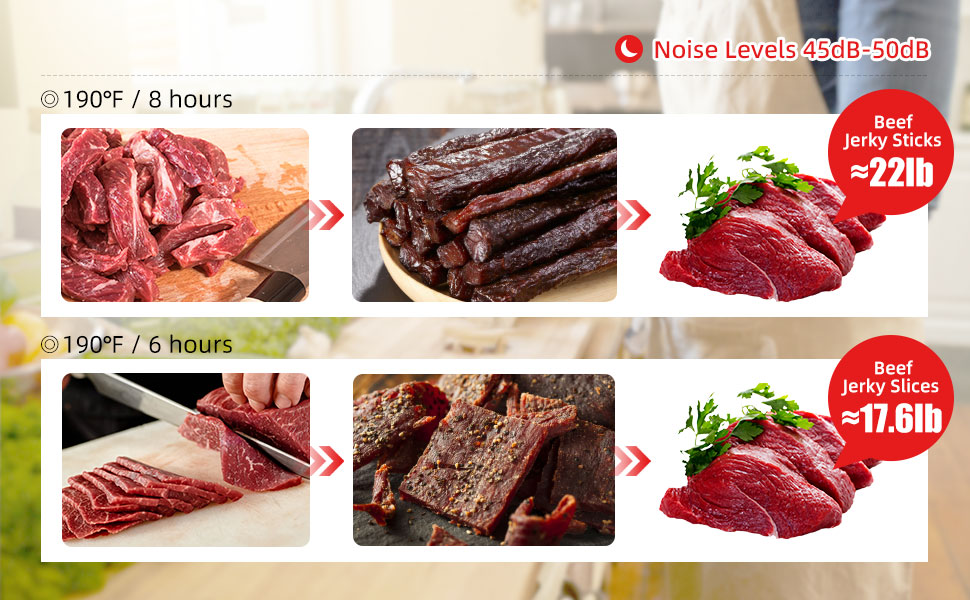
Image 5.2: Example drying times and temperatures for beef jerky sticks and slices.
6. Maintenance and Cleaning
Regular cleaning ensures the longevity and hygienic operation of your dehydrator.
Cleaning Steps:
- Unplug and Cool: Always unplug the dehydrator from the power outlet and allow it to cool completely before cleaning.
- Remove Trays and Drip Tray: Take out all stainless steel trays and the drip tray. These components are dishwasher-safe for convenience. For hand washing, use warm, soapy water and a non-abrasive sponge. Rinse thoroughly and dry.
- Clean Main Unit: The electric box of the dehydrator is detachable for easier cleaning of the main drying chamber.
- Front Dryer Section: The front section of the dryer can be cleaned with a garden hose or damp cloth. Ensure no water enters the electric box connection area.
- Electric Box: The electric box (rear section with fan and controls) should only be cleaned with a dry cloth or air duster. Never immerse the electric box in water or spray it with liquids.
- Wipe Interior/Exterior: Use a damp cloth to wipe down the interior and exterior surfaces of the dehydrator. For stubborn stains, a mild detergent can be used, followed by wiping with a clean, damp cloth.
- Dry Thoroughly: Ensure all parts are completely dry before reassembling and storing the dehydrator.

Image 6.1: Illustration of the electric box separation feature, allowing for easier cleaning of the main drying chamber.
7. Troubleshooting
If you encounter any issues with your dehydrator, please refer to the following troubleshooting guide:
- Dehydrator does not turn on:
- Ensure the power cord is securely plugged into a functional electrical outlet.
- Check if the ON/OFF button has been pressed.
- Verify the circuit breaker or fuse for the outlet.
- Food is not drying evenly:
- Ensure food items are sliced to a uniform thickness.
- Avoid overcrowding trays; arrange food in a single layer.
- Rotate trays periodically during the drying process.
- Check that the dehydrator door is fully closed.
- Temperature or time settings are incorrect:
- Refer to the “Operating Instructions” section to correctly set the temperature and time using the digital control panel.
- Unusual noise during operation:
- Ensure the dehydrator is on a stable, level surface.
- Check for any foreign objects inside the drying chamber or near the fan.
- If the noise persists and is excessive, discontinue use and contact customer service.
For issues not covered here, please contact Septree customer service for assistance.
8. Specifications
Detailed technical specifications for the Septree ST-01 Food Dehydrator:
- Brand: Septree
- Model Number: ST-01
- Material: Stainless Steel (Food Grade 304 for trays)
- Number of Trays: 10
- Tray Dimensions: 15.6 x 15.6 inches (each)
- Usable Drying Area: Approximately 17 square feet
- Wattage: 800 watts
- Voltage: 220 Volts
- Temperature Range: 70℉ - 190℉ (21℃ - 88℃)
- Timer Range: 0:30 - 24:00 hours
- Product Dimensions (D x W x H): 21.46" x 16.54" x 14.96" (54.5cm x 42cm x 38cm)
- Item Weight: 33.1 pounds (15 kg)
- Dishwasher Safe: Trays and Drip Tray only
- UPC: 632111337845
- ASIN: B09MCKYP3S
9. Warranty and Support
The Septree ST-01 Commercial 10-Tray Food Dehydrator comes with a 1-year warranty from the date of purchase. This warranty covers manufacturing defects and malfunctions under normal use.
If you encounter any problems or require technical assistance, please do not hesitate to contact Septree customer service. Our team is dedicated to providing support and resolving any issues you may experience.
Please have your purchase receipt and product model number (ST-01) ready when contacting support.


