
1. Introduction
Thank you for choosing the CL.Store Ergonomic Office Chair. This manual provides essential information for the safe assembly, operation, and maintenance of your new office chair. Please read it thoroughly before use and retain it for future reference.
This chair is designed for comfort and support during long hours of sitting, featuring a high-density foam cushion, breathable mesh backrest, adjustable lumbar support, and adjustable armrests. It is built with commercial-grade components to support users up to 400 lbs.
2. Safety Information
- Ensure all parts are securely fastened before using the chair.
- Do not stand on the chair or use it as a step stool.
- Avoid placing heavy objects on the chair that exceed the maximum weight capacity of 400 lbs.
- Keep children away from the chair during assembly and adjustment to prevent injury.
- Use the chair on a flat, stable surface.
- Regularly check all bolts and screws for tightness and re-tighten as necessary.
3. Parts List
Before assembly, please verify that all components are present and undamaged. Refer to the accessory kit for a detailed list of hardware. The package should include:
- 1x Office Chair (disassembled components)
- 1x Accessory Kit (containing screws, tools, etc.)
- 1x User Manual (this document)
If any parts are missing or damaged, please contact customer service immediately.
4. Assembly Instructions
Assembly typically takes 10-25 minutes. Follow these general steps. Detailed instructions and diagrams are provided in the accessory kit.
- Attach Casters to Base: Insert the five casters into the holes at the end of each leg of the chair base. Push firmly until they click into place.
- Insert Gas Lift: Place the gas lift cylinder into the center hole of the chair base.
- Assemble Seat and Backrest: Attach the seat cushion to the backrest using the provided screws and tools. Ensure proper alignment.
- Attach Armrests: Secure the armrests to the seat and backrest assembly with the designated screws.
- Connect Mechanism to Seat: Fasten the control mechanism to the underside of the seat cushion using screws. Ensure the front of the mechanism faces the front of the seat.
- Place Assembled Top onto Gas Lift: Carefully place the assembled seat, backrest, and armrest onto the gas lift cylinder. Press down firmly to secure.
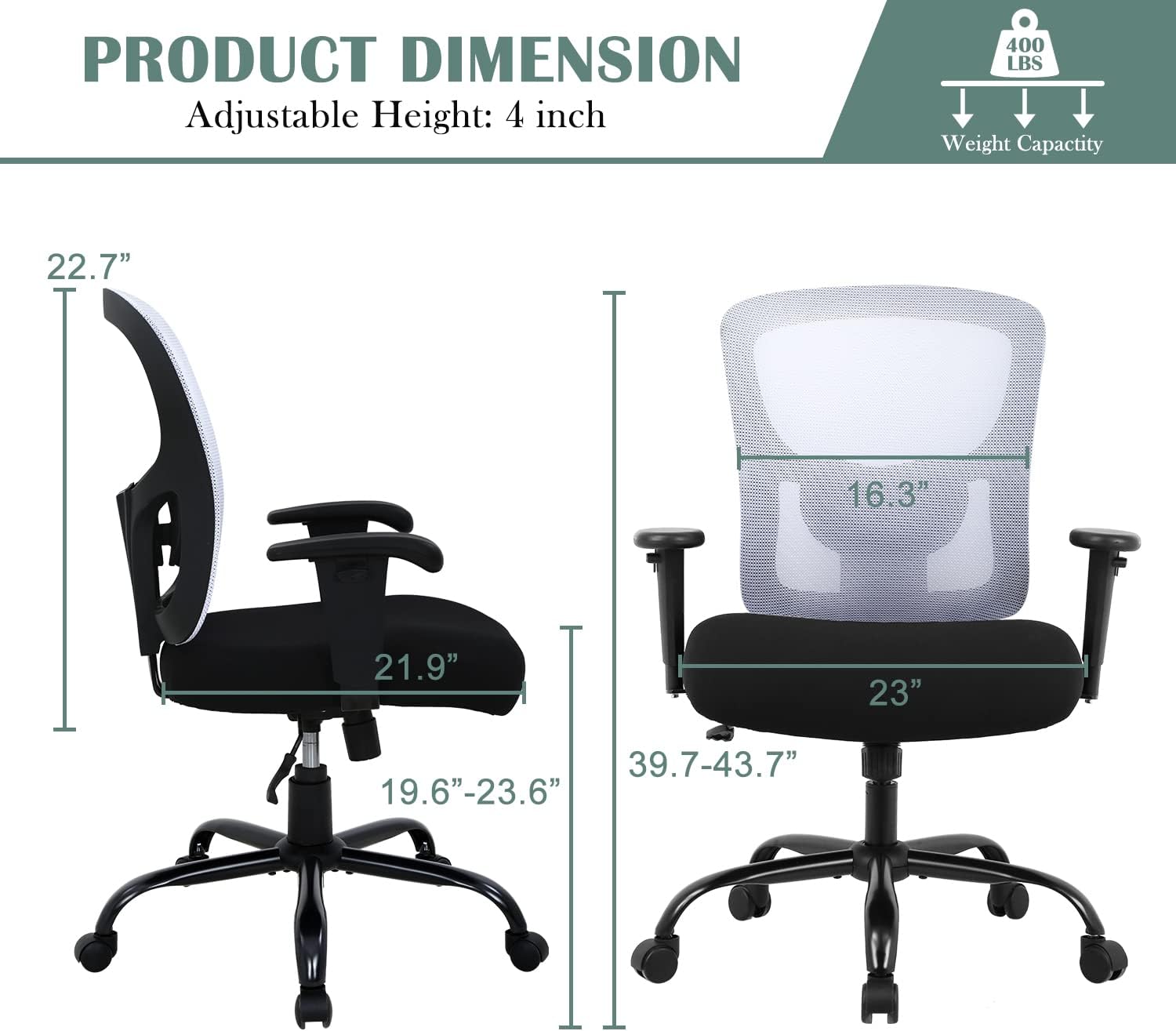
Image: Fully assembled CL.Store Ergonomic Office Chair, showcasing its design and components.
5. Operating Instructions
Your CL.Store Ergonomic Office Chair offers several adjustments to customize your seating experience:
5.1. Seat Height Adjustment
To adjust the seat height, pull the lever located under the right side of the seat upwards. While holding the lever, stand up to raise the seat or remain seated to lower it. Release the lever at your desired height.

Image: Diagram illustrating the adjustable height range of the chair, which is approximately 4 inches.
5.2. Lumbar Support Adjustment
The lumbar support can be adjusted vertically to fit the natural curve of your back. Locate the adjustment mechanism on the backrest and slide it up or down to find the most comfortable position for your lower back.

Image: Close-up view of the lumbar support, highlighting its 2.2-inch vertical adjustment range for personalized back support.
5.3. Armrest Adjustment
The padded armrests are height-adjustable. Press the button on the side of each armrest and move the armrest up or down to your preferred height. Release the button to lock it in place. The armrests also feature rotation for optimal positioning.

Image: Illustration demonstrating the 3.0-inch vertical adjustment of the chair's armrests.
5.4. Tilt and Lock Function
To recline the backrest, pull the lever on the left side of the seat outwards. Lean back to your desired angle (up to 120°) and push the lever inwards to lock the position. To return to the upright position, pull the lever outwards again and lean forward.

Image: Diagram illustrating the chair's recline function, allowing adjustment between 90 and 120 degrees.
5.5. Swivel Function
The chair is equipped with 360-degree swivel casters, allowing for easy movement and rotation around your workspace.

Image: Close-up of the chair's base, showing the 360-degree swivel casters for enhanced mobility.
5.6. Product Features Video
Video: An official product video from CL.Store demonstrating the ergonomic design, adjustable features (armrests, lumbar support, height), and overall comfort of the office chair.
6. Care and Maintenance
- Cleaning: Wipe the chair with a soft, damp cloth. For mesh areas, a mild soap solution can be used, followed by wiping with a clean, damp cloth. Avoid harsh chemicals or abrasive cleaners.
- Inspection: Periodically check all screws and bolts to ensure they are tight. Re-tighten if necessary to maintain stability and safety.
- Casters: Keep casters free of hair and debris to ensure smooth rolling.
- Avoid Direct Sunlight: Prolonged exposure to direct sunlight can cause fading of fabric and degradation of plastic components.
7. Troubleshooting
| Problem | Possible Cause | Solution |
|---|---|---|
| Chair is wobbly or unstable. | Loose screws or improper assembly. | Check all screws and bolts and tighten them securely. Ensure all parts are correctly assembled according to the instructions. |
| Gas lift not adjusting height. | Lever not fully engaged or gas lift malfunction. | Ensure the height adjustment lever is pulled completely. If the issue persists, the gas lift may need replacement. Contact customer support. |
| Casters not rolling smoothly. | Debris caught in casters. | Turn the chair over and remove any hair, dust, or debris from the caster wheels. |
| Chair makes squeaking noises. | Loose connections or friction between parts. | Tighten all screws. Apply a small amount of silicone lubricant to moving parts or connection points if necessary. |
8. Specifications
| Model Number | OC-BT380-WHITE |
| Brand | CL.Store |
| Color | White |
| Material | Metal (Frame), Nylon (Seat), Sponge (Fill), Mesh (Backrest) |
| Product Dimensions (D x W x H) | 21.9" x 23" x 43.7" |
| Item Weight | 39 Pounds |
| Maximum Weight Capacity | 400 LBS |
| Additional Features | Arm Rest, Ergonomic, Rolling, Seat Lock, Swivel, Adjustable Lumbar Support |
| Assembly Required | Yes |
9. Warranty Information
Specific warranty details for the CL.Store Ergonomic Office Chair are typically provided with your purchase documentation or on the manufacturer's official website. Please refer to those resources for information regarding warranty coverage, terms, and conditions. In case of any issues, please retain your proof of purchase.
10. Customer Support
If you have any questions, require assistance with assembly, or encounter any problems with your CL.Store Ergonomic Office Chair, please contact our customer support team. Refer to your purchase receipt or the CL.Store website for the most current contact information.
We are committed to providing you with the best service!