
ELEFOCUS RC-815S, TX-8030, RC-816S, RC-903S, RC-904S, TX-8160, TX-8050, TX-8140
ELEFOCUS Replacement Remote Control User Manual
For Onkyo RC-815S, TX-8030, RC-816S, RC-903S, RC-904S, TX-8160, TX-8050, TX-8140 Network Audio/Video AV Stereo Receivers
Introduction
This manual provides essential information for the proper use and maintenance of your ELEFOCUS replacement remote control. This remote is designed as a direct replacement for various Onkyo Network Audio/Video AV Stereo Receivers, including models RC-815S, TX-8030, RC-816S, RC-903S, RC-904S, TX-8160, TX-8050, and TX-8140.
Please note that this is a replacement item and while it functions out of the box with compatible models, some advanced or specific functions of your original remote may not be fully supported. No complex programming is required; simply insert batteries to begin use.
Setup
1. Battery Installation
The remote control requires two (2) AAA batteries (not included). Follow these steps to install them:
- Locate the battery compartment on the back of the remote control.
- Press down on the tab and slide the battery cover downwards to open it.
- Insert two AAA batteries, ensuring the positive (+) and negative (-) terminals align correctly with the markings inside the compartment.
- Slide the battery cover back into place until it clicks securely.
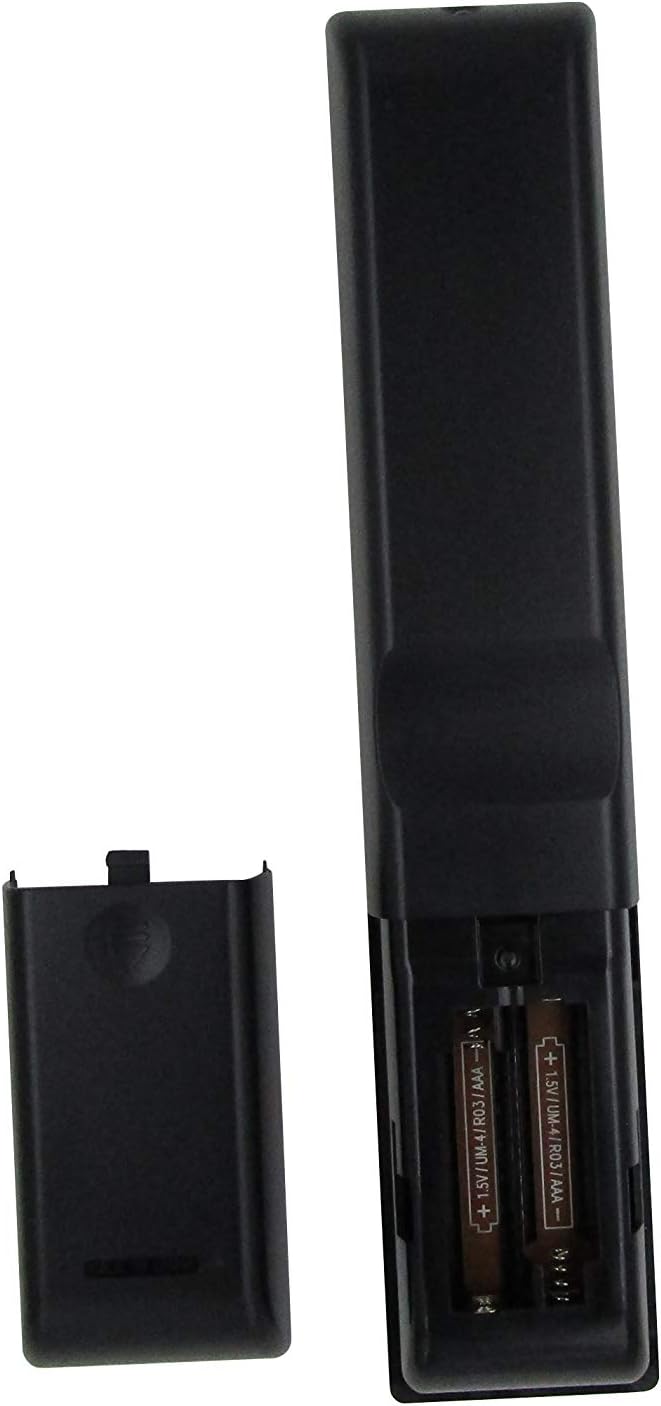
Figure 1: Battery compartment with AAA batteries. Ensure correct polarity when inserting batteries.
Once batteries are installed, the remote is ready for use. No additional programming or setup is typically required for compatible Onkyo receiver models.
Operating Instructions
This replacement remote control provides essential functions for your Onkyo receiver. Point the remote directly at the receiver's infrared (IR) sensor for optimal performance.

Figure 2: Overview of the remote control layout.
Key Functions:
- Power Button (⏻): Turns the receiver on or off.
- Input Selector Buttons (BD/DVD, CBL/SAT, PC, Game, TV/Tape, CD, Phono, Tuner, NET, Bluetooth): Selects the desired audio/video input source.
- Volume Up/Down (▲ / ▼): Adjusts the master volume level.
- Muting: Mutes or unmutes the audio output.
- Navigation Pad (Up, Down, Left, Right, Enter): Used to navigate menus and confirm selections on your receiver's display.
- Menu: Accesses the receiver's main menu.
- Setup: Enters the setup menu for configuration.
- Return: Goes back to the previous menu or screen.
- Audio: Cycles through audio modes or settings.
- Playback Controls (Rewind, Play/Pause, Fast Forward, Stop, Previous Track, Play, Next Track): Controls media playback for connected devices.
- Repeat: Toggles repeat playback mode.
- Random: Toggles random/shuffle playback mode.
- Speaker A/B: Selects speaker output groups.
- Numeric Keypad (0-9): For direct input of numbers, such as radio frequencies or track numbers.
- Caps: Functionality may vary by receiver model.
- >10: For entering numbers greater than 9 on some systems.
- D.TUN: Direct tuning for radio.
- Display: Changes display information on the receiver.
- Dimmer: Adjusts the brightness of the receiver's display.
- Sleep: Sets a sleep timer for the receiver.
- CLR: Clears current input or selection.
Important Note:
As a replacement remote, some advanced or specific functions present on your original Onkyo remote may not be replicated or fully functional. This remote is designed to cover the primary and most commonly used features.
Maintenance
1. Battery Replacement
Replace batteries when the remote's response becomes sluggish or stops working. Always replace both batteries at the same time with new AAA batteries. Do not mix old and new batteries, or different types of batteries.
2. Cleaning
To clean the remote control, use a soft, dry cloth. For stubborn dirt, slightly dampen the cloth with water or a mild, non-abrasive cleaner. Do not use harsh chemicals, solvents, or abrasive cleaning pads, as these can damage the remote's surface or internal components.
3. Storage
When not in use for extended periods, it is recommended to remove the batteries to prevent leakage, which can damage the remote. Store the remote in a cool, dry place away from direct sunlight and extreme temperatures.
Troubleshooting
| Problem | Possible Cause | Solution |
|---|---|---|
| Remote is not working at all. |
|
|
| Some functions do not work. |
|
|
| Remote works intermittently. |
|
|
If your specific Onkyo receiver model is not listed in the product title (RC-815S, TX-8030, RC-816S, RC-903S, RC-904S, TX-8160, TX-8050, TX-8140), this remote may not be compatible. Please verify compatibility before purchase.
Specifications
- Brand: ELEFOCUS
- Compatible Devices: Onkyo Network Audio/Video AV Stereo Receivers (Models: RC-815S, TX-8030, RC-816S, RC-903S, RC-904S, TX-8160, TX-8050, TX-8140)
- Connectivity Technology: Infrared (IR)
- Power Source: 2 x AAA Batteries (not included)
- Special Feature: Ergonomic design
- Max Number of Supported Devices: 1 (specific Onkyo receiver)
Warranty Information
Specific warranty details for this ELEFOCUS replacement remote control are not provided in the product information. Please refer to the seller's return policy or contact the seller directly for information regarding warranty coverage and terms.
Customer Support
For further assistance or inquiries regarding your ELEFOCUS replacement remote control, please contact the seller directly through the platform where the purchase was made. As this is a third-party replacement product, direct manufacturer support may not be available.
For general information about your Onkyo receiver, please refer to the original user manual provided with your receiver or visit the official Onkyo support website.
Additional Product Views

Figure 3: Angled view of the remote control.

Figure 4: Close-up of the upper section of the remote, showing input and media controls.
Official Product Videos
No official product videos from the seller were provided for this item.