1. Introduction
This manual provides essential information for the safe and efficient installation, operation, and maintenance of your NovaEluc FSP Flex Small 1U 200W Power Supply. Please read this manual thoroughly before installation and retain it for future reference.
This power supply unit (PSU) is designed for use in personal computer systems requiring a compact 1U form factor and 200W power output. It is compatible with various FSP Flex series models, including FSP200-50PLA, FSP100/150/200/250-50GUB, FSP150-60LE, FSP220-50AP, and FSP250-50CI.
2. Safety Information
WARNING: Risk of electric shock. Do not open the power supply casing. There are no user-serviceable parts inside. Refer all servicing to qualified service personnel.
- Ensure the power supply is disconnected from the main power outlet before installation or maintenance.
- Do not operate the power supply in wet or damp conditions.
- Install the power supply in a well-ventilated area to prevent overheating.
- Use only the provided or approved power cables.
- This product is intended for use with personal computers. Do not use it for other applications.
3. Package Contents
Verify that all items are present in the package:
- NovaEluc FSP Flex Small 1U 200W Power Supply Unit
- AC Power Cord (may vary by region)
- Mounting Screws (typically 4 screws)

Figure 1: NovaEluc FSP Flex Small 1U 200W Power Supply with its attached power cables, including the main 24-pin ATX connector, 4-pin CPU connector, SATA power connectors, and Molex connectors.
4. Setup and Installation
Follow these steps to install the power supply unit into your computer system:
- Preparation: Ensure your computer is completely powered off and unplugged from the wall outlet. Open the computer case according to its manufacturer's instructions.
- Remove Old PSU (if applicable): Disconnect all power cables from your existing components (motherboard, graphics card, drives). Unscrew and remove the old power supply from the case.
- Install New PSU: Carefully place the NovaEluc FSP Flex Small 1U 200W Power Supply into the designated PSU bay in your computer case. Ensure the fan is oriented correctly for optimal airflow (refer to your case's manual). Secure the PSU with the provided mounting screws.
- Connect Cables:
- Motherboard Power: Connect the 24-pin ATX power connector to the corresponding port on your motherboard.
- CPU Power: Connect the 4-pin (or 8-pin, if applicable) CPU power connector to the motherboard.
- Peripheral Power: Connect SATA power connectors to your hard drives, SSDs, and optical drives. Use Molex connectors for other compatible peripherals if needed.
- Graphics Card Power (if applicable): If your graphics card requires additional power, connect the appropriate PCIe power connectors from the PSU. This 200W PSU may not have dedicated PCIe power connectors or sufficient wattage for high-power graphics cards.
- Cable Management: Route cables neatly to improve airflow and aesthetics.
- Close Case: Once all connections are secure, close your computer case.
- Connect AC Power: Plug the AC power cord into the power supply's inlet and then into a wall outlet or surge protector.
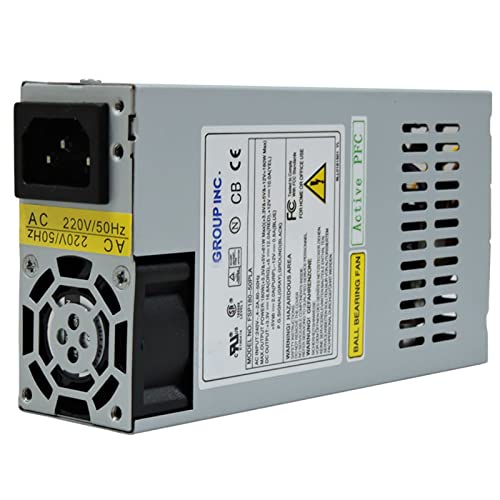
Figure 2: Side view of the power supply unit, highlighting the AC power input socket and the cooling fan exhaust.
5. Operating Instructions
After successful installation, operating the power supply is straightforward:
- Power On: Ensure the AC power cord is securely connected. If your PSU has a power switch on the back, ensure it is in the 'ON' position.
- System Start-up: Press the power button on your computer case. The power supply will provide power to all connected components, allowing your system to boot.
- Power Off: To shut down your system, use the operating system's shutdown procedure. The PSU will automatically cease power delivery to components. For complete power disconnection, switch off the PSU's rear switch and unplug the AC cord.
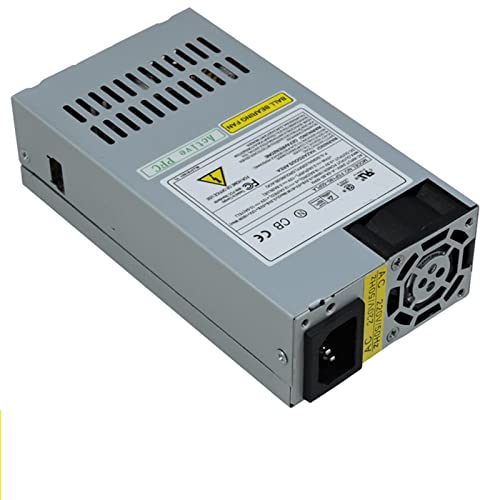
Figure 3: Top-down view of the power supply, showing the product label with safety certifications and warnings. Note the "BALL BEARING FAN" and "Active PFC" indicators.
6. Maintenance
Proper maintenance ensures the longevity and stable operation of your power supply:
- Dust Removal: Periodically (e.g., every 6-12 months), power off and unplug your computer. Use compressed air to gently clear dust from the PSU's fan and ventilation grilles. Accumulation of dust can hinder cooling and lead to overheating.
- Ventilation: Ensure that the computer case has adequate airflow and that the PSU's intake and exhaust vents are not obstructed.
- Cable Inspection: Occasionally check all power cables for secure connections and signs of wear or damage.
- Environmental Conditions: Operate the PSU within recommended temperature and humidity ranges. Avoid extreme conditions.
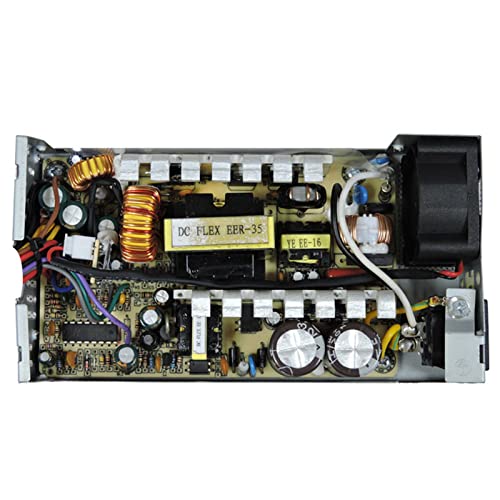
Figure 4: Internal view of the power supply unit, showing the circuit board, capacitors, coils, and other electronic components. This view is for informational purposes only; users should not open the PSU casing.
7. Troubleshooting
If you encounter issues with your power supply, consider the following:
- No Power:
- Check if the AC power cord is securely plugged into both the PSU and the wall outlet.
- Ensure the PSU's power switch (if present) is in the 'ON' position.
- Verify that the wall outlet is functional by plugging in another device.
- Confirm all internal power cables (24-pin ATX, CPU, etc.) are firmly connected to the motherboard and components.
- System Instability/Random Shutdowns:
- This could indicate an overloaded PSU or overheating. Ensure your system's total power consumption does not exceed 200W.
- Check for proper ventilation and dust accumulation.
- If the issue persists, consider testing with a different power supply or consulting a qualified technician.
- Unusual Noises:
- A rattling or grinding noise may indicate a failing fan. Ensure the fan is clear of obstructions.
- If the noise is persistent and loud, contact support.
8. Specifications
| Feature | Description |
|---|---|
| Model | FSP200-50PLA (Compatible with FSP100/150/200/250-50GUB, FSP150-60LE, FSP220-50AP, FSP250-50CI) |
| Brand | NovaEluc |
| Output Wattage | 200 Watts |
| Form Factor | Flex ATX / 1U Small Form Factor |
| Cooling Method | Air Cooling (Ball Bearing Fan) |
| Compatible Devices | Personal Computer |
| Input Voltage | AC 100-240V (as per label, typical for universal input) |
| PFC | Active PFC |
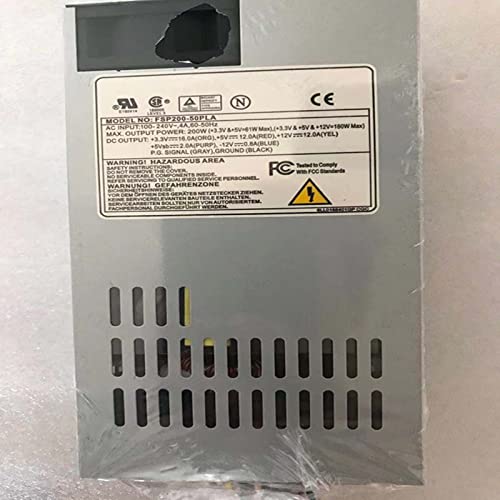
Figure 5: Detailed view of the power supply's specification label, showing model number, input/output voltages, and current ratings for different rails.
9. Warranty and Support
For warranty information or technical support, please contact your retailer or the manufacturer, NovaEluc. Keep your purchase receipt as proof of purchase.
For further assistance, you may refer to the official FSP Group website for general information regarding FSP Flex series power supplies, though specific support for this NovaEluc branded unit should be directed to NovaEluc.