
NovaEluc PCG007, DPS-310AB-1 A, DPS-310AB-3 A
NovaEluc 310W Power Supply Unit User Manual
Models: PCG007, DPS-310AB-1 A, DPS-310AB-3 A, 901772-001/002
Compatible with HP 680, 280, 800, 600, 480, 288 G3, G4 Series
1. Introduction
This manual provides essential information for the safe and effective installation, operation, and maintenance of your NovaEluc 310W Power Supply Unit (PSU). This PSU is designed to provide stable and reliable power to compatible personal computer systems, specifically various HP G3 and G4 series models.

Figure 1: NovaEluc 310W Power Supply Unit, main view.
2. Setup and Installation
2.1 Safety Precautions
WARNING: To avoid electric shock and damage to components, always disconnect the computer from the power outlet before opening the case or handling internal components. Ensure proper grounding to prevent electrostatic discharge (ESD).
- Ensure the power supply is compatible with your system's requirements.
- Do not open the power supply unit. There are no user-serviceable parts inside. High voltage is present.
- Handle the PSU by its metal casing, avoiding contact with circuit boards or connectors.
- Wear an anti-static wrist strap or frequently touch a grounded metal object before handling components.
- Ensure adequate ventilation around the PSU once installed.
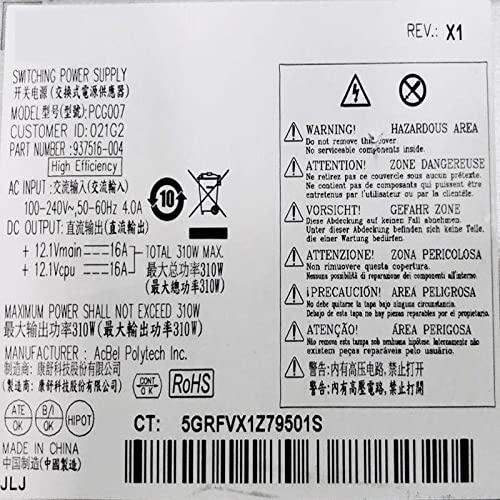
Figure 2: Product label showing safety warnings and specifications. Note the 'Hazardous Area' and 'Do not remove cover' warnings.
2.2 Package Contents
- NovaEluc 310W Power Supply Unit
- Integrated power cables (4-pin, 7-pin + 3 lines)
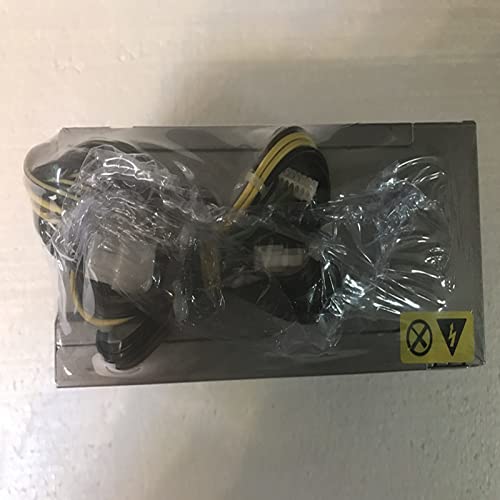
Figure 3: The power supply unit as it appears when packaged, showing the integrated cables.
2.3 Installation Steps
- Prepare the System: Power off your computer completely and disconnect the power cord from the wall outlet. Open the computer case.
- Remove Old PSU (if applicable): Disconnect all power cables from the motherboard, graphics card, drives, and other components. Unscrew and remove the old PSU from the chassis.
- Install New PSU: Carefully slide the NovaEluc 310W PSU into the designated PSU bay in your computer case. Secure it with screws.
- Connect Power Cables:
- Connect the main 4-pin power connector to the corresponding port on your motherboard.
- Connect the 7-pin and 3-line auxiliary power connectors to their respective ports on the motherboard or other components as required by your system.
- Connect any other necessary peripheral power cables (e.g., SATA, Molex) to your drives or accessories.
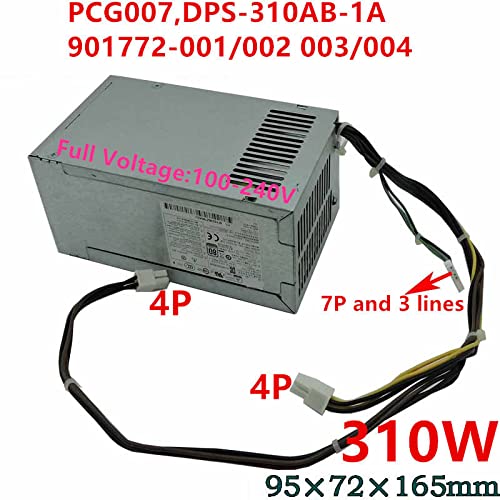
Figure 4: The power supply unit with its 4-pin and 7-pin + 3-line connectors clearly visible, along with dimensions.
- Organize Cables: Route cables neatly to improve airflow and prevent interference.
- Close Case: Replace the computer case cover and secure it.
- Power On: Reconnect the power cord to the wall outlet and power on your computer.
3. Operation
Once properly installed, the NovaEluc 310W Power Supply Unit operates automatically when your computer is powered on. It provides the necessary electrical power to all internal components of your system. The unit is designed for continuous operation within its specified wattage and voltage ranges.
4. Maintenance
Proper maintenance ensures the longevity and stable performance of your PSU. The unit itself requires no internal maintenance.
4.1 Cleaning
- Periodically clean the exterior of the PSU and the computer case vents to prevent dust buildup.
- Use compressed air to gently clear dust from the PSU's fan and vents. Ensure the computer is powered off and unplugged before cleaning.
- Do not use liquid cleaners directly on the PSU.
5. Troubleshooting
If you encounter issues with your power supply, refer to the table below for common problems and solutions.
| Problem | Possible Cause | Solution |
|---|---|---|
| Computer does not power on. | Loose power connections, faulty power outlet, PSU failure. | Check all power cable connections. Test the power outlet. If issues persist, consult a qualified technician. |
| System instability or random shutdowns. | Insufficient power, overheating, faulty PSU. | Ensure PSU wattage meets system requirements. Check for proper ventilation. If problems continue, professional diagnosis may be needed. |
| Loud fan noise from PSU. | Dust buildup in fan, fan bearing issue. | Clean the PSU fan and vents with compressed air (ensure power is off). If noise persists, the fan may be faulty. |
6. Specifications
Detailed technical specifications for the NovaEluc 310W Power Supply Unit:
| Feature | Specification |
|---|---|
| Brand | NovaEluc |
| Model Names | PCG007, DPS-310AB-1 A, DPS-310AB-3 A |
| Part Numbers | 901772-001/002, 937516-004, 901772-003 |
| Compatible Devices | Personal Computer (HP 680, 280, 800, 600, 480, 288 G3, G4 Series) |
| Output Wattage | 310 Watts (Max) |
| AC Input | 100-240V~, 50-60Hz, 4.0A |
| DC Output (+12Vmain) | 16A |
| DC Output (+12Vcpu) | 16A |
| PCI-Express Connector Configuration | 4 Pin |
| Dimensions (Approx.) | 95mm x 72mm x 165mm |
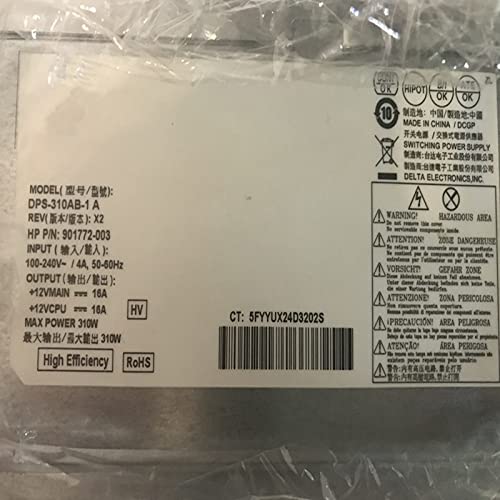
Figure 5: Product label showing detailed electrical specifications and model information.
7. Warranty and Support
For information regarding warranty coverage and technical support for your NovaEluc Power Supply Unit, please refer to the documentation provided with your purchase or contact your retailer. Keep your proof of purchase for warranty claims.