
Introduction
The AODELAN E4 Flash Trigger is a versatile wireless transmitter designed for Canon cameras, enabling seamless control and synchronization with Profoto flash systems. It supports advanced features such as TTL autoflash, manual flash, high-speed sync (HSS) up to 1/8000s, and various sync modes. This manual provides detailed instructions for setting up, operating, and maintaining your E4 Flash Trigger to maximize its potential in professional photography.
What's Included
Upon unboxing your AODELAN E4 Flash Trigger, please verify that all the following components are present:
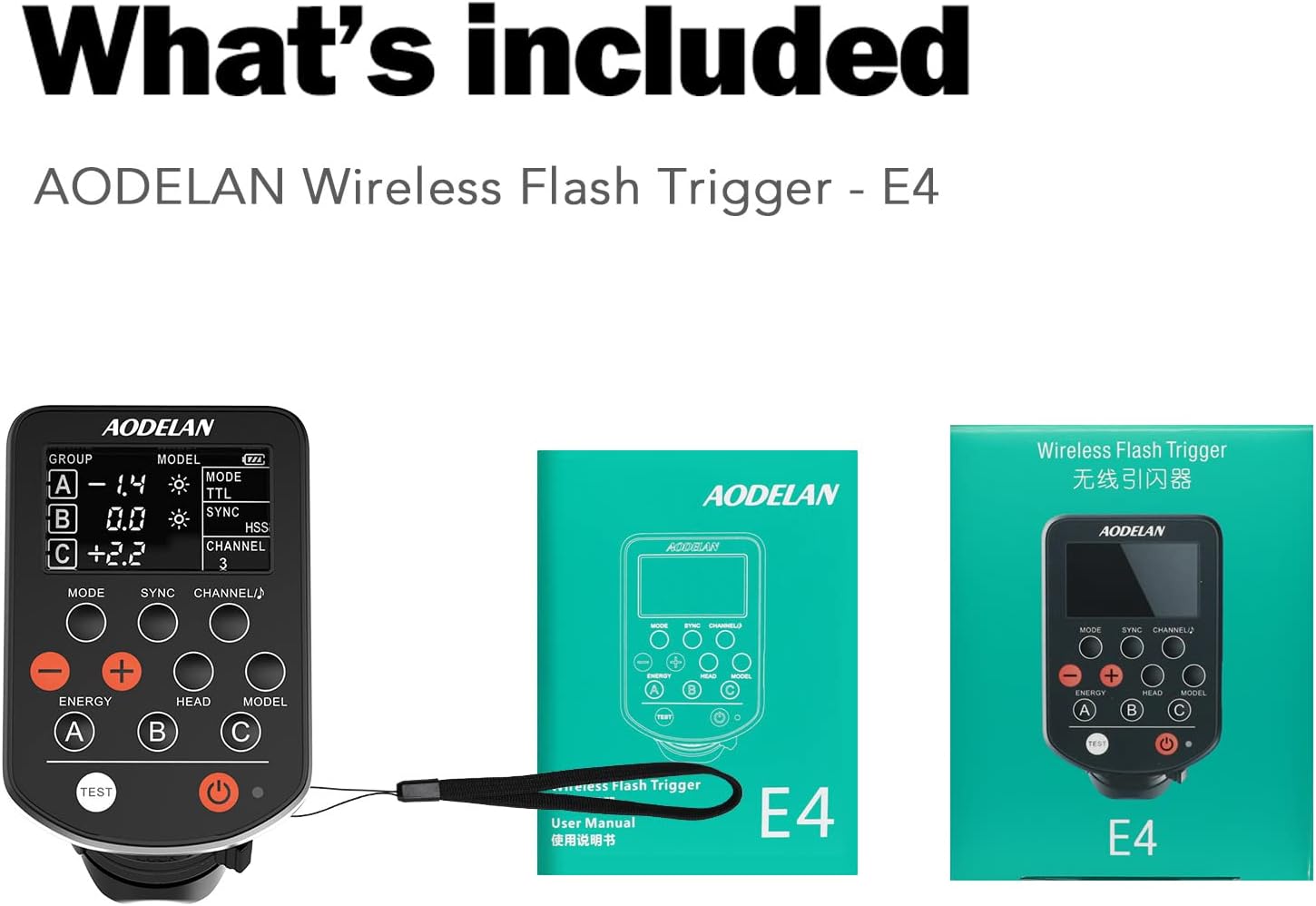
Image: The AODELAN E4 Wireless Flash Trigger, its user manual, and product packaging are included in the box.
- AODELAN E4 Wireless Flash Trigger
- User Manual
- Product Packaging
Product Overview
Familiarize yourself with the various parts and controls of your AODELAN E4 Flash Trigger:

Image: Detailed diagram of the AODELAN E4 Flash Trigger highlighting its display, Mode button, Sync button, Channel/Beeper button, Energy adjustment buttons, Group buttons (A, B, C), Test button, Power button, Indicator, Head button, and Model button.
- Display: Shows current settings including group, energy, mode, sync, and channel.
- Mode Button: Toggles between TTL (Through-The-Lens) and Manual flash modes.
- Sync Button: Selects sync modes (1st curtain, 2nd curtain, HSS).
- Channel/Beeper Button: Adjusts the communication channel and controls the beeper sound.
- Energy Adjustment Buttons (+/-): Increases or decreases flash power.
- Group Buttons (A, B, C): Selects specific flash groups for adjustment.
- Head Button: Controls the modeling light on compatible Profoto flashes.
- Model Button: Activates or deactivates the modeling light.
- Test Button: Fires a test flash.
- Power Button: Turns the E4 unit on or off.
- Indicator: Status light.
- Hot Shoe Mounting Foot: Connects the trigger to your camera's hot shoe.
- Mounting Foot Lock Lever: Secures the trigger to the camera.
- USB Port: For firmware updates.
- Strap Hole: For attaching a wrist strap.

Image: Rear and side view of the AODELAN E4 Flash Trigger, illustrating the battery compartment, USB port, strap hole, and the hot shoe mounting foot with its lock lever.
Setup
Follow these steps to set up your AODELAN E4 Flash Trigger:
- Install Batteries: Open the battery compartment (located on the back, as shown in the Product Overview image) and insert the required batteries, ensuring correct polarity.
- Mount on Camera: Slide the AODELAN E4 Flash Trigger onto your Canon camera's hot shoe. Ensure it is fully seated.
- Secure the Trigger: Rotate the Mounting Foot Lock Lever clockwise to secure the trigger firmly to the camera's hot shoe.
- Power On: Press and hold the Power Button until the display illuminates.
- Initial Pairing (if necessary): If using with new Profoto flashes, ensure they are set to a compatible AirTTL mode. The E4 will automatically communicate with compatible Profoto flashes.
Image: The AODELAN E4 Flash Trigger shown mounted on a Canon camera, demonstrating its compatibility with standard single pin contact hot shoe mounts.
Operating Instructions
The AODELAN E4 offers comprehensive control over your Profoto flash system. Here's how to operate its key functions:
1. Mode Selection (TTL / Manual)
Press the MODE button to switch between TTL (Through-The-Lens) and Manual flash modes. TTL mode automatically adjusts flash output for correct exposure, while Manual mode allows precise control over flash power.

Image: The AODELAN E4 Flash Trigger display indicating TTL mode, demonstrating its ability for fast switching between TTL and manual modes to achieve ideal exposure.
2. Sync Mode Selection
Press the SYNC button to cycle through available sync modes:
- First-Curtain Sync: Flash fires at the beginning of the exposure.
- Second-Curtain Sync: Flash fires at the end of the exposure, useful for creating motion blur effects with a sharp trailing image.
- High-Speed Sync (HSS): Allows flash synchronization at shutter speeds faster than the camera's native sync speed, up to 1/8000s. This is ideal for shooting with wide apertures in bright conditions.

Image: The AODELAN E4 Flash Trigger display showing HSS mode, indicating its capability for high-speed sync up to 1/8000 sec, which provides better control of ambient light.
3. Group and Channel Control
The E4 supports 3 groups (A, B, C) and 8 channels, allowing precise control over multiple flash units.
- Selecting Groups: Press the A, B, or C buttons to select the desired flash group.
- Adjusting Energy: Use the + and - buttons to adjust the flash power for the selected group. Power ratios can be adjusted from ±3 EV.
- Changing Channels: Press the CHANNEL/♪ button to change the communication channel. Ensure the trigger and flash units are on the same channel.

Image: A studio environment illustrating the AODELAN E4's capability to control 3 groups of flashes across 8 channels, with a triggering range of up to 656ft and remote control/TTL range up to 330ft.
4. Compatibility
The AODELAN E4 is designed for seamless integration with Canon cameras and Profoto flash systems.
- Canon Cameras: Compatible with all Canon cameras featuring a standard hot-shoe mount, including EOS DSLR and Mirrorless models (e.g., EOS 5D MK IV, 80D, T6S, EOS M, Powershot G16).
- Profoto Flashes: Fully supports TTL communication with Profoto flash lights, including A1 AirTTL, B1 500 AirTTL, B1X 500 AirTTL, B2 250 AirTTL, D2 200 AirTTL, D2 1000 AirTTL, Pro-10 2400 AirTTL, Q1, and B10.

Image: The AODELAN E4 Flash Trigger displayed alongside several Profoto AirTTL camera flashes, emphasizing its complete compatibility with the Profoto system.
Maintenance
To ensure the longevity and optimal performance of your AODELAN E4 Flash Trigger, follow these maintenance guidelines:
- Cleaning: Use a soft, dry cloth to clean the exterior of the trigger. Avoid using liquid cleaners or solvents, which can damage the device.
- Storage: When not in use, store the trigger in a cool, dry place, away from direct sunlight and extreme temperatures.
- Battery Care: Remove batteries if the trigger will not be used for an extended period to prevent leakage and damage.
- Hot Shoe Contacts: Keep the hot shoe contacts clean and free of dust or debris to ensure reliable communication with your camera.
- Avoid Impact: Protect the trigger from drops and impacts, as internal components can be sensitive to physical shock.
Troubleshooting
If you encounter issues with your AODELAN E4 Flash Trigger, refer to the following common problems and solutions:
| Problem | Possible Cause | Solution |
|---|---|---|
| Trigger does not power on. | Low or dead batteries; incorrect battery installation. | Replace batteries with fresh ones. Ensure batteries are inserted with correct polarity. |
| Flashes do not fire. | Incorrect channel setting; flash units not powered on or in range; trigger not securely mounted; camera settings. | Verify trigger and flash units are on the same channel. Ensure flashes are powered on and within range. Re-mount the trigger securely. Check camera flash settings. |
| TTL mode not working correctly. | Flash units not in TTL mode; environmental factors affecting exposure. | Ensure Profoto flashes are set to AirTTL mode. Adjust flash exposure compensation if needed. |
| HSS not activating. | Camera shutter speed too slow; HSS not selected on trigger. | Ensure camera shutter speed is above its native sync speed. Press the SYNC button on the E4 until HSS is displayed. |
| Limited range or intermittent connection. | Obstructions; interference; low battery. | Reduce distance between trigger and flashes. Minimize obstructions. Check for sources of radio interference. Replace batteries. |
Specifications
Detailed technical specifications for the AODELAN E4 Flash Trigger:

Image: A visual representation of the AODELAN E4 Flash Trigger's dimensions and key technical specifications, including frequency, range, channels, groups, operation modes, max sync speed, interface, dimensions, and weight.
| Feature | Detail |
|---|---|
| Model Number | AODELAN E4 |
| Connectivity Technology | Radio Frequency (2.4GHz) |
| Compatible Devices | Canon Cameras, Profoto Flashes (A1, B1, B1X, B2, D2, Pro-10, Q1, B10) |
| Channels | 8 Channels |
| Groups | 3 Groups (A, B, C) |
| Operation Modes | Manual (M), TTL (Through-The-Lens, Automatic) |
| Max Sync Speed | HSS: 1/8000s; 1st or 2nd Sync: 1/250s |
| Range | Up to 656ft (triggering); Up to 330ft (remote control and TTL) |
| Interface | Micro-USB B port, Multi contacts hot shoe mounting foot |
| Product Dimensions | 2.76 x 4.53 x 2.17 inches (7 x 11.5 x 5.5 cm) |
| Item Weight | 5.3 ounces (150 grams) |
| Special Feature | Digital Display |
Warranty and Support
AODELAN products are manufactured to high quality standards. For warranty information and technical support, please refer to the official AODELAN website or contact their customer service directly. Keep your purchase receipt as proof of purchase for any warranty claims.
For further assistance, you may visit the AODELAN store on Amazon: AODELAN Store