
Introduction
Welcome to the Fresh 'n Rebel Soul Bluetooth Speaker user manual. This guide will help you understand the features, set up, and operate your new portable speaker. The Soul speaker is designed to deliver high-quality audio with deep bass, offering up to 15 hours of playtime. It features an IPX5 splash-proof rating, stereo pairing capabilities, and a hands-free function for calls.

The Fresh 'n Rebel Soul Bluetooth Speaker in Deep Mauve, showcasing its sleek design and fabric grille.
What's in the Box
Upon unboxing your Fresh 'n Rebel Soul Bluetooth Speaker, please ensure all the following items are present:
- Fresh 'n Rebel Soul Bluetooth Speaker
- USB to USB-C Charging Cable
- 3.5 mm Audio Cable
- Quick Start Guide
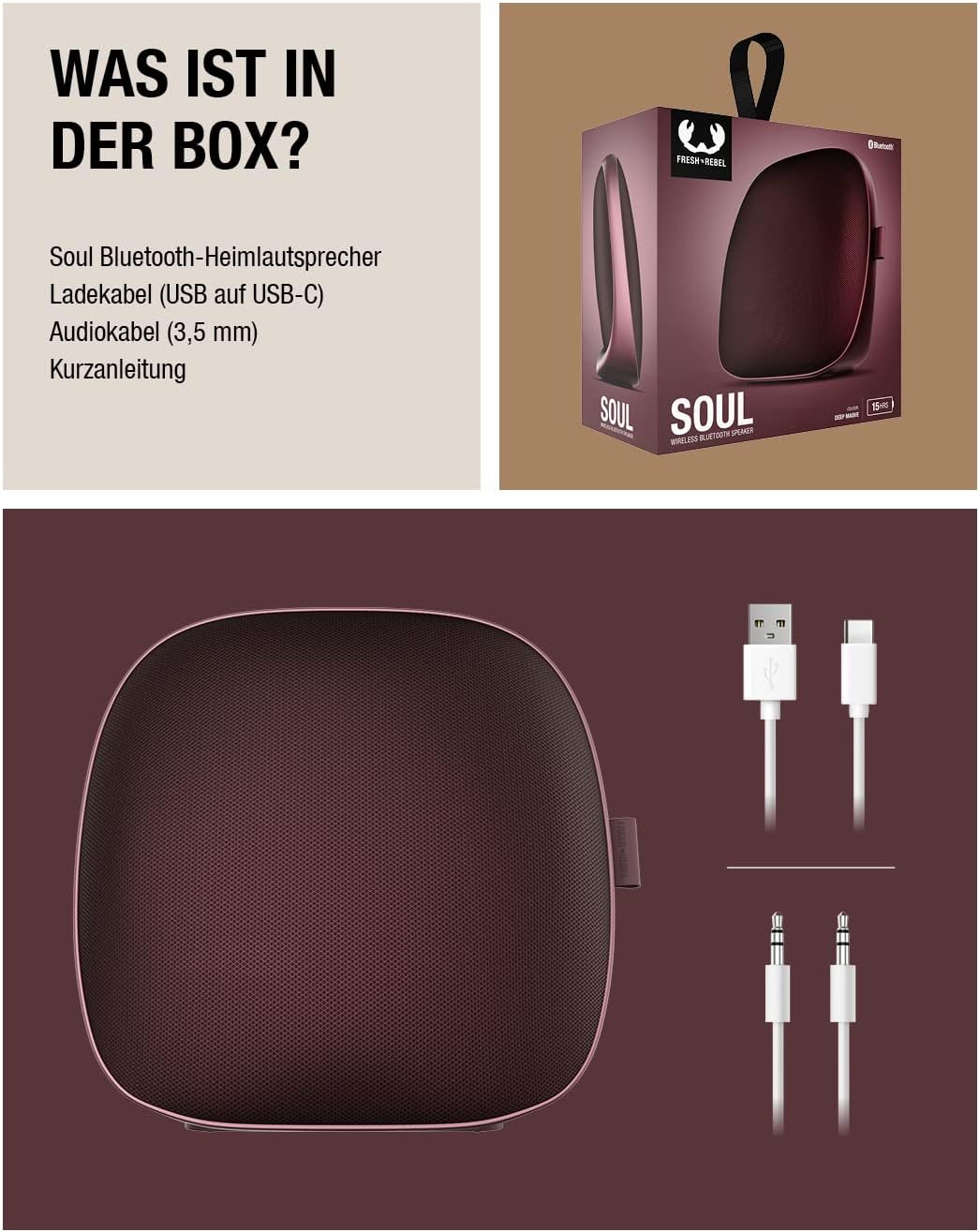
An illustration showing the Fresh 'n Rebel Soul speaker along with its included USB-C charging cable and 3.5mm audio cable.
Product Overview
Familiarize yourself with the buttons and ports on your Fresh 'n Rebel Soul speaker for optimal use.
Controls and Ports
- Power Button: Located on the back, used to turn the speaker on or off.
- Bluetooth Pairing Button: Adjacent to the power button, used to initiate Bluetooth pairing.
- Volume Up (+): Increases the speaker volume.
- Volume Down (-): Decreases the speaker volume.
- Play/Pause Button: Controls media playback.
- Previous Track Button: Skips to the beginning of the current track or the previous track.
- Next Track Button: Skips to the next track.
- USB-C Charging Port: For charging the speaker.
- 3.5mm Audio Input (AUX): For wired audio connection.

Rear view of the speaker, highlighting the power and Bluetooth pairing buttons, and the USB-C charging port.

Top view of the speaker, illustrating the media control buttons including volume, play/pause, and track navigation.
Setup
Initial Charging
Before first use, it is recommended to fully charge your Fresh 'n Rebel Soul speaker. Connect the supplied USB-C cable to the speaker's charging port and the other end to a USB power adapter (not included) or a computer USB port. A full charge takes approximately 2.5 hours.
Powering On/Off
- To Power On: Press and hold the Power button on the back of the speaker until you hear an audible indication or see the LED indicator light up.
- To Power Off: Press and hold the Power button again until the speaker powers down.
Operating Instructions
Bluetooth Pairing
To connect your Fresh 'n Rebel Soul speaker to a Bluetooth-enabled device:
- Ensure the speaker is powered on.
- Press the Bluetooth pairing button on the back of the speaker. The LED indicator will flash, indicating it's in pairing mode.
- On your device (smartphone, tablet, computer), enable Bluetooth and search for available devices.
- Select "Fresh 'n Rebel Soul" from the list of found devices.
- Once connected, the LED indicator will stop flashing and remain solid, and you will hear a confirmation tone.
Double Fun Mode (Stereo Pairing)
You can connect two Fresh 'n Rebel Soul speakers together to create a stereo sound experience.
- Ensure both Soul speakers are powered on and not connected to any other Bluetooth device.
- On one speaker (this will be your primary speaker), press and hold the Bluetooth button until it enters pairing mode.
- On the second speaker, quickly double-press the Bluetooth button. It will search for the primary speaker.
- Once connected, both speakers will indicate successful pairing, and you can then connect your device to the primary speaker via Bluetooth as described above.

Two Fresh 'n Rebel Soul speakers can be paired together for an immersive stereo sound experience.
Hands-Free Function
The Fresh 'n Rebel Soul speaker has a built-in microphone, allowing you to make and receive calls directly through the speaker when connected to your smartphone.
- Answering a Call: Press the Play/Pause button once.
- Ending a Call: Press the Play/Pause button once during a call.
- Rejecting a Call: Press and hold the Play/Pause button.

The speaker's hands-free function allows for convenient call management through its integrated microphone.
Audio Input (Auxiliary)
For devices without Bluetooth, you can connect them to the Soul speaker using the supplied 3.5mm audio cable. Simply plug one end into the speaker's AUX input and the other into your device's headphone jack.
Charging
The Fresh 'n Rebel Soul speaker provides up to 15 hours of wireless playtime on a single charge. To charge the speaker, use the included USB to USB-C cable. Connect the USB-C end to the speaker's charging port and the USB-A end to a compatible power source. A full charge takes approximately 2.5 hours.
Maintenance and Care
To ensure the longevity and optimal performance of your Fresh 'n Rebel Soul speaker, follow these care guidelines:
- Cleaning: Use a soft, dry cloth to clean the speaker. Do not use abrasive cleaners or solvents.
- Water Resistance: The speaker has an IPX5 splash-proof rating, meaning it can withstand light splashes of water. Do not submerge the speaker in water or expose it to strong jets of water. Ensure the charging port cover is securely closed when near water.
- Storage: Store the speaker in a cool, dry place away from direct sunlight and extreme temperatures.
- Battery Care: To preserve battery life, avoid fully discharging the battery frequently. Charge the speaker regularly, even if not in use for extended periods.

The IPX5 rating ensures the speaker is protected against light water splashes, making it suitable for outdoor use.
Troubleshooting
If you encounter issues with your Fresh 'n Rebel Soul speaker, try the following solutions:
Speaker Not Turning On
- Ensure the battery is charged. Connect the speaker to a power source and allow it to charge for at least 30 minutes before attempting to power on again.
- Press and hold the Power button firmly for a few seconds.
Cannot Pair via Bluetooth
- Make sure the speaker is in Bluetooth pairing mode (LED indicator flashing).
- Ensure Bluetooth is enabled on your device and it is within range (typically 10 meters or 33 feet).
- Turn off and on the Bluetooth on your device.
- Forget or remove "Fresh 'n Rebel Soul" from your device's Bluetooth list and try pairing again.
- If attempting Double Fun Mode, ensure both speakers are not connected to other devices before initiating stereo pairing.
No Sound or Low Volume
- Increase the volume on both the speaker and your connected device.
- Ensure the speaker is properly connected via Bluetooth or the 3.5mm audio cable.
- If using the AUX cable, ensure it is fully inserted into both the speaker and your device.
- Try playing audio from a different source or device to rule out issues with the audio file or device.
Poor Audio Quality
- Move the speaker closer to your Bluetooth device to reduce interference.
- Ensure there are no obstructions between the speaker and your device.
- Check if the audio source itself is of high quality.
Specifications
| Feature | Detail |
|---|---|
| Model Number | 1RB7100DM |
| Brand | Fresh 'n Rebel |
| Connectivity Technology | Bluetooth, Auxiliary, USB |
| Speaker Maximum Output Power | 15 Watts |
| Audio Output Mode | Stereo |
| Waterproof Rating | IPX5 (Splash-proof) |
| Playtime | Up to 15 hours |
| Charging Time | Approx. 2.5 hours |
| Product Dimensions | 1 x 1 x 1 cm; 486 g |
| Batteries | 2 Lithium Ion batteries required |
| Special Features | Wireless Bluetooth, Audio input port (3.5 mm), Hands-free function (built-in microphone), Splash-proof (IPX5), Double fun mode (two pairs of speakers) |
Warranty and Support
For warranty information and further support, please refer to the official Fresh 'n Rebel website or contact their customer service. Keep your proof of purchase for any warranty claims.
For technical assistance or inquiries not covered in this manual, please visit the Fresh 'n Rebel support page or contact their customer service directly.