
dotMod 49111
DotMod DotAIO V2 User Manual
Model: 49111 | Brand: dotMod
1. Introduction
Welcome to the DotMod DotAIO V2 User Manual. This guide provides comprehensive instructions for the safe and efficient operation, setup, and maintenance of your DotMod DotAIO V2 Kit. Please read this manual thoroughly before using the device to ensure optimal performance and safety.
The DotAIO V2 Kit is a compact and user-friendly vaping device, crafted from a high-quality alloy with a soft-touch finish for a comfortable grip. Its ergonomic design and accessible fire button ensure ease of use. The device features a color display for clear information and an innovative chipset supporting 5W to 75W output, including an automatic mode that adjusts power based on the installed coil.
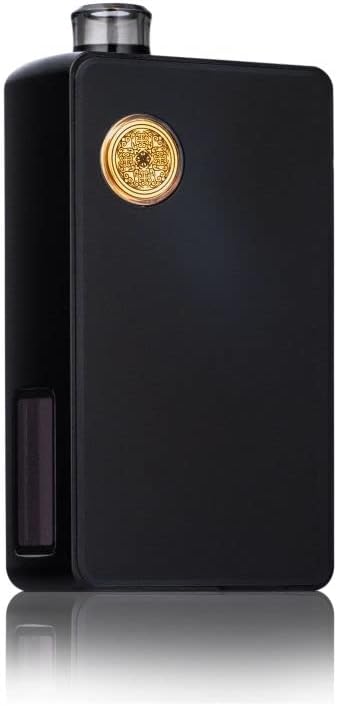
Image 1.1: The DotMod DotAIO V2 Kit in black, showcasing its sleek design.

Image 1.2: A lineup of DotMod DotAIO V2 Kits in different colors, highlighting the brand's aesthetic.
2. Package Contents
Upon unboxing your DotMod DotAIO V2 Kit, please verify that all the following components are included:
- 1 x DotMod DotAIO V2 Kit
- 1 x DotMod DotAIO V2 0.3 Ohm Mesh Coil
- 1 x DotMod DotAIO V2 0.7 Ohm Mesh Coil
- 2 x 510 DripTips (one for MTL, one for DL)
- 1 x USB Type-C Cable
- 1 x User Manual
Note: An 18650 battery is required for operation and is not included in the package.

Image 2.1: Visual representation of the DotAIO V2 kit components and key features.

Image 2.2: Close-up of the two included 510 DripTips, one for Mouth-to-Lung (MTL) and one for Direct-to-Lung (DL) vaping.
3. Safety Information
This product is nicotine-free.
Please observe the following safety guidelines:
- Keep the device out of reach of children and pets.
- Do not expose the device to extreme temperatures, direct sunlight, or water.
- Use only recommended 18650 batteries and charge them safely.
- Do not use damaged batteries or chargers.
- If the device shows signs of damage or malfunction, discontinue use immediately.
- Dispose of electronic waste responsibly according to local regulations.
4. Setup
4.1. Battery Installation
- Remove the magnetic side panel of the DotAIO V2 Kit.
- Insert a fully charged 18650 battery into the battery compartment, ensuring correct polarity (+/-).
- Replace the magnetic side panel.
4.2. Coil Installation
- Remove the magnetic side panel to access the tank.
- Pull out the 2.7ml tank from the device.
- Push the desired coil (0.3 Ohm or 0.7 Ohm) firmly into the base of the tank.
- Ensure the coil is securely seated.
- Reinsert the tank into the device.

Image 4.1: The DotAIO V2 with its side panel removed, revealing the tank and internal components for coil and battery access.
4.3. Filling the Tank
- With the tank installed, locate the silicone plug on the side of the tank (side-fill system).
- Carefully open the silicone plug.
- Fill the tank with your preferred e-liquid through the filling port.
- Close the silicone plug securely to prevent leaks.
- Allow the coil to prime for 5-10 minutes after the first fill or a new coil installation before vaping.
5. Operating Instructions
5.1. Power On/Off
To power the device on or off, rapidly press the fire button 5 times within 2 seconds.
5.2. Adjusting Wattage and Modes
The DotAIO V2 features an innovative chipset that allows for power output from 5W to 75W. It also includes an automatic mode that intelligently adjusts the wattage based on the detected coil resistance.
- Use the adjustment buttons (usually located near the display) to increase or decrease the wattage.
- Refer to the on-screen menu for mode selection (e.g., wattage mode, automatic mode).
5.3. Airflow Adjustment
The integrated airflow system allows you to customize your vaping experience for both Mouth-to-Lung (MTL) and Direct-to-Lung (DL) draws. Locate the airflow control ring or slider on the device or tank base and adjust it to your preferred setting.
5.4. Display Information
The color display provides clear and comprehensive information about your device's status, including:
- Current Wattage
- Coil Resistance (Ohms)
- Battery Level
- Puff Counter
- Selected Mode
You can also choose from various color schemes for the display.

Image 5.1: The silver DotAIO V2 showcasing its illuminated fire button and clear color display.
6. Maintenance
6.1. Cleaning
Regular cleaning ensures optimal performance and longevity of your device:
- Wipe down the exterior of the device with a soft, dry cloth.
- Clean the tank and drip tip regularly with warm water. Ensure all parts are completely dry before reassembly.
- Use a cotton swab to clean any e-liquid residue from the battery compartment and coil contacts.
6.2. Coil Replacement
Coils are consumable parts and need to be replaced periodically, typically every 1-2 weeks depending on usage and e-liquid. Follow the coil installation steps (Section 4.2) to replace a used coil with a new one.
7. Troubleshooting
If you encounter issues with your DotMod DotAIO V2 Kit, please refer to the following common problems and solutions:
- Device not turning on: Ensure the battery is correctly installed and fully charged. Press the fire button 5 times rapidly to power on.
- No vapor production: Check if the coil is properly installed and saturated with e-liquid. Ensure the wattage is set appropriately for the coil.
- Leaking: Verify that the coil is securely seated and the tank's silicone plug is closed tightly. Replace the coil if leaking persists, as it may be faulty.
- Burnt taste: This usually indicates a dry coil. Ensure the tank is filled and allow the coil to prime for several minutes before vaping. Replace the coil if the burnt taste persists.
- Display not working: Try restarting the device. If the issue persists, contact customer support.
For persistent issues not covered here, please contact DotMod customer support.
8. Specifications
| Feature | Specification |
|---|---|
| Brand | dotMod |
| Model Number | 49111 |
| ASIN | B09LV48YS7 |
| Dimensions | 77.9mm x 45.2mm x 22.7mm (approx.) |
| Tank Volume | 2.7 Milliliters |
| Wattage Output | 5W - 75W |
| Compatible Battery | 18650 (not included) |
| Charging Port | USB Type-C (Fast-Charge Function) |
| Coil Compatibility | DotAIO V2 Coils (0.3 Ohm Mesh, 0.7 Ohm Mesh), Voopoo PNP Coils |
| Special Feature | Compact Design, Color Display, Automatic Mode |
| Color | Black |
| UPC | 857918006491 |
9. Warranty and Support
For warranty information and customer support, please refer to the official DotMod website or contact your authorized retailer. Keep your proof of purchase for any warranty claims.
Related documents49111


Ask a question about this manual
Ask about setup, troubleshooting, compatibility, parts, safety, or missing instructions. Manuals+ will review the question and use this page’s manual context to help answer it.