
niubo power 48V-72V 45A Dual Mode Controller with SW900 Display
niubo power 48V-72V 45A Dual Mode Ebike Controller with SW900 Display User Manual
Model: 48V-72V 45A Dual Mode Controller with SW900 Display
Introduction
This manual provides detailed instructions for the niubo power 48V-72V 45A Dual Mode Controller and SW900 Display. It covers essential information for installation, operation, and maintenance to ensure safe and efficient use with your electric bicycle kit. Please read this manual thoroughly before installation and operation.
Product Overview
The niubo power controller and SW900 display system is designed for 48V-72V electric bicycle applications, offering dual-mode operation and a comprehensive display for monitoring riding parameters.
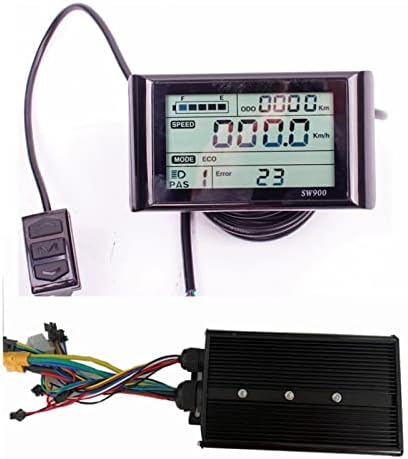
Figure 1: niubo power 48V-72V 45A Dual Mode Controller and SW900 Display. This image shows the main components of the system: the SW900 LCD display unit with its control buttons and the black finned controller unit with its various wiring harnesses.
Specifications
| Feature | Detail |
|---|---|
| Voltage | DC 48V-72V |
| Current | 45±1A |
| Brakes | Low-level |
| Booster Ratio | 1:1 |
| Speed Range | 1.1-4.2V (Throttle) |
| Mode | Dual Mode (Hall sensor or sensorless operation) |
| Controller Dimensions | 16.9cm (L) x 12cm (W) x 5cm (H) |
| Display Type | SW900 LCD Display |
| UPC | 767410156696 |

Figure 2: Controller Dimensions. The image displays the physical dimensions of the controller unit, measuring 16.9cm in length, 12cm in width, and 5cm in height.
Setup and Installation
Proper installation is crucial for the safe and correct operation of your ebike system. Ensure the battery is disconnected before beginning any installation.
Wiring Connections
Refer to the wiring diagram below for connecting the controller to your ebike components. Each wire is color-coded and serves a specific function.

Figure 3: Controller Wiring Diagram. This diagram illustrates the various connections for the controller, including motor phase wires, battery connections (positive and negative), Hall sensor, brake levers, throttle, PAS (Pedal Assist System), LCD display, and a lock connector. It also indicates the 25KPH speed limit wire and light battery voltage wire.
- Motor Phase Wires: Connect the three thick wires from the controller to the corresponding motor phase wires.
- Battery Connections: Connect the thick red wire to Battery+ and the thick black wire to Battery-.
- Hall Sensor: Connect the Hall sensor wires from the motor to the controller's Hall sensor connector. The controller supports operation with or without a Hall sensor.
- Brake Levers: Connect the brake lever wires to the low-level brake input.
- Throttle: Connect the throttle unit to the designated throttle connector.
- PAS (Pedal Assist System): Connect the PAS sensor to its dedicated connector.
- LCD Display: Connect the SW900 Display to the LCD Display connector.
- Lock Connector: This connector typically serves as an ignition or power switch.
- 25KPH Limited: This wire, if connected, can limit the maximum speed to 25 km/h.
- Light Battery's Voltage: Connect for auxiliary lighting power, if applicable.
Controller Bag Installation
The included controller bag provides protection and a convenient mounting solution for the controller. Ensure all wires are routed correctly and securely before closing the bag.

Figure 4: Controller Bag Dimensions. The image shows the dimensions of the controller bag: 27cm in length, 9.5cm in height, and 7cm in width. This bag is designed to house the controller and its wiring.

Figure 5: Controller Installed in Bag. This image demonstrates how the controller fits inside the protective bag, with all necessary wires exiting through the designated opening.
Operating Instructions
SW900 Display Functions
The SW900 LCD display provides real-time information about your ebike's performance and status.

Figure 6: SW900 Display Mounted on Handlebars. This image shows the SW900 display unit securely mounted on bicycle handlebars, providing a clear view of the screen for the rider.
The display typically shows the following parameters:
- Riding Speed: Current speed in km/h or mph.
- Single Mileage: Distance covered during the current trip.
- Cumulative Mileage: Total distance covered by the ebike.
- Riding Time: Duration of the current trip.
- Power-Assist Gear: Current level of pedal assistance.
- Motor Power and Temperature: Real-time motor output and temperature.
- Battery Voltage and Charge Status: Current battery voltage and remaining charge level.
- Brake Status: Indication when brakes are applied.
- Ambient Temperature: Current environmental temperature.
- Error Codes: Displays numerical codes for system malfunctions.
Controller Features
- Dual Mode Operation: The controller can operate with or without a Hall sensor, providing flexibility for various motor types.
- Regenerative Function: When used with the SW900 Display, this function can be activated to recover energy during braking or coasting, recharging the battery.
Maintenance
To ensure the longevity and optimal performance of your niubo power controller and display, follow these general maintenance guidelines:
- Keep Clean: Regularly wipe down the display and controller with a soft, dry cloth. Avoid using harsh chemicals or abrasive materials.
- Protect from Moisture: While the components are designed for outdoor use, avoid prolonged exposure to heavy rain or submersion in water. Ensure the controller bag is properly sealed.
- Check Connections: Periodically inspect all wiring connections for tightness and signs of wear or corrosion. Loose connections can lead to intermittent operation or damage.
- Avoid Physical Damage: Protect the display and controller from impacts or drops.
- Temperature: Operate and store the components within recommended temperature ranges to prevent damage to electronic circuits.
Troubleshooting
If you encounter issues with your niubo power controller or SW900 display, consider the following general troubleshooting steps:
- No Power to Display:
- Check battery connection and charge level.
- Verify all power cables from the battery to the controller and from the controller to the display are securely connected.
- Ensure the ignition/lock connector (if used) is properly engaged.
- Motor Not Responding:
- Check motor phase wire connections.
- Verify Hall sensor connections (if using Hall sensors). The controller supports sensorless operation, but incorrect Hall sensor wiring can cause issues if sensors are present.
- Inspect throttle connection and functionality.
- Check for any error codes displayed on the SW900.
- Incorrect Speed/Mileage Reading:
- Ensure wheel circumference settings in the display are correct (refer to SW900 display manual for parameter settings).
- Check speed sensor connection (if applicable).
- Displaying Error Codes:
- Note the specific error code displayed. Consult the SW900 display manual for a list of error codes and their meanings.
- Often, error codes indicate a specific component malfunction (e.g., Hall sensor error, throttle error).
For issues not resolved by these steps, or for specific error code interpretations, please contact niubo power customer support.
Warranty and Support
niubo power is committed to customer satisfaction. If you encounter any problems with the product, please contact us for assistance.
After-Sale Service Policy
- If you require assistance with product usage, please contact our support team. We will provide guidance to resolve any issues.
- Within 5 days of receiving the goods, if a product defect is identified and verified by our engineers through provided evidence (pictures, videos), we will arrange for a replacement or return. Freight costs for returns/replacements will be shared between the customer and niubo power.
- All returned items must be in their original packaging and include the shipping tracking number, specific reason for return, and your purchase order number. A full refund will be issued upon receipt of the returned goods.
Your feedback is valuable to us. If you have suggestions for improving our service, please let us know.