
1. Introduction and Overview
The ingbelle PAXCESS G6009 Portable 9-Pad Roll-Up Electronic Drum Set is a versatile and compact instrument designed for both beginners and experienced players. It offers a realistic drumming experience with its responsive pads, built-in speakers, and included accessories. The roll-up design ensures easy storage and portability, making it suitable for various practice environments.
Key features include:
- 9 responsive drum pads replicating 3 toms, 2 crashes, 1 hi-hat, 1 ride, 1 snare, and 1 bass drum.
- Built-in colorful LED lights for visual feedback.
- Integrated dual stereo speakers for clear sound output.
- Dual foot pedals for authentic bass drum and hi-hat control.
- Long-lasting rechargeable battery providing up to 8 hours of play.
- Multiple connectivity options: USB, MIDI, MP3 input, and headphone jack.
- 7 selectable tones, 10 demo songs, and 7 rhythms for diverse practice.

Image: The ingbelle PAXCESS G6009 electronic drum set in use, highlighting its colorful lights and built-in speakers.
2. What's in the Box
Carefully unpack the box and ensure all items are present and in good condition. The package should contain the following:
- 1 x 9-Pad Roll-Up Electronic Drum Kit
- 2 x Drum Sticks
- 2 x Foot Pedals (for Bass Drum and Hi-Hat functions)
- 1 x Type C USB Cable
- 1 x Audio Cable (1m)
- 1 x User Manual
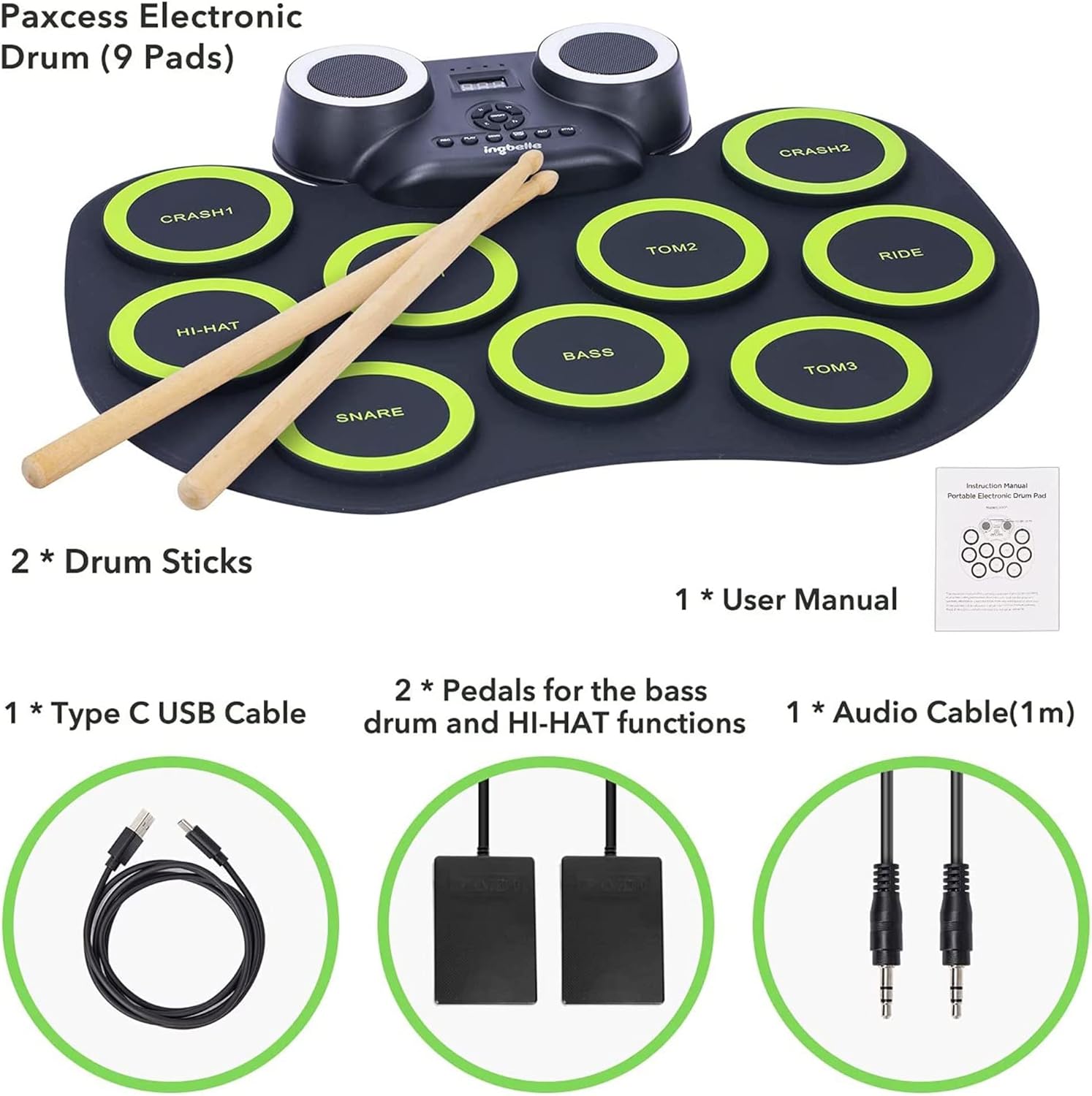
Image: All components included with the ingbelle PAXCESS G6009 electronic drum set.
3. Setup Instructions
- Unpack the Drum Set: Carefully remove all components from the packaging.
- Place the Drum Pad: Unroll the electronic drum pad and place it on a flat, stable surface.
- Connect Foot Pedals: Locate the 'PEDAL' input port on the control module and connect the two foot pedals. One pedal controls the bass drum, and the other controls the hi-hat.
- Charge the Battery: Before first use, fully charge the built-in rechargeable battery using the provided Type C USB cable and a compatible USB power adapter (not included). A full charge can provide up to 8 hours of use. The charging indicator will show status.
- Power On: Press the 'ON/OFF' button on the control module to power on the drum set.
- Optional Connections:
- Headphones: For quiet practice, connect headphones to the 'HEAD PHONE' jack.
- External Audio Source (MP3): Connect an external audio device (e.g., smartphone, MP3 player) to the 'MP3' input jack using the audio cable to play along with your favorite tracks.
- Computer/MIDI: Connect the drum set to a computer using the 'USB/DC 5V' port for MIDI functionality or to use with drumming games.
- Microphone: Connect a microphone to the 'MIC' input if desired.

Image: Detailed view of the control module's connectivity ports.
Video: An official ingbelle video demonstrating the features and connectivity options of the electronic drum set, including Bluetooth pairing, headphone use, and various input/output ports.
4. Operating Instructions
Familiarize yourself with the control panel and drum pad layout for optimal use.
Control Panel Functions:

Image: The control panel of the electronic drum set, detailing button functions.
- ON/OFF: Power switch for the device.
- V+ / V-: Adjusts the master volume up or down.
- T+ / T-: Adjusts the tempo/speed up or down.
- START/STOP: Starts or stops demo music and controls tones.
- REC: Initiates recording of your drumming.
- PLAY: Plays back recorded music.
- RHY: Selects from 7 metronome rhythms.
- DEMO: Selects from 10 pre-programmed demo songs.
- STYLE: Cycles through 7 different tone buttons/drum kit sounds.
Playing the Drum Set:
- Use the provided drumsticks to strike the individual drum pads.
- The pads are labeled for different drum components: Snare Drum, Bass Drum, High Drum, Low Drum, Floor Drum, Open Close Hi-Hat, Crash Cymbal (x2), and Ride Cymbal.
- Utilize the foot pedals for the bass drum and hi-hat to add realism to your drumming.
- Experiment with the 'STYLE' button to change the drum kit sound to suit different musical genres.
- Practice with the built-in 'RHY' (rhythms) and 'DEMO' (demo songs) functions to improve your timing and coordination.
- The colorful lights on the speakers will illuminate during play, adding a visual element to your performance.
5. Maintenance
- Cleaning: The drum pad is made of non-toxic and 100% waterproof silicone. Wipe the surface with a soft, damp cloth to clean. Avoid using harsh chemicals or abrasive cleaners.
- Storage: When not in use, roll up the drum pad for compact storage. Store in a cool, dry place away from direct sunlight and extreme temperatures.
- Battery Care: To prolong battery life, avoid fully discharging the battery frequently. Recharge the battery regularly, even if the drum set is not used for extended periods.
- General Care: Handle the drum set and its components with care. Avoid dropping or subjecting it to strong impacts. Keep away from liquids and excessive dust.

Image: The roll-up design of the electronic drum set for easy storage and transport.
6. Troubleshooting
- No Sound:
- Ensure the drum set is powered on and the volume is turned up (V+).
- If using headphones, ensure they are fully plugged into the 'HEAD PHONE' jack.
- If connected to external speakers, check their power and volume.
- Pad Not Responding:
- Ensure the drum pad is laid flat and not creased.
- Gently tap the pad to ensure proper contact.
- If a specific pad consistently fails, contact customer support.
- Foot Pedals Not Working:
- Verify that the foot pedals are securely plugged into the 'PEDAL' input.
- Ensure the pedals are placed on a flat surface and are not obstructed.
- Battery Not Charging:
- Check if the Type C USB cable is securely connected to both the drum set and the power source.
- Try a different USB power adapter or USB port.
- Ensure the power source is active.
- Bluetooth Connectivity Issues:
- Ensure the drum set's Bluetooth is enabled (refer to specific instructions if a dedicated Bluetooth button exists, otherwise assume automatic pairing mode).
- Ensure your external device's Bluetooth is on and it is searching for devices.
- Move the external device closer to the drum set.
- Try restarting both the drum set and the external device.
7. Specifications
| Feature | Detail |
|---|---|
| Model Number | G6009 |
| Brand | ingbelle |
| Color | Black |
| Material | Silicone |
| Drum Pads | 9 (3 Toms, 2 Crashes, 1 Hi-Hat, 1 Ride, 1 Snare, 1 Bass) |
| Tones | 7 |
| Demo Songs | 10 |
| Rhythms | 7 |
| Connectivity | USB Type B, MIC, MP3, Headphone, Pedal, Bluetooth |
| Battery Life | Up to 8 hours (rechargeable) |
8. Warranty and Support
For warranty information, technical support, or any inquiries regarding your ingbelle PAXCESS G6009 Electronic Drum Set, please refer to the contact details provided with your purchase documentation or visit the official ingbelle website. Please retain your proof of purchase for warranty claims.