
Introduction
Thank you for choosing the Galax Slider-04 Optical Wired Gaming Mouse. This manual provides essential information for setting up, operating, maintaining, and troubleshooting your new gaming mouse. Please read it carefully to ensure optimal performance and longevity of your device.
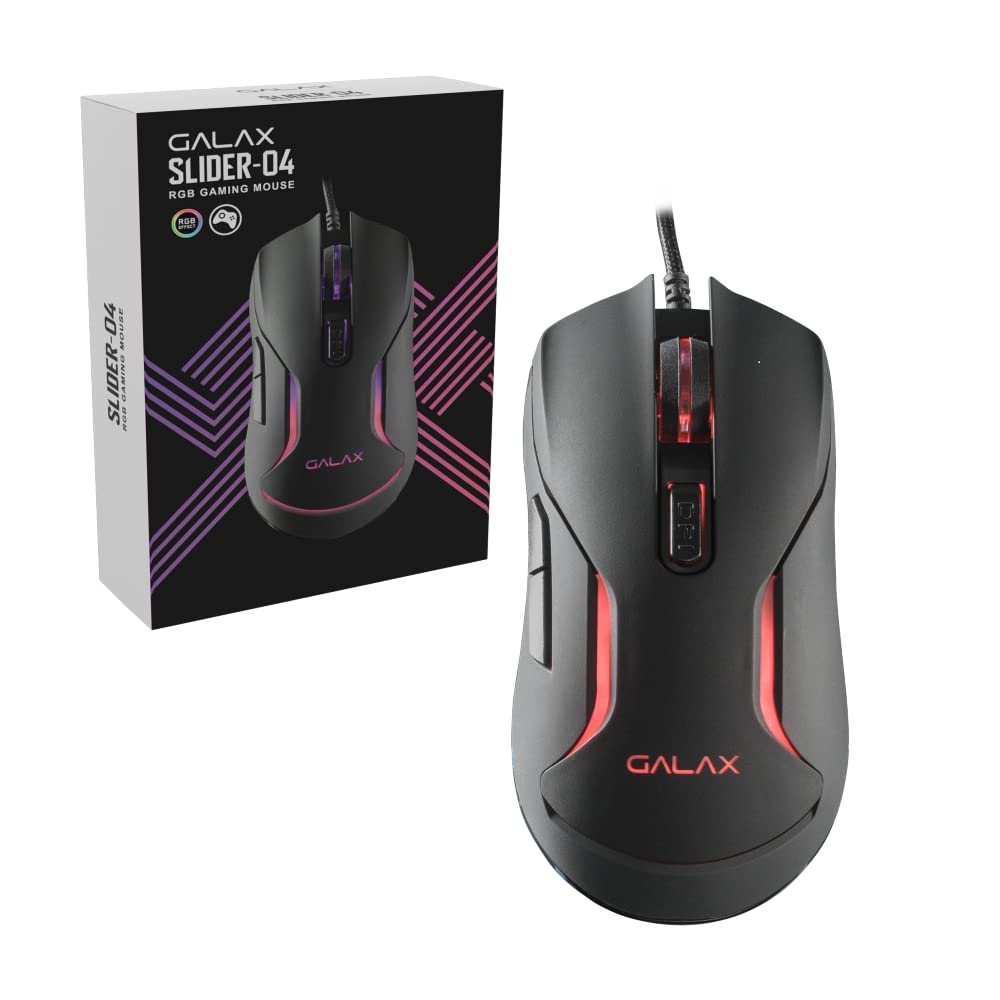
Image: Top view of the Galax Slider-04 Optical Wired Gaming Mouse, showcasing its ergonomic design and central scroll wheel.
Setup
The Galax Slider-04 Gaming Mouse is designed for simple plug-and-play functionality, requiring no additional software installation for basic use.
- Unpack the Mouse: Carefully remove the mouse from its packaging.
- Connect to Computer: Plug the USB connector of the mouse into an available USB port on your desktop, laptop, or PC.
- System Recognition: Your operating system (Windows, macOS, Unix) will automatically detect and install the necessary drivers. This process usually takes a few seconds.
- Ready for Use: Once the drivers are installed, the mouse is ready for immediate use.

Image: The Galax Slider-04 mouse with its braided USB cable, ready for connection to a computer.
Operating Instructions
The Galax Slider-04 features multiple buttons and customizable settings to enhance your gaming and productivity experience.
Button Functions
The mouse is equipped with 6 function keys for versatile control:
- 1. Left Mouse Button: Standard primary click function.
- 2. Right Mouse Button: Standard secondary click function (context menu).
- 3. Scroll Wheel: Scrolls up/down, and acts as a middle click button.
- 4. Forward Button: Navigates forward in web browsers or file explorers.
- 5. Back Button: Navigates backward in web browsers or file explorers.
- 6. DPI Button: Cycles through DPI sensitivity settings.

Image: A detailed diagram illustrating the location and numbering of the 6 function keys on the Galax Slider-04 mouse.
DPI Adjustment
Adjust the mouse sensitivity (DPI) to match your preference and task requirements. The Slider-04 offers four preset DPI levels:
- 1000 DPI
- 1600 DPI
- 3200 DPI
- 6400 DPI
Press the DPI button (Button 6) located behind the scroll wheel to cycle through these settings. Each change will typically be indicated by a change in the mouse's RGB lighting color.

Image: Visual representation of the four selectable DPI settings available on the Galax Slider-04 mouse.
RGB LED Lighting
The Galax Slider-04 features dynamic RGB LED lighting that enhances your gaming setup's aesthetics. The lighting effects cycle automatically, often changing color to indicate the current DPI setting.
Video: A short demonstration of the Galax Slider-04 mouse's RGB LED lighting effects, showcasing the dynamic color changes.

Image: The Galax Slider-04 mouse displayed with various RGB color presets, illustrating the range of lighting options.
Ergonomic Design
The mouse is designed with ergonomics to provide comfort and reduce hand fatigue during prolonged use. Its shape supports both fingertip and claw grip styles, promoting a natural hand posture.

Image: A diagram demonstrating how the ergonomic design of the Galax Slider-04 mouse accommodates both fingertip and claw grip styles.
Maintenance
Proper care will extend the life and performance of your Galax Slider-04 Gaming Mouse.
- Cleaning: Use a soft, dry cloth to wipe the surface of the mouse. For stubborn dirt, slightly dampen the cloth with water. Avoid harsh chemicals or abrasive cleaners.
- Optical Sensor: Keep the optical sensor on the underside of the mouse clean and free from dust or debris to ensure accurate tracking.
- Cable Care: Avoid sharply bending or twisting the braided USB cable. Store the cable neatly to prevent tangling and damage.
- Storage: When not in use, store the mouse in a clean, dry environment away from extreme temperatures.
Troubleshooting
If you encounter issues with your Galax Slider-04 Gaming Mouse, refer to the following common solutions:
- Mouse Not Detected:
- Ensure the USB cable is securely plugged into a working USB port.
- Try plugging the mouse into a different USB port on your computer.
- Restart your computer.
- Check your computer's Device Manager (Windows) or System Information (macOS) to see if the mouse is listed.
- DPI Not Changing:
- Ensure you are pressing the dedicated DPI button (Button 6).
- Verify that the mouse is properly connected and recognized by your system.
- RGB Lights Not Working:
- Ensure the mouse is properly connected to your computer.
- The RGB lighting is typically automatic and cycles through colors. If no lights appear, try reconnecting the mouse or restarting your computer.
- Inaccurate Tracking:
- Clean the optical sensor on the underside of the mouse.
- Use the mouse on a clean, uniform surface or a quality mouse pad.
- Adjust the DPI setting to a level suitable for your surface and preference.
Specifications
Below are the technical specifications for the Galax Slider-04 Optical Wired Gaming Mouse:
| Feature | Detail |
|---|---|
| Brand | Galax |
| Model Name | SLIDER |
| Model Number | MGS04UX26RG2B0 |
| Colour | Black |
| Connectivity Technology | USB (Wired) |
| Movement Detection Technology | Optical |
| Mouse Maximum Sensitivity | 6400 DPI |
| DPI Settings | 1000 / 1600 / 3200 / 6400 |
| Button Quantity | 6 |
| Button Lifespan | 3 million clicks |
| Polling Rate | 125Hz |
| Special Features | Ergonomic Design, RGB LED Lights, Lightweight |
| Cable Length | 1.5 meters (Braided) |
| Compatible Devices | Personal Computer |
| Operating System Support | Unix, Windows 7/8/10, macOS 10.12 Sierra and above |
| Item Weight | 250 Grams |
| Item Dimensions (L x W) | 12.9L x 4.1W Centimeters |
| Power Source | Corded Electric |
| Enclosure Material | Plastic |
| Product Finish Type | Matte |

Image: A table summarizing the key specifications of the Galax Slider-04 gaming mouse.
Warranty & Support
The Galax Slider-04 Optical Wired Gaming Mouse comes with a 1 Year Manufacturer Warranty from the date of purchase.
For warranty claims or technical support, please contact:
- Manufacturer: Galax Technology, Galaxy Microsystems Ltd., Hong Kong, Kowloon Bay, Sheung Yuet Rd, 3號企業廣場二期
- Importer (India): Technology And Gadgets, Gala no.142/143, 1st Floor, Building no.6, Mittal Industrial Estate, Marol, Andheri (East), Mumbai - 400059., Mumbai, India, Maharashtra
Please retain your purchase receipt as proof of purchase for warranty purposes.
