
Dorobeen TF29
Dorobeen TF29 Clip Fan User Manual
Model: TF29 | Brand: Dorobeen
Product Overview
The Dorobeen TF29 Clip Fan is an 8-inch mini fan designed for versatile personal cooling. It features a powerful 10000mAh rechargeable battery, multiple speed settings, and a flexible design that allows it to be used as both a clip-on and a desk fan. Its quiet operation and portable nature make it ideal for various environments, including offices, golf carts, strollers, and camping.

Figure 1: The Dorobeen TF29 Clip Fan, showcasing its compact design and clip base.
Key Features
- Powerful Airflow & Multiple Speeds: Offers 4 speed settings (Low, Mid, High, Natural Wind) with wind speeds ranging from 2.8m/s to 4.5m/s. The 3-blade design ensures strong air circulation.
- Quiet Operation: Engineered for quiet airflow, ensuring minimal disturbance during use, with noise levels below 50dB.
- Versatile Design (Clip-on & Desk Fan): Features a robust clip for attachment to various surfaces like tables, golf carts, or treadmills, and a stable base with non-slip silicone for desk use.
- 360-Degree Rotation: The fan head can be rotated 360 degrees both vertically and horizontally, allowing precise direction of airflow.
- Long-Lasting Rechargeable Battery: Equipped with a 10000mAh battery, providing up to 24 hours of continuous operation on a full charge (depending on speed setting).
- USB-C Charging: Features a USB-C port for convenient charging, compatible with laptops, phone adapters, power banks, and USB chargers. Offers 10W charging speed.
- Durable & Portable: Constructed from high-quality ABS material, making it exquisite, durable, and easy to transport for travel, business trips, camping, school, office, and home use.

Figure 2: Illustration of the fan's four speed settings and corresponding airflow.

Figure 3: The fan operating quietly, indicating it does not affect work or study.

Figure 4: The fan demonstrating its 360-degree vertical and horizontal rotation.

Figure 5: Battery life indicators showing working hours for different speed settings.

Figure 6: Examples of the fan's versatile use in a stroller, office, camping, and golf cart.
Setup and Placement
Using as a Clip-on Fan:
- Identify a suitable surface for clipping, such as a table edge, stroller bar, or golf cart frame.
- Open the strong clip at the base of the fan by pressing the levers.
- Securely attach the clip to the desired surface, ensuring a firm grip.
- Adjust the fan head to your preferred angle using its 360-degree rotation capability.
Using as a Desk Fan:
- Place the fan on a flat, stable surface. The non-slip silicone pads on the base will help keep it steady.
- Ensure the fan is positioned where it will not be easily knocked over.
- Adjust the fan head to direct airflow as needed.

Figure 7: The fan positioned on a desk, ready for use.
Operating Instructions
Power On/Off and Speed Control:
- To turn the fan ON, press the 'ON/OFF' button located on the back of the fan. The fan will start at the lowest speed setting.
- To cycle through speed settings (Low, Mid, High, Natural Wind), press the 'ON/OFF' button repeatedly.
- To turn the fan OFF, continue pressing the 'ON/OFF' button until the fan stops.

Figure 8: A hand demonstrating how to press the control button on the back of the fan.
Battery Level Indicator:
The fan features LED indicators on the back to show the remaining battery charge:
- One light: 30% charge remaining
- Two lights: 60% charge remaining
- Three lights: 100% charge remaining
Charging the Fan:
- Locate the USB-C charging port on the back of the fan.
- Connect the provided USB-C cable to the fan's charging port.
- Connect the other end of the USB-C cable to a compatible power source (e.g., USB wall adapter, computer USB port, power bank).
- The LED indicators will illuminate to show charging progress. A full charge typically takes approximately 6 hours.
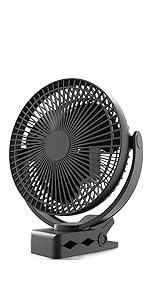
Figure 9: The fan connected to a power source for charging via its USB-C port.
Maintenance
Cleaning the Fan:
Regular cleaning helps maintain optimal performance and airflow.
- Ensure the fan is turned OFF and unplugged from any power source before cleaning.
- The front grille of the fan can be easily removed for cleaning. Gently twist or unclip the front cover as indicated in the product diagram (refer to product packaging for specific instructions if needed).
- Use a soft, dry cloth or a brush to remove dust and debris from the fan blades and the inside of the grille. For stubborn dirt, a slightly damp cloth can be used, but ensure no water enters the motor housing.
- Allow all parts to dry completely before reassembling the front grille.
- Do not use abrasive cleaners, solvents, or harsh chemicals, as these may damage the fan's surface or internal components.
Troubleshooting
| Problem | Possible Cause | Solution |
|---|---|---|
| Fan does not turn on. | Battery is depleted. | Charge the fan using the USB-C cable. Check battery indicator lights. |
| Fan does not turn on. | Power button not pressed correctly. | Ensure the 'ON/OFF' button is pressed firmly. |
| Weak airflow. | Fan blades are dirty or obstructed. | Turn off and unplug the fan. Remove the front grille and clean the blades. |
| Weak airflow. | Fan is on a low speed setting. | Press the 'ON/OFF' button to cycle to a higher speed setting. |
| Fan makes unusual noise. | Obstruction in fan blades or motor. | Turn off and unplug the fan. Check for any foreign objects obstructing the blades. If noise persists, contact customer support. |
| Fan does not hold a charge. | Charging cable or adapter issue. | Try a different USB-C cable or power adapter. Ensure the power source is functioning correctly. |
Technical Specifications
| Feature | Specification |
|---|---|
| Model Name | TF29 |
| Brand | Dorobeen |
| Color | Black+Black |
| Electric Fan Design | Table Fan / Clip Fan |
| Power Source | Battery Powered |
| Battery Capacity | 10000 mAh Lithium Polymer (included) |
| Charging Port | USB Type C |
| Charging Speed | 10W |
| Full Charge Time | Approx. 6 hours |
| Continuous Working Time | Up to 24 hours (on lowest speed) |
| Number of Power Levels | 4 (Low, Mid, High, Natural Wind) |
| Wind Speed Range | 2.8m/s - 4.5m/s |
| Noise Level | <50dB |
| Product Dimensions | 5.3"D x 8"W x 9.8"H |
| Item Weight | 1.87 pounds (0.85 Kilograms) |
| Material | High-quality ABS Plastic |
| Control Method | Push Button / Touch |
| Special Feature | Clip Fan, 360-degree Rotation, Rechargeable |
Safety Information
For detailed safety guidelines and warnings, please refer to the official Safety Information PDF document:
Download Safety Information (PDF)
- Do not insert fingers or any objects into the fan grille when operating.
- Keep the fan away from water or excessive moisture.
- Do not attempt to disassemble or repair the fan yourself. Contact customer support for assistance.
- Ensure the fan is placed on a stable surface to prevent tipping.
- Keep out of reach of small children.
Customer Support
If you have any questions, concerns, or require assistance with your Dorobeen TF29 Clip Fan, please do not hesitate to contact our customer support team. We are committed to providing the best products and services.
Our team will reply within 24 hours.
Contact Information:
- Please refer to your purchase platform or product packaging for specific contact methods (e.g., email, website).