
1. Product Overview
The Himarine SUNSUN JDP DC Variable Frequency Submersible Water Pump 3500Q is designed for use in marine and freshwater aquariums, reef tanks, and ponds. This pump features a DC variable frequency motor, offering quiet operation and adjustable flow and power settings. It can be used both submersed and externally, providing versatility for various aquatic setups.
Key Features:
- Multi-function intelligent control panel for adjustable flow and power.
- Quiet operation suitable for both fresh and saltwater environments.
- Amphibious design allows for submersible or external use.
- Smart controller with 99 adjustable speeds and a 10-minute pause feed mode.
- Memory function retains settings after power interruptions.
- WiFi mobile phone control capability.
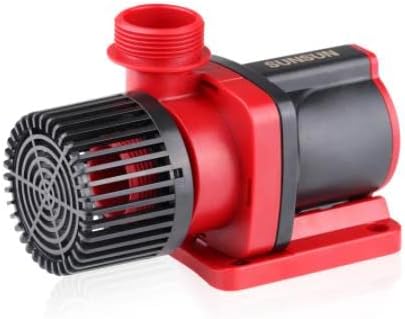
Figure 1: The Himarine SUNSUN JDP DC Variable Frequency Submersible Water Pump 3500Q. This image displays the main pump unit, highlighting its compact design and red and black casing.
2. Setup Instructions
Follow these steps for proper installation of your water pump:
- Unpacking: Carefully remove all components from the packaging. Verify that all parts are present, including the pump unit, controller, power adapter, and various hose adapters.
- Adapter Selection: Choose the appropriate hose adapter (20mm, 25mm, or 30mm) for your plumbing system. Securely attach it to the pump's outlet.
- Placement:
- Submersible Use: Place the pump fully submerged in the water at the desired location within your aquarium or pond. Ensure the intake is clear of debris.
- External Use: Position the pump outside the water source. Important: Before operating externally, ensure water is poured into the pump casing to prime it. This prevents dry running and potential damage.
- Connect Plumbing: Connect your hoses or PVC piping to the pump's inlet and outlet. Ensure all connections are secure and leak-free.
- Power Connection: Connect the pump to the intelligent control panel, then connect the power adapter to the control panel. Plug the power adapter into a suitable electrical outlet.

Figure 2: The pump shown with its WiFi mobile phone control feature and a display of the included 20mm, 25mm, and 30mm hose adapters for versatile installation.
3. Operating Instructions
The SUNSUN JDP pump features an intelligent control panel and WiFi connectivity for easy operation.
- Power On: Once connected to power, the pump will initiate. The control panel display will illuminate.
- Adjusting Flow/Power: Use the '+' and '-' buttons on the control panel to adjust the pump's speed and flow rate. There are 99 adjustable speed settings.
- Feed Mode: To activate the 10-minute pause feed mode, press the 'Feed' button on the control panel. The pump will temporarily stop, allowing fish to feed without being disturbed by water currents. After 10 minutes, the pump will automatically resume its previous operation.
- Memory Function: The pump's controller includes a memory function, which ensures that your last settings are retained even after a power outage or restart.
- WiFi Control (Optional): For remote control and advanced settings, download the compatible mobile application. Follow the app's instructions to connect your pump via WiFi. This allows for convenient adjustment of settings from your smartphone.
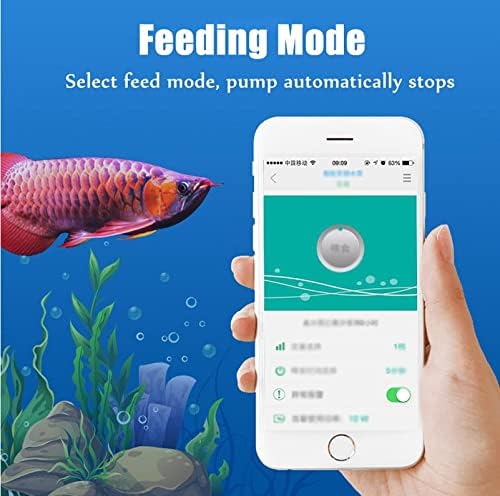
Figure 3: A mobile phone screen illustrating the 'Feeding Mode' feature, where selecting this option automatically pauses the pump's operation for a set duration.
4. Maintenance
Regular maintenance ensures optimal performance and longevity of your pump.
- Disconnect Power: Always unplug the pump from the power source before performing any maintenance.
- Clean Impeller: Periodically remove the pump's front cover and impeller assembly. Clean any accumulated debris, algae, or mineral deposits from the impeller and its housing using a soft brush and clean water.
- Check Intake Screen: Ensure the intake screen is free from blockages. A clogged intake can reduce flow and strain the motor.
- Inspect Cords: Regularly check the power cord and controller cable for any signs of damage, fraying, or wear. Replace if necessary.
- Rinse Components: After cleaning, rinse all components thoroughly with clean water before reassembling.
5. Troubleshooting
If you encounter issues with your pump, refer to the following common problems and solutions:
- Pump Not Starting:
- Check if the power cord is securely plugged into the outlet and the controller.
- Ensure the power outlet is functional.
- Verify that the controller is powered on and not in feed mode.
- Reduced Flow Rate:
- Inspect the pump's intake screen for blockages (e.g., debris, algae).
- Clean the impeller and its housing for any obstructions.
- Check for kinks or blockages in the connected hoses or piping.
- Ensure the pump speed setting on the controller is at the desired level.
- Excessive Noise:
- Clean the impeller and check for any foreign objects lodged within.
- Ensure the pump is properly seated and not vibrating against any surfaces.
- If used externally, confirm the pump is primed with water to prevent dry running noise.
- WiFi Connection Issues:
- Ensure your mobile device is connected to a 2.4GHz WiFi network (5GHz networks are often not supported by smart devices).
- Restart the pump and your WiFi router.
- Refer to the mobile application's specific troubleshooting guide for connection steps.
6. Specifications
Detailed specifications for the JDP-3500Q model and other related models are provided below:
| Model | Input | Power | Flow | Lift | Size (L×W×H) |
|---|---|---|---|---|---|
| JDP-3500Q / JDP-3500 | DC-24V | 10W - 30W | 2300L/h - 3500L/h | 1.7m - 3.5m | 155x72x97mm |
| JDP-6000Q / JDP-6000 | DC-24V | 13W - 60W | 3000L/h - 6000L/h | 1.6m - 5.0m | 175x83x113mm |
| JDP-10000Q / JDP-10000 | DC-24V | 20W - 100W | 6000L/h - 10000L/h | 2.2m - 5.8m | 195x95x125mm |
Additional Specifications:
- Manufacturer: Himarine
- Power Source: Corded Electric
- ASIN: B09LLS2N8Z
- First Available: November 2, 2023
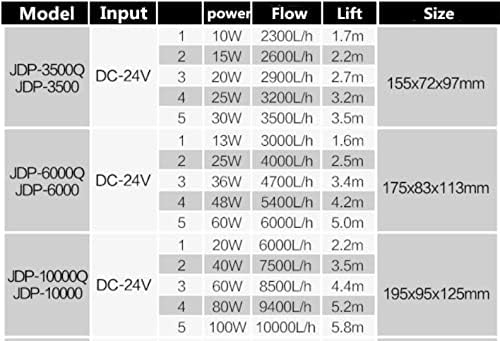
Figure 4: A detailed table outlining the input voltage, power consumption range, flow rate, maximum lift, and physical dimensions for various JDP pump models, including the JDP-3500Q.
7. Warranty and Support
For information regarding product warranty, please refer to the documentation provided at the time of purchase or contact Himarine customer support. Extended protection plans may be available for purchase separately.
For further assistance or inquiries, please visit the official Himarine Store or contact their customer service.