
1. Introduction
Thank you for choosing the SUNSUN JDP-6000Q DC Variable Frequency WiFi Submersible Water Pump. This pump is designed for efficient and quiet water circulation in marine reef aquariums, freshwater fish tanks, and ponds. Featuring variable frequency technology and WiFi control, it offers precise flow adjustment and convenient operation. Please read this manual thoroughly before installation and operation to ensure proper use and longevity of your pump.
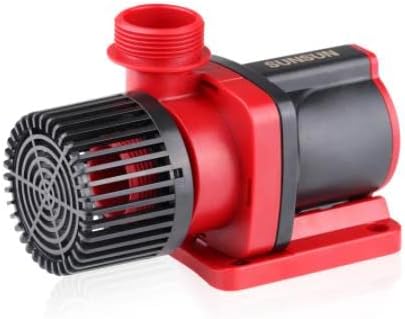
Image 1.1: The SUNSUN JDP-6000Q DC Variable Frequency Submersible Water Pump, showcasing its compact design with a red and black housing.
2. Safety Instructions
- Always disconnect the power supply before performing any maintenance, installation, or cleaning.
- Ensure the power outlet is properly grounded and protected by a Ground Fault Circuit Interrupter (GFCI).
- Do not operate the pump if the power cord or plug is damaged.
- This pump is designed for use with water only. Do not use it for flammable or corrosive liquids.
- When using the pump externally (non-submerged), it is crucial to pour water into the pump housing before starting operation to prevent dry running and damage.
- Keep children and pets away from the pump and electrical connections.
- Ensure the pump is securely placed to prevent accidental movement.
3. Package Contents
Verify that all components are present and undamaged upon unpacking:
- SUNSUN JDP-6000Q DC Variable Frequency Water Pump
- Smart Controller with Power Adapter
- Various Outlet Connectors (e.g., 20/25/32mm, 25mm, 30mm)
- User Manual (this document)
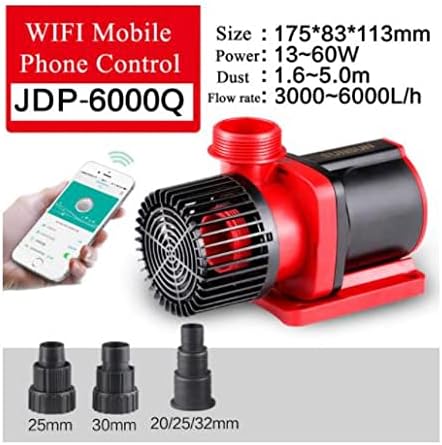
Image 3.1: The SUNSUN JDP-6000Q pump, illustrating its WiFi mobile phone control capability and the included outlet connectors of different sizes (25mm, 30mm, 20/25/32mm).
4. Product Features
- Multi-function Intelligent Control Panel: Allows for precise adjustment of flow rate and power consumption.
- Super Silent Operation: Engineered for quiet performance in both freshwater and saltwater environments.
- Amphibious Use: Suitable for both submersible and external (in-line) applications.
- Smart Controller: Features 99 adjustable speed settings for fine-tuning water flow.
- 10-Minute Pause Feed Mode: Temporarily stops the pump for feeding, then automatically resumes operation.
- Memory Function: Retains the last settings after a power interruption or restart.
- WiFi Connectivity: Enables convenient control and monitoring via a mobile application.
5. Setup and Installation
5.1 Choosing Installation Method (Submersible or External)
The JDP-6000Q pump can be used either fully submerged in water or externally as an in-line pump.
- Submersible Use: Place the pump entirely underwater in your aquarium or pond. Ensure it is stable and not obstructed.
- External Use: Position the pump outside the water source. Connect appropriate tubing to both the inlet and outlet. Crucially, prime the pump by pouring water into the pump housing before connecting power and starting it to prevent dry running.
5.2 Connecting Outlet Nozzles
Select the appropriate outlet connector (20mm, 25mm, 30mm, or 32mm) for your tubing and securely attach it to the pump's outlet port. Ensure a tight fit to prevent leaks.
5.3 Power Connection
- Connect the pump's cable to the smart controller.
- Connect the power adapter to the smart controller.
- Plug the power adapter into a grounded electrical outlet.
5.4 WiFi Setup (General Guidance)
For detailed WiFi setup instructions, refer to the specific guide provided with the smart controller or the manufacturer's website. Generally, this involves:
- Downloading the designated mobile application (e.g., "SUNSUN Home" or similar).
- Registering an account.
- Following the in-app instructions to connect the smart controller to your home WiFi network.
6. Operating Instructions
6.1 Basic Operation
Once powered on, the pump will start operating at its last saved setting due to the memory function. Use the smart controller or the mobile application to adjust settings.
6.2 Adjusting Flow Rate / Speed
The smart controller allows for 99 adjustable speed settings. Use the '+' and '-' buttons on the controller or the slider/buttons within the mobile app to increase or decrease the pump's output. Observe the flow rate in your system and adjust as needed for optimal performance.
6.3 Feed Mode
The pump features a 10-minute pause feed mode. Activate this mode via the smart controller or mobile app. The pump will stop for 10 minutes, allowing you to feed your aquatic inhabitants without food being immediately drawn into filtration. After 10 minutes, the pump will automatically resume its previous operation.
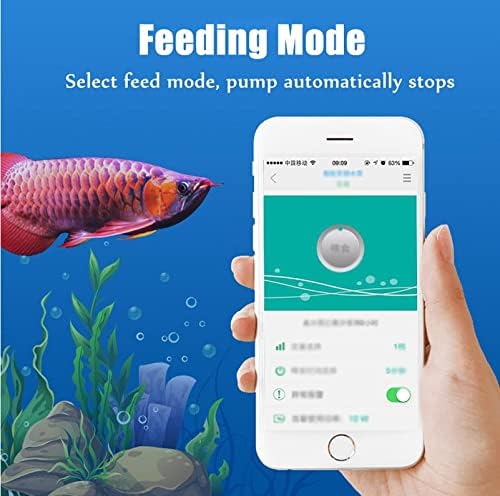
Image 6.1: A mobile phone displaying the "Feeding Mode" interface for the pump, with an aquarium visible in the background, indicating the pump's temporary pause for feeding.
7. Maintenance
Regular maintenance ensures optimal performance and extends the lifespan of your pump.
- Disconnect Power: Always unplug the pump before any maintenance.
- Clean Impeller: Periodically remove the pump's front cover and impeller assembly. Clean any debris, algae, or calcium buildup from the impeller and its housing using a soft brush and clean water. For stubborn calcium deposits, a mild vinegar solution can be used, followed by thorough rinsing.
- Check Inlet/Outlet: Ensure the inlet screen and outlet nozzles are free from blockages.
- Inspect Cord: Regularly check the power cord for any signs of damage or wear.
- Reassembly: Ensure all parts are correctly reassembled and securely fastened before reconnecting power.
8. Troubleshooting
| Problem | Possible Cause | Solution |
|---|---|---|
| Pump does not start | No power; impeller jammed; dry running (external use) | Check power connection and GFCI. Disconnect power, clean impeller. For external use, ensure pump is primed with water. |
| Low flow rate | Clogged inlet/outlet; dirty impeller; incorrect speed setting | Clean inlet screen, outlet, and impeller. Increase speed setting via controller/app. |
| Excessive noise | Debris in impeller; pump not stable; air in pump (external use) | Clean impeller. Ensure pump is securely placed. For external use, check for air leaks in tubing and ensure proper priming. |
| WiFi connection issues | Incorrect WiFi password; router too far; app issues | Verify WiFi password. Move router closer or use a repeater. Restart app/controller. Consult app's troubleshooting guide. |
9. Specifications
| Feature | Detail |
|---|---|
| Model | JDP-6000Q |
| Brand | SUNSUN (Manufactured by Himarine) |
| Input Voltage | DC-24V |
| Power Consumption | 13W - 60W (Variable) |
| Max Flow Rate | 3000 - 6000 L/h (Variable) |
| Max Lift Height | 1.6 - 5.0 m (Variable) |
| Dimensions (L x W x H) | 175mm x 83mm x 113mm (approx. 6.89" x 3.27" x 4.45") |
| Product Dimensions (L x W x H) | 9"L x 5.28"W x 7"H |
| Material | Plastic |
| Color | Black / Red |
| Application | Marine, Freshwater, Aquarium, Pond |
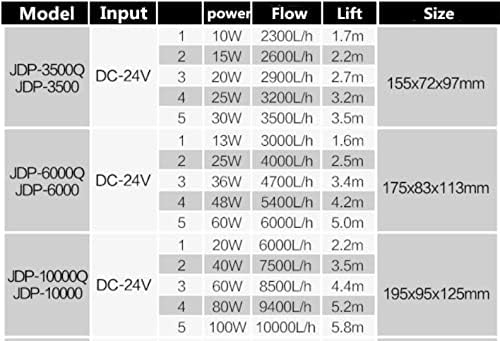
Image 9.1: A detailed specification table for various SUNSUN JDP pump models, highlighting input, power, flow, lift, and size, with the JDP-6000Q model's specifications clearly visible.

Image 9.2: Visual representation of the SUNSUN JDP-6000Q pump's dimensions, showing its length (9"), width (5.28"), and height (7").
10. Warranty and Support
For warranty information and technical support, please refer to the documentation included with your purchase or contact the manufacturer, Himarine, directly through their official channels. Keep your purchase receipt as proof of purchase for any warranty claims.