
Global Industrial 987545
Global Industrial Power Scissor Lift Table User Manual
Model: 987545
1. Introduction
Thank you for choosing the Global Industrial Power Scissor Lift Table. This manual provides essential information for the safe and efficient operation, maintenance, and troubleshooting of your new equipment. Please read this manual thoroughly before operating the lift table to ensure proper use and to prevent injury or damage.
This power scissor lift table is designed to reduce worker strain by lifting heavy loads to a comfortable working height, making it ideal for various industrial and commercial applications.
2. Important Safety Instructions
Always prioritize safety when operating any machinery. Failure to follow these instructions may result in serious injury or death.
- Read and understand all instructions before operating the lift table.
- Ensure the lift table is placed on a stable, level surface capable of supporting the unit's weight plus the maximum load.
- Do not exceed the maximum rated load capacity of 2200 lbs.
- Keep hands, feet, and clothing clear of moving parts, especially the scissor mechanism, during operation.
- Never stand or ride on the lift table.
- Ensure the power supply is disconnected before performing any maintenance or repairs.
- Use only authorized replacement parts.
- Regularly inspect the lift table for any signs of wear, damage, or loose components.
- Do not operate the lift table if it is damaged or malfunctioning.
- Always use the provided hand-held push button pendant control or foot pedal control for operation.
3. Product Overview and Components
The Global Industrial Power Scissor Lift Table features a robust design for heavy-duty lifting applications.
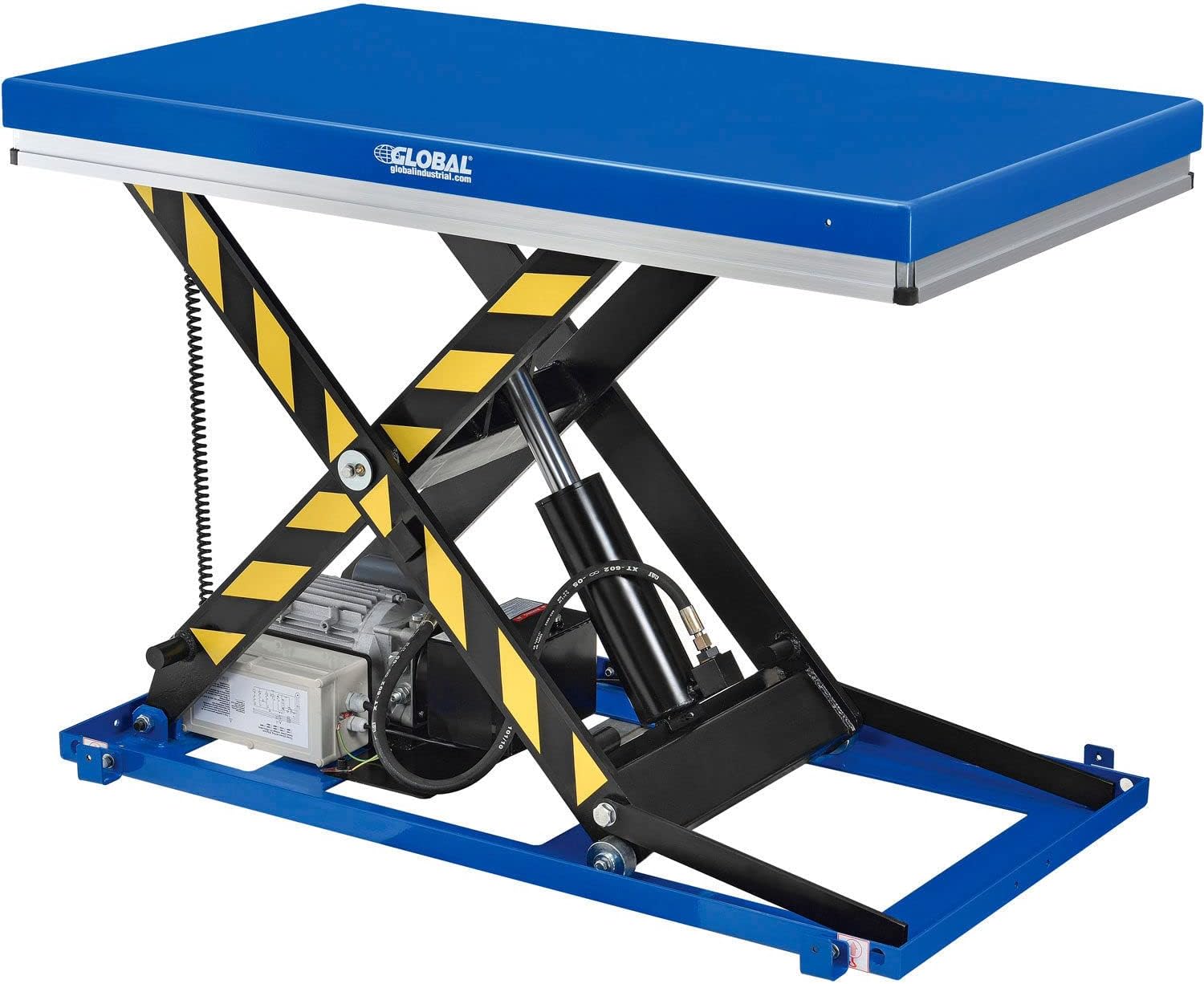
Figure 3.1: The Global Industrial Power Scissor Lift Table shown in a raised position, highlighting its sturdy scissor mechanism and blue platform.

Figure 3.2: Dimensional diagram of the lift table, indicating its 48"L x 36"W platform and adjustable height range of 7¾" to 40".
Key Components:
- Platform: 48"L x 36"W sturdy blue platform for supporting loads.
- Scissor Mechanism: Heavy-duty steel scissor legs for vertical lifting.
- Hydraulic Cylinder: Provides the lifting force.
- Motor and Pump Assembly: Powerful 110V 1-phase motor for hydraulic operation.
- Hand-held Pendant Control: Push-button control with 8' cord for raising and lowering.
- Foot Pedal Control: Additional control option with 8' cord for hands-free operation.
- Wall-mount Bracket: For convenient storage of the hand pendant control.
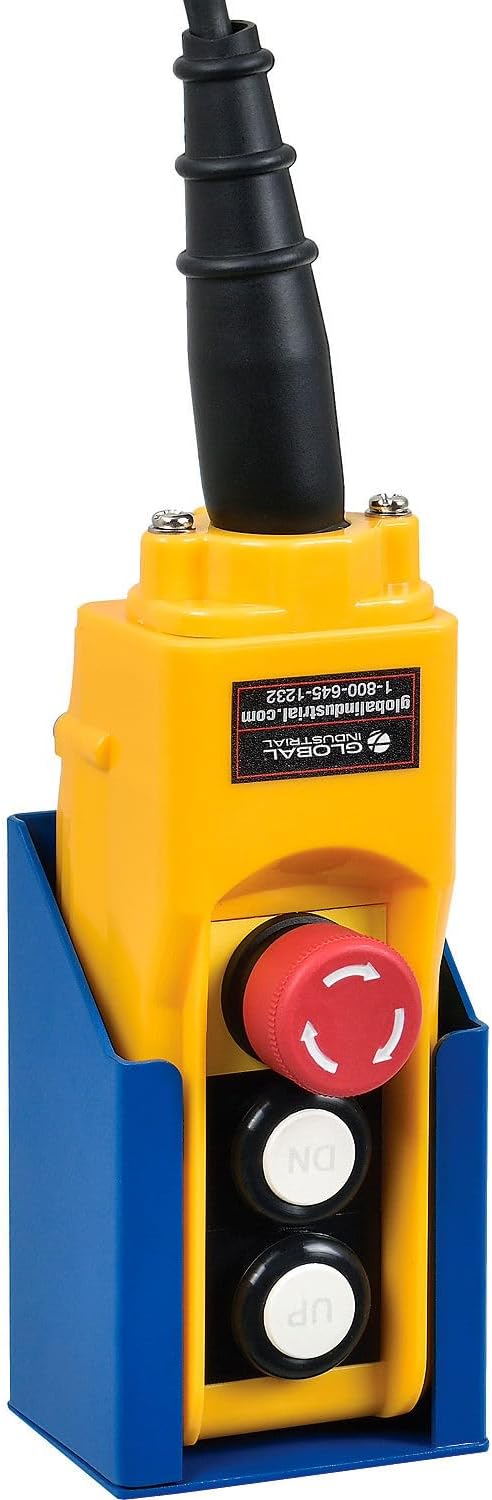
Figure 3.3: The yellow hand-held pendant control with UP/DN buttons and an emergency stop, shown with its blue wall-mount bracket.
4. Setup and Assembly
The Global Industrial Power Scissor Lift Table comes largely pre-assembled. Follow these steps for final setup:
- Unpacking: Carefully remove the lift table from its packaging. Inspect for any shipping damage.
- Placement: Position the lift table on a firm, level, and stable surface in your desired work area. Ensure adequate clearance around the table for safe operation and maintenance.
- Power Connection: Connect the lift table's power cord to a grounded 110V 1-phase electrical outlet. Ensure the power supply matches the requirements of the unit.
- Control Connection: Connect the hand-held pendant control and/or foot pedal control to the designated ports on the lift table's control box.
- Initial Test: Before loading, perform a test run by raising and lowering the platform using both the hand and foot controls to ensure smooth operation.
5. Operating Instructions
Operating the power scissor lift table is straightforward using the provided controls.
General Operation:
- Loading: Place the item to be lifted centrally on the platform. Ensure the load is stable and does not exceed the 2200 lb capacity.
- Raising the Platform: Press and hold the "UP" button on the hand-held pendant control or activate the "UP" foot pedal. The platform will smoothly ascend. Release the button/pedal when the desired height is reached.
- Lowering the Platform: Press and hold the "DN" button on the hand-held pendant control or activate the "DN" foot pedal. The platform will smoothly descend. Release the button/pedal when the desired height is reached.
- Emergency Stop: In case of an emergency, press the red emergency stop button on the hand-held pendant control. This will immediately cut power to the motor and stop all movement. To reset, twist the button clockwise until it pops out.

Figure 5.1: The lift table in a warehouse environment, demonstrating its use for elevating goods to a comfortable working height.

Figure 5.2: The lift table fully lowered, showing its compact profile when not in use.
6. Maintenance and Care
Regular maintenance ensures the longevity and safe operation of your lift table.
- Daily Inspection: Before each use, check for any visible damage, loose bolts, or hydraulic fluid leaks.
- Lubrication: Periodically lubricate all pivot points and moving parts with appropriate grease to ensure smooth operation and prevent wear.
- Hydraulic Fluid: Check the hydraulic fluid level regularly. Top up with recommended hydraulic oil if necessary. Refer to the manufacturer's specifications for the correct type of fluid.
- Electrical System: Inspect power cords and control cables for fraying or damage. Ensure all electrical connections are secure.
- Cleaning: Keep the platform and scissor mechanism clean and free of debris.
- Professional Service: For complex repairs or hydraulic system issues, contact a qualified service technician.
7. Troubleshooting Guide
This section provides solutions to common issues you might encounter.
| Problem | Possible Cause | Solution |
|---|---|---|
| Lift table does not raise | No power; Emergency stop engaged; Low hydraulic fluid; Overload | Check power connection; Reset emergency stop; Check/add hydraulic fluid; Reduce load |
| Lift table lowers slowly or erratically | Low hydraulic fluid; Air in hydraulic system; Leaking hydraulic cylinder/hose | Check/add hydraulic fluid; Bleed air from system (consult manual/professional); Inspect for leaks and repair |
| Unusual noise during operation | Lack of lubrication; Loose components; Motor issue | Lubricate pivot points; Tighten all fasteners; Contact service for motor inspection |
| Controls unresponsive | Loose control cable; Damaged control unit | Check cable connections; Test control unit; Replace if damaged |
8. Technical Specifications
Detailed specifications for the Global Industrial Power Scissor Lift Table.
| Attribute | Value |
|---|---|
| Model Number | 987545 |
| Manufacturer | Global Industrial |
| Platform Dimensions (L x W) | 48" x 36" |
| Maximum Load Capacity | 2200 lbs |
| Adjustable Height Range | 7¾" - 40" |
| Power Supply | 110V, 1-Phase |
| Item Weight | 517 pounds |
| Control Type | Hand-held Push Button Pendant & Foot Pedal |
9. Warranty Information
Global Industrial products are manufactured to high-quality standards. For specific warranty details, including coverage period and terms, please refer to the warranty card included with your product or visit the official Global Industrial website. Keep your purchase receipt as proof of purchase for any warranty claims.
10. Customer Support
If you have any questions, require technical assistance, or need to order replacement parts, please contact Global Industrial customer support:
- Website: www.globalindustrial.com
- Phone: Refer to the contact information on the Global Industrial website or your product documentation for the most current phone number.
When contacting support, please have your model number (987545) and serial number (if applicable) ready for faster service.
Ask a question about this manual
Ask about setup, troubleshooting, compatibility, parts, safety, or missing instructions. Manuals+ will review the question and use this page’s manual context to help answer it.