
1. Introduction
This manual provides detailed instructions for the setup, operation, maintenance, and troubleshooting of your GEC Global Industrial Digital Scale (Model 318513). Please read this manual thoroughly before using the scale to ensure proper function and longevity of the device.
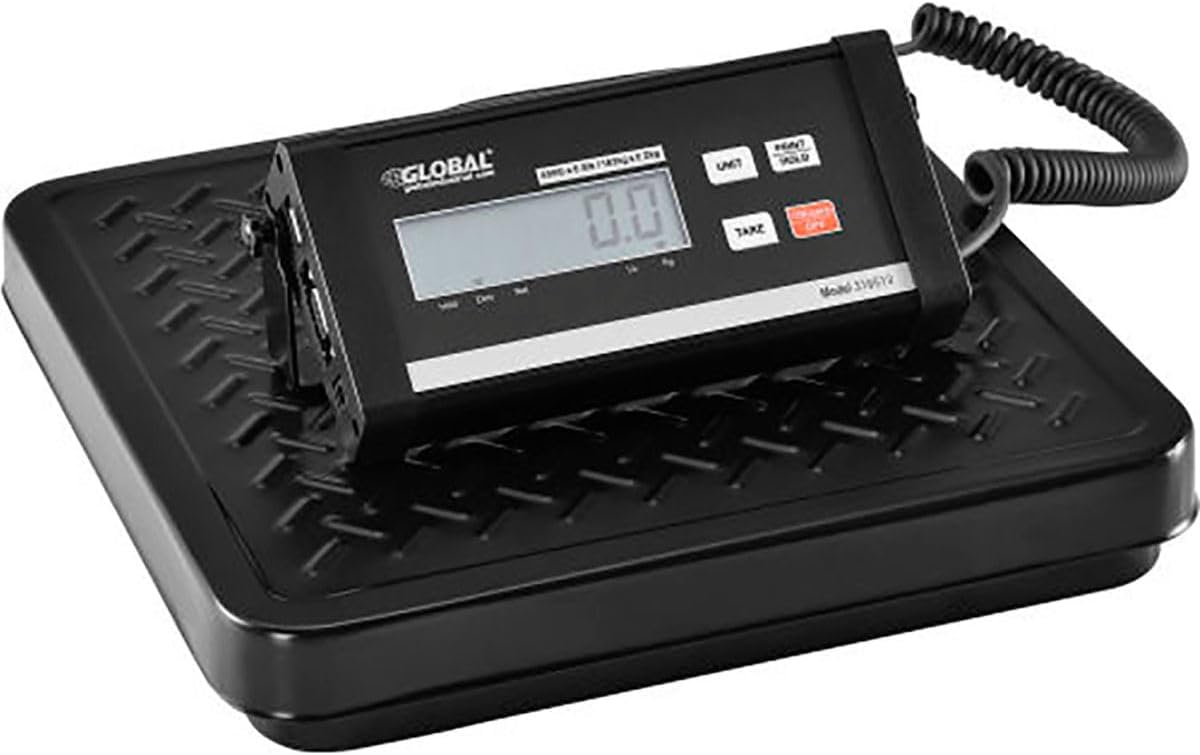
Figure 1: GEC Global Industrial Digital Scale (Model 318513)
2. Product Features
- High Capacity: Designed for industrial use with a capacity of up to 400 lbs (0.5 lbs increments).
- Versatile Display: Large, easy-to-read digital LCD display that can be wall or surface mounted for optimal viewing.
- Power Options: Operates using the included AC adapter or 6 AA batteries (not included) for portability.
- Energy Saving: Features an automatic power-off function after 2 minutes of non-use.
- Durable Construction: Rugged, low-profile steel platform built for demanding environments.
- User-Friendly Controls: Large, clearly labeled keys for Tare/Hold, Units, On, and Off functions.
- Extended Reach: Equipped with a 6-foot coiled cord connecting the platform to the display unit.
- Connectivity: Includes RS232 and USB interfaces for data transfer.
3. Package Contents
Please check the package contents carefully. If any items are missing or damaged, contact your vendor immediately.
- GEC Global Industrial Digital Scale Platform
- Digital Display Unit with Coiled Cord
- AC Power Adapter (120V)
- User Manual (this document)
4. Safety Information
Observe the following safety precautions to prevent injury or damage to the scale:
- Do not overload the scale beyond its maximum capacity of 400 lbs.
- Avoid dropping the scale or subjecting it to severe impacts.
- Keep the scale away from water or excessive moisture.
- Use only the provided AC adapter or specified batteries (6 AA, not included).
- Do not attempt to disassemble or repair the scale yourself. Refer to qualified service personnel.
- Ensure the scale is placed on a stable, level surface during operation.
5. Setup
5.1 Power Supply
- AC Adapter: Connect the included AC adapter to the power input port on the display unit and plug it into a standard 120V electrical outlet.
- Batteries: For battery operation, open the battery compartment on the display unit and insert 6 AA batteries (not included), ensuring correct polarity.
5.2 Placement
- Place the scale platform on a firm, flat, and stable surface to ensure accurate readings.
- Position the display unit where it is easily visible. It can be placed on a surface or mounted on a wall using appropriate hardware (not included).
- Ensure the coiled cord connecting the platform and display unit is not stretched or tangled.
6. Operating Instructions
6.1 Turning On/Off
- Press the ON button to turn on the scale. The display will show "0.0" when ready.
- Press the OFF button to turn off the scale. The scale will also automatically power off after 2 minutes of inactivity.
6.2 Weighing Items
- Ensure the scale is on and displays "0.0".
- Carefully place the item to be weighed in the center of the scale platform.
- Read the weight displayed on the LCD screen.
6.3 Unit Conversion
- Press the UNIT button to cycle through available weight units (e.g., lbs, kg, oz).
6.4 Tare Function
The Tare function allows you to subtract the weight of a container or packaging, so only the net weight of the contents is displayed.
- Place the empty container on the scale platform.
- Press the TARE button. The display will reset to "0.0".
- Add the items to be weighed into the container. The display will show the net weight of the items.
6.5 Hold Function
- Press the PRINT/HOLD button to hold the current weight reading on the display. This is useful for weighing large or awkward items that might obscure the display.
- Press the PRINT/HOLD button again to release the hold function.
7. Maintenance
- Cleaning: Wipe the scale platform and display unit with a soft, damp cloth. Do not use abrasive cleaners or immerse the unit in water.
- Storage: When not in use for extended periods, store the scale in a dry, cool place. If using batteries, remove them to prevent leakage.
- Calibration: This scale is factory calibrated. If you suspect inaccuracies, contact customer support for professional calibration services.
8. Troubleshooting
| Problem | Possible Cause | Solution |
|---|---|---|
| Scale does not turn on. | No power; batteries dead or incorrectly inserted; AC adapter not connected. | Check AC adapter connection. Replace batteries or ensure correct polarity. |
| Inaccurate readings. | Scale not on a level surface; overloaded; damaged sensor. | Place on a stable, level surface. Do not exceed capacity. Contact support if issue persists. |
| Display shows "Err" or "OL". | Overload beyond maximum capacity. | Remove item immediately. Ensure weight is within 400 lbs limit. |
| Display is dim or flickering. | Low battery power. | Replace batteries or use AC adapter. |
9. Specifications
| Attribute | Value |
|---|---|
| Brand | GEC |
| Model | 318513 |
| Capacity | 400 lbs (0.5 lbs increments) |
| Power Supply | AC Adapter (120V) or 6 AA Batteries (not included) |
| Interface | RS232, USB |
| Housing Material | Aluminum (Display Unit) |
| Platform Material | Steel |
| Platform Dimensions | 12 in. (Length) x 12 in. (Width) |
| Cord Length | 6 ft (coiled) |
| Display Type | LCD |
| Auto-Off | After 2 minutes of non-use |
| ASIN | B09LHZSC9T |
| UPC | 707022352710 |
10. Warranty and Support
For warranty information, technical support, or service inquiries, please contact GEC customer service. Keep your purchase receipt as proof of purchase.
Contact Information: Refer to the product packaging or the GEC official website for the most current contact details.