
1. Introduction
Thank you for choosing the Speedypress R02036 Rotary Iron Steam Roller Ironing Press. This appliance is designed to provide efficient and high-quality ironing results for a wide range of fabrics and large items. To ensure safe and optimal performance, please read this instruction manual thoroughly before first use and retain it for future reference.
2. Safety Instructions
WARNING: Failure to follow these safety instructions may result in fire, electric shock, or injury.
- Always connect the appliance to a grounded power outlet.
- Do not immerse the appliance, power cord, or plug in water or other liquids.
- Keep the appliance out of reach of children and pets.
- Do not touch hot surfaces. Use handles or knobs.
- Unplug from the outlet when not in use and before cleaning. Allow to cool before putting on or taking off parts.
- Do not operate any appliance with a damaged cord or plug, or after the appliance malfunctions or has been damaged in any manner.
- Use the appliance only for its intended purpose as described in this manual.
- Exercise caution when handling steam, as it can cause burns.
- Never leave the appliance unattended while it is operating.
- Ensure proper ventilation during use.
3. Product Overview
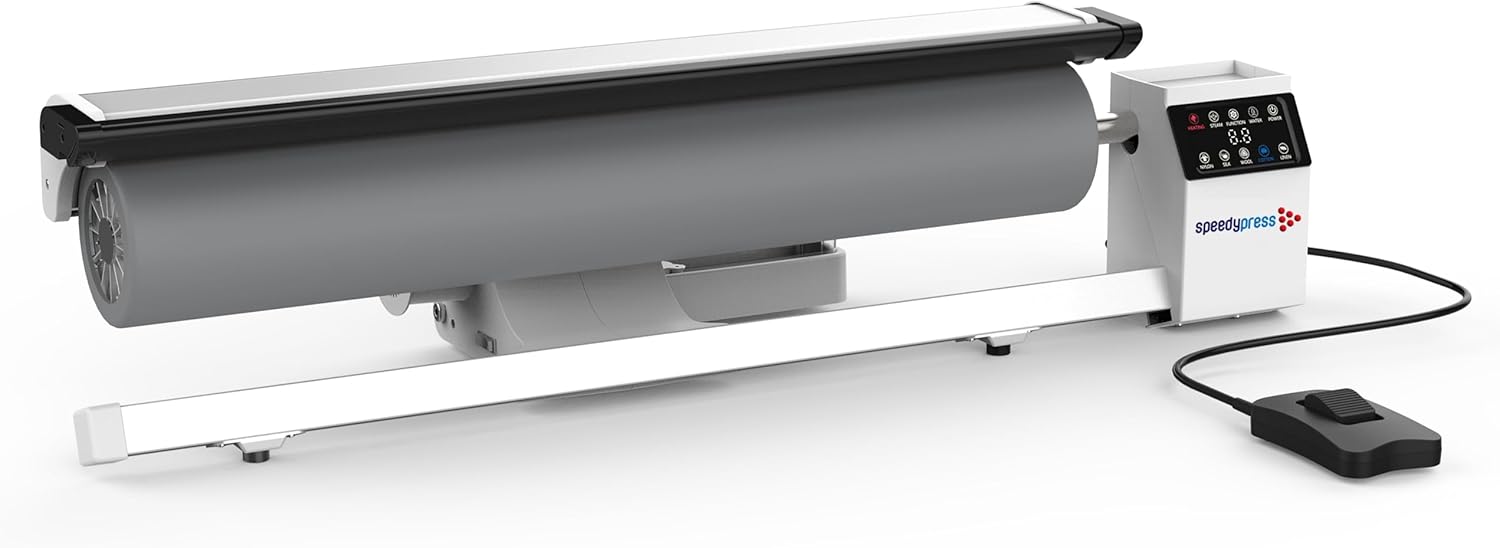
The Speedypress R02036 is a rotary ironing press designed for efficient and high-quality garment care. It features a large roller, an intuitive control panel, and a foot pedal for hands-free operation.
3.1 Main Components


3.2 Control Panel
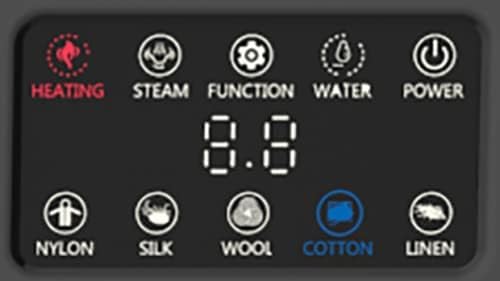
The control panel allows you to manage the appliance's functions:
- Heating Indicator: Illuminates when the heating element is active.
- Steam Button: Activates or deactivates the steam function.
- Function Button: Used to cycle through various settings or modes.
- Water Indicator: Alerts for low water levels in the tank.
- Power Button: Turns the appliance on or off.
- Fabric Settings: Dedicated buttons for Nylon, Silk, Wool, Cotton, and Linen to select appropriate temperature.
- Digital Display: Shows current settings or error codes.
3.3 Foot Pedal

The foot pedal provides hands-free control over the roller's movement, allowing you to guide fabrics with both hands for precise ironing.
4. Setup
Before operating your Speedypress R02036, follow these steps for initial setup:
- Unpacking: Carefully remove the ironing press from its packaging. Retain all packaging materials for potential future transport or storage.
- Placement: Place the ironing press on a stable, flat, and heat-resistant surface. Ensure there is adequate space around the unit for safe operation and ventilation.
- Water Tank Filling: Locate the water tank. Fill it with clean, distilled water. The tank capacity is 2 liters. Avoid overfilling.
- Power Connection: Plug the power cord into a grounded electrical outlet (110V / 240V, 50/60Hz).
- Foot Pedal Connection: Ensure the foot pedal is securely connected to the designated port on the appliance.
5. Operating Instructions
Follow these steps for effective and safe operation of your ironing press:
5.1 Powering On and Heating
- Press the Power Button on the control panel. The digital display will illuminate.
- Select the appropriate fabric setting (Nylon, Silk, Wool, Cotton, Linen) using the dedicated buttons. This will set the temperature.
- The Heating Indicator will light up. The appliance will heat up in approximately 2 minutes. Wait until the heating indicator turns off or the display indicates readiness before proceeding.
5.2 Using the Steam Function
- Once the appliance is heated, press the Steam Button to activate continuous steam. The steam output is 30g per minute.
- Ensure the water tank has sufficient water. The Water Indicator will alert you if the level is low.
- For dry pressing, ensure the steam function is turned off.
5.3 Ironing Process
- Lay the fabric smoothly onto the ironing surface, positioning it under the roller.
- Gently press the foot pedal. The roller will begin to rotate, drawing the fabric through the press.
- Guide the fabric with your hands, ensuring it feeds evenly. The roller can rotate both forward and backward for optimal control.
- Adjust the pressing plate pressure as needed for different fabric types.
- For larger items like sheets or tablecloths, feed them gradually, allowing the roller to process sections at a time.
- Release the foot pedal to stop the roller.
5.4 Powering Off
- When finished, press the Power Button to turn off the appliance.
- Unplug the power cord from the outlet.
- Allow the appliance to cool completely before cleaning or storing.
6. Maintenance
Regular maintenance ensures the longevity and optimal performance of your Speedypress R02036.
- Cleaning: After each use, ensure the appliance is unplugged and completely cool. Wipe down the exterior surfaces with a soft, damp cloth. Do not use abrasive cleaners or solvents.
- Water Tank: Empty any remaining water from the tank after each use to prevent mineral buildup. Clean the water tank periodically with a mild descaling solution if hard water is used.
- Roller: The roller is designed for minimal maintenance. If necessary, gently wipe the roller surface with a clean, dry cloth once cooled.
- Storage: Store the appliance in a dry, cool place, away from direct sunlight and moisture.
7. Troubleshooting
If you encounter issues with your Speedypress R02036, refer to the following common problems and solutions:
- Appliance does not power on:
- Check if the power cord is securely plugged into a working electrical outlet.
- Ensure the power button on the control panel has been pressed.
- No steam is produced:
- Check if the water tank is filled with water. The Water Indicator will light up if the water level is low.
- Ensure the steam function is activated via the Steam Button.
- Allow sufficient time for the appliance to heat up to the selected temperature.
- Roller does not move:
- Ensure the appliance is powered on and heated.
- Check if the foot pedal is properly connected and being pressed.
- Automatic Shut-Off: The appliance features an auto shut-off after 15 minutes of inactivity for safety and energy efficiency. If it turns off unexpectedly, simply power it back on.
- Manual Opening after Power Loss: In case of a power outage, the roller press can still be manually opened. Refer to the specific instructions in the full product manual for this procedure if needed.
If the problem persists after attempting these solutions, please contact Speedypress customer support for assistance.
8. Specifications
| Feature | Specification |
|---|---|
| Model | R02036 |
| Roller Width | 91.5 cm (36 inches) |
| Roller Diameter | 150 mm |
| Ironing Rotary Speed | 1.65 meters per minute |
| Water Tank Capacity | 2 liters |
| Heat-Up Time | 2 minutes |
| Power Consumption | 2900W |
| Voltage | 110V / 240V, 50/60Hz |
| Upper Temperature Rating | 185°C |
| Net Weight | 20 kg (44 lbs) |
| Product Dimensions (approx.) | 19"L x 17"W x 50"H (approx. 48cm L x 43cm W x 127cm H) |
| Material | Stainless Steel, Plastic, Polycarbonate |
9. Warranty and Support
Your Speedypress R02036 Rotary Iron Steam Roller Ironing Press comes with a 1-year home warranty from the date of purchase. This warranty covers manufacturing defects under normal household use.
For warranty claims, technical support, or any questions regarding the operation or maintenance of your appliance, please contact Speedypress customer service. Keep your proof of purchase for warranty validation.
For more information about Speedypress products, you may visit the official Speedypress store online.