
weeylite WY-S03-B
Weeylite S03 RGB Video Light Instruction Manual
1. Introduction
The Weeylite S03 is a compact and portable RGB video light designed for photography and video recording. It features smartphone app control for precise adjustments of brightness, color temperature, and various lighting effects. Its small size and versatile mounting options make it an ideal tool for diverse creative lighting needs.

Figure 1: Weeylite S03 RGB Video Light and its components.
2. Package Contents
Please verify that all items listed below are included in your package:
- Weeylite S03 Pocket RGB Fill Light
- USB to Type-C charging cable
- Hot Shoe Adapter
3. Product Features
- RGB Mode: Offers 36,000 full colors and 26+ scene lighting effects for creative control.
- Bi-Color Mode (CCT): Adjustable color temperature from 2800K to 6800K.
- High Color Accuracy: Equipped with RA≥97 and TLCI≥97 LED beads for natural color reproduction.
- App Control: Full control via the "WeeylitePro" Bluetooth App (compatible with iOS & Android).
- Multi-Light Control: Supports independent control of multiple S03 lights simultaneously or grouped for synchronized lighting.
- Compact & Portable: Measures 3.5 x 2 x 0.8 inches and weighs approximately 0.16 lbs (72g).
- Built-in Battery: 3.7V/1000mAh Lithium Ion battery.
- USB Type-C Charging: Convenient charging via Type-C port (5V/2A input).
- Mounting Options: Built-in universal 1/4 screw interface and included hot shoe adapter for compatibility with tripods, stands, cameras, and DSLR setups.
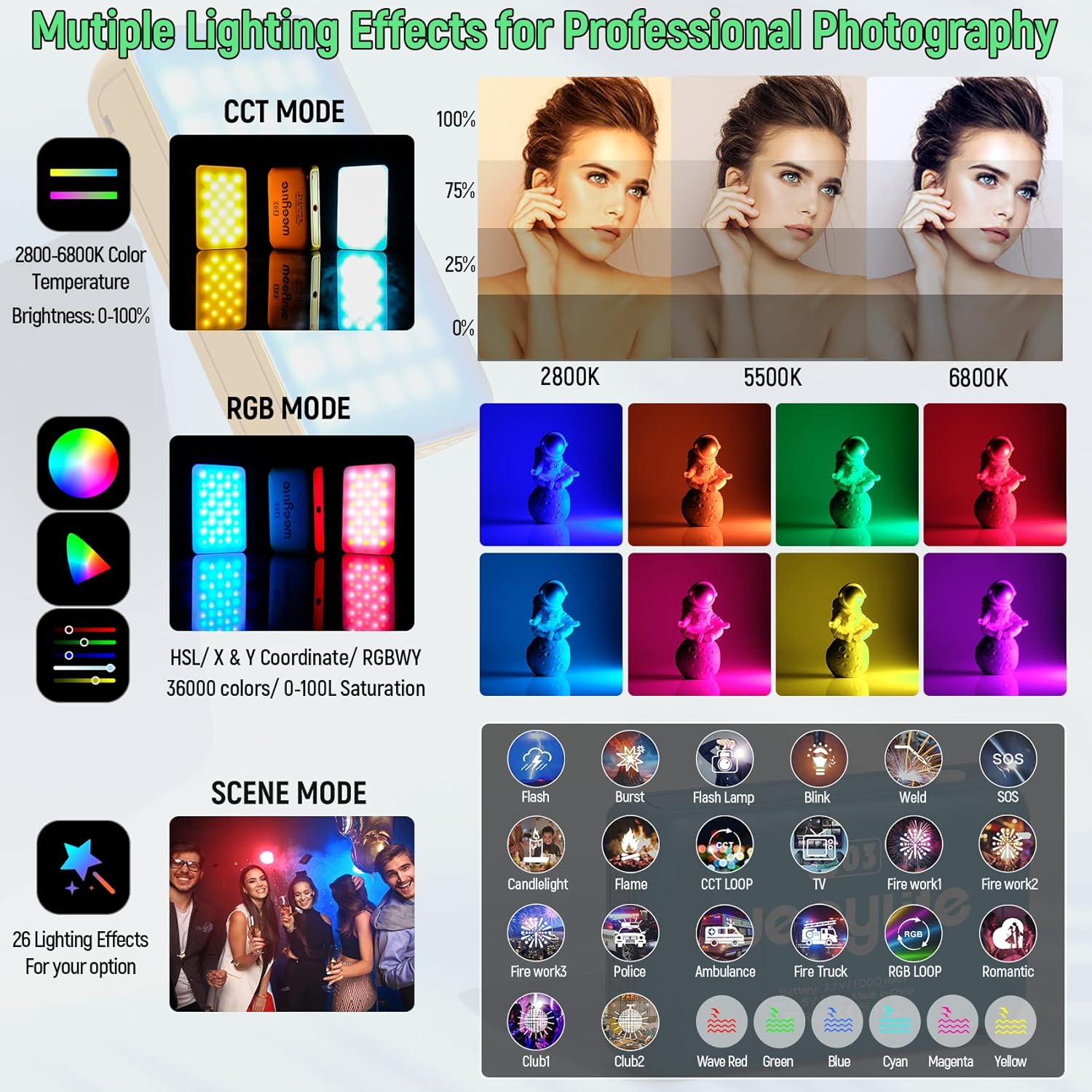
Figure 2: Overview of CCT, RGB, and Scene modes available on the Weeylite S03.
4. Setup
4.1 App Download
The Weeylite S03 is primarily controlled via the "WeeylitePro" Bluetooth App. To download the app:
- Scan the QR code provided in the user manual or on the product itself.
- Alternatively, search for "WeeylitePro" in the App Store (for iOS devices) or Google Play Store (for Android smartphones).
4.2 Device Pairing
To connect your Weeylite S03 to the app:
- Ensure Bluetooth is enabled on your smartphone.
- Turn on the Weeylite S03 light using its physical switch.
- Open the "WeeylitePro" app. The light should automatically connect to the app.
- For multi-light control, set the desired channel and group number within the app, then turn on the light. The light will automatically connect to the configured channel and group.
Video 1: Instructions for downloading and using the WeeylitePro App.
5. Operating Modes
The WeeylitePro app provides comprehensive control over various lighting modes:
- CCT Mode: Adjust color temperature from 2800K (warm) to 6800K (cool) and brightness from 0-100%.
- HSL Mode: Control hue (0-360°), saturation (0-100L), and brightness.
- RGBWY Mode: Fine-tune individual Red, Green, Blue, White, and Yellow color channels.
- Color Chip: Select from pre-programmed color filters (e.g., Rosco, Lee).
- FX (Scene) Mode: Choose from 26+ special lighting effects such as Flash, Burst, Flash Lamp, Blink, Weld, SOS, Candellight, Flame, CCT Loop, TV, Firework (1, 2, 3), Police, Ambulance, Fire Truck, RGB Loop, Romantic, Club (1, 2), Wave (Red, Green, Blue, Cyan, Magenta, Yellow).

Figure 3: WeeylitePro App interface for controlling multiple S03 lights and accessing various color modes.
Video 2: Demonstration of Weeylite S03 app control for various RGBWY and scene effects.
6. Charging
The Weeylite S03 features a built-in 3.7V/1000mAh Lithium Ion battery. To charge the device:
- Connect the provided USB to Type-C charging cable to the Type-C port on the side of the light.
- Connect the other end of the USB cable to a 5V/2A power source (not included).
- A full charge typically takes approximately 3 hours.
- At 100% brightness, the light can operate for about 60 minutes.

Figure 4: Battery and charging information for the Weeylite S03.
7. Mounting Options
The Weeylite S03 offers flexible mounting solutions:
- 1/4 Screw Interface: A built-in universal 1/4 screw hole allows direct attachment to tripods, light stands, or other compatible accessories.
- Hot Shoe Adapter: Use the included hot shoe adapter to mount the light onto cameras (DSLRs) or camera cages.

Figure 5: Examples of mounting the Weeylite S03 on different photography and video equipment.
8. Specifications
| Feature | Specification |
|---|---|
| Product Dimensions | 3.5 x 2 x 0.8 inches (8.89 x 5.08 x 2.03 cm) |
| Item Weight | 3.52 ounces (100g) |
| Model Number | WY-S03-B |
| Battery | 1 Lithium Ion battery required (3.7V/1000mAh) |
| Connectivity Technology | Bluetooth |
| Hardware Interface | USB Type C |
| Color Temperature Range | 2800K-6800K |
| CRI/TLCI | RA≥97, TLCI≥97 |
| Working Time (100% power) | Approx. 60 minutes |
| Full Charging Time | Approx. 3 hours |
9. Troubleshooting
- Light not connecting to app: Ensure Bluetooth is enabled on your smartphone. Verify that you have downloaded the correct "WeeylitePro" app version from your device's app store.
- Inconsistent brightness adjustment: Some users report that fine brightness adjustments (e.g., 1-10%) may not show significant changes. This is a characteristic of the light's output range.
- No physical controls for settings: The Weeylite S03 is designed for app-only control of advanced settings. The physical switch is for on/off functionality only.
10. Warranty and Support
If your product experiences a problem or arrives damaged, please contact our seller support. We are committed to providing excellent after-sales service and will respond as soon as possible to assist you.
Related documentsWY-S03-B


Ask a question about this manual
Ask about setup, troubleshooting, compatibility, parts, safety, or missing instructions. Manuals+ will review the question and use this page’s manual context to help answer it.