
CHICAGO ELECTRIC 10 In. Sliding Compound Miter Saw
Chicago Electric 10 In. Sliding Compound Miter Saw Instruction Manual
Brand: CHICAGO ELECTRIC | Model: 10 In. Sliding Compound Miter Saw
Introduction
This manual provides essential information for the safe and effective operation, setup, and maintenance of your Chicago Electric 10 In. Sliding Compound Miter Saw. Please read all instructions carefully before use to ensure proper functionality and to prevent injury.
Important Safety Information
Always adhere to general power tool safety guidelines. Failure to follow these instructions may result in electric shock, fire, and/or serious injury.
- Read the Manual: Understand all operating instructions and safety warnings before using the saw.
- Wear Personal Protective Equipment (PPE): Always wear safety glasses, hearing protection, and a dust mask.
- Secure Workpiece: Ensure the material being cut is firmly clamped to the saw table to prevent movement during operation.
- Maintain a Clean Work Area: Keep the area free of debris and obstructions.
- Proper Blade Selection: Use only the correct size and type of blade for the material being cut.
- Unplug Before Adjustments: Disconnect the saw from the power source before making any adjustments, changing blades, or performing maintenance.
- Avoid Overreaching: Maintain proper footing and balance at all times.
- Use Dust Collection: Utilize the dust bag or connect to a dust collection system to manage sawdust.
Product Overview and Components
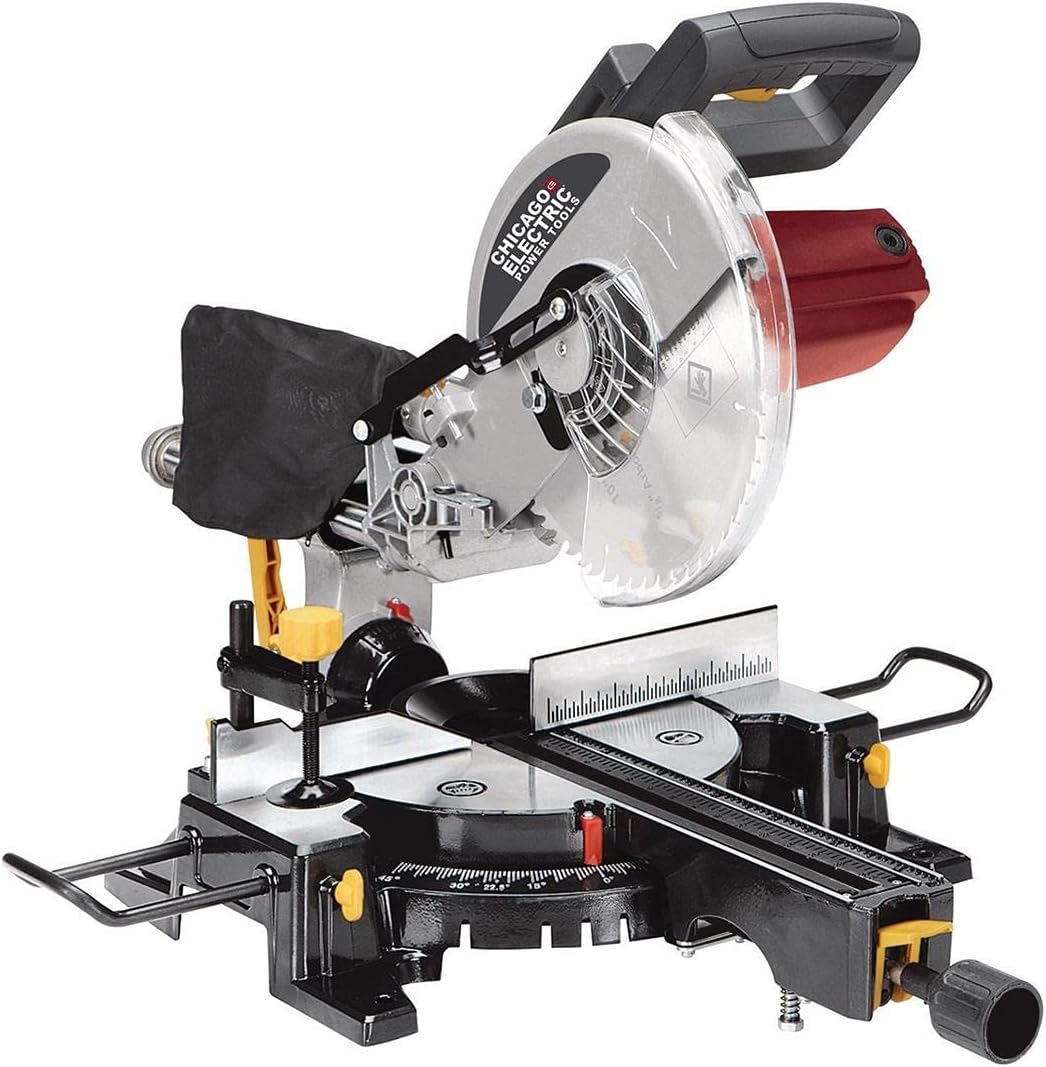
Image: The Chicago Electric 10 In. Sliding Compound Miter Saw, featuring its blade guard, dust bag, and adjustable table with extension bars.
Included Components:
- Dust Bag
- Extension Bars
- Table Clamp
Setup
- Unpacking: Carefully remove all components from the packaging. Inspect for any shipping damage.
- Mounting: Securely mount the miter saw to a stable workbench or stand using appropriate fasteners.
- Install Dust Bag: Attach the provided dust bag to the dust port to collect sawdust during operation.
- Attach Extension Bars: Slide the extension bars into their designated slots on the saw table to support longer workpieces.
- Position Table Clamp: Familiarize yourself with the table clamp for securing materials.
- Blade Check: Ensure the 10-inch blade is securely installed and the blade guard operates freely.
Operating Instructions
The Chicago Electric 10 In. Sliding Compound Miter Saw is designed for precision cross, bevel, and miter cuts. Its dual linear slide rails provide stability and smooth, precise cuts, while the rotating lockable table allows for various angle adjustments.
Making a Cut:
- Prepare Workpiece: Mark your desired cut line on the material.
- Adjust Miter Angle: Loosen the miter lock handle and rotate the table to the desired angle (e.g., 0°, 15°, 22.5°, 30°, 45°). Lock the table securely.
- Adjust Bevel Angle (if needed): For bevel cuts, adjust the saw head to the desired angle (up to 45° left bevel).
- Position Workpiece: Place the workpiece firmly against the fence and secure it with the table clamp. Ensure the blade path is clear of obstructions.
- Start Saw: Depress the trigger to start the motor. Allow the blade to reach full speed before beginning the cut.
- Perform Cut: Slowly lower the saw blade through the workpiece. For sliding cuts, pull the saw head forward, lower the blade, and push it smoothly through the material.
- Release Trigger: Once the cut is complete, release the trigger and allow the blade to stop completely before raising the saw head.
Maintenance
- Cleaning: Regularly clean the saw, especially the blade area and dust port, to prevent sawdust buildup. Ensure the saw is unplugged before cleaning.
- Blade Inspection: Periodically inspect the blade for sharpness and damage. Replace dull or damaged blades promptly.
- Lubrication: Apply a light coat of lubricant to moving parts as recommended in the full product manual (not provided here).
- Cord Inspection: Check the power cord for any signs of damage or fraying.
Troubleshooting
| Problem | Possible Cause | Solution |
|---|---|---|
| Saw does not start | No power, faulty switch, tripped circuit breaker | Check power connection, test outlet, reset breaker, contact service if switch is faulty. |
| Blade not cutting cleanly | Dull blade, incorrect blade for material, improper technique | Replace blade, ensure correct blade type, review operating instructions. |
| Excessive vibration | Loose blade, damaged blade, unstable mounting | Tighten blade, replace damaged blade, secure saw to workbench. |
Technical Specifications
| Feature | Specification |
|---|---|
| Brand | CHICAGO ELECTRIC |
| Model | 10 In. Sliding Compound Miter Saw |
| Power Source | Corded Electric |
| Voltage | 120 AC Volts |
| Motor | 15 Amp |
| Blade Size | 10 Inches |
| Arbor Size | 5/8 Inches |
| Maximum Speed | 4800 RPM |
| Horizontal Cutting Capacity | 12 Inches |
| Vertical Cutting Capacity | 2-3/4 Inches |
| Straight Bevel Cutting @ 45° | 1-9/16 in. x 12 in. |
| Miter Stop Angles | 0, 15, 22.5, 30, 45 degrees |
| Miter Capacity | 2-3/4 in. x 8-1/4 in. |
| Product Dimensions (L x W x H) | 35.5" x 17.19" x 22" |
| Item Weight | 32.56 lb (14.65 kg) |
| Blade Material | High Speed Steel |
| Surface Recommendation | Wood |
Warranty and Support
This Chicago Electric 10 In. Sliding Compound Miter Saw comes with a limited warranty. For specific details regarding warranty coverage, terms, and conditions, please refer to the warranty card included with your product or contact the manufacturer directly. For technical support or service inquiries, please reach out to Chicago Electric customer service.
Related Documents - 10 In. Sliding Compound Miter Saw
 |
Replacement Parts for Chicago Electric 12 in. Dual-Bevel Sliding Compound Miter Saw Official replacement parts list for Chicago Electric 12 in. Dual-Bevel Sliding Compound Miter Saw models 61969, 56597, and 61970. Includes part numbers, descriptions, diagram references, and pricing. |
 |
Chicago Electric 12" Double-Bevel Sliding Compound Miter Saw Owner's Manual & Safety Instructions Comprehensive owner's manual and safety instructions for the Chicago Electric 12-inch Double-Bevel Sliding Compound Miter Saw with Laser Guide. Includes setup, operation, maintenance, troubleshooting, and warranty information. |
 |
Owner's Manual & Safety Instructions: 10" Sliding Compound Miter Saw (Model 56708) Comprehensive owner's manual and safety instructions for the Chicago Electric 10" Sliding Compound Miter Saw, Model 56708. Covers setup, operation, maintenance, safety warnings, troubleshooting, parts list, and warranty information. |
 |
Chicago Electric 10" Sliding Compound Miter Saw Owner's Manual & Safety Instructions Owner's manual and safety instructions for the Chicago Electric 10" Sliding Compound Miter Saw (Model 61972), covering setup, operation, maintenance, safety warnings, and troubleshooting. |
 |
Chicago Electric 10" Sliding Compound Miter Saw Owner's Manual & Safety Instructions Comprehensive owner's manual and safety instructions for the Chicago Electric 10" Sliding Compound Miter Saw (Item 61971). Covers setup, operation, maintenance, safety warnings, troubleshooting, parts list, and warranty information. |
 |
Owner's Manual & Safety Instructions for Chicago Electric 10" Sliding Compound Miter Saw (Model 61971) Comprehensive owner's manual and safety instructions for the Chicago Electric 10" Sliding Compound Miter Saw (Item 61971). Covers setup, operation, maintenance, safety warnings, and troubleshooting for this power tool from Harbor Freight Tools. |
Ask a question about this manual
Ask about setup, troubleshooting, compatibility, parts, safety, or missing instructions. Manuals+ will review the question and use this page’s manual context to help answer it.