
PartsStorm DPS-900EB
PartsStorm DPS-900EB A 900W Server Power Supply Instruction Manual
Model: DPS-900EB A | P/N: 54Y8979
Introduction
This manual provides essential instructions for the safe and efficient installation, operation, and maintenance of your PartsStorm DPS-900EB A 900W Server Power Supply. This power supply is designed for use with P520 and P720 server systems, providing reliable power to critical components. Please read this manual thoroughly before installation and retain it for future reference.
Safety Information
Always observe the following safety precautions to prevent injury or damage to the equipment:
- Ensure the server is completely powered off and disconnected from the main power source before installing or removing the power supply.
- Only qualified personnel should perform installation and maintenance.
- Do not open the power supply unit. There are no user-serviceable parts inside.
- Avoid exposing the power supply to moisture or extreme temperatures.
- Handle the unit with care to prevent physical damage.
Package Contents
Verify that all items are present in the package:
- PartsStorm DPS-900EB A 900W Server Power Supply Unit
- (Optional) Power Cord (may be sold separately or included depending on region/seller)
- (Optional) Documentation (this manual, if printed)
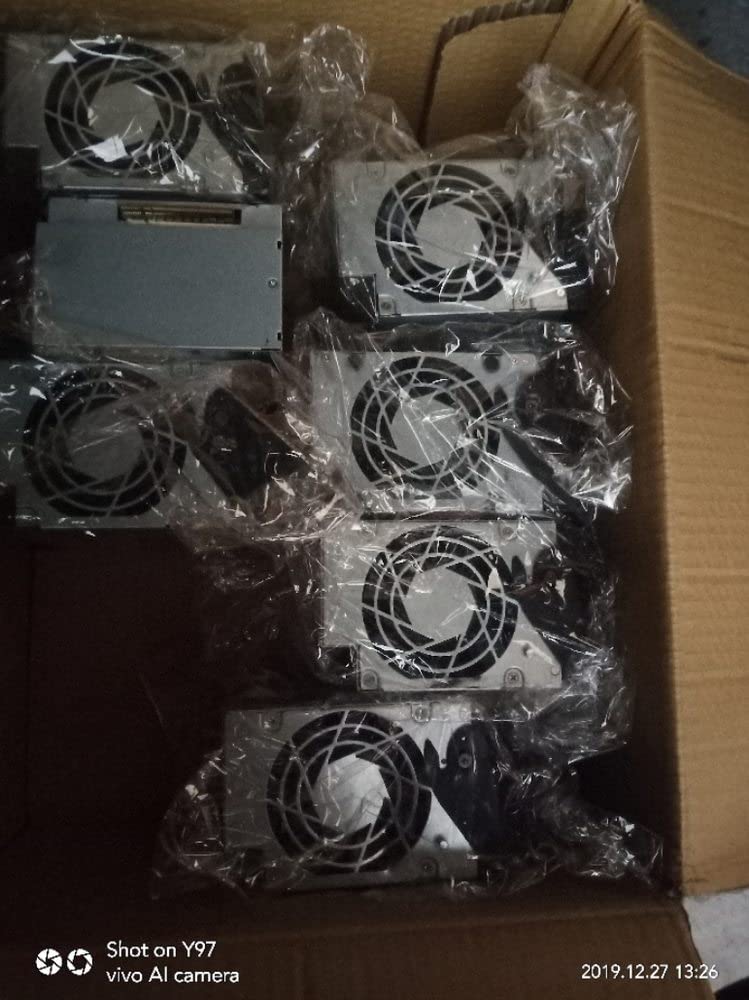
Figure 1: Multiple power supply units as typically packaged.
Setup and Installation
Follow these steps to properly install the power supply into your server system:
- Prepare the Server: Power down the server completely and unplug all power cords from the wall outlet. Open the server chassis to access the power supply bay.
- Remove Old Power Supply (if applicable): Disconnect all cables from the existing power supply. Unscrew any retaining screws and carefully slide out the old unit.
- Install New Power Supply: Gently slide the PartsStorm DPS-900EB A power supply into the designated bay until it is fully seated. Ensure the connectors align correctly.
- Secure the Unit: Fasten the power supply with the appropriate screws to secure it firmly within the server chassis.
- Connect Cables: Connect all necessary power cables from the new power supply to the motherboard, CPU, graphics cards, storage drives, and any other components requiring power. Ensure all connections are secure.
- Close Chassis: Close and secure the server chassis cover.
- Connect Power: Plug the server's power cord(s) back into the wall outlet.

Figure 2: The PartsStorm DPS-900EB A power supply unit.
Operating Instructions
Once the power supply is installed and all connections are secure, you can power on your server:
- Press the power button on your server.
- Observe the server's boot process. The power supply should provide stable power to all components.
- If the server does not power on or exhibits unusual behavior, refer to the Troubleshooting section.
Maintenance
Proper maintenance ensures the longevity and optimal performance of your power supply:
- Dust Removal: Periodically (e.g., every 3-6 months), power down the server and use compressed air to gently clean dust from the power supply's fan and vents. Accumulation of dust can hinder cooling and lead to overheating.
- Cable Inspection: Regularly check all power cables connected to the unit for any signs of wear, fraying, or loose connections.
- Environmental Conditions: Ensure the server operates in a well-ventilated area with stable temperature and humidity to prevent stress on the power supply.

Figure 3: Close-up of the power supply's cooling fan.
Troubleshooting
If you encounter issues with your power supply, refer to the following common problems and solutions:
| Problem | Possible Cause | Solution |
|---|---|---|
| Server does not power on. | Loose power cable, faulty power outlet, power supply not fully seated, internal component issue. | Check all power connections. Test the power outlet. Re-seat the power supply. If issues persist, consult a qualified technician. |
| Server powers on but shuts down unexpectedly. | Overheating, insufficient power, faulty component. | Ensure adequate ventilation and clean dust from fans. Verify power supply wattage meets server requirements. Check for other faulty components. |
| Loud fan noise from power supply. | Dust accumulation, failing fan bearing. | Clean the fan thoroughly. If noise persists, the fan may be failing, and the unit might require professional inspection. |
If troubleshooting steps do not resolve the issue, contact customer support or a certified technician.
Specifications
| Feature | Detail |
|---|---|
| Brand | PartsStorm |
| Model Name | DPS-900EB A |
| Part Number (P/N) | 54Y8979 |
| Output Wattage | 900 Watts |
| Compatible Devices | P520, P720 Servers |
| Form Factor | ATX |
| Connector Type | EPS |
| Cooling Method | Air |
| Maximum Input Voltage | 240 Volts (AC) |
Warranty and Support
This PartsStorm product is covered by a standard manufacturer's warranty. For specific warranty terms and conditions, please refer to the documentation provided at the time of purchase or contact your retailer.
For technical support, troubleshooting assistance, or warranty claims, please contact your point of purchase or visit the official PartsStorm website for contact information.