
Gigastone MSD-1TB-4-1PK
GIGASTONE 1TB Micro SD Card User Manual
Model: MSD-1TB-4-1PK
1. Introduction
Thank you for choosing the GIGASTONE 1TB Micro SD Card. This high-performance memory card is designed for demanding applications such as 4K Ultra HD video recording, high-resolution photography, and fast application loading on smartphones and tablets. With its robust design and advanced features, it provides reliable storage for your valuable data across a wide range of compatible devices.

Image: The GIGASTONE 1TB Micro SD Card, showcasing its branding and capacity.
2. Product Features
- High-Speed Performance: Read speeds up to 150 MB/s and write speeds up to 130 MB/s, ideal for 4K Ultra HD video recording and rapid data transfers.
- A2 Application Performance Class: Provides faster application loading and smoother performance for smartphones and tablets.
- V30 Video Speed Class: Ensures sustained video recording performance for 4K UHD and Full HD videos.
- Massive Storage Capacity: 1TB (Terabyte) of storage, allowing for extensive collections of photos, videos, and applications.
- Wide Compatibility: Suitable for use with various devices including laptops, tablets, PCs, smartphones, cameras (DSLR, action cameras like GoPro), dash cams, camcorders, surveillance systems, e-readers, drones, and gaming consoles (e.g., Nintendo Switch).
- Durable Design: Built to withstand harsh conditions, featuring X-ray proof, waterproof, shockproof, and temperature-proof properties.
- 5-Year Free Data Recovery Warranty: Offers peace of mind with a comprehensive warranty that includes data recovery services.

Image: Illustrates the ultra-high read and write speeds of the GIGASTONE Micro SD card, showing a drone and a person holding a GoPro.

Image: Demonstrates how the A2 grade improves device speed, showing a comparison of Input/Output Operations Per Second (IOPS) between A2 and A1 grades.
3. Setup and Installation
Before using your GIGASTONE Micro SD card, especially with devices like dash cams or surveillance systems, it is crucial to follow these setup steps:
- Read Your Device's User Manual:
- Check the maximum capacity supported by your device.
- Check the supported file systems (e.g., exFAT or FAT32).
Notice: If your device does not come with a user manual, please contact the device manufacturer directly for compatibility information.
- Format the Micro SD Card (If Needed):
- For 64GB or above capacity cards (including your 1TB card), the default file system should be exFAT.
- If your device only supports FAT32, you must format your micro SD card to FAT32 to ensure compatibility. You may need to use a third-party tool for this, as Windows' built-in formatter might not offer FAT32 for large capacities.
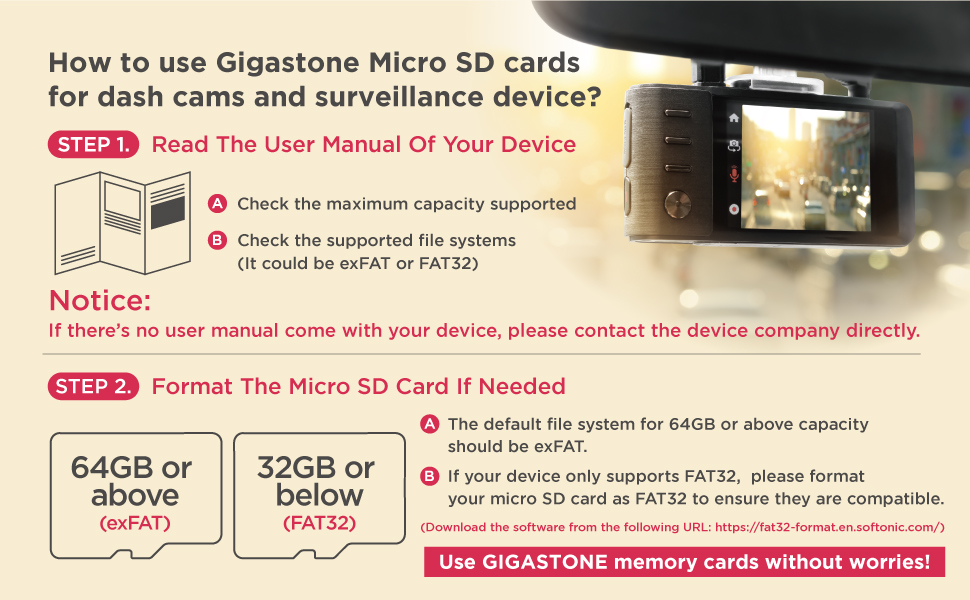
Image: Instructions on how to use Gigastone Micro SD cards for dash cams and surveillance devices, emphasizing checking device manual and formatting.
To insert the Micro SD card into your device, locate the memory card slot. Gently push the card into the slot until it clicks into place. To remove, push the card in again until it springs out slightly, then pull it out.

Image: Depicts two designs of the GIGASTONE Micro SD to SD adapters, clarifying that both function identically for conversion.
4. Operating Instructions
The GIGASTONE 1TB Micro SD Card is designed for optimal performance in various applications:
4.1. 4K UHD Video Recording
This card's V30 speed class and high write speeds make it ideal for capturing smooth, high-quality 4K Ultra HD video. Ensure your camera or drone is set to record at the appropriate resolution and bitrate for optimal results. Always use the card directly in the device for recording, or with the provided adapter if the device requires a standard SD card slot.

Image: A person skiing with an action camera, highlighting the card's capability for 4K UHD recording in action cameras.

Image: A camera with the GIGASTONE Micro SD card and adapter, illustrating its use for capturing vivid moments and 4K UHD high-quality videos.
4.2. Application Performance (A2 Grade)
The A2 rating ensures faster app loading and smoother performance when used as expandable storage for smartphones and tablets. You can install and run applications directly from the Micro SD card, freeing up internal device storage.
4.3. Data Transfer
To transfer files to or from the card, insert it into a compatible card reader connected to your computer. Drag and drop files as you would with any other storage device. The high read/write speeds will facilitate quick transfers of large files.

Image: Shows various GIGASTONE Micro SD card capacities and a camera, emphasizing extended compatibility across devices.
5. Maintenance and Durability
Your GIGASTONE Micro SD card is built for durability and reliability. To ensure its longevity and protect your data, consider the following:
- Physical Protection: The card is designed to be X-ray proof, waterproof, shockproof, and temperature-proof. While robust, avoid unnecessary exposure to extreme physical stress or prolonged submersion in water.
- Safe Removal: Always safely eject the card from your device or computer before physically removing it to prevent data corruption.
- Regular Backups: Despite the card's reliability and data recovery warranty, regularly back up important data to another storage medium.

Image: Illustrates the card's durability in harsh environments, showing it resistant to extreme temperatures, water, shock, and X-rays.
6. Troubleshooting
If you encounter issues with your GIGASTONE Micro SD card, try the following steps:
- Card Not Recognized:
- Ensure the card is fully inserted into the device or card reader.
- Try the card in another compatible device or card reader to rule out a device issue.
- Check if your device supports the 1TB capacity and exFAT file system. If your device only supports FAT32, you may need to reformat the card (see Setup section).
- Slow Performance / Lagging Video:
- Ensure your device is compatible with UHS-I U3 and V30 speed classes.
- Verify that the card is not nearly full, as this can sometimes affect performance.
- Format the card (after backing up data) to refresh its performance.
- Data Corruption:
- Always safely eject the card before removal.
- If data becomes corrupted, refer to the Warranty and Support section for data recovery services.
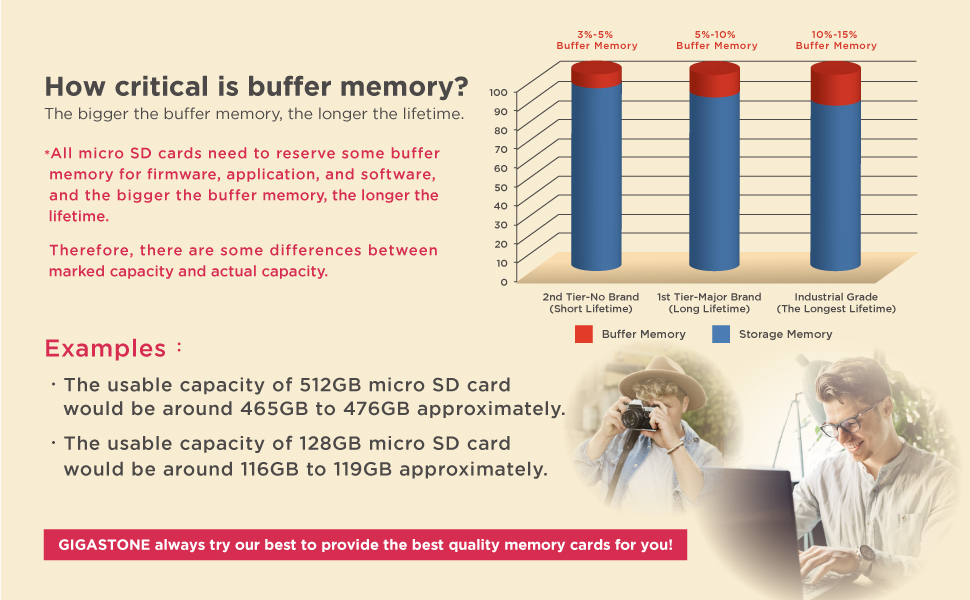
Image: Explains the importance of buffer memory in Micro SD cards, showing how a larger buffer contributes to a longer lifetime and explaining the difference between marked and actual capacity.
7. Technical Specifications
| Attribute | Detail |
|---|---|
| Brand | Gigastone |
| Model Name | MSD-1TB-4-1PK |
| Flash Memory Type | Micro SDXC |
| Memory Storage Capacity | 1 TB |
| Read Speed | Up to 150 MB/s |
| Write Speed | Up to 130 MB/s |
| Speed Class | UHS-I U3, V30, A2, Class 10 |
| Hardware Interface | microSDXC |
| Special Features | X-Ray Proof, Waterproof, Shockproof, Temperature-Proof |
| Compatible Devices | Dash Cam, Security Camera, GoPro, Drone, Camera, Smartphones, Tablets, PCs, Nintendo Switch |
| Item Weight | 0.704 ounces |
| Country of Origin | Taiwan |

Image: A detailed table showing specifications for various GIGASTONE 4K Camera Pro Micro SD card capacities, including file system, read speed, and estimated storage for music, photos, and videos.
8. Warranty and Support
8.1. 5-Year Limited Warranty with Free Data Recovery
GIGASTONE provides a 5-year limited warranty for this Micro SD card, which includes a free data recovery service. This service is designed to help you retrieve valuable data in case of accidental deletion or card malfunction.
- Eligibility: This warranty and data recovery service applies to cards purchased from June 1st, 2021, onwards.
- Data Recovery Success Rate: The success rate of data recovery can vary depending on the extent of damage to the memory card. Files, pictures, and Full HD videos generally have a higher recovery success rate compared to 4K UHD videos, Nintendo Switch game files, or game records.

Image: Highlights the 5-year free data recovery warranty, showing a graph of data recovery success rates based on data type and damage level.
8.2. Contact Support
For warranty claims, data recovery requests, or any technical assistance, please visit the official Gigastone website or contact their customer support directly. Refer to the packaging or the official Gigastone website for the most current contact information.
You can also visit the Gigastone Store on Amazon for more information and product updates.