
1. Introduction
Thank you for choosing the Windgoo M12 Electric Scooter. This manual provides essential information for the safe operation, assembly, maintenance, and troubleshooting of your new electric scooter. Please read this manual thoroughly before your first ride to ensure optimal performance and safety.

Figure 1: The Windgoo M12 Electric Scooter shown in both its unfolded riding position and its compact folded state, highlighting its portability.
2. Safety Guidelines
Your safety is paramount. Always adhere to the following guidelines when operating the Windgoo M12 Electric Scooter:
- Always wear a helmet and appropriate safety gear (knee pads, elbow pads) when riding.
- Do not exceed the maximum load capacity of 120 kg (256 lbs).
- Avoid riding in heavy rain or through puddles. The scooter has an IP54 protection grade, meaning it is protected from dust and splashing water, but not immersion.
- Be aware of your surroundings and other road users. Ride defensively.
- Ensure both the front headlight and rear taillight are functional, especially when riding at night.
- Familiarize yourself with local laws and regulations regarding electric scooter usage.
- Perform a pre-ride check: inspect tires, brakes, and ensure all parts are securely fastened.
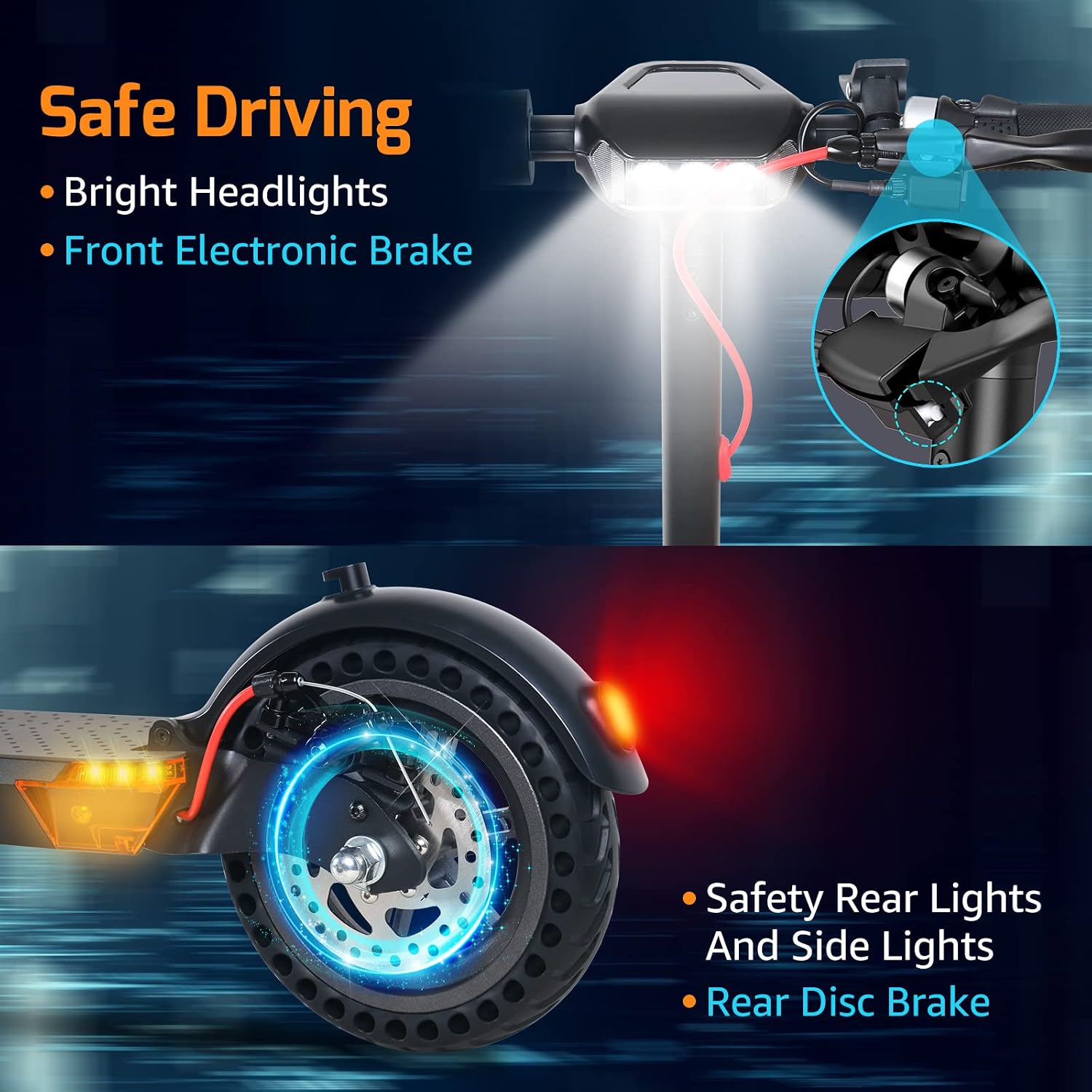
Figure 2: The scooter features a bright front headlight and safety rear lights, along with a rear disc brake, enhancing visibility and stopping power for safe riding.
3. Product Components
The Windgoo M12 Electric Scooter is designed with user convenience and durability in mind. Key components include:
- Handlebar with LCD Display: Ergonomic design with anti-slip grips and a clear LCD for essential ride information.
- 8.5-inch Thickened Honeycomb Wheels: Solid tires designed for durability and reduced risk of flats.
- Front and Rear Suspension System: Provides shock absorption for a smoother ride on various terrains.
- Dual Braking System: Electric front brake and rear disc brake for reliable stopping power.
- LED Lighting System: Front headlight and rear taillight for improved visibility.
- Folding Mechanism: A quick, one-step folding system for easy storage and transport.

Figure 3: The high-definition LCD display provides real-time information including cruise control status, current speed, mileage, headlight status, battery life, and speed grade.

Figure 4: The 8.5-inch thickened honeycomb solid wheel offers enhanced durability and reduces concerns about flat tires, providing a confident ride.

Figure 5: The integrated front and rear suspension system is designed to absorb shocks, ensuring a more comfortable riding experience over uneven surfaces.
4. Setup and Assembly
The Windgoo M12 Electric Scooter arrives approximately 90% assembled, requiring minimal effort to complete setup.
4.1 Initial Assembly
- Carefully remove the scooter from its packaging.
- Unfold the scooter by engaging the one-step folding mechanism until it locks securely into place. Ensure the handlebar stem is fully upright and locked.
- Attach any remaining components as per the quick start guide included in the box (e.g., handlebars if detached for shipping).
- Before your first ride, fully charge the battery.
4.2 Folding the Scooter
To fold the scooter for storage or transport:
- Ensure the scooter is powered off.
- Locate the folding latch mechanism near the base of the handlebar stem.
- Follow the instructions on the latch to release the locking mechanism.
- Gently fold the handlebar stem downwards until it clicks into its folded position, securing it to the rear fender.

Figure 6: The lightweight and portable design allows the scooter to be easily carried with one hand and conveniently stored in a car trunk, on a bus, or in the subway, minimizing space requirements.
5. Operating Instructions
5.1 Power On/Off
Press and hold the power button on the LCD display to turn the scooter on or off.
5.2 LCD Display Functions
The LCD display provides real-time information:
- Current Speed: Displays your speed in KM/H.
- Battery Indicator: Shows the remaining battery level.
- Headlight Status: Indicates if the headlight is on or off.
- Mileage: Tracks your total distance traveled.
- Speed Grade: Shows the current speed mode.
5.3 Speed Modes
The scooter features 3-level speed modes. Use the mode selection button on the display to switch between modes according to your preference and riding conditions.
5.4 Riding
- Place one foot firmly on the deck.
- Push off with your other foot to gain initial momentum.
- Gently press the accelerator lever to engage the motor.
- To slow down or stop, release the accelerator and use the brake levers. The scooter is equipped with electric and rear double disc brakes.
6. Charging
To charge your Windgoo M12 Electric Scooter:
- Ensure the scooter is powered off before charging.
- Locate the charging port, usually covered by a rubber flap, on the scooter's frame.
- Connect the charger to the charging port, then plug the charger into a standard wall outlet.
- The charging indicator on the charger will typically show red during charging and turn green when fully charged.
- A full charge takes approximately 4 hours.
- Once charging is complete, disconnect the charger from the outlet first, then from the scooter. Replace the rubber flap over the charging port.
7. Maintenance
Regular maintenance ensures the longevity and safe operation of your scooter.
- Cleaning: Wipe the scooter with a damp cloth. Do not use high-pressure water jets or immerse the scooter in water.
- Tires: The 8.5-inch thickened honeycomb wheels are solid and do not require air pressure checks. Periodically inspect them for wear and tear.
- Brakes: Regularly check the functionality of both the electric and disc brakes. If braking performance degrades, consult a professional.
- Battery Care: For optimal battery life, avoid fully draining the battery frequently. If storing the scooter for an extended period, charge it to about 50-70% and recharge every 1-2 months.
- Fasteners: Periodically check all screws and bolts to ensure they are tight.
8. Troubleshooting
If you encounter issues with your Windgoo M12 Electric Scooter, refer to the following common problems and solutions:
| Problem | Possible Cause | Solution |
|---|---|---|
| Scooter does not power on | Low battery; Loose connections | Charge the battery; Check all visible cable connections. |
| Reduced range | Low battery charge; Riding uphill frequently; Heavy load; Cold weather | Ensure full charge; Adjust riding style; Note that range decreases in cold conditions. |
| Brakes not effective | Brake pads worn; Cable loose | Inspect brake pads and cables. If unsure, seek professional assistance. |
| Unusual noises | Loose components; Debris in wheels | Check all fasteners; Inspect wheels for foreign objects. |
If the problem persists after attempting these solutions, please contact customer support.
9. Technical Specifications
| Feature | Specification |
|---|---|
| Model Name | M12 |
| Maximum Load | 120 kg (256 lbs) |
| Maximum Speed | 25 KM/H |
| Climbing Ability | 15° |
| Protection Grade | IP54 |
| Maximum Range | 20 KM |
| Standard Voltage | 36V |
| Battery Type | Lithium battery |
| Battery Capacity | 6.0AH |
| Motor Type | Brushless DC motor |
| Rated Output Power | 350W |
| Braking Method | Electric and Rear double disc brakes |
| Lighting System | LED indicator, Front light |
| Folding Method | Riser handle |
| Wheel Size | Front wheel: 8.5", Rear wheel: 8.5" |
| Charger Output Voltage | 42V |
| Charger Output Current | 1.5A |
| Charging Time | 4 Hours |
| Dimensions Unfolded (L*W*H) | 1200*235*950mm |
| Dimensions Folded (L*W*H) | 670*360*580mm |
| Net Weight (Product) | 15.3 KG |
| Gross Weight (Product with package) | 15.8 KG |
10. Warranty and Support
The Windgoo M12 Electric Scooter comes with a 24-month product warranty. We also provide lifetime friendly technical support to assist you with any questions or issues you may encounter.
For technical assistance, warranty claims, or any other inquiries, please contact our customer support team. Refer to the contact information provided with your purchase documentation.