
1. Introduction
The Asetek 645LT Small Form Factor (SFF) All-In-One (AIO) CPU Liquid Cooler is designed to provide efficient and reliable cooling for compact PC systems. Developed in collaboration with Daniel Hansen, the creator of Dan Cases, this closed-loop water cooler is engineered to enhance PC performance within the smallest enclosures.
2. Product Overview
The 645LT features Asetek's 6th generation liquid cooling technology, optimized for SFF builds. It includes a 92mm radiator, 250mm tubes with 90-degree rotating connections, and a low-profile pump and cold plate assembly. This design ensures compatibility with tight spaces while delivering superior thermal performance.

Figure 2.1: The Asetek 645LT AIO CPU Cooler unit, showcasing its compact design.
When tested against leading air coolers, the 645LT can reduce CPU package temperatures by 15% while maintaining quiet operation at 39.5dBA under full load. This allows for increased overclocking headroom and improved gaming performance. Please note that the cooling fan and retention kit are sold separately.
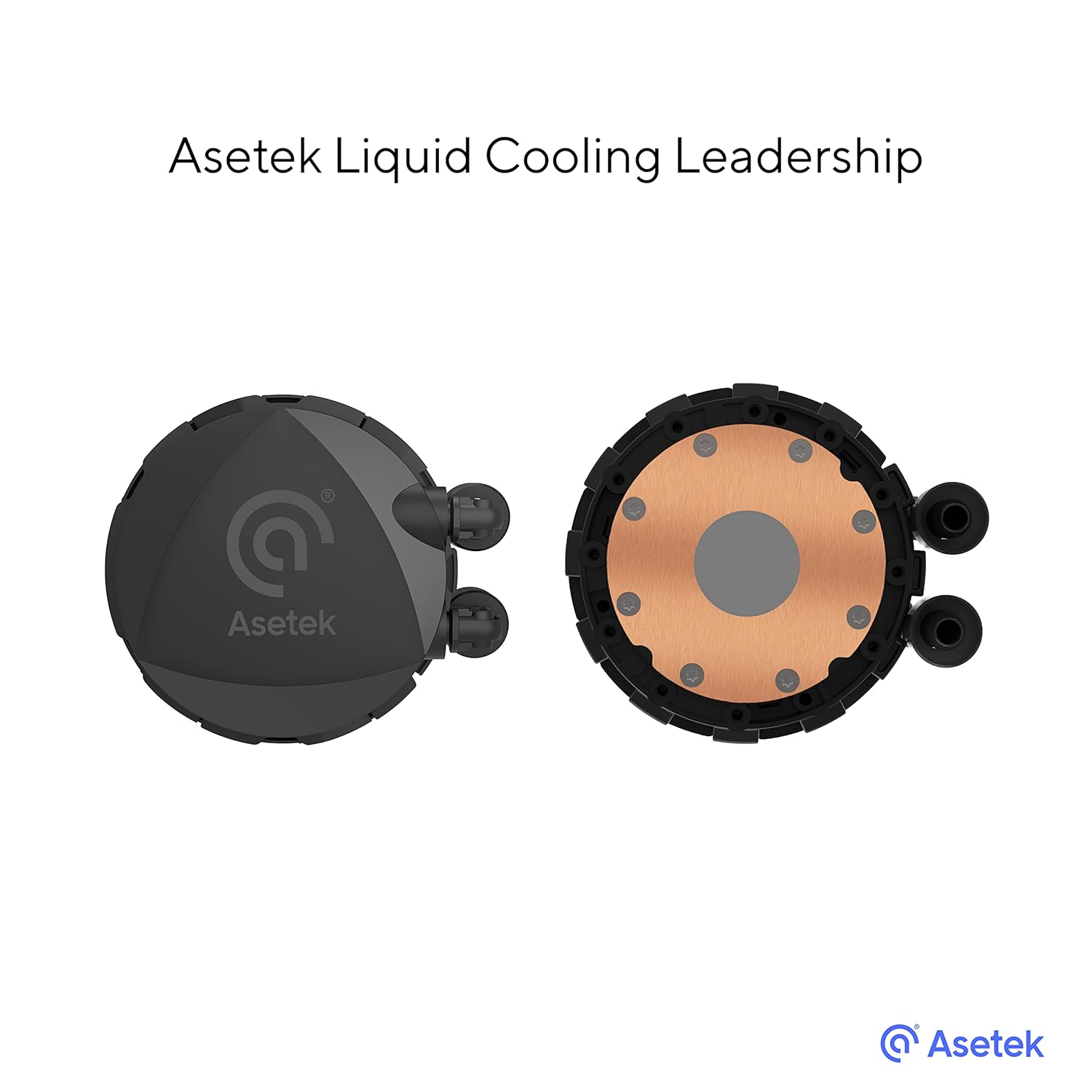
Figure 2.2: Top and bottom view of the Asetek 645LT pump and cold plate, highlighting the copper base.
3. Setup and Installation
Before installation, ensure you have purchased a compatible 92mm cooling fan and the appropriate retention kit for your CPU socket. The Asetek 645LT supports Intel LGA 1700, 1200, 115x, 1366, and AMD AM4 sockets.
3.1. Pre-Installation Steps
- Unpack the Asetek 645LT cooler and inspect for any damage.
- Ensure your motherboard is compatible with the cooler's dimensions and your chosen retention kit.
- Install the cooling fan onto the radiator (fan sold separately).
3.2. Mounting the Cooler
- Apply thermal paste to the CPU's integrated heat spreader (IHS) if not pre-applied to the cold plate.
- Secure the pump/cold plate assembly to the CPU using the retention kit (sold separately), ensuring even pressure.
- Mount the radiator with the attached fan to an available 92mm fan mount in your PC case.
- Connect the 3-pin power cable from the pump to an appropriate header on your motherboard (e.g., CPU_FAN or AIO_PUMP).

Figure 3.1: The Asetek 645LT installed in a Dan Cases A4-SFX, demonstrating its SFF compatibility.

Figure 3.2: Close-up view of the pump unit mounted on a motherboard, showing clearance with other components.
4. Operating Instructions
Once installed and powered on, the Asetek 645LT operates automatically. The pump maintains a speed of 2800 RPM to circulate the cooling fluid, a mixture of propylene glycol and water. Ensure your system's BIOS or operating system fan control settings are configured to provide adequate power to the pump and any attached cooling fans.
The cooler is designed for continuous operation within an ambient temperature range of 5°C to 35°C, with a maximum operating fluid temperature of 60°C. Its quiet operation ensures minimal acoustic disturbance during use.
5. Maintenance
The Asetek 645LT is a closed-loop liquid cooling system, requiring minimal maintenance. The cooling fluid is factory-sealed and does not require refilling or replacement under normal operating conditions.
5.1. Recommended Checks
- Dust Removal: Periodically inspect the radiator fins and attached fan for dust accumulation. Use compressed air or a soft brush to gently remove dust, ensuring optimal airflow.
- Visual Inspection: Occasionally check the tubing and connections for any signs of leaks or damage. While rare, any visible fluid leakage should prompt immediate system shutdown and professional inspection.
- Pump Operation: Listen for any unusual noises from the pump. A constant, low hum is normal, but grinding or rattling sounds may indicate an issue.
6. Troubleshooting
If you experience cooling performance issues or unusual behavior from your Asetek 645LT cooler, consider the following troubleshooting steps:
- High CPU Temperatures:
- Verify that the pump's 3-pin power cable is securely connected to the motherboard and receiving power.
- Ensure the cooling fan (if installed) is spinning correctly and not obstructed.
- Check if the cold plate is making proper contact with the CPU's IHS. Re-seat the cooler if necessary, reapplying thermal paste.
- Clean any dust buildup from the radiator fins.
- Unusual Pump Noise:
- Ensure the pump is securely mounted and not vibrating against other components.
- If the noise is persistent and abnormal, contact Asetek support.
- System Not Booting/No Display:
- Double-check all power connections, including the pump's power cable.
- Ensure the cooler's mounting pressure is not excessive, which could potentially warp the motherboard.
For further assistance, refer to the Asetek support website or contact their customer service.
7. Specifications
| Feature | Specification |
|---|---|
| Model Number | 35-102-0000316 |
| Pump Speed | 2800 RPM |
| Operating Fluid | Propylene Glycol and Water Mixture |
| Max Operating Fluid Temperature | 60°C |
| Operating Temperature Range | 5°C to 35°C |
| Weight | 465g |
| CPU Socket Support | Intel: LGA 1700, 1200, 115x, 1366; AMD: AM4 |
| Pump & Cold Plate Height | 29.8mm |
| Radiator/Heat Exchanger Dimensions | 118 x 97 x 35mm |
| Fan Support | 1 x 92mm (fan sold separately) |
| Rated Voltage | 12VDC |
| Rated Power | 3.9W |
| Power Cable | 3-pin, 300+/- 20mm |
| Cable Connector | 3-pin |
| Noise Level | 39.5 dBA (under full load) |
| Material | Polycarbonate (housing) |
8. Warranty and Support
The Asetek 645LT SFF AIO CPU Cooler comes with a 2-year warranty from the date of purchase. This warranty covers defects in materials and workmanship under normal use.
For warranty claims, technical support, or inquiries regarding compatible retention kits and accessories (such as the Asetek retention ring kit available on Amazon), please visit the official Asetek website or contact their customer service department. Keep your proof of purchase for warranty validation.


