
TERENCE GTS01
TERENCE GTS01 61-Key Semi-Weighted Keyboard Piano User Manual
Model: GTS01
1. Introduction
This manual provides essential instructions for the safe and effective use of your TERENCE GTS01 61-Key Semi-Weighted Keyboard Piano. Please read this manual thoroughly before operating the instrument and retain it for future reference.

The TERENCE GTS01 keyboard piano, shown with its Z-style stand, sheet music stand, portable carrying bag, power adapter, earphones, AUX 3.5mm audio cable, piano note stickers, and user manual.
2. Important Safety Information
- Power Supply: Use only the provided power adapter. Ensure the voltage matches your local power supply. Do not leave the piano charging for excessively long periods to prevent potential battery overheating.
- Battery Care: The piano contains a built-in rechargeable lithium battery. Do not attempt to replace it yourself. Avoid exposing the battery to extreme temperatures or direct sunlight.
- Water and Moisture: Keep the instrument away from water, moisture, and high humidity. Do not operate with wet hands.
- Ventilation: Ensure adequate ventilation around the instrument. Do not block ventilation openings.
- Cleaning: Clean only with a dry, soft cloth. Avoid using abrasive cleaners or solvents.
- Handling: Handle with care. Avoid dropping or subjecting the instrument to strong impacts.
3. Package Contents
Verify that all items listed below are included in your package:
- TERENCE GTS01 Keyboard Piano
- Z-Style Piano Stand
- Portable Carrying Bag
- Sheet Music Stand
- Piano Note Stickers
- Power Adapter
- Earphones
- AUX 3.5mm Audio Cable
- User Manual (this document)

A comprehensive display of all components included with the TERENCE GTS01 Keyboard Piano: the keyboard, Z-style piano stand, portable carrying bag, sheet music stand, piano note stickers, power adapter, earphones, AUX 3.5mm audio cable, and user manual.
4. Product Overview
The TERENCE GTS01 is a portable 61-key semi-weighted keyboard piano designed for beginners and enthusiasts. It features a streamlined control panel and a responsive keybed.
4.1 Key Features
- 61 Semi-weighted, full-sized keys with 1:1 piano key ratio.
- Built-in 1800mAh rechargeable lithium battery for up to 8 hours of playing time.
- 140 Tones, 128 Rhythms, 61 Keyboard Percussion sounds, and 60 Demo songs.
- Bluetooth connectivity for piano learning applications (e.g., Garage Band, Perfect Piano, Pop Piano).
- MIDI USB interface for connection to computers or tablets.
- Functions include Master Volume, Accompaniment Volume, Speed, Sustain, Tremolo, Single/Multi-finger Chord, 3-step Intelligent Teaching System, Programming, Recording, Playback, Synchro, Insert, and Dual Keyboard mode.
- Dual high-fidelity stereo speakers and headphone output for private practice.
4.2 Keybed and Touch Response
The 61 semi-weighted keys are designed to provide a comfortable and responsive playing experience, mimicking the feel of a traditional piano. The force sensing function allows for varied dynamics, from soft to loud, based on playing strength.

This image provides a detailed diagram of the TERENCE GTS01's 61 full-sized semi-weighted keys, highlighting their 1:1 piano key ratio and the internal mechanism that provides a realistic playing feel.

A close-up view of a hand interacting with the semi-weighted keys of the TERENCE GTS01 keyboard piano, demonstrating the responsive key action.
4.3 Control Panel
The GTS01 features a minimalist control panel with three physical push-buttons for essential functions, ensuring ease of use. Specific functions are accessed via combinations with keyboard keys, as detailed in the "Operating" section.
5. Setup
5.1 Assembling the Z-Style Stand
- Unpack the Z-style stand components.
- Connect the horizontal bars to the vertical supports, ensuring all screws are tightened securely.
- Adjust the stand to your desired height using the locking mechanisms.
- Place the TERENCE GTS01 keyboard piano securely on the assembled stand.
5.2 Powering On and Charging
- Connect the provided power adapter to the DC IN port on the piano and then to a power outlet.
- Press the Power button to turn the piano on.
- The built-in 1800mAh lithium battery charges when connected to the power adapter. A full charge takes approximately 2-3 hours and provides up to 8 hours of playing time.
- The charging indicator light will turn green when the battery is fully charged.
- The piano can also be powered via a power bank (cable not included).

A user playing the TERENCE GTS01 keyboard piano, emphasizing its portability and long playing time thanks to the built-in 1800mAh rechargeable lithium battery, which provides up to 8 hours of use.
5.3 Connecting Accessories
- Earphones: Plug the included earphones into the 3.5mm headphone jack for private practice.
- Audio Cable: Use the AUX 3.5mm audio cable to connect the piano to external audio devices.
- Sheet Music Stand: Insert the sheet music stand into the designated slot on the piano.

An illustration detailing the dual high-fidelity stereo speakers for rich sound output and the headphone jack for private practice on the TERENCE GTS01 keyboard piano.
5.4 Applying Piano Note Stickers
For beginners, the included piano note stickers can be applied to the keys to aid in learning and note identification. Carefully peel and place each sticker onto the corresponding key as indicated in the sticker guide.
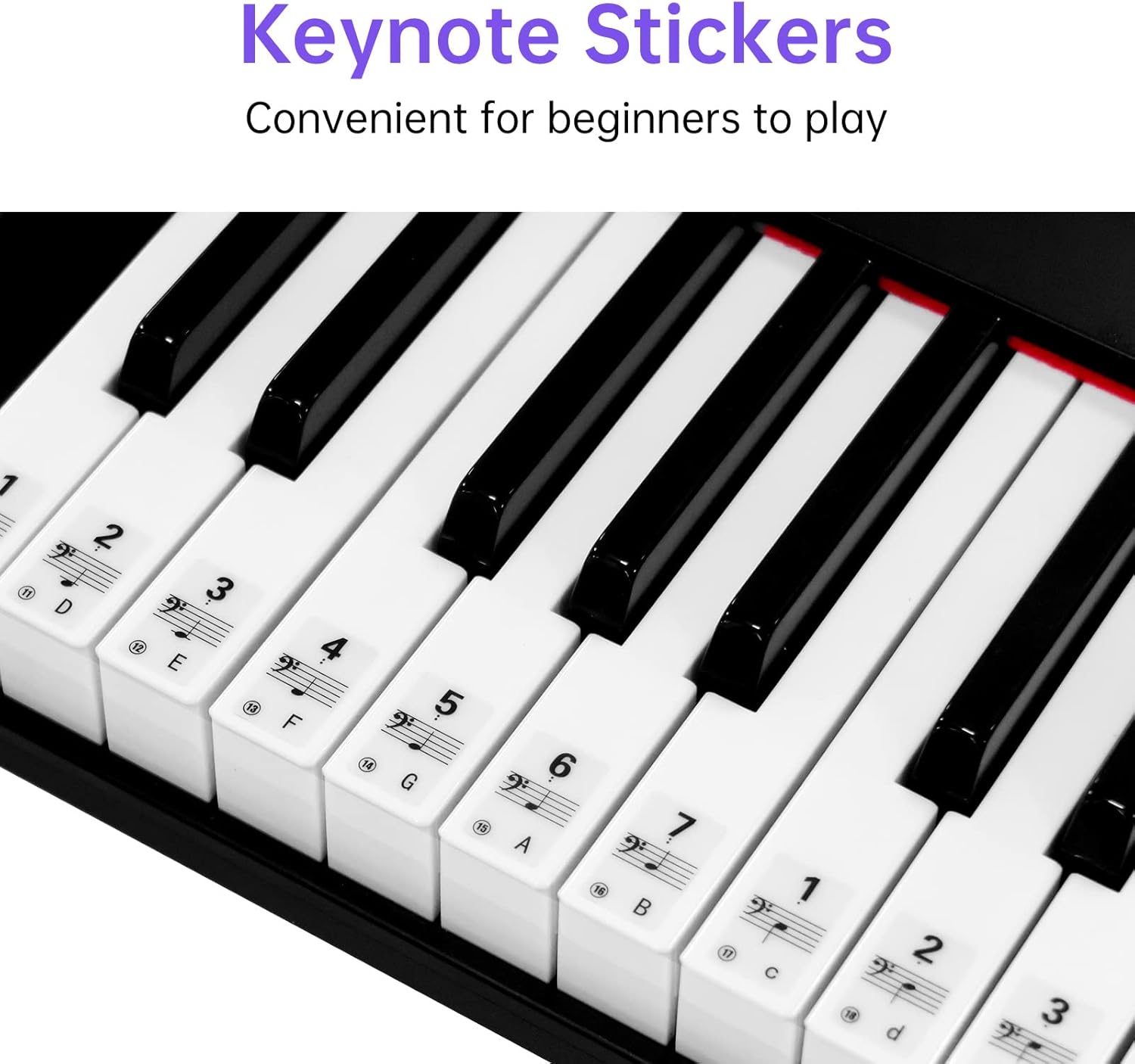
A close-up view of the TERENCE GTS01 keyboard keys with keynote stickers applied, designed to help beginners identify notes and learn to play.
6. Operating Instructions
The TERENCE GTS01 features a simplified control panel. Most functions are accessed by pressing the "Function" button (often labeled "Func" or similar) followed by specific keys on the keyboard. Refer to the detailed function table in the printed manual for exact key combinations.
6.1 Basic Functions
- Power On/Off: Press the dedicated Power button.
- Volume Control: Use the Master Volume buttons/knob to adjust the overall sound level.
- Tone Selection: Access 140 different tones. Consult the function table for specific key combinations to select desired tones.
- Rhythm Selection: Choose from 128 rhythms. Refer to the function table for rhythm selection.
- Demo Songs: Play one of the 60 built-in demo songs.
6.2 Advanced Functions
- Sustain/Tremolo: Activate these effects to enhance your playing.
- Chord Functions: Engage single-finger or multi-finger chord modes for simplified accompaniment.
- 3-Step Intelligent Teaching System: Utilize the integrated teaching system for guided learning. This often involves lighted keys or on-screen prompts when connected to an app.
- Programming, Recording, Playback: Record your performances and play them back. Refer to the manual for detailed steps on using these features.
- Synchro and Insert Functions: These functions allow for synchronized rhythm starts and inserting musical phrases.
- Dual Keyboard Mode: Splits the keyboard into two identical ranges, allowing two players to play simultaneously or for teacher/student interaction.
6.3 Connectivity
- Bluetooth Connection:
- Ensure Bluetooth is enabled on your smartphone or tablet.
- Turn on the TERENCE GTS01.
- Search for available Bluetooth devices on your mobile device and select "TERENCE GTS01" to pair.
- Once paired, you can use piano learning applications such as Garage Band, Perfect Piano, and Pop Piano to enhance your learning experience.
- MIDI USB Interface:
Connect the piano to your PC or tablet using a MIDI USB cable (not included) for arrangement, accompaniment, or use with digital audio workstations (DAWs).

The TERENCE GTS01 keyboard piano featuring its lighted key function, designed to assist beginners. The image also shows icons for Bluetooth connectivity and compatible piano learning applications like GarageBand, Perfect Piano, and Pop Piano.
6.4 Official Product Video
This video provides an overview of the TERENCE GTS01 Keyboard Piano, demonstrating its portable design, semi-weighted keys, and sound quality. It highlights key features and user experience.
7. Maintenance
- Cleaning: Use a soft, dry, lint-free cloth to wipe the surface of the piano. Do not use liquid cleaners, waxes, or solvents.
- Storage: When not in use, store the piano in its portable carrying bag to protect it from dust and damage. Avoid storing in areas with extreme temperatures, direct sunlight, or high humidity.
- Battery Longevity: For optimal battery life, avoid completely draining the battery frequently. Charge it regularly, but disconnect once fully charged.
8. Troubleshooting
| Problem | Possible Cause | Solution |
|---|---|---|
| No sound from speakers. | Volume too low; headphones connected; power issue. | Increase Master Volume. Disconnect headphones. Ensure piano is powered on and charged. |
| Bluetooth connection fails. | Bluetooth not enabled; piano not in pairing mode; interference. | Ensure Bluetooth is on for both devices. Restart both devices. Move closer to the piano. |
| Keys are unresponsive or sound incorrect. | Incorrect tone selected; internal software issue. | Verify the selected tone. Try resetting the piano (power off/on). |
| Battery not charging. | Adapter not properly connected; faulty adapter/cable. | Check all connections. Try a different power outlet. Contact support if issue persists. |
9. Specifications
- Model Name: GTS01
- Brand: TERENCE
- Number of Keys: 61
- Key Type: Semi-weighted, Full-sized
- Battery: 1800mAh Lithium Ion (included)
- Playing Time: Up to 8 hours (fully charged)
- Tones: 140
- Rhythms: 128
- Keyboard Percussion: 61
- Demo Songs: 60
- Connectivity: Bluetooth, MIDI USB
- Supported Software: Garage Band, Perfect Piano, Pop Piano, MIDI
- Headphones Jack: 3.5mm
- Power Source: Battery Powered, AC Adapter
- Item Weight: 15.47 pounds (approx. 7.02 kg)
- Package Dimensions: 38.5 x 11.8 x 6 inches (approx. 97.8 x 30 x 15.2 cm)
- Color: Black
- Skill Level: Beginner
- Special Feature: Portable
10. Warranty and Support
For warranty information and customer support, please refer to the warranty card included in your package or visit the official TERENCE website. Keep your purchase receipt as proof of purchase for any warranty claims.
If you encounter any issues not covered in this manual, please contact TERENCE customer service for assistance.