
Introduction
The MELBON PunnkFunnk MT500 Smartwatch is designed to enhance your daily life with its comprehensive health and activity tracking capabilities, alongside smart notifications and communication features. This manual provides detailed instructions for setting up, operating, and maintaining your MT500 smartwatch to ensure optimal performance and longevity.
Key features include a 1.4-inch full touch color display, Bluetooth calling, IP68 water resistance, heart rate monitoring, sleep tracking, and 9 sports modes. With an impressive 8-day battery life, the MT500 is a reliable companion for your active lifestyle.

Figure 1: MELBON PunnkFunnk MT500 Smartwatch - Front View
What's in the Box
Upon opening the package, verify that all components are present:
- MELBON PunnkFunnk MT500 Smartwatch
- Charging Cable
- User Manual (this document)

Figure 2: Package Contents and Key Features Overview
Setup
1. Charging the Smartwatch
Before initial use, fully charge the MT500 smartwatch. Connect the provided charging cable to the charging port on the back of the watch and plug the USB end into a standard USB power adapter (not included) or a computer's USB port.
- A full charge typically takes approximately 2 hours.
- The battery icon on the watch screen will indicate charging status.
2. App Installation (FitPro)
To unlock the full functionality of your MT500 smartwatch, download and install the "FitPro" application on your smartphone. The app is available on both Android and iOS app stores.
- Scan the QR code provided in the quick start guide (if available) or search for "FitPro" in your phone's app store.
- Download and install the application.
- Open the FitPro app and follow the on-screen instructions to create an account or log in.
3. Pairing the Smartwatch with Your Smartphone
Ensure Bluetooth is enabled on your smartphone before proceeding.
- Open the FitPro app on your smartphone.
- Navigate to the "Device" or "My Device" section within the app.
- Tap "Add Device" or "Bind Device" to search for your smartwatch.
- Select "MT500" from the list of available devices.
- Confirm the pairing request on both your smartphone and the smartwatch if prompted.
- Once successfully paired, the watch will synchronize time and data with your phone.
Operating Instructions
1. Basic Navigation
- Touch Screen: Swipe left/right, up/down to navigate through menus and features. Tap to select an option.
- Side Button: Press the side button to return to the home screen or wake the device.

Figure 3: Smartwatch User Interface Example
2. Bluetooth Calling
The MT500 supports Bluetooth calling, allowing you to make and receive calls directly from your wrist when connected to your smartphone.
- Receiving Calls: When an incoming call is received, the watch will display the caller ID. Tap the green phone icon to answer or the red phone icon to reject.
- Making Calls: Access the dialer or contact list on the watch to initiate a call.
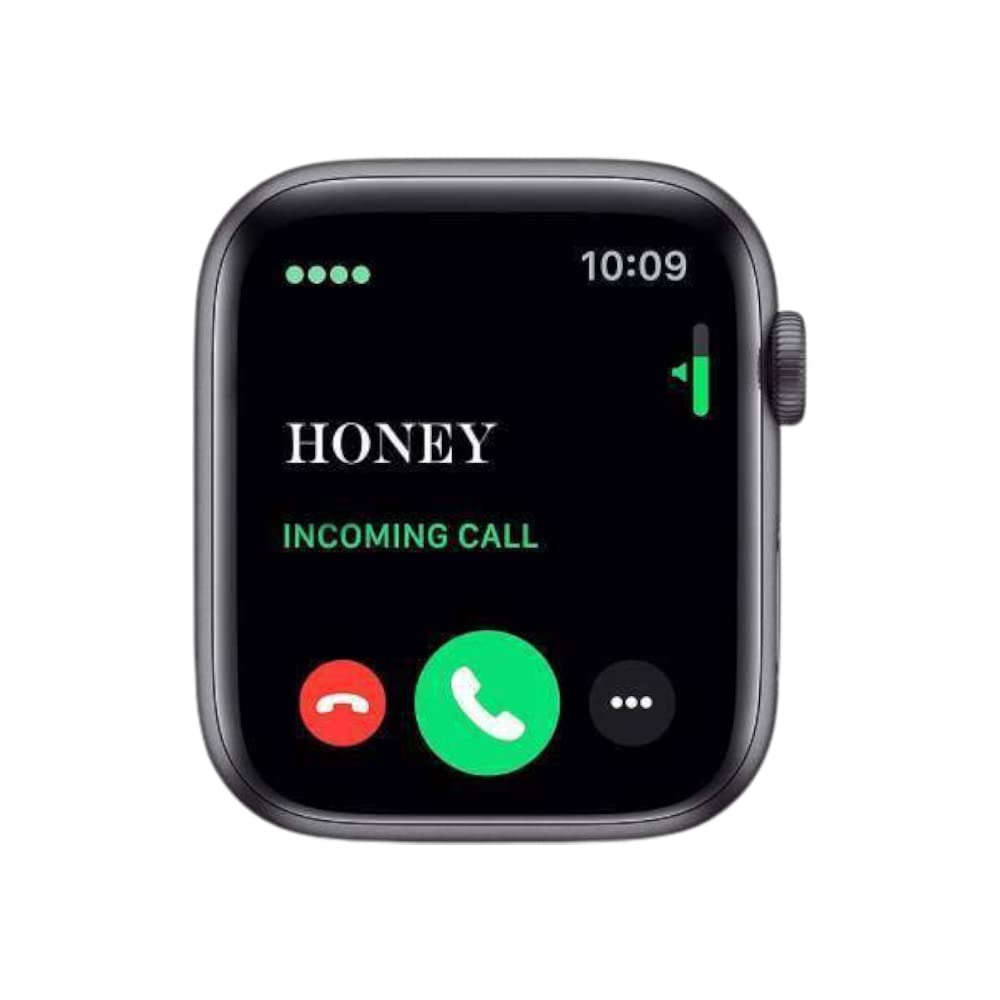
Figure 4: Incoming Call Display
3. Health Monitoring
The MT500 provides various health monitoring features:
- Heart Rate Monitor: Access the heart rate function on the watch to measure your current heart rate. Data is also recorded in the FitPro app.
- Sleep Monitoring: Wear the watch during sleep to track sleep patterns, including deep sleep, light sleep, and awake times.
- ECG, Blood Pressure, Breath Monitor: The watch offers these features for data analysis. Consult the FitPro app for detailed reports.

Figure 5: Heart Rate Sensor and Monitoring
4. Activity Tracking
The smartwatch tracks your daily activity:
- Steps: Counts the number of steps taken throughout the day.
- Distance: Estimates the distance covered based on your steps.
- Calories Burned: Calculates estimated calorie expenditure.
- Active Minutes: Records periods of physical activity.
5. Notifications
Receive timely notifications directly on your wrist:
- SMS Messages: View incoming text messages.
- Social Media Alerts: Get notifications from apps like WhatsApp, WeChat, QQ, Facebook, and others.
- Calendar Alerts: Stay informed about your schedule.
Ensure notification permissions are enabled for the FitPro app in your smartphone settings.

Figure 6: Information Reminder and Social Media Notifications
6. Music Control
Control music playback on your smartphone directly from the smartwatch. This feature allows you to play, pause, skip tracks, and adjust volume without needing to access your phone.
7. Sports Modes
The MT500 includes 9 sports modes to track specific activities. Select the appropriate mode before starting your workout for more accurate data collection.
Maintenance
1. Cleaning
Regularly clean your smartwatch to maintain its appearance and functionality.
- Wipe the screen and body with a soft, lint-free cloth.
- For stubborn marks, dampen the cloth slightly with water. Avoid harsh chemicals or abrasive materials.
- Ensure the charging contacts on the back of the watch are clean and dry.
2. Water Resistance (IP68)
The MT500 is IP68 rated, meaning it is resistant to dust and can withstand immersion in water up to 1.5 meters for up to 30 minutes. While it is suitable for daily use and light water exposure (e.g., hand washing, rain), it is not recommended for swimming, diving, or hot showers/saunas as steam and hot water can damage the seals.
3. Battery Life
The MT500 offers an average battery life of 8 days. To maximize battery life:
- Reduce screen brightness.
- Disable unnecessary notifications.
- Limit continuous heart rate monitoring if not required.
- Charge the device fully before extended periods of non-use.
Troubleshooting
| Problem | Possible Solution |
|---|---|
| Watch not turning on | Ensure the watch is fully charged. Connect to the charging cable and allow it to charge for at least 30 minutes before attempting to power on. |
| Cannot pair with smartphone |
|
| Notifications not received |
|
| Inaccurate health data |
|
Specifications
| Feature | Detail |
|---|---|
| Brand | MELBON |
| Model | MT500 |
| Display Size | 1.4 inches (Full Touch Color Display) |
| Connectivity | Bluetooth |
| Water Resistance | IP68 |
| Battery Life (Average) | 8 Days |
| Battery Type | Lithium Ion (210 mAh) |
| Operating System | Android Wear 2.9 (as per specifications, likely refers to compatibility) |
| Item Weight | 31 g |
| Dimensions (LxWxH) | 9 x 10.5 x 4.5 cm |
| Special Features | Breath Monitor, Blood Pressure Monitor, Calorie Tracker, Heart Rate Monitor, Music Player, Sleep Monitoring, Pedometer, Sports Modes, Bluetooth Calling, Notifications |
Warranty and Support
Warranty Information
The MELBON PunnkFunnk MT500 Smartwatch comes with a 6-month warranty from the date of purchase. This warranty covers manufacturing defects and malfunctions under normal use. It does not cover damage caused by misuse, accidents, unauthorized repairs, or normal wear and tear.
Please retain your proof of purchase for warranty claims.
Customer Support
For technical assistance, troubleshooting, or warranty inquiries, please contact MELBON customer support. Refer to the product packaging or the official MELBON website for the most current contact information.