
Geevorks ST-5150
Geevorks ST-5150 Digital Satellite Finder User Manual
Model: ST-5150 DVB-S2/T2/C COMBO HD
1. Introduction
The Geevorks ST-5150 is a versatile Digital Satellite Finder designed for precise installation and alignment of satellite dishes and terrestrial antennas. This device supports DVB-S2, DVB-T2, and DVB-C standards, featuring H.265 HEVC, MPEG-4, and MPEG-2 hardware decoding for high-quality video signal analysis. Its 4.3-inch TFT LCD screen provides clear visual feedback, making signal acquisition efficient and accurate.
This manual provides essential information for the safe and effective use of your ST-5150 Digital Satellite Finder. Please read it thoroughly before operation and retain it for future reference.
2. Safety Information
- Power Supply: Use only the provided charger. Ensure the voltage matches the device specifications.
- Battery: The device contains a built-in Lithium-ion battery. Do not attempt to replace it yourself. Avoid exposing the device to extreme temperatures or direct sunlight.
- Water Exposure: This device is not waterproof. Keep it away from water, rain, and high humidity.
- Handling: Handle the device with care. Avoid dropping it or subjecting it to strong impacts.
- Ventilation: Ensure proper ventilation during use and charging to prevent overheating.
- Maintenance: Do not attempt to open or repair the device. Refer all servicing to qualified personnel.
3. Package Contents
Verify that all items are present in the package:
- Geevorks ST-5150 Digital Satellite Finder
- Power Adapter (EU Plug)
- AV Cable
- USB Cable
- Shoulder Strap
- User Manual
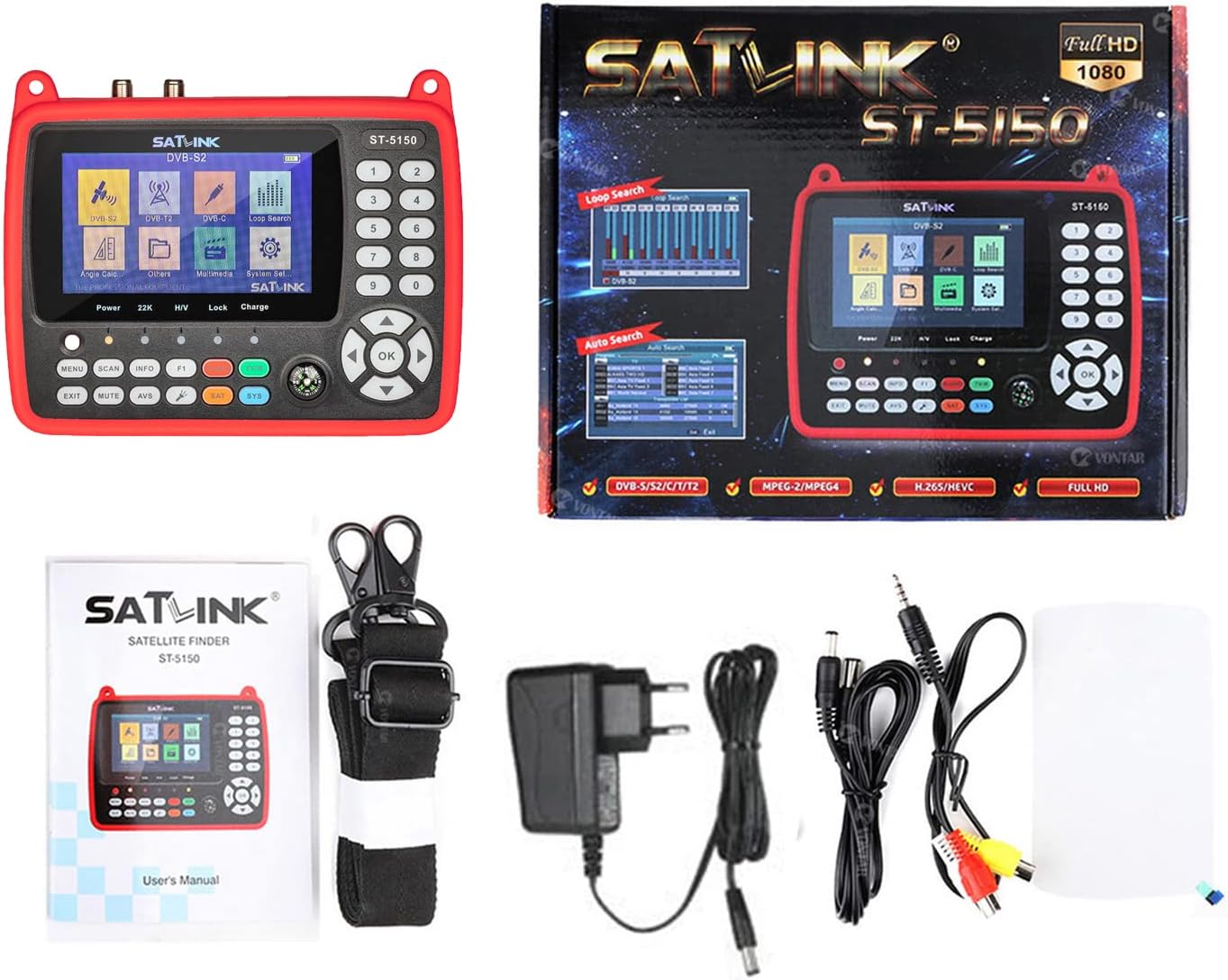
Image: Contents of the Geevorks ST-5150 package, showing the device, power adapter, AV cable, USB cable, shoulder strap, and user manual.
4. Product Overview
4.1 Key Features
- Multi-Standard Support: Fully compatible with DVB-S/S2, DVB-T/T2, and DVB-C.
- Advanced Decoding: Supports MPEG2, MPEG4, H.264/MPEG4 AVC, and H.265/HEVC hardware decoding for smooth, high-quality video playback.
- High-Definition Display: Features a 4.3-inch high-definition TFT LCD screen for clear signal information and channel viewing.
- Signal Alarm: Equipped with an audible and visual alarm that activates upon signal detection or loss, aiding in precise alignment.
- Automatic Angle Calculation: Automatically calculates Azimuth (AZ) and Elevation (EL) angles for optimal dish orientation.
- DiSEqC and Unicable Support: Supports DiSEqC 1.0/1.1/1.2, Unicable, and 0/22 kHz tone for comprehensive satellite control.
- Long Battery Life: Integrated 7.4V/2600mAh rechargeable Lithium-ion battery for extended portable use.
- LNB Protection: Includes LNB short circuit protection.
- Software Upgrade: Supports software upgrades via USB.
4.2 Device Layout

Image: Detailed diagram illustrating the input/output ports and connections of the ST-5150 device.
The device features a user-friendly interface with a keypad for navigation and input, a 4.3-inch LCD screen, and various ports for connectivity. Key components include:
- LCD Screen: Displays menus, signal strength, and video.
- Keypad: For menu navigation, channel selection, and function control.
- LNB IN / ANT IN: Connectors for satellite dish LNB or terrestrial antenna.
- AV IN / AV OUT: For external audio/video input or output.
- HDMI Output: For connecting to an external display.
- USB Port: For software upgrades and multimedia playback.
- DC IN: Power adapter connection.

Image: The 4.3-inch high-definition TFT LCD screen of the ST-5150 in operation.

Image: The ST-5150 displaying its decoding capabilities for various video formats.
5. Setup
5.1 Charging the Device
- Connect the provided power adapter to the DC IN port on the ST-5150.
- Plug the adapter into a suitable power outlet.
- The charging indicator light will illuminate. Allow the device to charge fully before first use. A full charge typically takes several hours.
5.2 Initial Power On
- Press and hold the POWER button to turn on the device.
- The main menu will appear on the 4.3-inch LCD screen.
5.3 Connecting to Satellite LNB or Terrestrial Antenna
- For satellite signal finding, connect the LNB cable from your satellite dish to the DVB-S/S2 input port.
- For terrestrial or cable signal finding, connect the antenna cable to the DVB-T/T2/C input port.
6. Operating Instructions
6.1 Menu Navigation
- Use the directional arrow buttons (UP/DOWN/LEFT/RIGHT) to navigate through menu options.
- Press the OK button to confirm a selection or enter a submenu.
- Press the MENU button to return to the previous menu or the main menu.
- Press the EXIT button to exit a menu or function.
6.2 Satellite Signal Finding (DVB-S/S2)
- From the main menu, select DVB-S2.
- Choose the desired satellite from the list or add a new one.
- Adjust LNB settings (LNB Type, LNB Power, 22KHz, DiSEqC) as required for your setup.
- Select a transponder (frequency, symbol rate, polarization).
- Slowly adjust your satellite dish. Observe the signal strength and quality bars on the screen.
- The device will emit an audible alarm and the signal indicator light will flash when a strong signal is detected. Fine-tune the dish for maximum signal quality.
- Once the signal is optimized, you can perform a channel scan.
6.3 Terrestrial/Cable Signal Finding (DVB-T/T2/C)
- From the main menu, select DVB-T2 or DVB-C depending on your signal type.
- Select your country/region and adjust parameters like frequency, bandwidth, and modulation.
- Adjust your terrestrial antenna or cable connection. Monitor the signal strength and quality indicators.
- Optimize the antenna position for the best signal.
- Perform a channel scan to find available channels.
6.4 Angle Calculation (AZ/EL)
The device can automatically calculate the Azimuth and Elevation angles. This feature assists in pre-aligning your satellite dish before fine-tuning with live signal feedback.
- From the main menu, select Angle Calc.
- Input your current location coordinates (latitude and longitude) or select a predefined city.
- Select the target satellite.
- The device will display the calculated Azimuth and Elevation angles. Use these as a guide for initial dish positioning.
6.5 Software Upgrade via USB
Periodically check the Geevorks website for firmware updates. Updates can improve performance and add new features.
- Download the latest firmware file from the official Geevorks website to a USB flash drive.
- Insert the USB flash drive into the USB port of the ST-5150.
- Navigate to System Settings > Software Upgrade.
- Select the firmware file from the USB drive and confirm the upgrade.
- Do not power off the device during the upgrade process.
7. Maintenance
- Cleaning: Use a soft, dry cloth to clean the device. Do not use liquid cleaners or solvents.
- Battery Care: To prolong battery life, avoid fully discharging the battery frequently. Charge the device regularly, even if not in use for extended periods.
- Storage: Store the device in a cool, dry place away from direct sunlight and extreme temperatures.
- Connectors: Keep all connectors clean and free from dust or debris to ensure optimal signal transmission.
8. Troubleshooting
| Problem | Possible Cause | Solution |
|---|---|---|
| Device does not power on. | Battery is discharged. Power button not pressed correctly. | Charge the device fully. Press and hold the POWER button for a few seconds. |
| No signal detected. | Incorrect LNB/antenna connection. Wrong satellite/transponder settings. Dish/antenna misalignment. | Check all cable connections. Verify satellite/transponder settings. Adjust dish/antenna position slowly. |
| Poor signal quality. | Minor misalignment. Obstruction in signal path. Weather conditions. | Fine-tune dish/antenna alignment. Ensure clear line of sight. Wait for weather to improve. |
| Screen is blank or frozen. | Software error. Low battery. | Reboot the device by holding the POWER button. Charge the device. If issue persists, try a software upgrade. |
| LNB Short Circuit Alarm. | Short circuit in LNB cable or LNB itself. | Disconnect the LNB cable and check for damage. Replace faulty cable or LNB. |
9. Specifications

Image: Dimensions of the ST-5150 device.
| Feature | Detail |
|---|---|
| Model Number | VBC5341513443181XN |
| Manufacturer | Geevorks |
| Dimensions (L x W x H) | 17 x 12 x 4 cm (6.69 x 4.72 x 1.57 inches) |
| Weight | 700 Grams |
| Material | ABS |
| Display | 4.3-inch TFT LCD |
| Decoding Support | MPEG2, MPEG4, H.264/MPEG4 AVC, H.265/HEVC |
| Battery Type | Lithium-ion |
| Battery Capacity | 7.4V / 2600mAh |
| Power Source | Battery Powered |
| Voltage | 7.4 Volts |
| Satellite Control | DiSEqC 1.0/1.1/1.2, Unicable, 0/22 kHz Tone |
10. Warranty and Support
Specific warranty information is not provided in the product data. For details regarding warranty coverage, technical support, or service, please refer to the documentation included with your purchase or contact Geevorks customer service directly through their official website or the retailer where the product was purchased.