
Nikon Z 9
Nikon Z 9 User Manual
Flagship Professional Full-Frame Stills/Video Mirrorless Camera
1. Introduction
The Nikon Z 9 is a flagship professional full-frame mirrorless camera designed for demanding stills and video applications. It features a fast and powerful autofocus system with advanced subject detection technology, high-resolution stills, and robust video capabilities.
Key features include:
- 45.7MP Stacked CMOS sensor and EXPEED 7 image processing for exceptional image quality.
- Advanced AF system with deep learning technology for automatic detection and tracking of various subjects (people, animals, vehicles).
- High-speed continuous shooting up to 120 fps for stills.
- Internal 8K/30p and 4K/120p slow-motion video recording.
- World's first truly blackout-free viewfinder and a 4-axis tilting touchscreen.
- Durable construction for professional use in challenging environments.

Figure 1.1: Front view of the Nikon Z 9 camera body, showcasing its robust design and Z-mount.
2. Initial Setup
2.1. Charging the Battery
The Nikon Z 9 uses an EN-EL18d Rechargeable Li-ion Battery. Before first use, ensure the battery is fully charged using the supplied MH-33 Battery Charger and EH-7p Charging AC Adapter.
- Connect the MH-33 charger to a power outlet using the EH-7p AC adapter.
- Insert the EN-EL18d battery into the charger.
- The charging indicator on the charger will show the charging status. A full charge is indicated when the light turns off.
2.2. Inserting Memory Cards
The Nikon Z 9 supports Cfexpress and XQD memory cards. It features two card slots for flexible storage options.
- Open the memory card slot cover on the side of the camera.
- Insert the Cfexpress or XQD card into the designated slot with the correct orientation until it clicks into place.
- Close the memory card slot cover securely.

Figure 2.1: Memory card slots of the Nikon Z 9, showing two Cfexpress/XQD cards inserted.
2.3. Attaching a Lens
The Nikon Z 9 uses the Nikon Z mount. Ensure the camera is off before attaching or detaching a lens.
- Remove the body cap from the camera and the rear cap from the lens.
- Align the mounting mark on the lens with the mounting mark on the camera body.
- Rotate the lens counter-clockwise until it clicks into place.
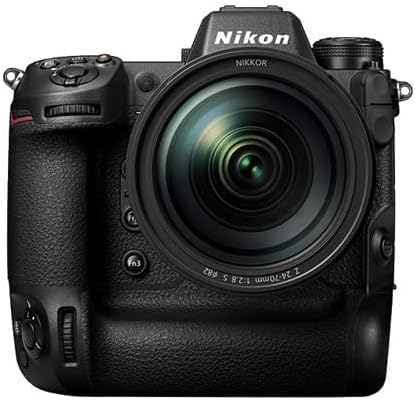
Figure 2.2: Front view of the Nikon Z 9 with a Nikkor Z lens attached.
3. Operating the Camera
3.1. Power On/Off
To power on the camera, rotate the power switch located around the shutter release button to the "ON" position. To power off, rotate it back to "OFF".
3.2. Shooting Stills
The Nikon Z 9 offers various shooting modes including Auto, Programmed auto, Shutter-priority auto, Aperture-priority auto, and Manual. These can be selected via the mode dial.
The camera's 45.7MP stacked CMOS sensor allows for high-resolution images. For fast-action photography, the Z 9 can capture stills at 20 or 30 frames per second (fps) at full resolution, or an impressive 120 fps at 11MP, all with full autofocus and auto-exposure tracking.

Figure 3.1: Illustration of the Pre-Release Capture feature, allowing capture of moments before the shutter is fully pressed.
3.3. Autofocus and Subject Detection
The Z 9 features an advanced autofocus system utilizing deep learning technology. This enables automatic detection and tracking of a wide range of subjects without manual menu changes.
- Human Subjects: Detects and tracks people, including eyes, faces, and upper bodies.
- Animal Subjects: Recognizes and tracks cats, dogs, and birds, focusing on their eyes or bodies.
- Vehicles: Identifies and tracks cars, motorcycles, bicycles, trains, and planes.

Figure 3.2: Examples of the Z 9's subject detection capabilities, highlighting focus on eyes of a lion and a car's headlights.
3.4. Video Recording
The Z 9 is a powerful video tool, capable of internal 8K/30p video capture for over two hours of recording time. It also supports 4K/120p slow-motion video.
For professional workflows, the camera can record 10-bit 4K/30p from oversampled 8K, directly in-camera as ProRes 422 HQ or H.265 video. A new high-efficiency RAW file format is also available, reducing file size while maintaining image quality.
4. Maintenance
4.1. Cleaning the Camera
- Camera Body: Use a soft, dry cloth to wipe the camera body. For stubborn dirt, use a cloth lightly dampened with water or a neutral detergent.
- Lens and Viewfinder: Use a blower brush to remove dust. For smudges, use a lens cleaning solution and a microfiber cloth.
- Sensor: The Z 9 features a sensor shield that closes when the camera is powered off, protecting the sensor during lens changes. For sensor cleaning, it is recommended to use the camera's built-in sensor cleaning function or consult a professional Nikon service center.
4.2. Storage
When not in use for extended periods, store the camera in a cool, dry place away from direct sunlight and extreme temperatures. Remove the battery before storage to prevent leakage.
5. Troubleshooting
This section addresses common issues you might encounter with your Nikon Z 9. For more detailed troubleshooting or issues not listed here, please refer to the comprehensive online manual or contact Nikon support.
| Problem | Possible Cause / Solution |
|---|---|
| Camera does not power on. | Ensure the battery is fully charged and correctly inserted. Check if the battery chamber cover is securely closed. |
| Images are blurry. | Check focus mode (AF-S, AF-C, MF). Ensure sufficient light. Verify lens is clean. Consider using a higher shutter speed or tripod. |
| Memory card error. | Ensure the card is inserted correctly. Try reformatting the card (this will erase all data). Use a different card if the issue persists. |
| Video recording stops unexpectedly. | This can occur if the camera overheats during prolonged recording, especially at high resolutions (8K/4K). Allow the camera to cool down. Use high-speed memory cards. |
6. Specifications
| Feature | Detail |
|---|---|
| Brand | Nikon |
| Model Name | Z 9 FX-format Mirrorless Camera Body |
| Model Number | 1669 |
| Photo Sensor Resolution | 45.7 MP |
| Photo Sensor Size | Full Frame (35mm) |
| Image Stabilization | Dual |
| Video Resolution | 4320p (8K) |
| Continuous Shooting | 120 fps (11MP), 20/30 fps (45.7MP) |
| Display Type | LCD, Tilting |
| Screen Size | 3.2 Inches |
| Memory Slots | 2 (Cfexpress, XQD) |
| Connectivity | Ethernet, GPS, HDMI, USB, Wi-Fi, Bluetooth |
| Item Weight | 2.95 Pounds |
| Battery Type | Lithium Ion (EN-EL18d) |
| Processor | EXPEED 7 Processor |
| Included in Box | Camera Body & Accessories, EN-EL18d Battery, MH-33 Charger, EH-7p AC Adapter, BL-7 Battery Chamber Cover, UC-E24 USB Cable, HDMI/USB Cable Clip, AN-DC24 Strap, BF-N1 Body Cap, DK-33 Rubber Eyecup |
7. Warranty and Support
7.1. Manufacturer's Warranty
The Nikon Z 9 comes with a 1-year manufacturer's warranty. Please retain your proof of purchase for warranty claims. For specific terms and conditions, refer to the warranty card included with your product or visit the official Nikon website.
7.2. Customer Support
For technical assistance, service, or additional information, please contact Nikon customer support. You can find contact details and frequently asked questions on the official Nikon USA website:
For purchases made through Amazon, you may also contact the seller, Adorama, for order-specific inquiries.
Related documentsZ 9


Ask a question about this manual
Ask about setup, troubleshooting, compatibility, parts, safety, or missing instructions. Manuals+ will review the question and use this page’s manual context to help answer it.