
1. Important Safety Instructions
Always observe basic safety precautions when using electric tools to reduce the risk of fire, electric shock, and personal injury. Read all instructions before operating this product.
General Power Tool Safety Warnings
- Work Area Safety: Keep the work area clean and well-lit. Cluttered or dark areas invite accidents. Do not operate power tools in explosive atmospheres, such as in the presence of flammable liquids, gases, or dust. Power tools create sparks which may ignite the dust or fumes. Keep children and bystanders away while operating a power tool. Distractions can cause you to lose control.
- Electrical Safety: Power tool plugs must match the outlet. Never modify the plug in any way. Do not use any adapter plugs with earthed (grounded) power tools. Unmodified plugs and matching outlets will reduce risk of electric shock. Avoid body contact with earthed or grounded surfaces such as pipes, radiators, ranges, and refrigerators. There is an increased risk of electric shock if your body is earthed or grounded. Do not expose power tools to rain or wet conditions. Water entering a power tool will increase the risk of electric shock. Do not abuse the cord. Never use the cord for carrying, pulling, or unplugging the power tool. Keep cord away from heat, oil, sharp edges, or moving parts. Damaged or entangled cords increase the risk of electric shock.
- Personal Safety: Stay alert, watch what you are doing, and use common sense when operating a power tool. Do not use a power tool while you are tired or under the influence of drugs, alcohol, or medication. A moment of inattention while operating power tools may result in serious personal injury. Use personal protective equipment. Always wear eye protection. Protective equipment such as dust masks, non-skid safety shoes, hard hats, or hearing protection used for appropriate conditions will reduce personal injuries. Prevent unintentional starting. Ensure the switch is in the off-position before connecting to power source, picking up, or carrying the tool.
- Power Tool Use and Care: Do not force the power tool. Use the correct power tool for your application. The correct power tool will do the job better and safer at the rate for which it was designed. Do not use the power tool if the switch does not turn it on and off. Any power tool that cannot be controlled with the switch is dangerous and must be repaired. Disconnect the plug from the power source before making any adjustments, changing accessories, or storing power tools. Such preventive safety measures reduce the risk of starting the power tool accidentally. Store idle power tools out of the reach of children and do not allow persons unfamiliar with the power tool or these instructions to operate the power tool. Power tools are dangerous in the hands of untrained users.
Specific Percussion Drill Safety
- Wear ear protectors when impact drilling. Exposure to noise can cause hearing loss.
- Use auxiliary handles supplied with the tool. Loss of control can result in personal injury.
- Hold power tool by insulated gripping surfaces when performing an operation where the cutting accessory may contact hidden wiring or its own cord. Contact with a 'live' wire will also make exposed metal parts of the power tool 'live' and shock the operator.
- Always ensure the workpiece is securely clamped or held.
2. Product Overview
The Ingco ID6808 is a 680W percussion drill designed for various drilling tasks in wood, metal, and masonry. It features variable speed control and a reversible function for enhanced versatility.

Image: The Ingco ID6808 680W Percussion Drill, showcasing its main body, chuck, auxiliary handle, and depth gauge.
Key Features
- Power: 680 Watts for efficient drilling.
- Voltage: 220-240V~50/60Hz.
- Variable Speed: Allows for precise control over drilling speed.
- Reversible Function: Enables both forward and reverse rotation for driving and removing screws, and for freeing jammed drill bits.
- Percussion Mode: For drilling into masonry and concrete.
- Lock Speed Button: For continuous operation without holding the trigger.
- Maximum Chuck Size: 0.5 Inches (13mm).
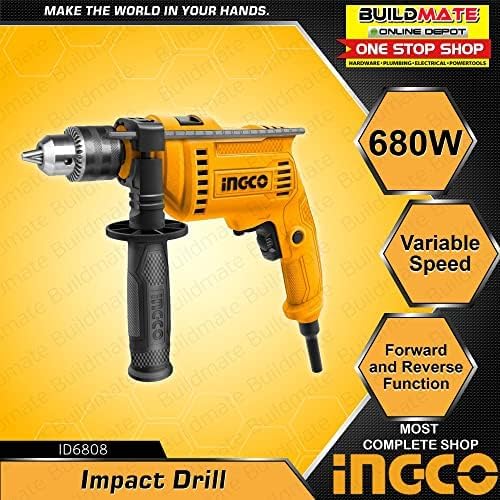
Image: The Ingco ID6808 Percussion Drill with labels indicating its 680W power, variable speed, and forward/reverse function.
3. Setup and Assembly
Unpacking
Carefully remove the drill and all accessories from the packaging. Inspect the tool for any damage that may have occurred during transit. Ensure all components listed in the 'What's in the Box' section are present.
Attaching the Auxiliary Handle
- Loosen the auxiliary handle by rotating it counter-clockwise.
- Slide the handle onto the front of the drill body.
- Adjust the handle to a comfortable and secure position.
- Tighten the handle by rotating it clockwise until it is firmly secured.
Installing and Removing Drill Bits

Image: A close-up view of the drill's chuck, showing the mechanism for securing drill bits.
- Ensure the drill is unplugged from the power source.
- Open the chuck jaws by rotating the chuck key counter-clockwise.
- Insert the drill bit into the chuck, ensuring it is centered and fully seated.
- Tighten the chuck jaws by rotating the chuck key clockwise until the bit is securely held. Ensure all three jaws grip the bit evenly.
- To remove, reverse the process.
Setting the Depth Gauge
- Loosen the auxiliary handle.
- Insert the depth gauge through the hole in the auxiliary handle.
- Adjust the depth gauge to the desired drilling depth, measuring from the tip of the drill bit.
- Tighten the auxiliary handle to secure the depth gauge in place.
4. Operation
Before operating, ensure you have read and understood all safety instructions.

Image: A worker wearing safety gear operating the Ingco ID6808 percussion drill on a wall, demonstrating proper usage.
Powering On/Off
- To turn on the drill, press the trigger switch.
- To turn off, release the trigger switch.
- For continuous operation, press the trigger switch and then press the lock-on button. To release, press the trigger switch again.
Variable Speed Control
The drill features a variable speed trigger. The drilling speed can be adjusted by varying the pressure on the trigger switch. Apply less pressure for lower speeds and more pressure for higher speeds. This allows for precise control depending on the material and application.
Forward/Reverse Rotation
A selector switch, typically located above the trigger, controls the direction of rotation. Push the switch to one side for forward (clockwise) rotation for drilling and driving screws. Push it to the other side for reverse (counter-clockwise) rotation for removing screws or freeing jammed bits.
Drilling Modes (Drill vs. Percussion)
The ID6808 has a mode selector switch, usually on the top or side of the drill body, to switch between standard rotary drilling and percussion drilling.
- Drill Mode (Rotary): Use this mode for drilling into wood, metal, plastics, and for driving screws. The symbol often looks like a drill bit.
- Percussion Mode (Impact): Use this mode for drilling into hard materials like concrete, brick, and stone. The symbol often looks like a hammer.
Drilling Techniques
- Wood: Use high speeds and wood-specific drill bits. Apply steady, moderate pressure.
- Metal: Use medium to high speeds with metal-specific drill bits. Use cutting oil for harder metals to prolong bit life and improve cutting. Start with a center punch to prevent the bit from wandering.
- Masonry (Concrete, Brick): Use percussion mode with carbide-tipped masonry drill bits. Apply firm, steady pressure. Do not force the drill; let the percussion action do the work.
5. Maintenance and Care
Regular maintenance ensures the longevity and optimal performance of your Ingco ID6808 percussion drill.
Cleaning
- Always unplug the tool before cleaning.
- Keep the ventilation openings clean to prevent overheating. Use a soft brush or compressed air to clear dust and debris.
- Wipe the tool housing with a damp cloth. Do not use harsh chemicals or abrasive cleaners.
- Clean the chuck jaws regularly to ensure proper grip on drill bits.
Storage
Store the drill in a dry, secure location, out of reach of children and away from direct sunlight or extreme temperatures. If possible, store it in its original case.
Carbon Brush Replacement
The carbon brushes are wear parts and should be checked periodically. If the motor sparks excessively or the drill loses power, the carbon brushes may need replacement. This procedure should ideally be performed by a qualified service technician.
6. Troubleshooting
This section addresses common issues you might encounter with your percussion drill.
| Problem | Possible Cause | Solution |
|---|---|---|
| Drill does not start | No power supply; Faulty switch; Worn carbon brushes | Check power connection; Test outlet; Replace switch (professional service); Replace carbon brushes (professional service) |
| Loss of power during operation | Overload; Worn carbon brushes; Damaged motor | Reduce pressure; Replace carbon brushes (professional service); Seek professional repair |
| Excessive sparking from motor | Worn carbon brushes; Dirty commutator | Replace carbon brushes (professional service); Clean commutator (professional service) |
| Drill bit jams frequently | Incorrect bit for material; Excessive pressure; Dull bit | Use appropriate bit; Apply steady, moderate pressure; Replace or sharpen bit |
| Chuck does not hold bit securely | Chuck jaws worn or dirty; Bit not inserted correctly | Clean chuck jaws; Ensure bit is fully seated and tightened evenly |
7. Technical Specifications
Detailed specifications for the Ingco ID6808 Percussion Drill.
| Feature | Specification |
|---|---|
| Brand | Ingco |
| Model Number | ID6808 |
| Power Source | Corded Electric |
| Maximum Power | 680 Watts |
| Voltage | 220-240V~50/60Hz |
| Amperage | 16 Amps |
| Maximum Rotational Speed | 3000 RPM |
| Maximum Chuck Size | 0.5 Inches (13 mm) |
| Drill Type | Impact Driver (Percussion Drill) |
| Drilling Capacity Wood | 13 Millimetres |
| Drilling Capacity Metal | 13 Millimetres |
| Special Feature | Lock Speed Button |
| Product Dimensions | 28L x 25.7W x 7.3H Centimeters |
| Item Weight | 350 Grams |
| Material | Plastic |
| Included Components | Percussion Drill |
8. Warranty and Support
Warranty Information
This Ingco power tool is covered by a manufacturer's warranty against defects in materials and workmanship. The specific terms and duration of the warranty may vary by region and retailer. Please refer to your purchase documentation or contact your retailer for detailed warranty information.
Customer Support
For technical assistance, spare parts, or service inquiries, please contact your local Ingco service center or the retailer from whom you purchased the product. You can also visit the official Ingco website for further support information.
For more information about Ingco products, visit the Ingco Store on Amazon.