
Introduction
Welcome to the user manual for your new HUAWEI Watch FIT New smartwatch. This guide will help you set up, operate, and maintain your device to get the most out of its advanced features. The HUAWEI Watch FIT New combines a sleek design with powerful health and fitness tracking capabilities, designed to enhance your daily life.

Image: The HUAWEI Watch FIT New smartwatch with a red strap, displaying time and activity metrics.
Setup
1. What's in the Box
- HUAWEI Watch FIT New
- Charging cable (Type-C adapter)
2. Charging Your Device
Before first use, fully charge your HUAWEI Watch FIT New. Connect the charging cable to the watch and a power source. A 5-minute charge can provide enough power for a full day of use, while a full charge can last up to 10 days under typical usage conditions.

Image: The HUAWEI Watch FIT New screen showing a 100% battery charge indicator, illustrating its long battery life.
3. Pairing with Your Smartphone
To unlock the full potential of your HUAWEI Watch FIT New, pair it with your smartphone using the HUAWEI Health app. The app is compatible with both iOS and Android devices.
- Download the HUAWEI Health App: Scan the QR code provided in the watch's quick start guide or search for "Huawei Health" on your phone's app store. Alternatively, visit consumer.huawei.com/fr to download.
- Open and Pair: Open the HUAWEI Health app, navigate to Devices > Add > Smartwatches, and select your device name from the list. Follow the on-screen instructions to complete the pairing process.

Image: A visual guide showing two steps to connect the HUAWEI Watch FIT New: downloading the app via QR code or search, and then pairing within the app.
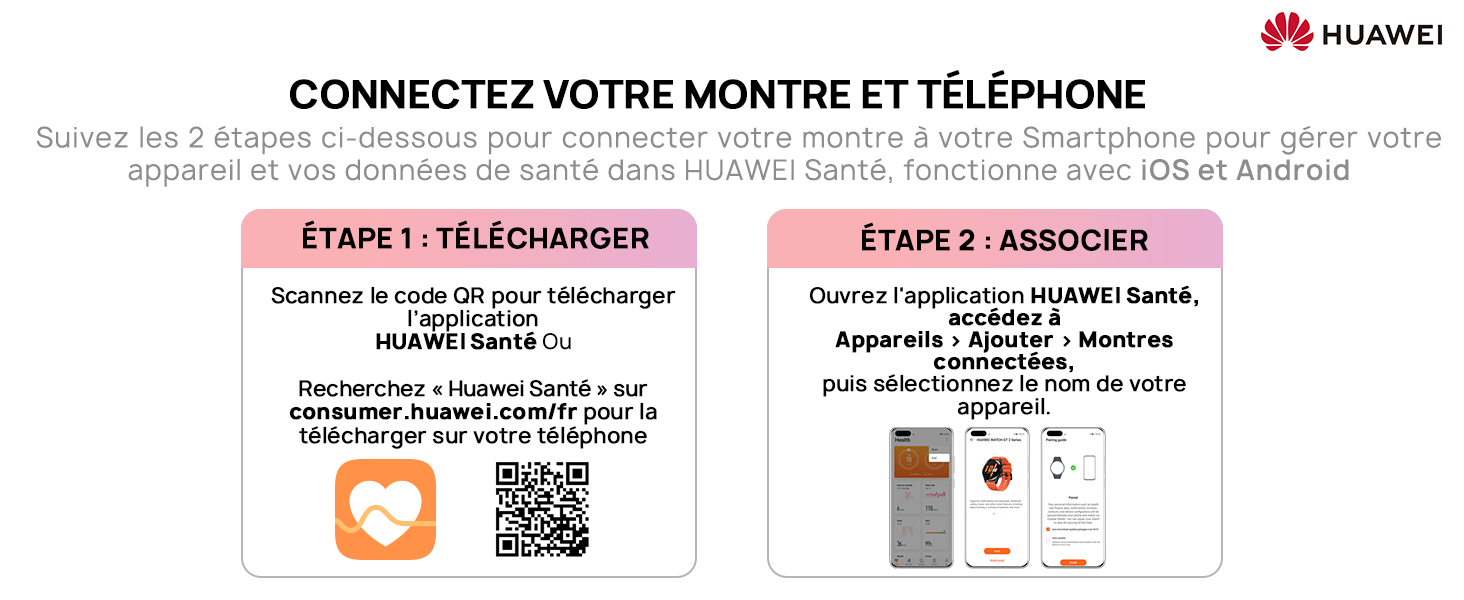
Image: Screenshot of the Huawei Health app interface, highlighting its features and user statistics.
Operating Your Device
1. Display and Customization
The HUAWEI Watch FIT New features a vibrant 1.64-inch AMOLED rectangular display with a resolution of 280 x 456 HD. The screen brightness adjusts automatically for optimal visibility in various lighting conditions. You can personalize your watch with a variety of watch faces to match your style.

Image: Infographic detailing the 1.64-inch AMOLED display, 280x456 resolution, 2.5D curved glass, and 70% screen-to-body ratio.
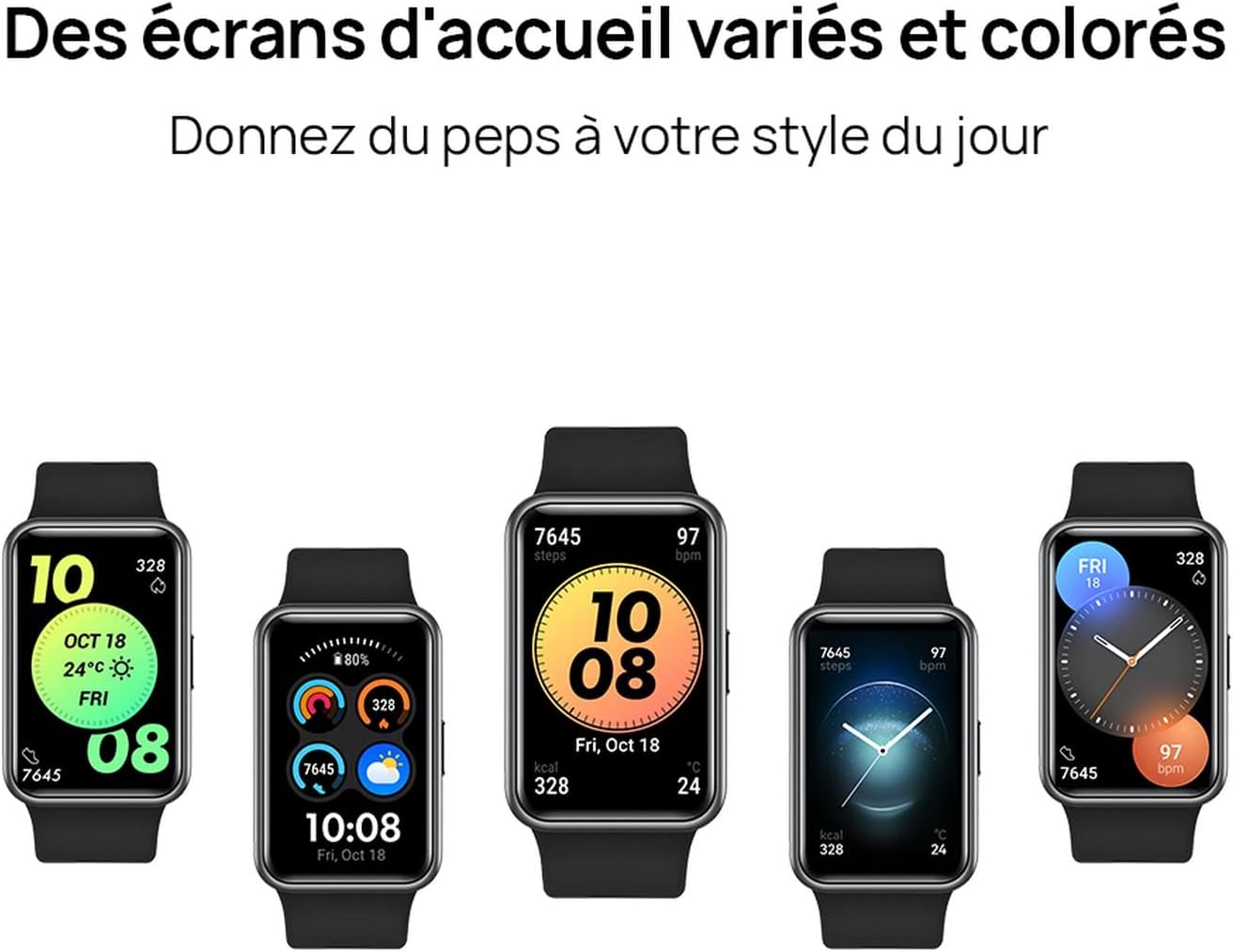
Image: A collection of five different watch faces displayed on the HUAWEI Watch FIT New, showcasing customization options.
2. Workout Modes
The watch offers 97 workout modes to track your fitness activities. It provides precise, real-time data for 12 professional sports modes, including running, swimming, cycling, and jump rope. Additionally, 85 custom workout modes are available for various activities like yoga and high-intensity training. The watch monitors heart rate, calories burned, and workout duration.

Image: A woman performing a yoga pose on a beach, illustrating the diverse range of 97 workout modes available on the watch.
3. Animated Workouts
For guided exercises, the HUAWEI Watch FIT New includes 12 animated quick workouts, such as "Workout at Work," "Stretching," and "Abdominal Training." These animated guides demonstrate 44 classic movements to help you exercise correctly.

Image: A grid of HUAWEI Watch FIT New screens, each showing a different animated exercise demonstration.
4. Health Monitoring
- 24/7 Heart Rate Monitoring: Powered by HUAWEI TruSeen 4.0 technology, the watch precisely measures your heart rate in real-time throughout the day and even during sleep. It can detect abnormal heart rate frequencies and send alerts.

Image: The HUAWEI Watch FIT New screen showing a heart rate graph and current BPM, indicating 24/7 heart rate monitoring.
- Continuous SpO2 Monitoring: The Watch FIT New monitors your blood oxygen saturation (SpO2) levels and provides reminders if issues are detected.
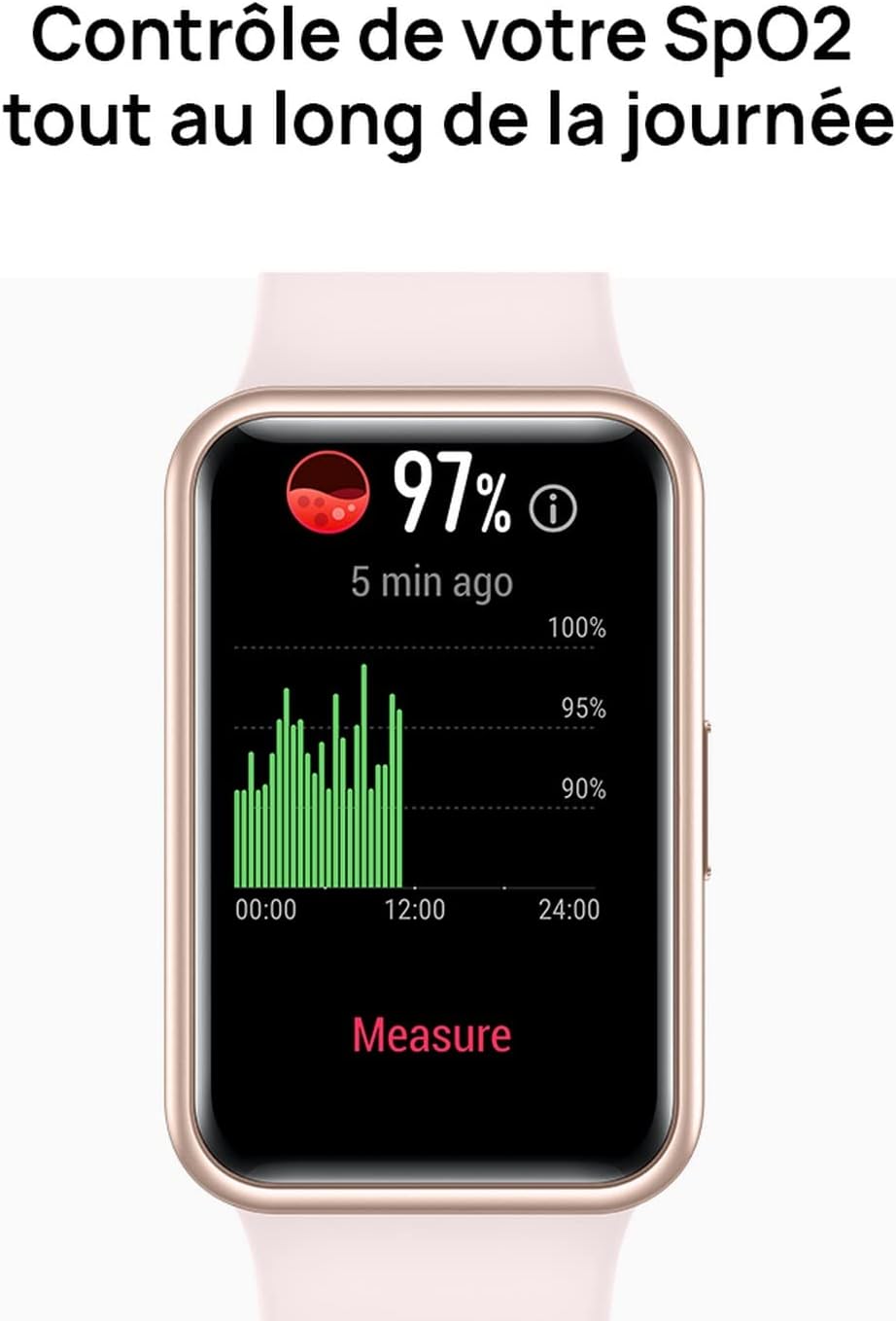
Image: The HUAWEI Watch FIT New screen showing a blood oxygen saturation (SpO2) reading of 97% with a historical graph.
- Sleep and Stress Monitoring: The watch also provides comprehensive sleep tracking and stress level monitoring to help you manage your overall well-being.
5. Personal Assistant Features
Beyond health and fitness, the HUAWEI Watch FIT New offers convenient personal assistant features, including time display, notifications, and more, making it a practical companion for daily life.

Image: Several HUAWEI Watch FIT New devices in different colors, each displaying a different smart feature like weather, music control, reminders, and remote shutter.
Maintenance
To ensure the longevity and optimal performance of your HUAWEI Watch FIT New, follow these maintenance guidelines:
- Cleaning: Regularly clean the watch and strap with a soft, dry cloth. If necessary, use a slightly damp cloth and mild soap, then dry thoroughly.
- Water Resistance: The watch is water-resistant. However, avoid prolonged exposure to hot water, steam, or harsh chemicals. Dry the watch thoroughly after exposure to water.
- Storage: Store the watch in a cool, dry place when not in use. Avoid extreme temperatures.
Troubleshooting
If you encounter issues with your HUAWEI Watch FIT New, try the following steps:
- Watch Not Turning On: Ensure the watch is fully charged. Connect it to the charger for at least 10 minutes.
- Pairing Issues: Make sure Bluetooth is enabled on your phone and the watch is within range. Restart both your phone and the watch, then try pairing again. Ensure the HUAWEI Health app is updated to the latest version.
- Inaccurate Data: Ensure the watch is worn snugly on your wrist. Clean the sensors on the back of the watch.
- Notifications Not Appearing: Check notification settings in the HUAWEI Health app and on your phone's system settings to ensure permissions are granted.
- Screen Unresponsive: Try restarting the watch by pressing and holding the side button until it powers off, then power it back on.
Specifications
| Feature | Specification |
|---|---|
| Model Number | KT00547 |
| Display | 1.64" AMOLED Touchscreen |
| Resolution | 280 x 456 HD |
| Weight | 260 g |
| Connectivity | Bluetooth, Wi-Fi |
| OS | AsteroidOS |
| Battery Life | Up to 10 days (typical usage) |
| Compatibility | iOS and Android |
| Color | Red |
| Dimensions (Package) | 16.8 x 9 x 7.2 cm |
Warranty and Support
For warranty information and customer support, please refer to the warranty card included with your product or visit the official HUAWEI support website for your region. You can also find additional resources and FAQs on the HUAWEI Health app.
For further assistance, please contact HUAWEI customer service.