
niizero T8801gray
niizero Smart Fitness Watch User Manual
Model: T8801gray
Introduction
Thank you for choosing the niizero Smart Fitness Watch. This device is designed to help you monitor your health and fitness activities with its 1.69-inch HD display, pedometer, heart rate monitor, and various sports modes. Please read this manual carefully to ensure proper use and optimal performance of your new smartwatch.
Package Contents
- niizero Smart Fitness Watch (Model T8801gray)
- Charging Cable
- User Manual
Setup
1. Charging the Device
Before first use, fully charge your niizero Smart Fitness Watch. Connect the charging cable to the charging port on the back of the watch and plug the USB end into a standard USB power adapter (not included) or a computer's USB port. A full charge typically takes about 2 hours.
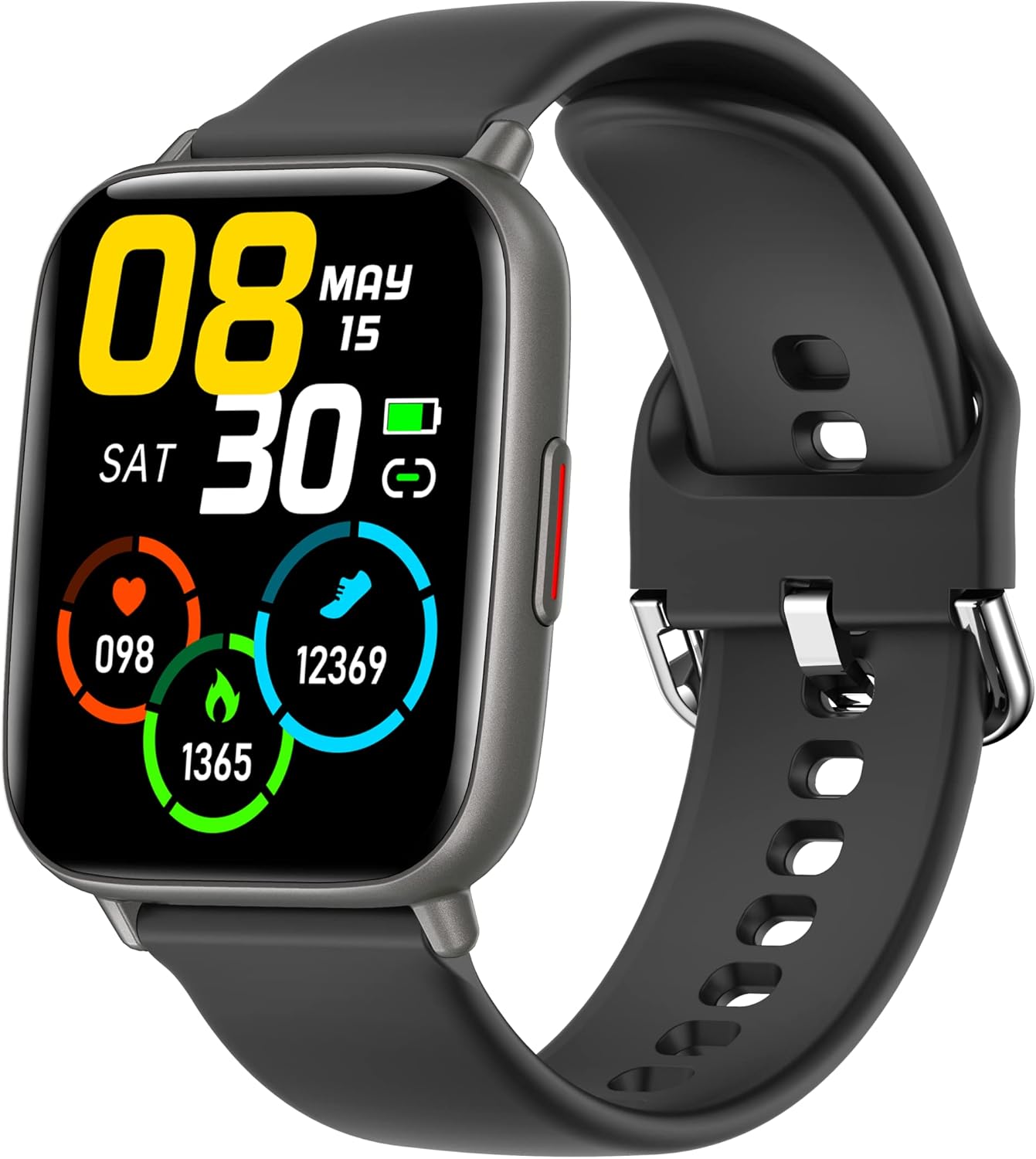
Image: The niizero Smart Fitness Watch with its display showing time, date, and various fitness metrics like heart rate, steps, and calories burned. The watch has a black strap and a dark grey casing.
2. Downloading the App
The official companion application for your niizero Smart Fitness Watch is GloryFit. You can download it from the App Store (for iOS devices) or Google Play Store (for Android devices).
- For iOS: Requires iOS 9.0 or above.
- For Android: Requires Android 4.4 or above.
3. Pairing the Watch with Your Phone
- Ensure Bluetooth is enabled on your smartphone.
- Open the GloryFit app.
- Follow the on-screen instructions to add a new device. The app will search for your niizero Smart Fitness Watch.
- Select your watch from the list of found devices to establish the connection.
- Once paired, the watch will synchronize time and data with your phone.
Operating Instructions
Basic Navigation
- Touch Screen: The 1.69-inch TFT HD LCD screen is fully touch-sensitive. Swipe left/right or up/down to navigate through menus and functions.
- Side Button: Press the side button to return to the main watch face or to wake the screen.
- Raise to Wake: The watch supports raising your wrist to automatically turn on the screen. This feature can be enabled/disabled in the GloryFit app.
Key Features
- Health Monitoring:
- Heart Rate Monitoring: The watch supports 24-hour heart rate monitoring. Access this function on the watch or view detailed data in the GloryFit app.
- Sleep Monitoring: The watch automatically detects your sleep patterns, analyzing deep sleep, light sleep, and awake times. View sleep quality and trends in the app.
- Activity Tracking:
The activity tracker accurately records daily activities such as steps taken, distance covered, calories burned, and more. This data is synchronized with the GloryFit app.
- Sports Modes:
The niizero Smart Fitness Watch offers 24 sports modes, including walking, running, cycling, yoga, swimming, badminton, basketball, football, spinning, and stepping. Select a mode before starting your workout to record specific data for that activity.
- Smart Notifications:
Once connected to your smartphone, the watch will vibrate to alert you of incoming calls, SMS messages, and notifications from social media apps (e.g., Facebook, Twitter, WhatsApp, LinkedIn, Messenger). Ensure notification permissions are granted in the GloryFit app.
- Music Control:
Control music playback on your smartphone directly from the watch. Functions include play, pause, skip forward, and skip backward.
- Camera Controller:
Use your watch as a remote shutter for your phone's camera. Open the camera function in the GloryFit app and then use the watch to take photos.
- Other Functions:
The watch also includes features such as alarm clock, weather forecast, stopwatch, timer, and "Find Phone" function.
Maintenance
Water Resistance (IP68)
The niizero Smart Fitness Watch has an IP68 water resistance rating. This means it is protected against immersion in water up to 1.5 meters for up to 30 minutes. You can wear it in the rain, while washing your hands, sweating, or swimming. However, it is not suitable for hot showers, saunas, or diving, as steam and hot water can damage the seals.
Cleaning and Care
- Wipe the watch and strap regularly with a soft, damp cloth.
- Do not use harsh chemicals or abrasive cleaners.
- Ensure the charging contacts are clean and dry before charging.
- Avoid exposing the watch to extreme temperatures.
Troubleshooting
| Problem | Possible Solution |
|---|---|
| Watch not turning on | Ensure the watch is fully charged. Connect it to the charger for at least 10 minutes. |
| Cannot pair with phone |
|
| Notifications not received |
|
| Inaccurate health data |
|
Specifications
| Feature | Detail |
|---|---|
| Brand | niizero |
| Model Number | T8801gray |
| Display Type | 1.69" TFT HD LCD Full Touch Color Screen |
| Resolution | 240 x 280 pixels |
| Water Resistance Rating | IP68 |
| Battery Capacity | 200 mAh (Lithium-polymer) |
| Charging Time | Approx. 2 hours |
| Usage Time | Up to 7 days |
| Standby Time | Up to 20 days |
| Strap Width | 22 mm |
| Compatible OS | iOS 9.0 and above, Android 4.4 and above |
| Connectivity | Bluetooth |
| App Name | GloryFit |
Warranty and Support
For warranty information and customer support, please refer to the documentation provided with your purchase or contact the retailer where you purchased the niizero Smart Fitness Watch. Please note that specific warranty terms may vary by region and retailer.