
1. Introduction
Thank you for purchasing the IRIS OHYAMA IC-FAC3 Dust Mite Mattress and Furniture Vacuum Cleaner. This manual provides essential information for the safe and efficient operation, maintenance, and troubleshooting of your new appliance. Please read this manual thoroughly before first use and keep it for future reference.
The IC-FAC3 is designed to effectively remove dust mites and allergens from mattresses, sofas, and other upholstered surfaces. Its lightweight design and powerful suction, combined with a unique dust sensor, ensure a cleaner and healthier living environment.
2. Product Overview
Familiarize yourself with the components of your IRIS OHYAMA IC-FAC3 vacuum cleaner.
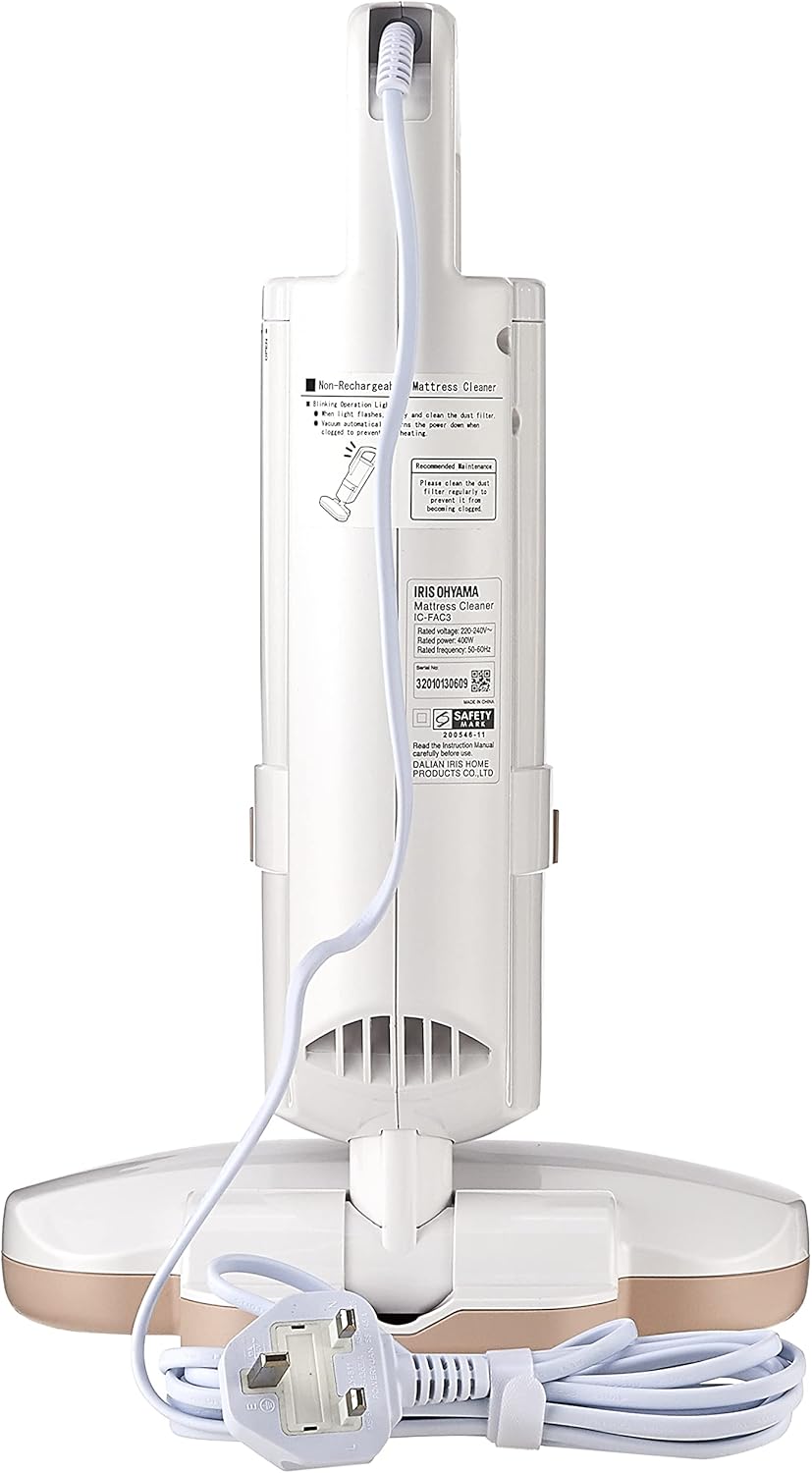
Figure 2.1: Front view of the IRIS OHYAMA IC-FAC3 Dust Mite Mattress and Furniture Vacuum Cleaner.

Figure 2.2: Back view showing the power cord and product label with specifications.

Figure 2.3: Close-up of the control panel, featuring High, Standard, Low power modes, and the ON/OFF button.

Figure 2.4: Included accessories: multiple washable filters and a small cleaning brush for maintenance.
Key Features:
- Dust Sensor: Indicates the amount of dust on the surface (red for high dust, green for low dust).
- Powerful Agitator: Vibrates to loosen dust mites and allergens from fabric.
- Cyclone Stream Technology: Efficiently captures agitated particles.
- HEPA Filter: Captures fine dust and allergens.
- Lightweight Design: Easy to handle and maneuver.
- Extra-Long Cord: Provides extended reach without frequent outlet changes.
3. Safety Instructions
To reduce the risk of fire, electric shock, or injury, always follow basic safety precautions when using an electrical appliance.
- Read all instructions before using the appliance.
- Do not use outdoors or on wet surfaces.
- Do not allow to be used as a toy. Close attention is necessary when used by or near children.
- Use only as described in this manual. Use only manufacturer’s recommended attachments.
- Do not use with a damaged cord or plug. If appliance is not working as it should, has been dropped, damaged, left outdoors, or dropped into water, return it to a service center.
- Do not pull or carry by cord, use cord as a handle, close a door on cord, or pull cord around sharp edges or corners. Do not run appliance over cord. Keep cord away from heated surfaces.
- Do not unplug by pulling on cord. To unplug, grasp the plug, not the cord.
- Do not handle plug or appliance with wet hands.
- Do not put any object into openings. Do not use with any opening blocked; keep free of dust, lint, hair, and anything that may reduce air flow.
- Keep hair, loose clothing, fingers, and all parts of body away from openings and moving parts.
- Do not pick up anything that is burning or smoking, such as cigarettes, matches, or hot ashes.
- Do not use to pick up flammable or combustible liquids, such as gasoline, or use in areas where they may be present.
- Do not use without dust cup and/or filters in place.
- Turn off all controls before unplugging.
- Use extra care when cleaning on stairs.
- Store the appliance indoors.
4. Setup
The IRIS OHYAMA IC-FAC3 is designed for immediate use with minimal assembly required.
- Unpack the Unit: Carefully remove all components from the packaging. Ensure all parts listed in the 'Included Components' section are present.
- Check Filters: Ensure the HEPA filter and dust cup are correctly installed before first use. Refer to the 'Maintenance' section for filter installation details.
- Connect to Power: Plug the extra-long power cord into a suitable electrical outlet (230 Volts).
5. Operating Instructions
Follow these steps for effective cleaning of your mattresses and furniture.
- Power On: Press the ON/OFF button located on the control panel (refer to Figure 2.3). The vacuum will start in Standard mode.
- Select Power Mode: You can cycle through power modes (Low, Standard, High) by pressing the mode button. For heavily soiled areas, select High mode. For lighter cleaning, Low or Standard mode is sufficient.
- Utilize the Dust Sensor: The integrated dust sensor will indicate the cleanliness of the surface:
- Red Light: Indicates a high concentration of dust and allergens. Continue vacuuming this area.
- Green Light: Indicates the area is relatively clean.
- Vacuuming Technique: Move the vacuum cleaner slowly and steadily across the surface of your mattress or furniture. Allow the powerful agitator to vibrate and loosen embedded dust mites and allergens. The cyclone stream technology will then suction these particles into the dust cup.
- Targeted Cleaning: The lightweight and handheld design allows for easy maneuverability, making it ideal for cleaning hard-to-reach areas, crevices, and corners of upholstered items.
- Power Off: Once cleaning is complete, press the ON/OFF button to turn off the appliance. Unplug the power cord from the outlet.
6. Maintenance
Regular maintenance ensures optimal performance and extends the lifespan of your vacuum cleaner.
6.1. Emptying the Dust Cup
- Ensure the vacuum is turned off and unplugged.
- Locate the dust cup release button (consult Figure 2.1 for location).
- Press the release button and carefully detach the dust cup from the main unit.
- Open the dust cup and empty its contents into a waste bin.
- Reattach the dust cup securely until it clicks into place.
6.2. Cleaning/Replacing Filters
The IRIS OHYAMA IC-FAC3 uses a washable, reusable HEPA filter. Regular cleaning is crucial for maintaining suction power.
- Ensure the vacuum is turned off and unplugged.
- Remove the dust cup as described in Section 6.1.
- Carefully remove the HEPA filter from the dust cup assembly.
- Rinse the filter under cool, running water until the water runs clear. Do not use detergent or hot water.
- Allow the filter to air dry completely for at least 24 hours before reinserting. Do not use a dryer or other heating methods.
- Once completely dry, reinsert the filter into the dust cup and reattach the dust cup to the vacuum cleaner.
Figure 6.1: The washable filters and cleaning brush are essential for maintaining your vacuum cleaner.
6.3. General Cleaning
- Wipe the exterior of the vacuum cleaner with a soft, damp cloth. Do not use abrasive cleaners or solvents.
- Use the included cleaning brush to remove any debris from the agitator brush and suction nozzle.
7. Troubleshooting
If you encounter any issues with your IRIS OHYAMA IC-FAC3, refer to the following table for common problems and solutions.
| Problem | Possible Cause | Solution |
|---|---|---|
| Vacuum does not turn on. | No power supply. | Check if the power cord is securely plugged into a working outlet. |
| Low suction power. | Dust cup is full or filter is clogged. | Empty the dust cup and clean the HEPA filter as per Section 6. |
| Dust sensor always shows red. | Area is very dusty or sensor is dirty. | Continue vacuuming the area. If the issue persists, gently wipe the sensor area with a dry cloth. |
| Unusual noise during operation. | Obstruction in the nozzle or agitator. | Turn off and unplug the vacuum. Inspect the nozzle and agitator for any blockages and remove them. |
8. Specifications
Technical details for the IRIS OHYAMA IC-FAC3 Dust Mite Mattress and Furniture Vacuum Cleaner.
- Model Number: IC-FAC3
- Brand: IRIS OHYAMA
- Power Source: Corded Electric
- Voltage: 230 Volts
- Wattage: 400 watts
- Filter Type: HEPA
- Form Factor: Handheld
- Item Weight: 0.5 Kilograms
- Item Dimensions (L x W x H): 9.8L x 5.7W x 15.9H centimetres
- Recommended Uses: Upholstered surfaces (mattresses, couches, furniture)
- Included Components: 1 x Vacuum cleaner
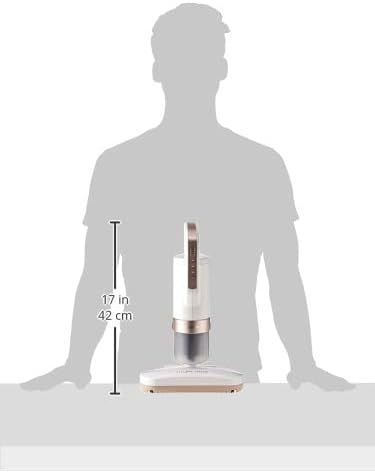
Figure 8.1: Product dimensions for the IRIS OHYAMA IC-FAC3.
9. Warranty and Support
This IRIS OHYAMA IC-FAC3 Dust Mite Mattress and Furniture Vacuum Cleaner comes with a 1 Year Distributor Carry-in Warranty. Please retain your proof of purchase for warranty claims.
For technical support, service, or warranty inquiries, please contact your local distributor or the point of purchase. Do not attempt to repair the appliance yourself, as this may void the warranty and pose safety risks.


