
1. Introduction
This manual provides essential information for the safe and efficient installation, operation, and maintenance of the KAINSC PRODUCTS Mean Well NDR-240-24 Industrial DIN Rail Power Supply. The NDR-240 series is an economical, slim 240W AC/DC power supply designed for installation on TS-35/7.5 or TS-35/15 mounting rails. It delivers a stable 24VDC output at 10A, suitable for various industrial control applications.
2. Safety Information
WARNING: Improper installation or operation can lead to electric shock, fire, or damage to the unit and connected equipment. Please read all instructions carefully before proceeding.
- Ensure the power supply is disconnected from the main power source before any installation, wiring, or maintenance procedures.
- This device is designed for use in a controlled environment.
- Installation should be performed by qualified personnel only.
- Use copper wire only, rated for a minimum of 75°C.
- Maintain a minimum 20mm air gap below the power supply for adequate ventilation.
- Ensure the maximum surrounding air temperature does not exceed 50°C.
- This product is intended for installation in a pollution degree 2 environment.

3. Product Features
The NDR-240-24 power supply offers robust performance and safety features:
- Output: 24VDC, 10A, 240W.
- Input Voltage: 90 ~ 264VAC / 124 ~ 370VDC.
- Protections: Short circuit, Overload, Over Voltage, Over Temperature.
- Certifications: UL and CE certified, UL 508 (Industrial Control Equipment) approved.
- High Efficiency: Up to 88.5%.
- Low Ripple & Noise: Maximum 150mVp-p.
- Mounting: Designed for DIN Rail (TS-35/7.5 or TS-35/15).
4. Technical Specifications
| Parameter | Value |
|---|---|
| Model | NDR-240-24 |
| Input Voltage Range | 90 ~ 264VAC / 127 ~ 370VDC |
| Input Frequency | 47 ~ 63 Hz |
| Output Voltage | 24VDC |
| Output Current | 10A |
| Output Power | 240W |
| Efficiency (Typ.) | 88.5% |
| Ripple & Noise (Max.) | 150mVp-p |
| Line Regulation | 0.5% |
| Load Regulation | 1% |
| Minimum Isolation Voltage | 3000VAC |
| Operating Temperature | -20°C to 70°C |
| Dimensions (L x W x H) | 113.5 x 63 x 125.2 mm (4.47 x 2.48 x 4.93 inches) |
| Weight | 1000g (2.13 pounds) |
| Mounting | DIN Rail |
| Cooling Method | Air |
| Connector Type | Screw Terminal Block |

5. Installation
5.1 Mounting
The NDR-240-24 is designed for easy installation on standard TS-35/7.5 or TS-35/15 DIN rails. Ensure the mounting location allows for proper ventilation, maintaining a minimum 20mm air gap below the unit.

5.2 Wiring
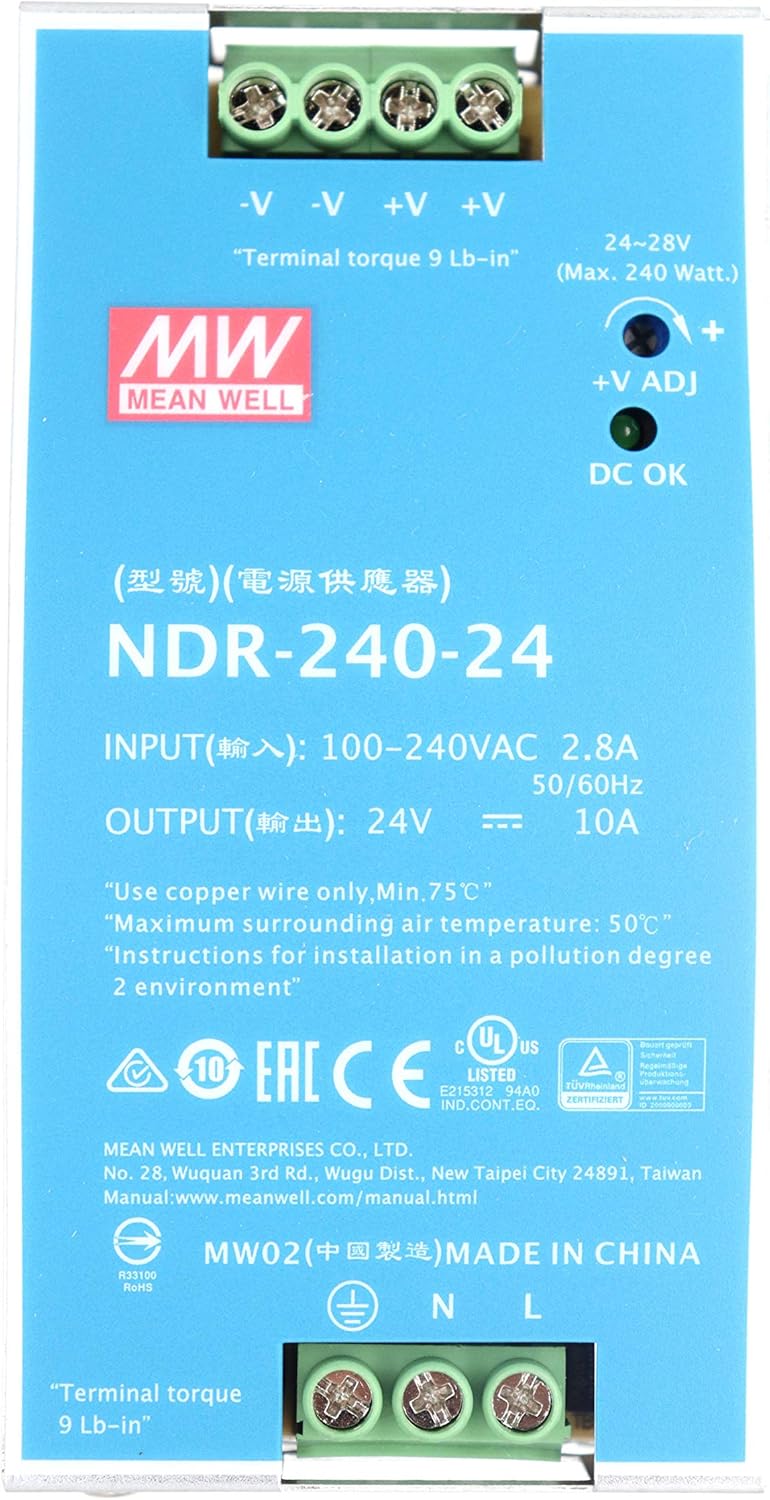
All connections are made via screw terminal blocks. Refer to the product label and mechanical specifications for precise terminal assignments.
- Input Connections (TB1): Connect the AC input (L, N) and Earth Ground (FG) to the designated terminals. For DC input, connect positive and negative to the appropriate AC/L and AC/N terminals as per the diagram.
- Output Connections (TB2): Connect the DC output load to the -V and +V terminals.
- Wire Type: Use copper wire only, rated for a minimum of 75°C.
- Terminal Torque: Ensure terminal screws are tightened to the specified torque:
- Input Terminals: 6.5 Lb-in
- Output Terminals: 9 Lb-in

6. Operation
6.1 Power On
Once properly installed and wired, apply the specified AC or DC input voltage. The power supply will begin operation, providing 24VDC output.
6.2 Output Voltage Adjustment
The output voltage can be finely adjusted within the range of 24-28VDC using the "+V ADJ" potentiometer located on the front panel. Use a small screwdriver to carefully turn the potentiometer to achieve the desired output voltage.
6.3 DC OK Indicator
The "DC OK" LED indicator on the front panel illuminates when the output voltage is within the acceptable operating range, confirming proper function.
7. Maintenance
The NDR-240-24 power supply is designed for reliable, long-term operation with minimal maintenance. However, periodic checks are recommended:
- Ventilation: Ensure that the ventilation openings are clear of dust and obstructions to maintain proper airflow and prevent overheating.
- Connections: Periodically check all terminal connections for tightness to prevent loose wiring, which can cause intermittent operation or overheating.
- Environmental Conditions: Ensure the operating environment remains within the specified temperature range (-20°C to 70°C) and humidity levels.
- Cleaning: If necessary, gently clean the exterior of the unit with a soft, dry cloth. Do not use liquid cleaners or solvents.
8. Troubleshooting
If the power supply is not functioning as expected, consider the following:
- No Output Power / DC OK LED Off:
- Check the input power source. Ensure AC or DC input voltage is within the specified range (90-264VAC / 127-370VDC).
- Verify all input and output wiring connections are secure and correct.
- Check for short circuits or overloads on the output. The unit has short circuit and overload protection, which may cause it to shut down. Remove the fault and cycle the input power to reset.
- Output Voltage Too Low or High:
- Adjust the "+V ADJ" potentiometer on the front panel.
- Ensure the load is not exceeding the rated 10A output current.
- Overheating:
- Check for adequate ventilation. Ensure the 20mm air gap below the unit is maintained and no vents are blocked.
- Reduce the ambient temperature if it exceeds 50°C.
- Ensure the load is not exceeding the rated output power (240W).
- Over Voltage Protection (OVP): If the output voltage exceeds a preset limit, the unit will shut down. Remove the fault and cycle the input power to reset.
- Over Temperature Protection (OTP): If the internal temperature exceeds a safe limit, the unit will shut down. Allow the unit to cool down, ensure proper ventilation, and then cycle the input power to reset.
9. Warranty and Support
For warranty information and technical support, please contact KAINSC PRODUCTS KAWAGUCH INDUSTRIAL SCIENTIFIC or refer to the official Mean Well website.
Manufacturer: MEAN WELL ENTERPRISES CO., LTD.
Official Manuals: For detailed technical documentation, please visit www.meanwell.com/manual.html.