
1. Product Overview
The Camslead CL9D91BCH is a comprehensive 9-inch 1080P wired backup camera system designed for various large vehicles such as fifth wheels, tractor trailers, campers, and RVs. This system features an HD monitor with built-in DVR recording capabilities, along with multiple 1080P waterproof cameras to enhance safety and visibility during driving and parking maneuvers.
2. Package Contents
Ensure all items listed below are present in your package:
- 9 inch Monitor with DVR x 1pcs
- 1080P Side Camera x 2pcs
- 1080P Backup Camera x 2pcs
- 4PIN 15m Cable x 4pcs
- U-Bracket x 1pcs
- Power Cable x 1pcs
- Sunshade x 1pcs
- Remote Control x 1pcs
- Operation Manual x 1pcs
- Sponge Mat x 2pcs

Figure 2.1: Complete Package Contents
3. System Components
3.1. 9-inch HD Digital Monitor with DVR
The system includes a high-definition 9-inch digital color LCD monitor with a resolution of 1024(H)*600(V). It features a built-in quad/split screen function, allowing simultaneous display of up to four camera views. Eight multi-screen combination display modes are available and can be set as the default boot screen. The monitor also has a built-in 1080P DVR for video recording, storing files on an SD card (max 256G, not included) with loop recording and auto-overwrite functionality. Recorded videos can be played back directly on the monitor or on a computer.

Figure 3.1: 9-inch HD Digital Monitor with DVR Features

Figure 3.2: 9-inch Monitor Dimensions
3.2. 1080P Cameras
The system includes 1080P cameras (reversing and side-view) equipped with a SONY CCD 1/2.8" 1080P image sensor, providing effective pixels of 1920(H) x 1080(V) at 30 frames per second. Both camera types feature sturdy metal shells and an IP69 waterproof rating for durability. They are equipped with IR Night Vision for clear visibility in low-light conditions, with the backup camera having 18 IR LEDs and the side cameras having 12 IR LEDs, offering a night vision distance of up to 12 meters.
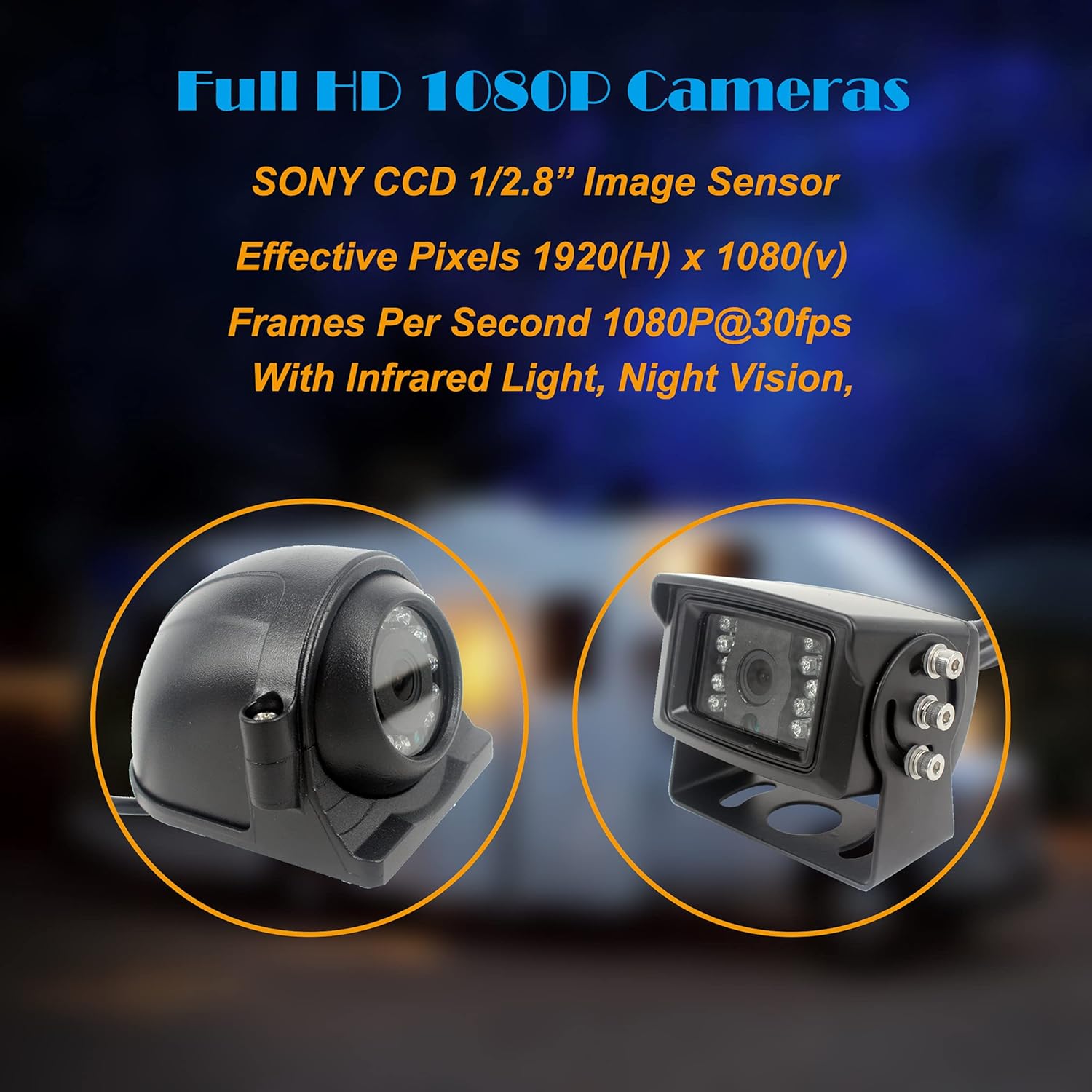
Figure 3.3: Full HD 1080P Camera Features

Figure 3.4: Full HD 1080P Backup Camera Details

Figure 3.5: Full HD 1080P Side Camera Details

Figure 3.6: Camera Types
4. Installation Guide
This system is designed for easy installation with a wide voltage range (12V-36V DC) suitable for most medium to large vehicles.
4.1. Wiring Connections
- Connect the Red and Yellow wires to the ACC (Accessory) power source.
- Connect the Black wire to a metal ground point on your vehicle.
- Connect the 4-pin plugs from the cameras to the corresponding extension cables as shown in the diagram.
- The trigger wires (AV1/AV2/AV3/AV4) can be connected based on your specific needs. When a trigger wire is activated, the monitor will display the corresponding camera image in full screen.
4.2. 24-Hour Parking Monitoring
For 24-hour parking monitoring functionality, connect the yellow wire to the battery+ and the red wire to ACC+. Note: The yellow wire must be connected to the ACC+ or battery+; otherwise, the monitor will remain in sleep mode and the screen will not activate.
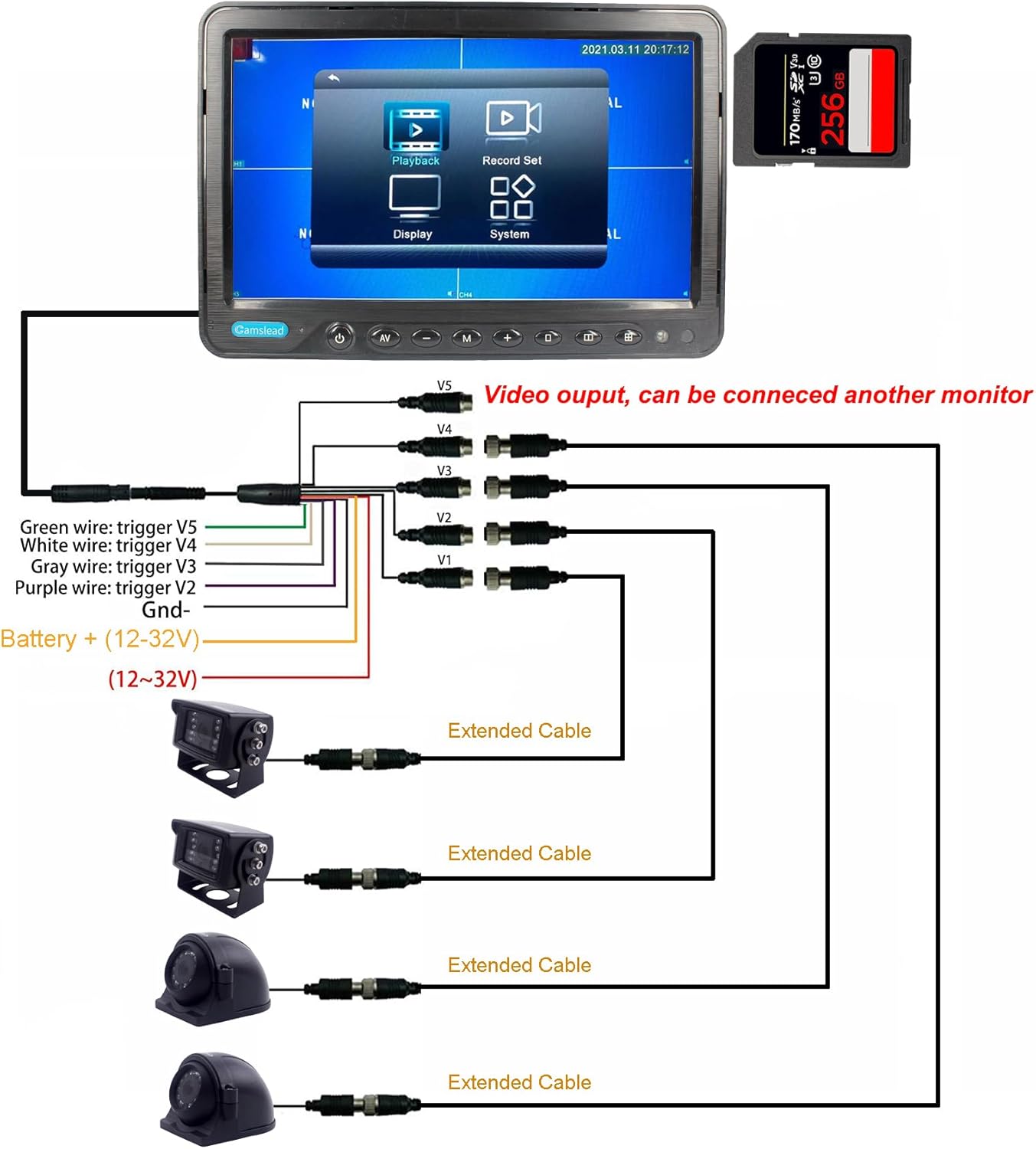
Figure 4.1: System Wiring Diagram
4.3. Installation Overview
Video 4.1: This video provides an overview of the Camslead car monitor with DVR and backup/side camera system, demonstrating its features and potential applications in a vehicle.
5. Operating Instructions
5.1. Monitor Display Modes
The 9-inch monitor supports various display modes, including single camera view, dual view, triple view, and quad view, allowing you to monitor multiple camera feeds simultaneously. You can easily switch between these modes using the monitor's controls.
5.2. DVR Recording and Playback
The built-in DVR records 1080P video footage to an SD card (not included). The system supports loop recording, automatically overwriting older files when the card is full. You can play back recorded videos directly on the monitor to review events.
5.3. Parking Lines Assistance
The reversing screen can display parking lines to assist with safer and faster parking. These parking lines can be added or adjusted through the display settings on the monitor.
5.4. General Operation Overview
Video 5.1: This video from Camslead demonstrates the car monitor's features, including 1080P recording and side camera views, showcasing its functionality in a vehicle.
Video 5.2: This video, from Fookoo, illustrates various features of a 9-inch HD 1080P wireless backup camera system, including easy installation, split screen modes, loop recording, infrared night vision, adjustable lens, and parking lines assistance. While from a different brand, the features demonstrated are highly relevant to the Camslead system's capabilities.
6. Specifications
| Feature | Specification |
|---|---|
| Product Dimensions | 8.98 x 6.1 x 1.06 inches |
| Item Weight | 13.2 pounds |
| Item Model Number | CL9D91BCH |
| Batteries | 2 Lithium Metal batteries required (included) |
| Display Technology | LCD |
| Screen Size | 9 Inches |
| Voltage | 12V-36V DC |
| Optical Sensor Technology | CMOS |
| Lens Type | Wide Angle |
| Real Angle of View | 150 Degrees |
| Optical Sensor Size | 1/2.8 inches |
7. Maintenance
To ensure optimal performance and longevity of your Camslead backup camera system, follow these maintenance guidelines:
- Cleaning: Regularly clean the monitor screen and camera lenses with a soft, damp cloth. Avoid abrasive cleaners that could scratch surfaces.
- Cable Inspection: Periodically check all wiring connections for any signs of wear, damage, or loose connections. Secure any loose cables to prevent interference or disconnection.
- Camera Placement: Ensure cameras remain securely mounted and their viewing angles are not obstructed.
- SD Card Management: If using the DVR function, regularly back up important footage and format the SD card to maintain recording efficiency.
8. Troubleshooting
If you encounter any issues with your Camslead backup camera system, refer to the following common troubleshooting tips:
- No Signal: Check all power and video cable connections. Ensure the cameras are receiving power and the monitor is correctly configured for the active input channel.
- Flickering/Distorted Image: Verify that all connections are secure and free from damage. Ensure proper grounding. Interference from other electronic devices can sometimes cause this; try to isolate the system's wiring.
- Upside-Down Menu After Reset: If your monitor's menu appears upside down after a reset, this can typically be fixed through a specific sequence of button presses to access and adjust the rotation settings.
8.1. Fixing Upside-Down Menu
Video 8.1: This video, from WOOCARTY-US, demonstrates a quick fix for an upside-down menu issue that may occur after a monitor reset. The steps involve long-pressing the 'M' button, navigating to the rotation menu with 'OK', and selecting 'MODE 2' to correct the display orientation. This is a common troubleshooting step for similar monitor systems.
9. Warranty and Support
Camslead is committed to customer satisfaction and product reliability. Your system comes with the following:
- 12-Month Warranty: Covers manufacturing defects and malfunctions under normal use.
- 30-Day Return Policy: Allows for returns within 30 days of purchase, subject to terms and conditions.
- 24-Hour Customer Support: Dedicated support team available to assist with any product-related inquiries or issues.
For further assistance, please refer to the contact information provided in your product packaging or visit the official Camslead website.