
JBL EON712
JBL Professional EON712 Powered PA Speaker User Manual
Model: EON712 | Brand: JBL
1. Introduction
Thank you for choosing the JBL Professional EON712 Powered PA Speaker. This 12-inch, 1300-watt loudspeaker with Bluetooth connectivity is designed to deliver advanced acoustic performance for a wide range of applications, including live sound, DJ sets, houses of worship, and more. This manual provides essential information for the safe and effective setup, operation, and maintenance of your EON712 speaker.
2. Safety Information
Please read and understand all safety instructions before operating this product. Retain this manual for future reference.
- Power Source: Connect the speaker only to the specified power supply type as indicated on the unit. Ensure the power cord is not walked on or pinched.
- Ventilation: Do not block any ventilation openings. Install in accordance with the manufacturer's instructions.
- Water and Moisture: Do not expose this apparatus to rain or moisture. Do not use near water.
- Heat: Do not install near any heat sources such as radiators, heat registers, stoves, or other apparatus (including amplifiers) that produce heat.
- Servicing: Do not attempt to service this product yourself. Refer all servicing to qualified service personnel. Servicing is required when the apparatus has been damaged in any way, such as power-supply cord or plug is damaged, liquid has been spilled or objects have fallen into the apparatus, the apparatus has been exposed to rain or moisture, does not operate normally, or has been dropped.
- Hearing Protection: Prolonged exposure to high sound pressure levels can cause permanent hearing damage. Use caution when setting volume levels.
3. Product Overview
The JBL EON712 is a powerful and versatile PA speaker designed for professional audio applications. It combines advanced acoustic performance with user-friendly features and robust construction.
Key Features:
- Advanced Acoustic Performance: Features a state-of-the-art design with an advanced waveguide and transducer for uniform coverage.
- Powerful Amplification: Powered by 1,300 watts of ultra-efficient discrete Class D amplification for clean, clear sound.
- Versatile Connectivity: Equipped with Bluetooth 5.0 for convenient wireless audio streaming.
- Integrated DSP: Comprehensive Digital Signal Processing (DSP) package including EQ, limiters, delay, dbx Automatic Feedback Suppression, and ducking.
- Flexible Control: Settings accessible via an integrated backlit LCD screen on the speaker or remotely using the JBL Pro Connect App.
- Portable Design: Lightweight and easy to transport, part of the EON700 Series.
- Multiple Mounting Options: Built-in pole mount, top and rear suspension points for flying, and can be used as floor monitors.
Product Views:

Figure 3.1: Angled front view of the JBL EON712 Powered PA Speaker, showcasing its robust grille and integrated handles.
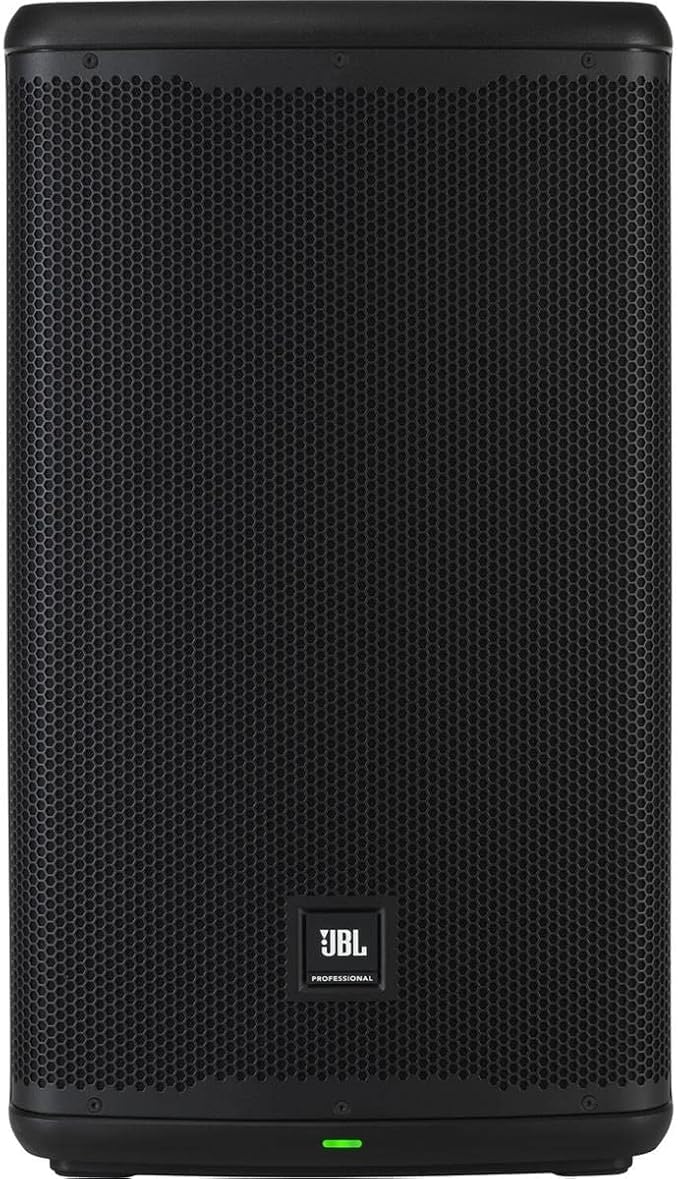
Figure 3.2: Direct front view of the JBL EON712 speaker, highlighting the JBL Professional logo and the status indicator light at the bottom.

Figure 3.3: Side view of the JBL EON712 speaker, showing the integrated side handle for easy transport.

Figure 3.4: Rear panel of the JBL EON712, showing the LCD screen, input/output connections (XLR, gain controls), and power input.

Figure 3.5: The JBL EON712 speaker with its approximate dimensions: 26.3 inches height, 15 inches width, and 12.75 inches depth.

Figure 3.6: A person carrying the JBL EON712 speaker, demonstrating its portability and ease of transport for musicians and creative providers.
4. Setup
4.1 Initial Placement
The EON712 can be used in various configurations:
- Main PA Speaker: Place on a speaker pole using the built-in pole mount.
- Floor Monitor: Position the speaker on its side for use as a stage monitor.
- Flown Installation: Utilize the top and rear suspension points for fixed installations with an optional universal yoke mount.
4.2 Power Connection
- Ensure the speaker's power switch is in the OFF position.
- Connect the provided corded electric power cable to the AC inlet on the rear panel of the speaker.
- Plug the other end of the power cable into a suitable electrical outlet.
4.3 Audio Connections
Connect your audio sources (mixers, microphones, instruments) to the input jacks on the rear panel. The EON712 typically features XLR/TRS combo inputs.
4.4 Bluetooth Pairing
To stream audio wirelessly via Bluetooth 5.0:
- Power on the EON712 speaker.
- Navigate to the Bluetooth pairing option on the speaker's LCD screen or via the JBL Pro Connect App.
- Enable Bluetooth on your audio device (smartphone, tablet, computer).
- Select "JBL EON712" from the list of available devices to pair.
- Once paired, you can stream audio directly to the speaker.
5. Operating Instructions
5.1 Powering On/Off
To power on the speaker, flip the power switch located on the rear panel to the ON position. The status indicator light on the front will illuminate. To power off, flip the switch to the OFF position.
5.2 Using the Integrated LCD Screen
The backlit LCD screen on the rear panel provides access to the speaker's Digital Signal Processing (DSP) functions. Use the navigation buttons to browse menus and adjust settings such as:
- EQ: Adjust equalization settings to tailor the sound to your environment.
- Limiters: Protect the speaker from excessive signal levels.
- Delay: Synchronize audio with other speakers in larger setups.
- dbx Automatic Feedback Suppression: Minimize unwanted audio feedback.
- Ducking: Automatically lower background music when a microphone signal is present.
5.3 JBL Pro Connect App Control
For comprehensive remote control, download the JBL Pro Connect App from your device's app store. The app allows you to manage all DSP functions, save and recall presets, and control multiple EON700 series speakers from anywhere in the venue.
- Download and install the JBL Pro Connect App.
- Ensure your EON712 speaker is powered on and Bluetooth is enabled.
- Open the app and follow the on-screen instructions to connect to your speaker(s).
5.4 Gain Control
Adjust the gain knobs on the rear panel for each input channel to achieve optimal signal levels without clipping. Monitor the LIMIT indicator light; if it flashes frequently, reduce the input gain.
6. Maintenance
6.1 Cleaning
Clean the exterior of the speaker with a soft, dry cloth. Do not use abrasive cleaners, waxes, or solvents. Ensure no liquids enter the speaker's openings.
6.2 Storage
When not in use, store the EON712 in a cool, dry place, away from direct sunlight and extreme temperatures. The stackable cabinet design allows for easy storage.
6.3 Inspection
Periodically inspect the power cord for any damage. If the cord is damaged, it must be replaced by qualified service personnel.
7. Troubleshooting
If you encounter issues with your JBL EON712 speaker, refer to the following common troubleshooting steps:
| Problem | Possible Cause | Solution |
|---|---|---|
| No Power | Power cable disconnected; outlet not active; speaker power switch off. | Check power cable connection; test outlet with another device; ensure power switch is ON. |
| No Sound Output | Input gain too low; source device volume low; incorrect input selected; faulty cable. | Increase input gain; check source device volume; verify correct input on speaker; try a different cable. |
| Distorted Sound | Input signal too high (clipping); speaker overloaded; EQ settings incorrect. | Reduce input gain (check LIMIT light); lower overall volume; adjust EQ settings. |
| Bluetooth Connection Issues | Device too far; interference; speaker not in pairing mode. | Move device closer to speaker; avoid obstacles; ensure speaker is in Bluetooth pairing mode. |
If the problem persists after trying these steps, please contact JBL Professional customer support.
8. Specifications
| Feature | Detail |
|---|---|
| Brand | JBL |
| Model | EON712 |
| Speaker Type | Powered PA Speaker, Loudspeaker |
| Speaker Size | 12-inch |
| Maximum Output Power | 1300 Watts |
| Frequency Response | Up to 20000 Hz |
| Connectivity Technology | Bluetooth 5.0, Corded Electric |
| Amplification | Class D |
| DSP Features | EQ, Limiters, Delay, dbx Automatic Feedback Suppression, Ducking |
| Control Interface | Integrated backlit LCD screen, JBL Pro Connect App |
9. Warranty and Support
JBL Professional products are designed for reliability and performance. For detailed warranty information specific to your region and product, please refer to the warranty card included with your purchase or visit the official JBL Professional website.
For technical support, service, or additional product information, please visit the JBL Professional Store on Amazon or the official JBL Professional website.
Related Documents - EON712
 |
JBL PRX500 Series Professional PA Loudspeakers User Guide Comprehensive user guide for JBL PRX500 series self-powered PA loudspeakers, covering setup, specifications, applications, troubleshooting, and warranty information. Learn how to optimize performance and ensure safe operation of your JBL audio equipment. |
 |
JBL EON700 Series Loudspeaker User's Guide | Setup, Features, and Specifications Comprehensive user's guide for the JBL EON700 Series loudspeakers, covering safety instructions, setup, mixer panel functions, application examples, technical specifications, connectivity, contact information, and warranty details. |
 |
JBL 4367 Owner's Manual: 15-inch 2-Way Floorstanding Loudspeaker This owner's manual provides detailed information on the JBL 4367, a 15-inch 2-way floorstanding loudspeaker. Learn about setup, placement, connections, controls, and care for optimal audio performance. |
 |
JBL Factory Reset Guide for Audio Equipment Comprehensive guide detailing how to perform a factory reset on various JBL audio equipment models, including EON, EON ONE, IRX, PRX, and 7 Series. Restores devices to default settings. |
 |
JBL Bar 1300 Owner's Manual: Setup, Features, and Troubleshooting Comprehensive guide for the JBL Bar 1300 soundbar system. Learn about setup, connections (HDMI, Bluetooth, Wi-Fi), detachable speaker usage, sound settings, multi-room playback, software updates, and troubleshooting. Includes product specifications and safety instructions. |
 |
JBL Bar 1300 Owner's Manual: Setup, Features, and Troubleshooting Comprehensive owner's manual for the JBL Bar 1300 soundbar system, detailing setup, connections, features like 3D surround sound, Bluetooth, Wi-Fi, app integration, and troubleshooting. Learn how to optimize your home theater audio experience. |
Ask a question about this manual
Ask about setup, troubleshooting, compatibility, parts, safety, or missing instructions. Manuals+ will review the question and use this page’s manual context to help answer it.