
1. Safety Information
Please read these instructions carefully before using the device. Keep this manual for future reference.
- Do not disassemble or modify the unit.
- Do not expose the unit to water, moisture, or extreme temperatures.
- Use only the provided power adapter or one specified by the manufacturer.
- Ensure proper ventilation to prevent overheating.
- Disconnect the power cable during lightning storms or when unused for long periods.
2. Product Overview
The SABAJ A20d 2023 is a high-performance decoding and headphone amplifier designed for audiophiles. It features the AK4499EX+AK4191EQ chip combination, supporting MQA, MQA-CD full decoding, Bluetooth 5.0 with LDAC and Apt-X HD, and native DSD512 up to 32-bit/768kHz PCM. It integrates a high-quality headphone amplifier and versatile input/output options.

A front view of the Sabaj A20d 2023 Decoding & Headphone Amplifier, showcasing its sleek design and display. This unit features the AK4499EX chip and a high-performance headphone amplifier.
3. Package Contents
Verify that all items are present in the package:
- 1 × SABAJ A20d 2023 Unit
- 1 × Power Cable
- 1 × USB Cable (Type-C)
- 1 × Remote Control
- 1 × Bluetooth Antenna
- 1 × User Manual

This image provides the dimensions of the Sabaj A20d 2023 (200mm width, 210mm depth, 59mm height) and lists the included accessories: power cable, remote control, Bluetooth antenna, USB cable (Type-C), and user manual.
4. Setup
4.1 Connecting the Device
Before connecting, ensure the unit is powered off.

This image displays the rear panel of the Sabaj A20d 2023, highlighting its various input and output connections. Numbered labels indicate: 1. Display, 2. Knob, 3. 6.35mm headphone jack, 4. 4.4mm headphone jack, 5. XLR output, 6. RCA output, 7. Coaxial input, 8. Optical input, 9. USB input (Type-C), 10. Bluetooth antenna, 11. Power input (100-240V).
- Power Connection: Connect the provided power cable to the AC IN port (11) on the rear panel and then to a power outlet.
- Bluetooth Antenna: Screw the Bluetooth antenna (10) into its designated port on the rear panel for optimal wireless reception.
- Input Source:
- USB Input (Type-C): Connect your computer or other USB audio source to the USB input port (9) using the supplied USB cable.
- Optical Input: Connect an optical cable from your audio source to the Optical input port (8).
- Coaxial Input: Connect a coaxial cable from your audio source to the Coaxial input port (7).
- Output Connection:
- XLR Output: For balanced audio output, connect XLR cables from the XLR output ports (5) to your amplifier or active speakers.
- RCA Output: For unbalanced audio output, connect RCA cables from the RCA output ports (6) to your amplifier or active speakers.
- Headphone Output: Connect your headphones to either the 6.35mm headphone jack (3) or the 4.4mm balanced headphone jack (4) on the front panel.
4.2 Initial Power On
After all connections are made, press the power button on the front panel or the remote control to turn on the device. The display (1) will illuminate.
5. Operation
5.1 Front Panel Controls
- Knob (2): Rotate to adjust volume. Press to access the menu or confirm selections.
- Display (1): Shows current input, sample rate, volume level, and menu options.
5.2 Remote Control Functions
The included remote control provides convenient access to all functions.

The remote control for the Sabaj A20d 2023, showing buttons for Power (ON/OFF), Menu, Mute, Input selection, FN (customizable function), Volume Up, and Volume Down. The remote allows convenient control of the device's features.
- ON/OFF: Power on or off the unit.
- Menu: Access the device's settings menu.
- Mute: Mute or unmute the audio output.
- Input Selection: Cycle through available input sources (USB, Optical, Coaxial, Bluetooth).
- FN (Function): Customizable button for quick access to a specific setting.
- Volume Up/Down: Adjust the output volume.
5.3 Input Selection
Use the Input Selection button on the remote or the front panel knob to switch between USB, Optical, Coaxial, and Bluetooth inputs.
5.4 PCM and DSD Filters
The A20d 2023 offers various digital filters to fine-tune the sound characteristics. Access these options via the menu.
The display interface of the Sabaj A20d 2023, illustrating the available PCM filter options (Sharp Roll-off, Slow Roll-off, Short Sharp, Short Slow, Super Slow, Low Dispersion), Sound Color settings (Sound 1-4), and DSD filter options (Wide, Narrow). This allows users to customize the audio output characteristics.
- PCM Filters: Select from 7 different options including Sharp Roll-off, Slow Roll-off, Short Sharp, Short Slow, Super Slow, and Low Dispersion.
- DSD Filters: Choose between 'Wide' and 'Narrow' modes.
- Sound Color: Four distinct sound color options are available to further customize the audio output.
5.5 Preamplifier Mode
The A20d 2023 can operate in different preamplifier modes, affecting the output volume control.

This image shows the Sabaj A20d 2023 display with preamplifier mode settings, including 'Variable', 'Fixed', and 'Fixed DSD Bypass'. These modes control the output volume behavior and DSD signal processing.
- Variable: Output volume is controlled by the device's volume knob/remote.
- Fixed: Output volume is fixed at a maximum level, bypassing the device's volume control. Ideal when connecting to an amplifier with its own volume control.
- Fixed DSD Bypass: DSD signals are passed through directly without processing, and the output volume is fixed.
5.6 Bluetooth Operation
The A20d 2023 supports Bluetooth 5.0 with high-quality codecs like LDAC and Apt-X HD.
- Switch the input to Bluetooth. The display will show 'BT'.
- On your source device (smartphone, tablet), search for Bluetooth devices and select 'SABAJ A20d'.
- Once paired, audio will stream wirelessly to the A20d 2023.
5.7 MQA Decoding
The A20d 2023 is a full MQA decoder, capable of rendering MQA audio files and MQA-CDs.

This image illustrates the Sabaj A20d 2023's capability as a full MQA decoder, supporting MQA-CD playback via optical/coaxial inputs. The display shows the MQA logo, indicating active MQA decoding.
- When playing MQA content, the display will show the MQA logo, confirming active decoding.
- MQA-CDs can be decoded when connected via optical or coaxial inputs from a compatible CD player.
5.8 Headphone Output
The integrated headphone amplifier provides high-quality audio for various headphone types.
The front panel of the Sabaj A20d 2023, illustrating the 6.35mm single-ended and 4.4mm balanced headphone jacks. Icons represent various headphone types: ear buds, in-ear monitors, and over-ear headphones, indicating compatibility.
- Connect headphones to the 6.35mm (single-ended) or 4.4mm (balanced) jacks.
- Adjust volume using the front panel knob or remote control.
- The headphone amplifier features adjustable gain (+8dB / 0dB) for compatibility with various headphone sensitivities.
6. Maintenance
To ensure the longevity and optimal performance of your SABAJ A20d 2023, follow these maintenance guidelines:
- Cleaning: Use a soft, dry cloth to clean the exterior of the unit. Avoid using abrasive cleaners, solvents, or chemical sprays.
- Ventilation: Ensure that the ventilation openings are not blocked. Do not place the unit in an enclosed space without adequate airflow.
- Storage: If storing the unit for an extended period, disconnect it from power and store it in a cool, dry place away from direct sunlight.
- Cable Connections: Periodically check all cable connections to ensure they are secure and free from damage.
7. Troubleshooting
If you encounter issues with your SABAJ A20d 2023, refer to the following common solutions:
| Problem | Possible Cause | Solution |
|---|---|---|
| No power | Power cable not connected; Power outlet faulty; Unit switched off. | Check power cable connection; Try a different outlet; Press the power button. |
| No sound output | Incorrect input selected; Volume too low; Mute function active; Output cables loose/incorrect. | Select correct input; Increase volume; Deactivate mute; Check output cable connections. |
| Bluetooth connection issues | Device not in pairing mode; Interference; Source device too far. | Ensure A20d is in Bluetooth input mode; Move closer to the unit; Re-pair the device. |
| Distorted or poor sound quality | Incorrect filter settings; Source audio quality; Damaged cables. | Experiment with PCM/DSD filter settings; Use high-quality audio files; Check/replace cables. |
| No volume control on Mac (USB) | Operating system limitation. | Adjust volume directly on the A20d 2023 using its knob or remote. This is a known characteristic for some DACs with macOS. |
| USB-C connection issues with Android/PC | Driver issues; Compatibility. | Ensure necessary drivers are installed for your operating system. Some devices may require specific apps or advanced configurations. Consider using optical or coaxial inputs if USB-C is problematic. |
8. Specifications
Key technical specifications of the SABAJ A20d 2023:
- DAC Chip: AK4499EX + AK4191EQ
- Op-Amps: 3 × OPA1612
- USB Solution: Second-generation XMOS (supports DoP256, native DSD512, PCM up to 32-bit/768kHz)
- Bluetooth: 5.0 (Qualcomm chip, supports LDAC 24bit/96kHz, APTX/HD, SBC, AAC)
- MQA Support: MQA, MQA-CD Full Decoding
- Headphone Amplifier: TPA6120A2 (with +8dB / 0dB gain adjustment)
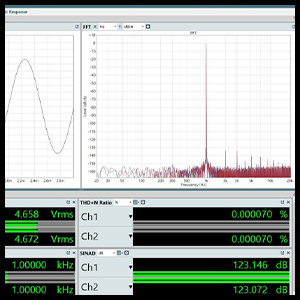
- Output Amplitude: XLR: 4.6Vrms; RCA: 2.3Vrms
- Power Supply: Built-in low-noise switching power supply; discrete component linear power supply.
- Display: High-resolution tempered glass display with 6 brightness levels.
- Dimensions: Approximately 200mm (W) x 210mm (D) x 59mm (H)
- Weight: Approximately 2.57 pounds (1.17 kg)

A detailed view of the AK4499EX and AK4191EQ decoding chips on the circuit board, highlighting the core components responsible for the device's high-resolution audio processing.
9. Warranty and Support
SABAJ products are designed for reliability and performance. For warranty information or technical support, please refer to the documentation included with your purchase or visit the official Sabaj website. Keep your purchase receipt as proof of purchase for warranty claims.
For further assistance, you may contact the seller or visit the Sabaj Store on Amazon.


