
1. Introduction
The HPE Networking Instant On Switch Series 1960, model JL805A#ABB, is an advanced, smart-managed, stackable Layer 2+ Ethernet switch designed for growing businesses. This manual provides essential information for setting up, operating, maintaining, and troubleshooting your switch, ensuring optimal performance and network reliability.
2. Product Overview
Key Features
- Highest Performance Capacity: Smart-managed and stackable Layer 2+ switch with 10GbE uplinks and Class 4 and Class 6 PoE.
- Easy Setup and Management: Configure, manage, and monitor Instant On switches and access points via the Instant On mobile app or web browser without subscription fees.
- Flexible Configuration: Rack-width design with rack mounting ears for versatile installation (rack, wall, or flat-surface mount). Ports and LEDs are front-facing for easy access.
- High-Performance Ports: Features 16 active ports, including 12x gigabit 100/1000/10GBase-T ports and 4x 1G/10G SFP+ uplink ports.
- Stackable Design: Stack up to four 1960 switches for simplified network operations and future expansion, with flexible stacking at 1G and 10G speeds.
- Enhanced Security: Includes advanced security features such as IEEE 802.1X, MAC authentication, Access Control Lists (ACL), Layer 3 IPv4, IPv6 static routing, and Spanning Tree Protocols.
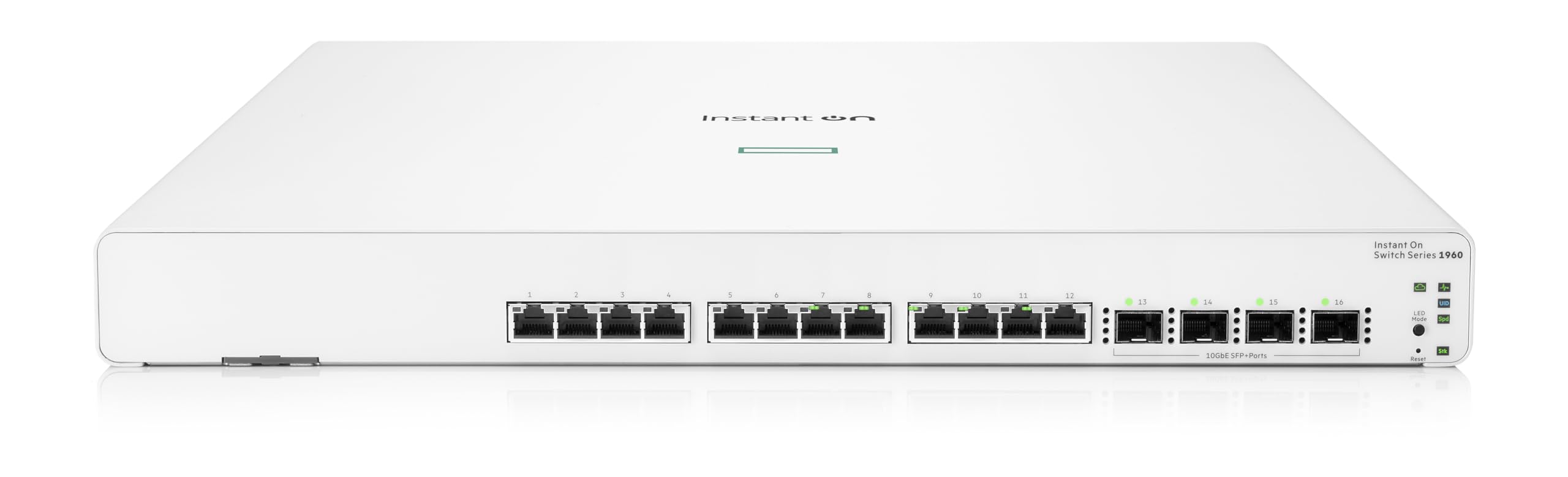
Figure 1: Front view of the HPE Networking Instant On Switch 1960 Series JL805A#ABB, showing the 12 10GBase-T ports and 4 SFP+ uplink ports.

Figure 2: Back view of the HPE Networking Instant On Switch 1960 Series JL805A#ABB, showing the power input and ventilation.

Figure 3: Multiple HPE Networking Instant On Switch Series 1960 units stacked, demonstrating their stackable capability.
3. What's in the Box
Upon unboxing your HPE Networking Instant On Switch Series 1960, model JL805A#ABB, verify that all components are present:
- HPE Networking Instant On Switch Series 1960 (JL805A#ABB)
- 4 SFP+ ports/connectors (transceivers may be sold separately)
- US Power Cord
- Rack mounting ears (for rack or wall mount)
4. Setup
4.1 Physical Installation
The switch can be installed in a rack, mounted on a wall, or placed on a flat surface. Ensure adequate ventilation around the unit.
- Rack Mount: Attach the provided rack mounting ears to the sides of the switch using the included screws. Secure the switch into a standard 19-inch equipment rack.
- Wall Mount: Use the rack mounting ears to secure the switch to a suitable wall surface. Ensure the wall can support the weight of the switch and connected cables.
- Desktop Placement: Place the switch on a stable, flat surface, ensuring that ventilation openings are not obstructed.
4.2 Power Connection
Connect the provided US power cord to the power inlet on the back of the switch and then to a grounded electrical outlet.
4.3 Network Connections
Connect your network devices (servers, workstations, access points) to the 10GBase-T Ethernet ports using appropriate Ethernet cables. For high-speed uplinks, insert SFP+ transceivers (if not already installed) into the SFP+ slots and connect fiber optic cables.
4.4 Initial Configuration
The HPE Instant On 1960 Series switches can be configured via the Instant On mobile app or a web browser.
- Mobile App: Download the HPE Instant On mobile app. Locate the 'Luggage Tag' on your switch, which contains a QR code with the switch ID. Scan the QR code with the app for easy pairing and guided setup.
- Web Browser: Connect a computer directly to one of the switch's Ethernet ports. The switch will obtain an IP address via DHCP or use a default fallback IP. Access the web-based GUI by entering the switch's IP address in your browser.

Figure 4: Front view of the switch with the 'Luggage Tag' pulled out, showing the QR code for easy mobile app pairing.
5. Operating Instructions
5.1 Management Interface
Manage your switch using the HPE Instant On mobile app or the cloud-based web portal. These interfaces allow you to:
- Monitor network status and device health.
- Configure port settings, VLANs, and QoS.
- Manage security features like 802.1X and ACLs.
- Set up guest networks and employee access.
5.2 Stacking Switches
The 1960 Series supports stacking up to four switches. This allows for unified management and increased network capacity.
- Connect the stacking ports (SFP+ ports) between the switches using appropriate cables.
- Use the Instant On mobile app or web portal to configure the stacking. The system will guide you through the process of creating a stack and managing it as a single logical unit.

Figure 5: Illustration of the stacking capability of the HPE Networking Instant On Switch Series 1960, showing multiple units connected.
6. Maintenance
Regular maintenance ensures the longevity and optimal performance of your switch.
- Firmware Updates: Periodically check for and apply firmware updates through the Instant On management interface to ensure your switch has the latest features and security patches.
- Environmental Conditions: Ensure the switch operates within the specified temperature range (up to 40 Degrees Celsius) and has proper ventilation to prevent overheating.
- Cleaning: Keep the switch and its ports free from dust and debris. Use a soft, dry cloth for cleaning. Avoid liquid cleaners.
- Cable Management: Ensure all network and power cables are securely connected and neatly organized to prevent accidental disconnections or damage.
7. Troubleshooting
If you encounter issues with your HPE Networking Instant On Switch, refer to the following common troubleshooting steps:
7.1 Power Issues
- No Power: Verify the power cord is securely connected to both the switch and the electrical outlet. Check if the outlet is functional.
- Power LED Off: If the power LED is off, ensure the power source is active. If the issue persists, contact support.
7.2 Connectivity Issues
- No Link on Port: Check the Ethernet cable connection to the port and the connected device. Ensure the cable is not damaged. Verify the link/activity LED for the port is active.
- Slow Performance: Check for network congestion. Ensure all cables are rated for the speed of the connected devices (e.g., Cat6a for 10GbE). Verify duplex settings on connected devices.
- SFP+ Port Issues: Ensure the SFP+ transceivers are correctly seated and compatible. Check the fiber optic cables for damage.
7.3 Management Access Issues
- Cannot Access Web GUI: Verify your computer's IP address is in the same subnet as the switch. Try resetting the switch to factory defaults (refer to the reset button on the front panel) if you have lost the configuration.
- Mobile App Connection Failure: Ensure your mobile device has an active internet connection. Verify the switch is powered on and connected to the network. Re-scan the 'Luggage Tag' QR code if necessary.
8. Specifications
| Attribute | Value |
|---|---|
| Model Number | JL805A#ABB |
| Brand | Hewlett Packard Enterprise |
| Number of Ports | 12 (10GBase-T) + 4 (SFP+) |
| Interface Type | RJ45, SFP+ |
| Data Transfer Rate | 320 Gigabits Per Second |
| Item Weight | 14.02 pounds (6.37 Kilograms) |
| Product Dimensions | 13.8 x 17.42 x 1.73 inches |
| Voltage | 240 Volts |
| Upper Temperature Rating | 40 Degrees Celsius |
| Case Material | Copper |
| Color | White |
| Manufacturer | Aruba a Hewlett Packard Enterprise company |
| Date First Available | September 30, 2021 |
9. Warranty and Support
The HPE Networking Instant On Switch Series 1960 comes with an industry-leading lifetime warranty. Chat support is available for the life of the product, providing peace of mind for managing your network.
For technical assistance, warranty claims, or additional support, please visit the official Hewlett Packard Enterprise support website or contact their customer service.
Official Product Videos
Video 1: An overview of the HPE Networking Instant On Switch 1960, highlighting its features and benefits for businesses.
Video 2: A general introduction to HPE Networking Instant On Switches, covering their ease of use and robust capabilities.