
Introduction
This manual provides detailed instructions for the setup, operation, maintenance, and troubleshooting of your Skmei 1338 Digital World Time Zone Watch. Please read this manual thoroughly to ensure proper use and to maximize the lifespan of your watch.

Image 1: Front view of the Skmei 1338 Digital World Time Zone Watch, displaying time, date, and a world map graphic.
Watch Components and Button Functions
The Skmei 1338 watch features four primary buttons for navigation and setting. Refer to the image below for button identification.
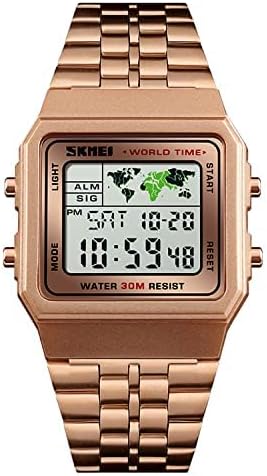
Image 2: Close-up view of the Skmei 1338 watch, highlighting the 'MODE', 'LIGHT', 'START', and 'RESET' button labels.
- MODE Button (Bottom Left): Used to cycle through different watch modes (Time, Alarm, Stopwatch, World Time).
- LIGHT Button (Top Left): Activates the backlight for improved visibility in low-light conditions.
- START Button (Top Right): Used to start/stop functions in Stopwatch mode and to adjust settings during setup.
- RESET Button (Bottom Right): Used to reset functions in Stopwatch mode and to adjust settings during setup.
Setup and Initial Configuration
1. Setting Time and Date
- From the normal time display, press the MODE button three times to enter Time Setting mode. The seconds will begin to flash.
- Press the RESET button to cycle through the settings: Seconds → Hour → Minute → Month → Date → Day of Week.
- Use the START button to adjust the flashing value. Hold START to increase values rapidly.
- Once all settings are correct, press the MODE button to exit Time Setting mode.
2. Setting the Alarm
- From the normal time display, press the MODE button once to enter Alarm mode. The alarm hour will flash.
- Press the RESET button to select between alarm hour and alarm minute.
- Use the START button to adjust the flashing value.
- Press the MODE button to exit Alarm mode.
- To turn the alarm ON/OFF, press the START button while in Alarm mode. An alarm icon will appear/disappear on the display.
3. World Time Zone Function
The Skmei 1338 features a world time display. While the specific setting method for different time zones is not detailed in the provided information, typically:
- Press the MODE button until you reach the World Time display (often indicated by a world map or city code).
- Use the START or RESET buttons to cycle through available time zones or city codes.
- The watch will automatically adjust the time displayed for the selected zone.
Operating Instructions
1. Using the Stopwatch
- From the normal time display, press the MODE button twice to enter Stopwatch mode. The display will show "00:00:00".
- Press the START button to begin timing.
- Press the START button again to pause timing.
- Press the RESET button while paused to reset the stopwatch to "00:00:00".
- Press the MODE button to exit Stopwatch mode and return to the normal time display.
2. Activating the Backlight
Press the LIGHT button (top left) at any time to illuminate the watch display. The backlight will remain active for a few seconds.
Maintenance and Care
- Cleaning: Wipe the watch case and strap with a soft, dry cloth. For stubborn dirt, a slightly damp cloth can be used, followed by immediate drying. Avoid harsh chemicals or abrasive materials.
- Water Resistance: This watch is rated "WATER 30M RESIST". This means it is suitable for daily use, splashes, and rain. It is not suitable for showering, bathing, swimming, or diving. Avoid pressing buttons underwater.
- Temperature: Avoid exposing the watch to extreme temperatures (hot or cold) or sudden temperature changes, as this can affect its accuracy and lifespan.
- Impact: Protect the watch from strong impacts and shocks.
- Battery: When the display becomes dim or functions become erratic, the battery may need replacement. Battery replacement should ideally be performed by a qualified watch technician to ensure proper sealing and water resistance.
Troubleshooting
| Problem | Possible Cause | Solution |
|---|---|---|
| Display is blank or dim. | Low battery. | Replace the battery. |
| Time is incorrect. | Time not set correctly or accidental button press. | Re-set the time and date following the "Setting Time and Date" instructions. |
| Buttons are unresponsive. | Watch may be in a frozen state or battery is very low. | Try a soft reset by holding all four buttons simultaneously for a few seconds (if applicable, consult a technician if this doesn't work). Replace battery if necessary. |
| Water inside the watch. | Exceeded water resistance limits or damaged seal. | Immediately take the watch to a qualified technician for inspection and repair to prevent further damage. |
Specifications
- Model: Skmei 1338
- Display Type: Digital
- Functions: Time (Hour/Minute/Second), Date (Month/Day/Day of Week), Alarm, Stopwatch, World Time, Backlight.
- Water Resistance: 30M (3 ATM) - Splash/rain resistant. Not suitable for swimming or showering.
- Case Material: Stainless Steel (inferred from product title "Stainless Steel, Back")
- Power Source: Battery (Type not specified, typically button cell)
- Package Dimensions: 11 x 9.6 x 7.1 cm (as per product data)
- Weight: 150 g (as per product data)
Warranty and Support
For warranty information or technical support, please refer to the documentation provided with your purchase or contact the retailer. Keep your proof of purchase for any warranty claims.