1. Product Overview
The AIDITIYMI AKB76037601 is a direct replacement infrared (IR) remote control designed for various LG Smart TV models from 2021. This remote offers immediate functionality without the need for complex programming or pairing, providing a seamless user experience.
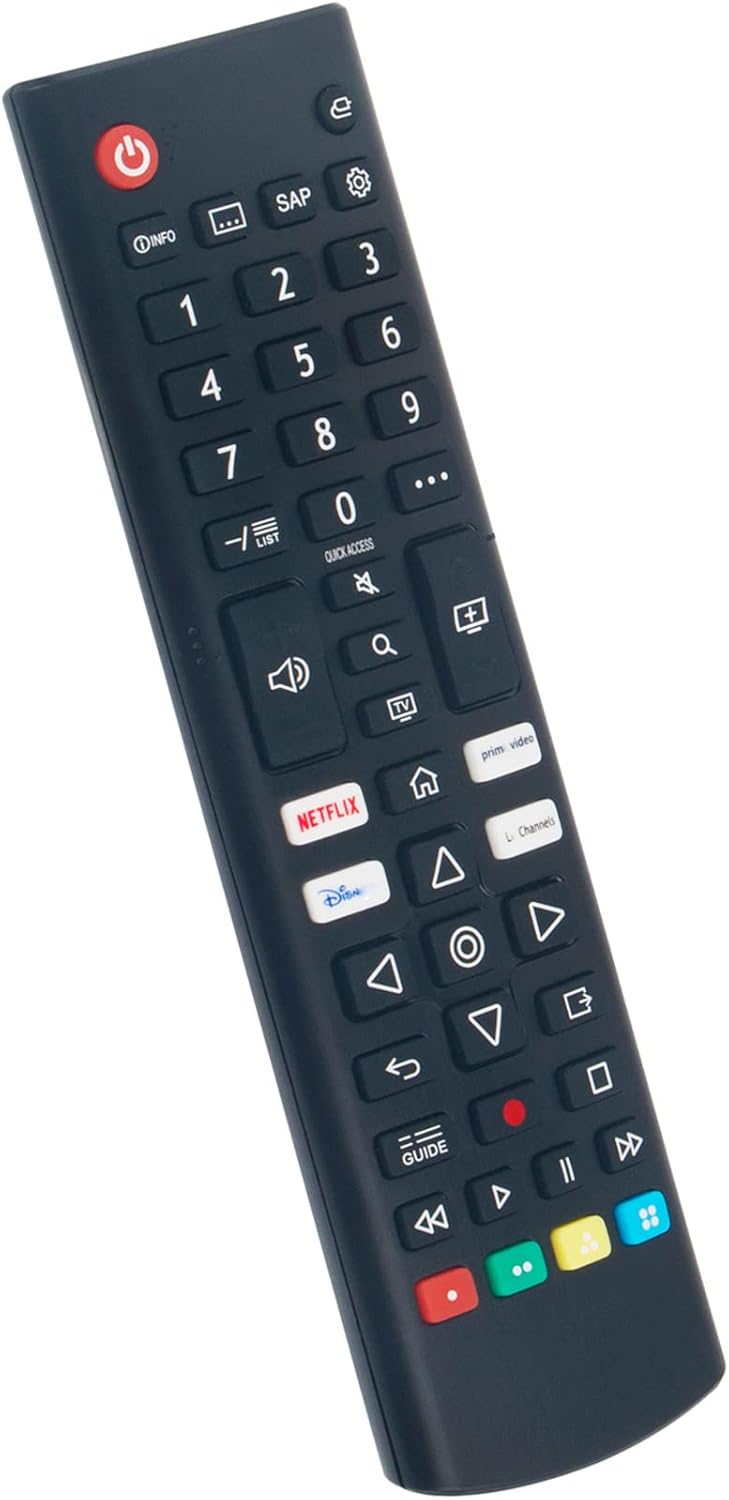
Figure 1: Front view of the AKB76037601 Replacement Remote Control.
2. Compatibility
This replacement remote control is compatible with a wide range of LG Smart TV 2021 models. Please verify your TV model number against the list below to ensure compatibility:
- 43UP7000PUA
- 32LM627BPUA
- 32LM577BPUA
- 43UP8000PUR
- 50UP8000PUR
- 55UP8000PUR
- 60UP8000PUR
- 75UP8070PUR
- 65UP8000PUR
- 70UP8070PUR
- 32LM577BZUA
- 32LM637BPUB
- 43LM5770PUA
- 43LM6370PUB
- 43UP7670PUC
- 50UP7670PUC
- 55UP7670PUC
- 60UP7670PUB
- 65UP7670PUC
- 70UP7670PUB
- 75UP7670PUB
- 32LQ630BPUA
- 32LQ630BAUA
- 55UQ7050ZUD
- 65UQ7050ZUD
- 75UQ7050ZUD
- 43UQ7590PUB
- 50UQ7570PUJ
- 55UQ7570PUJ
- 65UQ7570PUJ
- 70UQ7590PUB
- 75UQ7590PUB
- 86UQ7590PUD
- 43UQ9000PUD
- 55QNED85UQA
- 65QNED85UQA
- 75QNED85UQA
- 86QNED85UQA
- 55NANO75UQA
- OLED48A2PUA
- 42LX3QPUA
3. Setup
Setting up your new AIDITIYMI remote control is quick and easy. No programming or pairing is required.
3.1. Installing Batteries
- Locate the battery compartment on the back of the remote control.
- Slide the battery compartment cover downwards to open it.
- Insert two (2) new AAA alkaline batteries, ensuring the positive (+) and negative (-) terminals align correctly with the markings inside the compartment.
- Slide the battery compartment cover back into place until it clicks securely.

Figure 2: Inserting AAA batteries into the remote control.
Once batteries are installed, the remote is ready for immediate use with your compatible LG Smart TV.
4. Operating Instructions
The AIDITIYMI AKB76037601 remote control provides intuitive access to your LG Smart TV's functions.
4.1. Basic Functions
- Power Button (⑨): Turns the TV on or off.
- Number Buttons (0-9): Directly select channels.
- Volume Up/Down (🔊): Adjusts the TV volume.
- Mute (🔇): Mutes or unmutes the TV sound.
- Channel Up/Down (⬆︎/⬇︎): Changes TV channels.
- Navigation Pad (Up, Down, Left, Right, OK): Navigates through menus and selects options.
- Back (↶︎): Returns to the previous screen or menu.
- Home (🏠): Accesses the TV's home screen or smart hub.
- Settings (⚙︎): Opens the TV's settings menu.
4.2. Shortcut App Buttons
The remote features dedicated shortcut buttons for popular streaming services, allowing for quick access:
- Netflix: Launches the Netflix application.
- Prime Video: Launches the Amazon Prime Video application.
- Disney+: Launches the Disney+ application.
- LG Channels: Accesses LG's free streaming channels.

Figure 3: Using the remote control with an LG Smart TV.
5. Maintenance
5.1. Battery Replacement
Replace batteries when the remote's response becomes sluggish or stops working. Always replace both batteries at the same time with new AAA alkaline batteries. Do not mix old and new batteries, or different types of batteries.
5.2. Cleaning
To clean the remote control, wipe it gently with a soft, dry cloth. Do not use liquid cleaners, sprays, or abrasive materials, as these may damage the remote's surface or internal components.
6. Troubleshooting
| Problem | Possible Cause | Solution |
|---|---|---|
| Remote not responding. | Dead or incorrectly inserted batteries. | Replace batteries with new AAA alkaline batteries, ensuring correct polarity. |
| Remote only works sometimes. | Weak batteries or obstruction between remote and TV. | Replace batteries. Ensure a clear line of sight to the TV's IR receiver. |
| Specific buttons not working. | Button stuck or internal issue. | Gently press the button multiple times. If issue persists, consider replacing the remote. |
| Remote does not control TV. | Incompatible TV model. | Verify your TV model is listed in the "Compatibility" section. This remote is an IR replacement and does not require pairing. |
7. Specifications
- Model Number: ADSNCTY-AKB76037601-AD01
- Brand: AIDITIYMI
- Color: Black
- Product Dimensions: 6.69 x 1.97 x 0.59 inches (17 x 5 x 1.5 cm)
- Item Weight: 2.1 ounces (approx. 59.5 grams)
- Batteries Required: 2 x AAA (not included)
- Special Feature: Ergonomic design
- Compatible Devices: LG Smart Televisions (specific models listed in Section 2)

Figure 4: Remote control dimensions.
8. Important Notes
- This is an infrared (IR) remote control and does not require Bluetooth pairing.
- Batteries are not included in the package.
- Ensure a clear line of sight between the remote and your TV's IR receiver for optimal performance.