
FITHOOD CS-TCA300BT
FITHOOD Battery Replacement User Manual
Model: CS-TCA300BT
1. Product Overview
This manual provides essential information for the safe and effective use of your FITHOOD replacement battery, model CS-TCA300BT. This high-quality Li-Polymer battery is designed as a direct replacement for specific Technicolor devices.
Key Features:
- High quality replacement battery for Alarm System.
- Certified with ISO9001, RoHS, CE, UN38.3, and MSDS for safety and quality assurance.
- Capacity: 2250mAh, 8.33Wh, Type: Li-Polymer, Voltage: 3.7V.
- Dimensions: 86.4 x 58.4 x 9.12mm; Weight: 106.0g.
2. What's in the Box
Upon opening the package, you should find the following item:
- 1 x FITHOOD Replacement Battery (Model: CS-TCA300BT)
3. Compatibility
This FITHOOD replacement battery is compatible with the following models and battery part numbers:
- Compatible Model: Technicolor TCA300COM
- Compatible Battery Part Number: U46P313.00
Before installation, please confirm that your device's model and original battery part number match those listed above to ensure proper fit and function.
4. Setup and Installation
Follow these steps carefully to replace the battery in your compatible device. It is recommended to power off your device before beginning the installation process.
4.1. Preparation
- Ensure your device is powered off and disconnected from any power sources.
- Gather any necessary tools, such as a small screwdriver, if required to open your device's battery compartment.
4.2. Removing the Old Battery
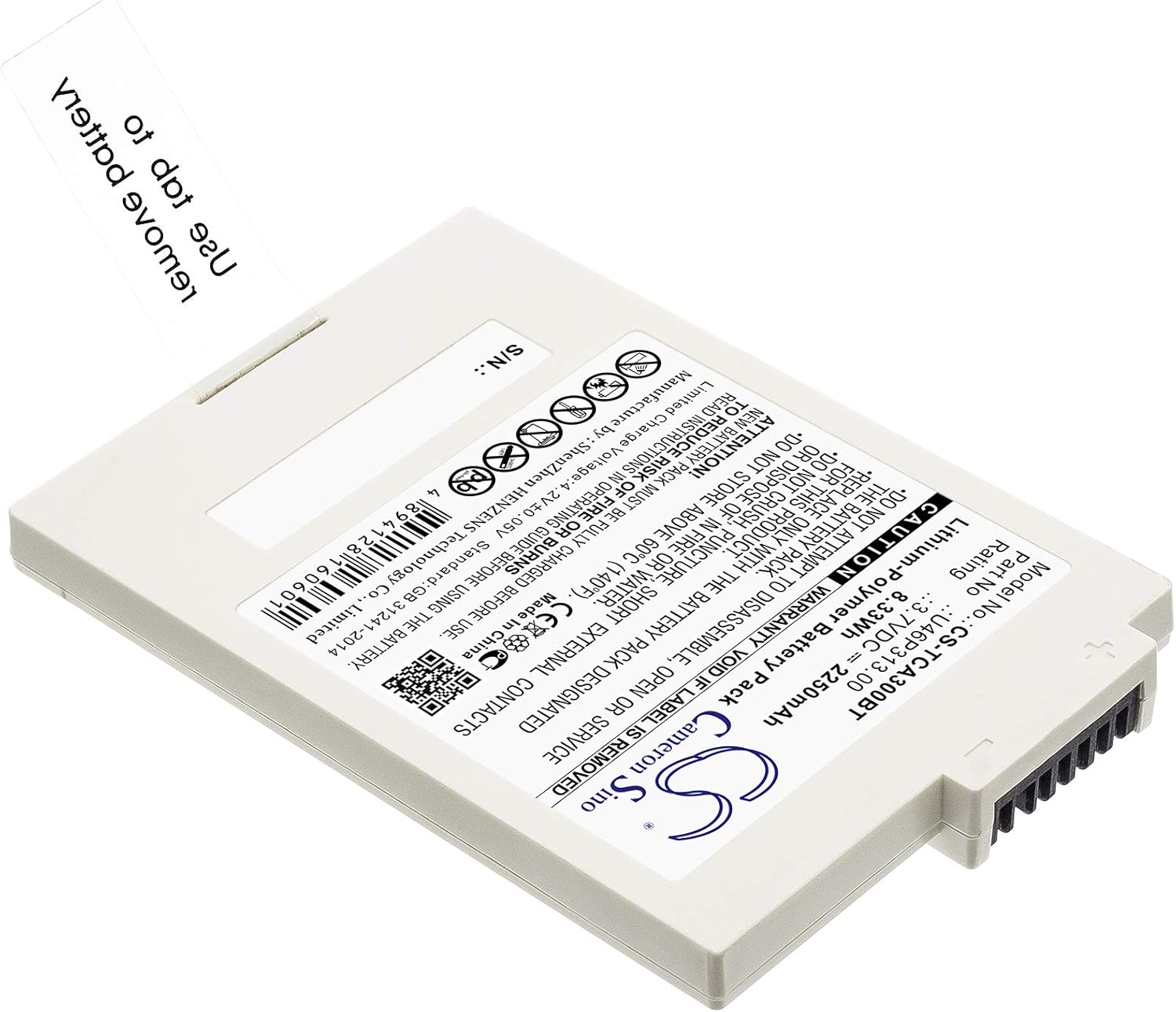
- Locate the battery compartment on your Technicolor TCA300COM device. This may be on the back or underside of the unit.
- Open the battery compartment cover. This might involve sliding a latch, unscrewing small screws, or gently prying open a cover.
- Carefully disconnect the old battery from its connector. Some batteries may have a pull tab (similar to the replacement battery) to aid in removal. Gently pull the tab or lift the battery to remove it from the compartment.
- Set the old battery aside for proper disposal.
4.3. Installing the New Battery


- Align the new FITHOOD battery with the battery compartment, ensuring the connector pins on the battery match the receptacle in the device.
- Gently push the battery into place until it is securely seated and the connector is fully engaged. Do not force the battery.
- Close the battery compartment cover, ensuring it is securely latched or screwed back into place.
- You may now power on your device. The battery may require an initial charge before full use.
5. Operating and Charging
Once installed, the FITHOOD battery operates as the primary power source for your compatible device. For optimal performance and longevity, follow these guidelines:
- Initial Charge: It is recommended to fully charge the new battery before its first use. Connect your device to its original charger and allow it to charge until the device indicates a full charge.
- Regular Charging: Charge the battery using only the charger supplied with your device or a compatible charger recommended by the device manufacturer.
- Avoid Deep Discharge: While Li-Polymer batteries do not suffer from "memory effect," it is generally best to avoid completely draining the battery before recharging.
- Temperature: Operate and charge the battery within the recommended temperature range of your device. Extreme temperatures can affect battery performance and lifespan.
6. Maintenance and Storage
Proper care and storage can extend the life of your FITHOOD replacement battery.
- Cleaning: Keep the battery contacts clean and free of dust or debris. Use a dry, soft cloth to wipe them if necessary.
- Storage: If storing the battery for an extended period, store it in a cool, dry place, ideally at about 50% charge. Avoid extreme temperatures and direct sunlight.
- Avoid Physical Damage: Do not drop, puncture, or disassemble the battery. Physical damage can lead to internal short circuits or other hazards.
7. Troubleshooting
If you encounter issues with your FITHOOD replacement battery, consider the following common solutions:
| Problem | Possible Cause | Solution |
|---|---|---|
| Battery not charging. | Incorrect installation, faulty charger, or device issue. |
|
| Battery drains quickly. | High device usage, background apps, or battery degradation. |
|
| Device does not power on with new battery. | Battery not installed correctly, battery not charged, or device fault. |
|
If these steps do not resolve the issue, please refer to the "Warranty and Support" section for further assistance.
8. Safety Information and Warnings
Please read and follow these safety instructions carefully to prevent injury or damage to the battery or device.
- Do Not Disassemble: Never attempt to disassemble, open, or service the battery pack. This can cause electric shock, fire, or exposure to hazardous materials.
- Avoid Short Circuits: Do not short-circuit the battery. This can occur if a metallic object accidentally connects the positive and negative terminals.
- Protect from Water: Do not expose the battery to water or moisture.
- Temperature Extremes: Avoid exposing the battery to extreme heat (e.g., direct sunlight, fire, radiators) or extreme cold. Do not store above 60°C (140°F).
- Proper Disposal: Do not dispose of batteries in fire or with household waste. Always follow local regulations for battery recycling and disposal.
- Handle with Care: Do not crush, puncture, or drop the battery. Avoid strong impacts.
- Children: Keep batteries out of reach of children.
- Swelling/Leakage: If the battery appears swollen, leaks, or shows any signs of damage, discontinue use immediately and dispose of it properly.

9. Product Specifications
| Specification | Detail |
|---|---|
| Brand | FITHOOD |
| Model Number | CS-TCA300BT |
| Battery Type | Li-Polymer |
| Voltage | 3.7V |
| Capacity | 2250mAh |
| Watt-Hours (Wh) | 8.33Wh |
| Product Dimensions | 86.4 x 58.4 x 9.12mm (3.4 x 2.3 x 0.36 inches) |
| Item Weight | 106.0g (3.74 ounces) |
| Certifications | ISO9001, RoHS, CE, UN38.3, MSDS |
| Manufacturer | FITHOOD |
10. Warranty and Support
FITHOOD is committed to providing high-quality products. For any questions or concerns regarding your replacement battery, please contact us.
- Return Policy: This product is subject to a 30-day return policy for refund or replacement, as per Amazon's standard return guidelines.
- Customer Support: If you are unsure about compatibility or encounter any issues not covered in this manual, please send an email to the seller with your battery details or pictures for professional suggestions.
- Manufacturer: FITHOOD
Ask a question about this manual
Ask about setup, troubleshooting, compatibility, parts, safety, or missing instructions. Manuals+ will review the question and use this page’s manual context to help answer it.