
Product Overview
The AGM Rattler TS35-640 is a compact thermal imaging scope designed for 24-hour operation in various weather and environmental conditions. Featuring a 35mm Germanium lens, it is optimized for medium-range shooting. The device incorporates a 640x512, 12µm thermal detector with a 50 Hz refresh rate and a 1024x768 OLED monitor, ensuring clear imagery even in challenging environments such as darkness, fog, smoke, dust, rain, snow, or through wood and camouflage.
This versatile unit can function as a thermal rifle scope or a handheld monocular, making it suitable for applications like patrolling and hunting. It operates on two CR123 batteries, providing up to 4.5 hours of continuous use. For extended operation, an external 5V power bank can be connected via the USB port. The integrated Wi-Fi module allows for live video streaming and recording of videos and images, stored on its built-in 16 GB EMMC storage.
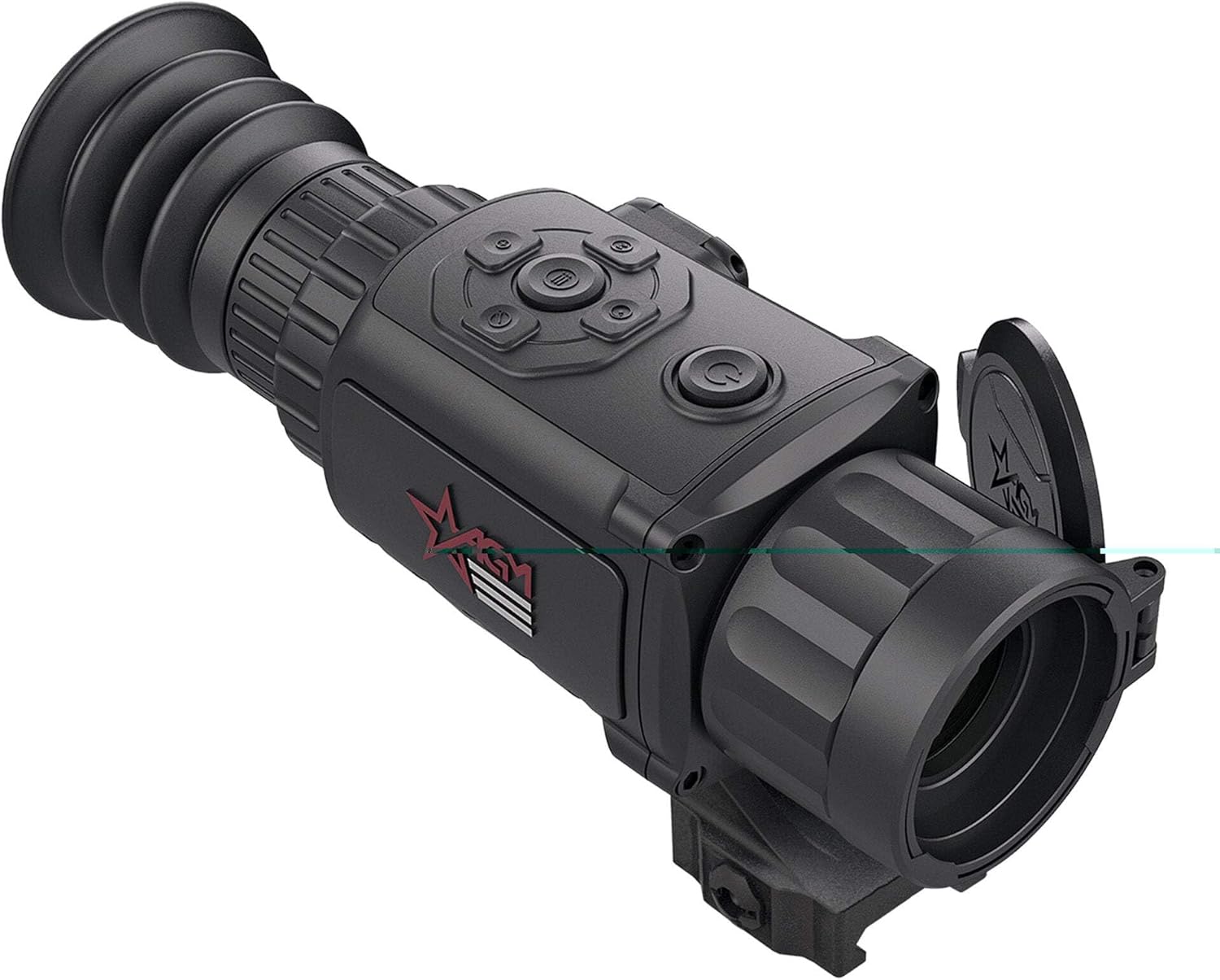
Figure 1: Front view of the AGM Rattler TS35-640 Thermal Imaging Rifle Scope, showcasing its compact design and objective lens.
Key Features
- High-Resolution Thermal Detector: 640x512, 12µm, 35 mK NETD for high sensitivity.
- Fast Imaging: 50Hz refresh rate for smooth thermal imagery.
- OLED Display: 1024x768 resolution, 0.39-inch OLED monitor for clear viewing.
- Digital Image Processing: Enhanced image quality.
- Optical Magnification: 2x optical magnification with 1x, 2x, 4x, 8x digital zoom.
- Connectivity: Onboard Wi-Fi module for live streaming and data transfer.
- Recording: Video recording and snapshot capabilities with built-in 16 GB EMMC storage.
- Customization: Adjustable color palettes and various reticle types and colors.
- Rangefinding: Stadia metric rangefinder for distance estimation.
- Power Management: Standby mode to conserve battery life.
- Durability: Waterproof and shockproof tactical device.
- Power Source: Up to 4.5 hours continuous operation with CR123 batteries; external 5V power supply capability.
Setup Guide
1. Unboxing and Initial Inspection
Carefully remove all components from the packaging. Verify that all included items are present:
- Thermal Imaging Rifle Scope
- Mount (Picatinny Mount)
- USB Cable
- Lens Cloth
- User Manual (this document)
Inspect the device for any signs of damage during transit. Ensure the lens caps are securely in place.
2. Battery Installation
The AGM Rattler TS35-640 operates on two CR123 batteries. Locate the battery compartment, typically on the side or bottom of the unit. Open the compartment and insert the batteries, paying close attention to the correct polarity (+/-) as indicated inside the compartment. Close the battery compartment securely.
For extended use, an external 5V power bank can be connected via the USB port. This is recommended for prolonged operation to avoid frequent battery changes.
3. Mounting the Scope
The scope comes with a Picatinny Mount. Attach the mount to your rifle's Picatinny rail. Ensure the mount is aligned correctly and tighten all screws firmly to prevent any movement during use. Refer to your rifle's manual for specific mounting instructions if necessary.

Figure 2: The AGM Rattler TS35-640 mounted on a rifle, demonstrating its integration as a thermal scope.
Operating Instructions
1. Powering On/Off and Standby Mode
To power on the device, press and hold the power button (usually marked with a power symbol) until the display illuminates. To power off, press and hold the power button again until the display shuts down.
The device features a standby mode to conserve battery life. A short press of the power button will typically activate or deactivate standby mode. In standby, the display turns off, but the device remains ready for quick activation.
2. Adjusting Settings and Display
Use the control buttons (often a joystick or directional pad) to navigate through the on-screen menu. Key adjustments include:
- Brightness/Contrast: Adjust the display for optimal viewing in different light conditions.
- Color Palettes: Select from various thermal color palettes (e.g., White Hot, Black Hot, Red Hot, Fusion) to suit your preference and target identification needs.
- Reticle Selection: Choose from multiple reticle types and colors. This is crucial for aiming when used as a rifle scope.
- Digital Zoom: Utilize the digital zoom (1x, 2x, 4x, 8x) to magnify the image. Note that digital zoom may reduce image clarity compared to optical magnification.

Figure 3: Top view of the AGM Rattler TS35-640, highlighting the control buttons for menu navigation and settings adjustment.
3. Thermal Imaging and Observation
Point the thermal scope towards the area of interest. The device will display thermal signatures, allowing you to detect heat sources in complete darkness or through obscurants. The 50Hz refresh rate ensures a smooth, real-time image.
Use the focus ring on the objective lens to achieve a sharp image of objects at varying distances. The stadia metric rangefinder can be used to estimate distances to targets based on their known size.

Figure 4: Thermal image captured through the scope, showing a boar in the crosshairs, demonstrating target acquisition.
4. Recording Videos and Photos
The AGM Rattler TS35-640 allows for recording videos and capturing still images. Use the dedicated recording buttons (refer to the device's button layout for exact functions) to start/stop video recording or take a snapshot. All media is stored on the internal 16 GB EMMC storage.
To access recorded media or stream live video, connect to the device's Wi-Fi hotspot using the AGM Connect app on your smartphone or tablet. Follow the app's instructions for pairing and media management.
Video 1: A demonstration of the thermal imaging capabilities of the AGM Rattler scope, showing various scenes and targets in thermal view.
Maintenance
Proper maintenance ensures the longevity and optimal performance of your thermal scope.
- Lens Cleaning: Use the provided lens cloth or a soft, lint-free cloth specifically designed for optics to clean the objective and eyepiece lenses. Avoid abrasive materials or harsh chemicals.
- Body Cleaning: Wipe the body of the scope with a damp cloth to remove dirt or debris. Do not submerge the device in water, despite its waterproof rating, unless specifically instructed for cleaning.
- Storage: When not in use, store the scope in its protective case in a cool, dry place, away from direct sunlight and extreme temperatures. Remove batteries if storing for extended periods to prevent leakage.
- Battery Care: Use only recommended CR123 batteries. Replace batteries when the low battery indicator appears. Dispose of used batteries responsibly.
Troubleshooting
If you encounter issues with your AGM Rattler TS35-640, refer to the following common troubleshooting steps:
- Device Not Powering On:
- Ensure batteries are correctly inserted with proper polarity.
- Replace batteries with fresh ones.
- Check if the battery compartment is fully closed.
- Poor Image Quality:
- Adjust the focus ring on the objective lens.
- Clean the lenses with a soft lens cloth.
- Adjust brightness and contrast settings.
- Ensure there are no obstructions in front of the objective lens.
- Wi-Fi Connectivity Issues:
- Ensure the Wi-Fi hotspot on the device is activated.
- Restart both the scope and your smart device.
- Ensure your smart device is within range of the scope's Wi-Fi signal.
- Update the AGM Connect app to the latest version.
- Device Freezing/Unresponsive:
- Perform a soft reset by removing and reinserting the batteries.
- If the issue persists, contact customer support.
For more complex issues, please refer to the official AGM Global Vision support resources or contact their customer service.
Specifications
| Feature | Detail |
|---|---|
| Model Name | RATTLER (TS35-640) |
| Thermal Detector Resolution | 640x512, 12µm, 35 mK NETD |
| Refresh Rate | 50 Hz |
| Lens Diameter | 35 Millimeters (Germanium) |
| Display Resolution | 1024x768 OLED |
| Optical Magnification | 2x |
| Digital Zoom | 1x, 2x, 4x, 8x |
| Field Of View | 12.5 Degrees |
| Eye Relief | 45 Millimeters |
| Storage | 16 GB EMMC (Built-in) |
| Power Source | 2x CR123 batteries (up to 4.5 hours) or external 5V power bank |
| Mounting Type | Picatinny Mount |
| Item Weight | 2 Pounds |
| Dimensions (LxWxH) | 7.4 x 2.5 x 3.1 inches |
| Material | Polycarbonate |
| Waterproof | Yes |
| Shockproof | Yes |
Warranty and Support
The AGM Rattler TS35-640 comes with a Limited 3-year manufacturer warranty. Please retain your proof of purchase for warranty claims.
For detailed warranty information, technical support, or service requests, please visit the official AGM Global Vision website or contact their customer support team.
An official User Manual (PDF) is also available for download: Download User Manual (PDF)
