
SG SURGOAL RS3000iPlus
SG SURGOAL Laser Rangefinder RS3000iPlus User Manual
Model: RS3000iPlus
1. Introduction
Thank you for choosing the SG SURGOAL Laser Rangefinder RS3000iPlus. This high-precision optical instrument is designed for accurate distance measurement in various outdoor activities, including hunting, golf, hiking, and more. It features advanced laser technology to provide reliable and fast measurements.
The RS3000iPlus is built with user comfort and durability in mind, featuring an ergonomic design and weather-resistant materials. Please read this manual carefully before using the device to ensure proper operation and to maximize its lifespan.

Image: SG SURGOAL Laser Rangefinder RS3000iPlus, showcasing its compact and ergonomic design.
2. Safety Information
This device contains a laser. Please observe the following safety precautions:
- Do not look directly into the laser aperture or point the laser at others.
- Avoid direct eye exposure to the laser beam.
- Keep the device out of reach of children.
- Do not disassemble or modify the device. Unauthorized repairs can cause damage and void the warranty.
- Use only the specified battery type.
- Dispose of batteries properly according to local regulations.
3. Package Contents
Upon opening your package, please verify that all the following items are included:
- SG SURGOAL Laser Rangefinder RS3000iPlus
- Carrying Case
- Wrist Strap
- Cleaning Cloth
- User Manual (this document)
- Battery (Alkaline)

Image: The laser rangefinder shown alongside its protective carrying case, highlighting portability.
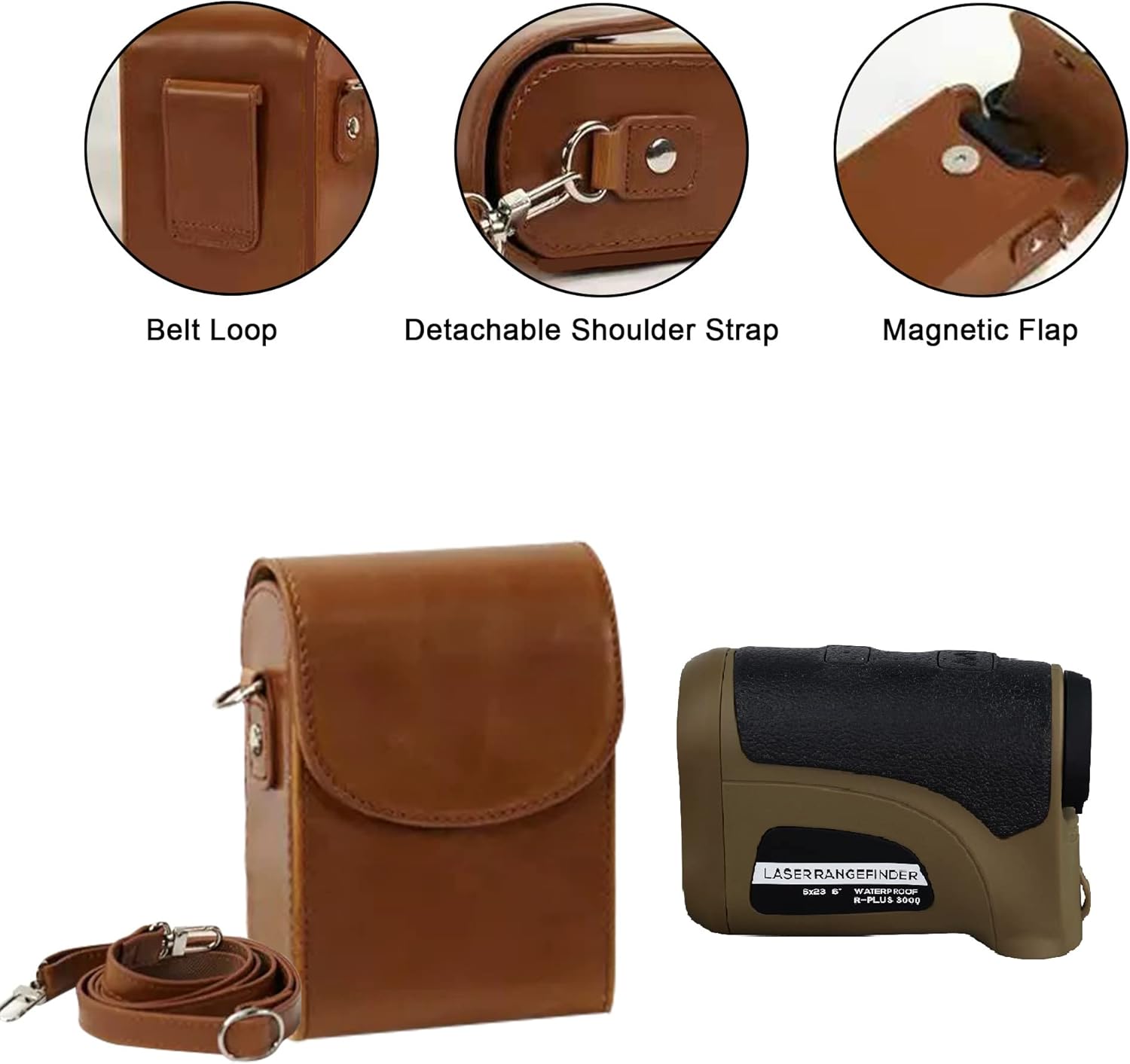
Image: Detailed view of the carrying case features, including a belt loop, detachable shoulder strap, and magnetic flap for secure closure.
4. Setup
4.1 Battery Installation
- Locate the battery compartment on the device.
- Twist the battery cap counter-clockwise to open.
- Insert the provided Alkaline battery, ensuring correct polarity (+/-).
- Replace the battery cap and twist clockwise to secure.

Image: Close-up view of the rangefinder's battery compartment with the cap removed, showing where to insert the battery.
4.2 Adjusting Diopter
The diopter adjustment allows you to focus the eyepiece for clear viewing, compensating for individual eyesight differences.
- Look through the eyepiece.
- Rotate the diopter adjustment ring (typically located near the eyepiece) until the reticle and display appear sharp and clear.

Image: Illustration of the 6X adjustable zoom feature, showing how the diopter adjusts focal length for clearer measurements.
5. Operating Instructions
5.1 Basic Measurement
- Power On: Press the Power/Measurement button (usually the top button) once to turn on the device.
- Aim: Look through the eyepiece and align the reticle with your target.
- Measure: Press the Power/Measurement button again to take a measurement. The distance will be displayed in the eyepiece.
5.2 Mode Selection
The RS3000iPlus offers various measurement modes. To cycle through modes, press the Mode button (usually the bottom button) repeatedly until the desired mode is selected. Common modes may include:
- Standard Measurement: Measures direct line-of-sight distance.
- Scan Mode: Allows continuous measurement as you pan across multiple targets.
- Slope Compensation (if applicable): Provides adjusted distance for uphill or downhill shots, particularly useful for golf.
Video: Demonstration of the laser rangefinder in use, showing its ergonomic design, ease of use, and the display of measurements in the eyepiece. This video also highlights the device's ability to measure various ranges and its suitability for hunting, shooting, and golf.
5.3 Range Capabilities
This device is designed for precision, capable of measuring distances up to 3000 yards or 9000 feet with an accuracy of ±0.5 yard. The 6X magnification ensures clear target acquisition even at long distances.

Image: Visual representation of various applications for the rangefinder, including shooting, skiing exploration, construction surveys, golfing, hunting, hiking adventure, and cable engineering.
6. Maintenance
6.1 Cleaning Lenses
The multi-coating lens system is designed to prevent glare, scratches, and fogging. To maintain optical clarity:
- Gently brush off any dust or debris from the lenses using a soft brush or compressed air.
- Use the provided cleaning cloth to wipe the lenses in a circular motion. For stubborn smudges, a small amount of lens cleaning fluid can be applied to the cloth (not directly to the lens).
- Avoid using abrasive materials or harsh chemicals, as these can damage the lens coatings.

Image: Diagram illustrating the multi-layer coating of the lens, detailing hard coating for scratch resistance, hydrophobic coating for anti-fogging, anti-radiation coating for eye protection, and anti-reflective coating for improved light transmission.
6.2 General Care and Storage
- Store the rangefinder in its protective carrying case when not in use.
- Keep the device in a cool, dry place, away from direct sunlight and extreme temperatures.
- The device is water-resistant (IPX4), but avoid submerging it in water. Wipe off any moisture immediately after exposure.
- If storing for extended periods, remove the battery to prevent leakage.

Image: Visual demonstrating the IPX4 water protection feature, showing water splashing on the device, indicating its resistance to splashes from any direction.
7. Troubleshooting
| Problem | Possible Cause | Solution |
|---|---|---|
| Device does not power on | Low or dead battery; Incorrect battery installation | Replace battery; Reinstall battery with correct polarity |
| Inaccurate readings | Lens dirty; Target too small or reflective; Environmental interference (fog, heavy rain) | Clean lenses; Aim at a larger, less reflective target; Re-measure in clearer conditions |
| Display is blurry | Diopter not adjusted correctly | Adjust the diopter ring until the display is clear |
| No measurement displayed | Target out of range; Obstruction in laser path | Ensure target is within specified range; Clear any obstructions |
8. Specifications

Image: Infographic detailing the 10 top core technologies of the rangefinder, including 3,000yd/9,000ft/2,743M range, intelligent power saving, IPX4 protection, patent algorithms, multi-coating lens, 6x magnification, Class 1M EN/IEC, 0.3s rapid acquisition, accurate measurement, and HD image.
| Feature | Specification |
|---|---|
| Brand | SG SURGOAL |
| Model Number | RS3000iPlus |
| Measuring Range | 3000 yards / 9000 feet |
| Accuracy | ±0.5 yard |
| Magnification | 6 x |
| Lens Type | Multi-coating lens |
| Water Resistance Level | Water Resistant (IPX4) |
| Material | Acrylonitrile Butadiene Styrene (ABS) |
| Item Weight | 165 Grams |
| Battery Type | Alkaline (included) |
| Item Dimensions (LxWxH) | 4 x 1.38 x 2.72 inches |
9. Warranty and Support
SG SURGOAL is committed to providing high-quality, enduring, and easy-to-use measurement products. For specific warranty details and customer support, please refer to the warranty card included with your product or visit the official SG SURGOAL website. You may also contact the seller, Harmonic Electronics, for assistance.
For general inquiries or technical support, please retain your purchase receipt and product model number (RS3000iPlus) for faster service.

Image: SG SURGOAL brand logo and text, emphasizing their 20+ years of R&D and innovation experience in sensor technology, and commitment to quality products.
Ask a question about this manual
Ask about setup, troubleshooting, compatibility, parts, safety, or missing instructions. Manuals+ will review the question and use this page’s manual context to help answer it.