Introduction
The Coolwell SIM7600G-H-M.2 is an LTE Cat 4 module designed for wireless communication, supporting LTE-TDD, LTE-FDD, HSPA+, GSM, GPRS, and EDGE modes. It offers a maximum downlink rate of 150Mbps and an uplink rate of 50Mbps. This module utilizes an M.2 form factor and integrates multiple satellite high-accuracy positioning GNSS systems. It includes built-in network protocols and drivers for various operating systems such as Windows, Linux, and Android. The AT commands are compatible with SIM7500/SIM7600 series modules, ensuring broad compatibility and ease of integration for IoT applications like telematics, surveillance devices, CPE, industrial routers, and remote diagnostics.
Setup and Installation
The SIM7600G-H-M.2 module is designed for integration into compatible M.2 B Key slots. Ensure the host device supports the M.2 B Key interface for proper installation.
- Prepare the Host Device: Power off the host device and disconnect it from any power sources.
- Locate M.2 Slot: Identify an available M.2 B Key slot on your host device's motherboard or expansion board.
- Insert the Module: Gently align the SIM7600G-H-M.2 module with the M.2 slot and insert it at an angle. Push down the module until it lies flat and secure it with a screw, if provided by the host device.
- Connect Antennas: Connect appropriate antennas to the IPEX-4 connectors on the module. Typically, this includes a main LTE antenna, an LTE diversity antenna, and a GNSS antenna. Ensure secure connections.
- Insert SIM Card: Insert a 1.8V/3.0V SIM card into the designated SIM card slot on the module or adapter board. Ensure correct orientation.
- Power On: Reassemble your host device and power it on.
- Driver Installation: Install the necessary USB drivers for your operating system (Windows, Linux, Android). These drivers are typically provided by the module manufacturer or can be found on their official website.

Figure 1: Top view of the SIM7600G-H-M.2 module. This image displays the main components including the SIMCom SIM7600G-H chip, product identification numbers, and the IPEX-4 antenna connectors labeled 'GNSS AUX' and 'MAIN'.
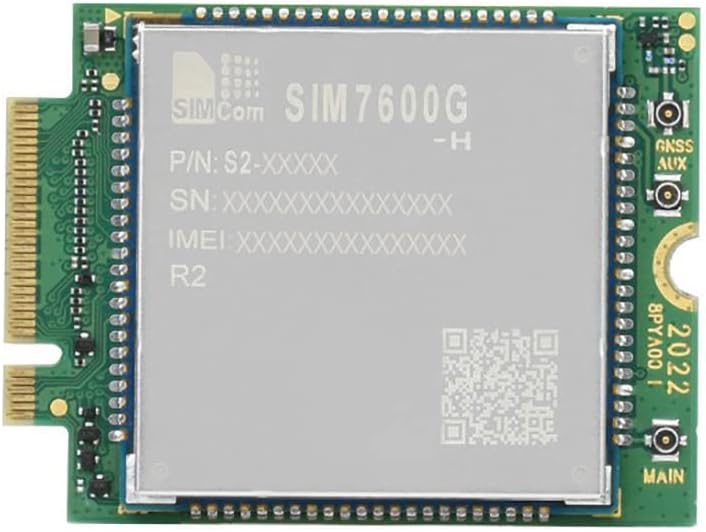
Figure 2: Bottom view of the SIM7600G-H-M.2 module. This image illustrates the M.2 B Key interface connector and the general layout of the module's underside, including solder pads and traces.
Operating Instructions
Once installed and drivers are in place, the SIM7600G-H-M.2 module can be operated using AT commands or through software interfaces provided by your operating system.
Communication Modes and Data Rates
- LTE Cat 4: Up to 150 Mbps Downlink, 50 Mbps Uplink.
- HSPA+: Up to 42 Mbps Downlink, 5.76 Mbps Uplink.
- GSM/GPRS/EDGE: Supports various 2G/2.5G modes for global coverage.
GNSS Functionality
The module integrates multi-constellation GNSS (GPS, BeiDou, GLONASS, Galileo, QZSS) for high-accuracy positioning. Ensure the GNSS antenna is properly connected for optimal performance.
Software Functions
The module supports various software functions to enhance its capabilities:
- FOTA (Firmware Over-The-Air): Allows for remote firmware updates.
- LBS (Location Based Service): Provides location information using cellular network data.
- TLS (Transport Layer Security): Ensures secure communication.
AT Commands
The module is controlled via AT commands, which are compatible with SIM7500/SIM7600 series modules. Refer to the detailed AT Command Set documentation provided by SIMCom for specific commands and their usage. Common AT commands are used for network registration, data connection management, SMS, and GNSS control.
Maintenance
The SIM7600G-H-M.2 module is a robust electronic component designed for reliable operation. Minimal maintenance is required.
- Environmental Conditions: Operate the module within its specified operating temperature range of -40°C to +85°C. Avoid exposure to extreme humidity, dust, or corrosive environments.
- Cleaning: If necessary, gently clean the module with a soft, dry, anti-static cloth. Do not use liquid cleaners or solvents.
- Firmware Updates: Periodically check for firmware updates from the manufacturer to ensure optimal performance and access to new features. Updates can typically be performed via FOTA or through a USB connection.
- Antenna Connections: Ensure all antenna connections remain secure and free from damage. Loose connections can degrade signal quality.
Troubleshooting
If you encounter issues with your SIM7600G-H-M.2 module, consider the following troubleshooting steps:
- No Network Connection:
- Verify that the SIM card is correctly inserted and activated with a valid data plan.
- Check antenna connections for security and proper type (LTE main, diversity).
- Ensure the module drivers are correctly installed on your operating system.
- Confirm that the module is receiving adequate power (3V-4.2V).
- Check network coverage in your area.
- Use AT commands to query network registration status (e.g.,
AT+CREG?).
- GNSS Not Functioning:
- Ensure the GNSS antenna is properly connected and has a clear view of the sky.
- Verify that GNSS functionality is enabled via AT commands.
- Module Not Detected by OS:
- Confirm the module is securely seated in the M.2 slot.
- Reinstall USB drivers.
- Check the host device's BIOS/UEFI settings to ensure the M.2 slot is enabled.
- Slow Data Rates:
- Check signal strength using AT commands.
- Ensure you are in an area with good LTE Cat 4 coverage.
- Verify that your SIM card and data plan support the expected speeds.
- Ensure antennas are correctly positioned and not obstructed.
Specifications
Detailed technical specifications for the Coolwell SIM7600G-H-M.2 module are provided below:

Figure 3: Comprehensive specifications table for the SIM7600G-H-M.2 module, detailing frequency bands, data rates, software features, and hardware characteristics.
| Feature | Description |
|---|---|
| Brand | Coolwell |
| Model | SIM7600G-H-M.2 |
| Hardware Interface | USB |
| Compatible Devices | Desktop (and other M.2 compatible systems) |
| Data Link Protocol | USB |
| Data Transfer Rate | 150 Megabits Per Second (Downlink) |
| UPC | 794304545038 |
| Compatible Operating Systems | Android, Linux, Windows |
| Manufacturer | Coolwell |
| Form Factor | M.2 B Key |
| Power Supply | 3V – 4.2V |
| Operating Temperature | -40°C to +85°C |
| Dimensions | 42.0 × 31.4 × 3.8mm |
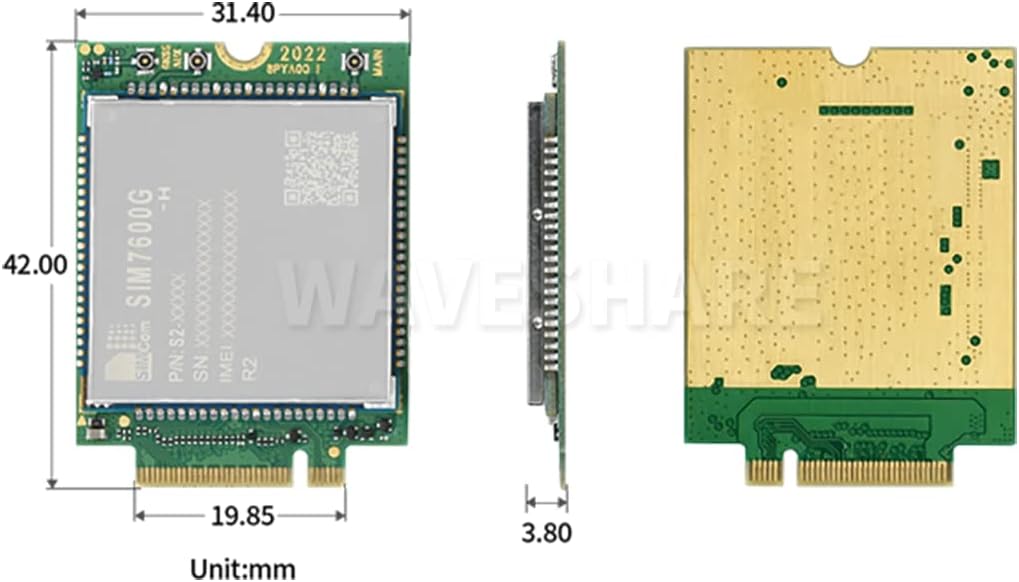
Figure 4: Dimensional drawing of the SIM7600G-H-M.2 module, indicating its length (42.0mm), width (31.4mm), and thickness (3.8mm).
Warranty Information
The product comes with a manufacturer's warranty. The provided information indicates a "Warranty Description: 1". For detailed terms and conditions of the warranty, including coverage period and claims process, please refer to the documentation included with your purchase or contact Coolwell Technology directly. Keep your proof of purchase for warranty claims.
Support and Contact
For technical assistance, additional documentation, or support regarding the SIM7600G-H-M.2 module, please contact the manufacturer:
- Manufacturer: Coolwell Technology
- Website: Please visit the official Coolwell Technology website for support resources, driver downloads, and contact information.
- AT Command Set: For comprehensive details on AT commands, refer to the official SIMCom documentation for the SIM7600 series modules.