
NOCMPIC AUB09JK3RQZL
NOCMPIC AUB09JK3RQZL Bone Conduction Headphones User Manual
Model: AUB09JK3RQZL | Brand: NOCMPIC
Introduction
This manual provides detailed instructions for the use and maintenance of your NOCMPIC AUB09JK3RQZL Bone Conduction Headphones. These open-ear, IP68 waterproof sports headphones feature built-in 8GB memory and Bluetooth connectivity, designed for various fitness activities including swimming and running. Please read this manual thoroughly before using the product to ensure proper operation and longevity.
Product Overview

Image: The NOCMPIC AUB09JK3RQZL Bone Conduction Headphones, shown in black, designed for open-ear listening.
Key Features
- Bone Conduction Technology: Delivers audio through vibrations to the cheekbones, leaving ears open to ambient sounds.
- IP68 Waterproof Rating: Fully submersible and resistant to dust, suitable for swimming and water sports.
- Built-in 8GB Memory: Allows for direct storage and playback of music without needing a connected device, ideal for swimming.
- Bluetooth 4.2 Connectivity: Provides wireless connection to compatible devices within a 10-meter range.
- Integrated Microphone: For hands-free calls.
- Lightweight Design: Weighs approximately 0.28 ounces (8 grams) for comfortable extended wear.
- Open-Ear Design: Enhances situational awareness during outdoor activities.
What's in the Box
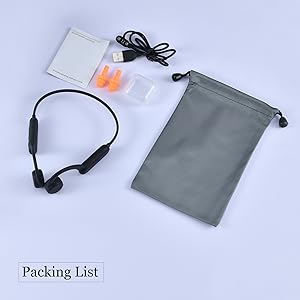
Image: Contents of the product package, including the headphones, charging cable, user manual, and earplugs.
- NOCMPIC AUB09JK3RQZL Bone Conduction Headphones
- Magnetic Charging Cable
- User Manual
- Earplugs (for enhanced sound experience during swimming)
Setup
1. Charging the Headphones
Before first use, fully charge the headphones. Use the provided magnetic charging cable.
- Connect the magnetic end of the charging cable to the charging port on the headphones.
- Connect the USB end of the cable to a standard USB power adapter (not included) or a computer's USB port.
- The indicator light will show charging status (refer to LED indicator section for details).
- A full charge typically takes approximately 2 hours and provides up to 8 hours of playback.
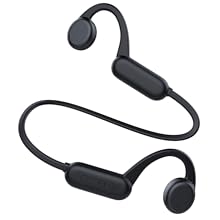
Image: Close-up of the magnetic charging connection for the headphones, illustrating how the cable attaches securely.
2. Power On/Off
- Power On: Press and hold the Power button for 3-5 seconds until the LED indicator lights up and you hear a power-on prompt.
- Power Off: Press and hold the Power button for 3-5 seconds until the LED indicator turns off and you hear a power-off prompt.
3. Bluetooth Pairing
To connect your headphones to a Bluetooth-enabled device:
- Ensure the headphones are powered off.
- Press and hold the Power button for approximately 5-7 seconds until the LED indicator flashes red and blue alternately, indicating pairing mode.
- On your device (smartphone, tablet, etc.), enable Bluetooth and search for available devices.
- Select "NOCMPIC AUB09JK3RQZL" from the list of found devices.
- Once connected, the LED indicator will flash blue slowly, and you will hear a connection confirmation.
4. Using MP3 Mode (Built-in 8GB Memory)
The headphones have 8GB of internal storage for music playback without a Bluetooth connection, which is ideal for swimming.
- Transferring Music: Connect the headphones to a computer using the magnetic charging cable. The headphones will appear as a removable disk. Drag and drop MP3 audio files into the device's storage. Note: Only MP3 format is supported.
- Switching to MP3 Mode: While the headphones are on, press the Mode button (often combined with the Power button or a dedicated button) to switch between Bluetooth and MP3 playback modes. A voice prompt will confirm the current mode.
Operating Instructions
Button Functions
| Button/Action | Function |
|---|---|
| Power Button (Long Press) | Power On/Off |
| Power Button (Short Press) | Play/Pause music, Answer/End call |
| Volume + Button (Short Press) | Increase Volume |
| Volume - Button (Short Press) | Decrease Volume |
| Volume + Button (Long Press) | Next Track |
| Volume - Button (Long Press) | Previous Track |
| Mode Button (Short Press) | Switch between Bluetooth Mode and MP3 Mode |
Making and Receiving Calls
- Answer Call: Short press the Power button when a call comes in.
- End Call: Short press the Power button during a call.
- Reject Call: Long press the Power button for 2 seconds when a call comes in.
- Redial Last Number: Double-press the Power button.
Situational Awareness

Image: Two individuals running outdoors, demonstrating the open-ear design that allows users to hear their surroundings for safety.
The open-ear design of these headphones allows you to remain aware of your surroundings while listening to audio. This is particularly beneficial for outdoor activities like running or cycling, where hearing traffic or other environmental sounds is important for safety.
Maintenance
Cleaning
Due to their IP68 waterproof rating, these headphones can be rinsed with fresh water after use, especially after swimming or intense workouts.
- Gently wipe the headphones with a soft, damp cloth.
- Ensure the charging contacts are clean and dry before charging to prevent corrosion.
- Do not use harsh chemicals or abrasive cleaners.

Image: The headphones shown with water splashing, highlighting their water-resistant and durable construction.
Storage
- Store the headphones in a cool, dry place away from direct sunlight and extreme temperatures.
- Avoid placing heavy objects on the headphones.
- If storing for an extended period, charge the headphones periodically to maintain battery health.
Troubleshooting
| Problem | Possible Solution |
|---|---|
| Headphones do not power on. | Ensure the headphones are fully charged. Press and hold the Power button for 3-5 seconds. |
| Cannot pair via Bluetooth. |
|
| No sound or low sound. |
|
| Bluetooth disconnects frequently. |
|
| Cannot transfer music files. |
|
Specifications
| Feature | Detail |
|---|---|
| Model Number | AUB09JK3RQZL |
| Brand | NOCMPIC |
| Connectivity Technology | Wireless (Bluetooth) |
| Wireless Communication Technology | Bluetooth 4.2 |
| Bluetooth Range | 10 Meters |
| Water Resistance Level | IP68 (Waterproof) |
| Built-in Memory | 8GB |
| Battery Life | Up to 8 hours |
| Charging Time | Approx. 2 hours |
| Item Weight | 8 Grams (0.282 ounces) |
| Ear Placement | Open Ear |
| Material | Silicone, silica gel |
| Control Type | Media Control, Touch |
| Special Features | Lightweight, Microphone Included, Noise Cancellation (for microphone), Sports-and-exercise focused |
Official Product Video
Video: An official product video demonstrating the features and use of the NOCMPIC Bone Conduction Sports Headphones, including their waterproof capabilities and open-ear design.
Warranty and Support
For warranty information or technical support, please refer to the contact details provided with your product packaging or visit the official NOCMPIC website. Keep your purchase receipt for warranty claims.
Ask a question about this manual
Ask about setup, troubleshooting, compatibility, parts, safety, or missing instructions. Manuals+ will review the question and use this page’s manual context to help answer it.