
1. Introduction
Thank you for choosing the RORIOS AA-1OX002 Men's Chronograph Quartz Watch. This manual provides detailed instructions for the proper setup, operation, and maintenance of your watch. Please read this manual thoroughly to ensure optimal performance and longevity of your timepiece.
Package Contents:
- 1 x RORIOS AA-1OX002 Watch
- 1 x Watch Link Remover
- 1 x User Manual & Warranty Card
- 1 x Gift Box

Image 1.1: The RORIOS watch is presented in a gift box, as shown above.
2. Product Overview
The RORIOS AA-1OX002 is a multi-functional analogue quartz watch featuring a chronograph, calendar, and moon phase display. It is designed with a durable stainless steel bracelet and a high-hardness glass face.

Image 2.1: Front view of the RORIOS AA-1OX002 watch.
Watch Components:

Image 2.2: Key components and functions of the watch dial.
- Start/Stop Button: Activates and pauses the chronograph function.
- Crown (First Gear - Calendar): Used to adjust the date.
- Crown (Second Gear - Time): Used to adjust the time.
- Chronograph Sub-dial: Measures elapsed time in seconds and minutes.
- 24-Hour Sub-dial: Displays time in a 24-hour format, often integrated with the moon phase.
- 60-Minute Sub-dial: Part of the chronograph, measures up to 60 minutes.
- Second Hand Sub-dial: Displays the running seconds of the main time.
- Calendar Window: Displays the current date.
3. Setup
Setting the Time and Date:
- Pull the crown out to the Second Gear position.
- Rotate the crown to set the hour and minute hands to the correct time. Ensure the 24-hour sub-dial (moon phase) is also correctly aligned for AM/PM.
- Push the crown back in to the First Gear position.
- Rotate the crown to adjust the date in the calendar window.
- Once the date is set, push the crown fully back into its normal operating position.
Adjusting the Watch Band:
The stainless steel bracelet can be adjusted to fit your wrist. A watch link remover tool is included in the package for this purpose. To adjust the band:
- Identify the removable links on the bracelet.
- Use the provided link remover tool to carefully push out the pins from the links you wish to remove.
- Remove an equal number of links from both sides of the clasp for a balanced fit.
- Reassemble the bracelet by inserting the pins back into the links.
- Ensure all pins are securely in place before wearing the watch.
4. Operating the Watch
Chronograph Function:
The chronograph allows for precise timing of events.
- To start the chronograph, press the Start/Stop button (typically the upper button on the right side of the watch case). The chronograph second hand will begin to move.
- To pause the chronograph, press the Start/Stop button again. The hands will stop, indicating the elapsed time.
- To resume timing, press the Start/Stop button once more.
- To reset the chronograph, ensure it is paused, then press the reset button (typically the lower button on the right side of the watch case). All chronograph hands will return to their zero positions.
Moon Phase Display:
The 24-hour sub-dial often incorporates a moon phase indicator, which visually represents the current phase of the moon. This display typically advances with the main hour hand, indicating whether it is day or night.
Luminous Hands:
The watch features luminous hands and markers. These absorb light energy during exposure to light and then emit a glow in low-light conditions, allowing for time readability in the dark.
5. Maintenance
Water Resistance:
This watch is rated for 3ATM (30 meters) daily water resistance. This means it is suitable for daily use and can withstand splashes, rain, and brief immersion in water, such as during hand washing. It is not suitable for showering, bathing, swimming, diving, or any activities involving prolonged water exposure or high-pressure water.
- Do not operate the crown or push buttons while the watch is wet or submerged.
- Ensure the crown is fully pushed in after setting the time/date to maintain water resistance.

Image 5.1: Features including the daily life waterproof capability.
Cleaning and Care:
- Wipe the watch case and bracelet regularly with a soft, dry cloth to remove dirt and moisture.
- For the stainless steel bracelet, a slightly damp cloth can be used, followed by a dry cloth.
- Avoid exposing the watch to extreme temperatures, direct sunlight for prolonged periods, or strong magnetic fields.
- Avoid contact with chemicals, solvents, and detergents, as these can damage the watch's finish and seals.
Battery Replacement:
The watch is powered by a quartz movement, which requires a battery. When the watch stops or the second hand begins to skip, it indicates that the battery needs replacement. Battery replacement should be performed by a qualified watch technician to ensure proper sealing and function.
6. Troubleshooting
- Watch not running: Check if the crown is fully pushed in. If the watch still does not run, the battery may need replacement.
- Time inaccuracy: Ensure the crown is fully pushed in. If the watch is consistently inaccurate, it may require servicing by a professional.
- Date not changing: Verify that the time is set correctly, especially the 24-hour cycle. The date typically changes around midnight.
- Condensation under glass: This indicates a potential breach in water resistance. Avoid further water exposure and seek professional inspection immediately.
7. Specifications
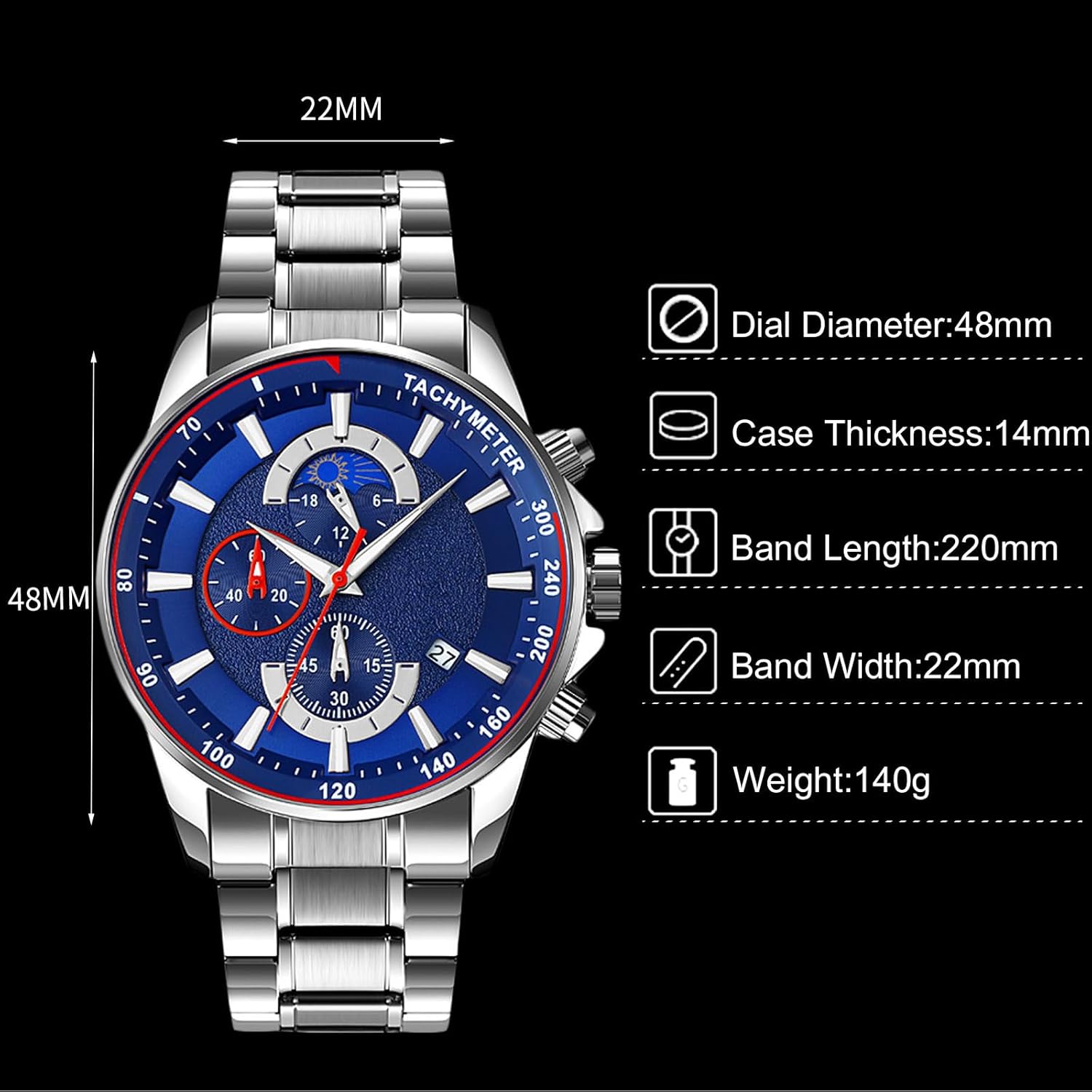
Image 7.1: Physical dimensions of the RORIOS AA-1OX002 watch.
| Feature | Specification |
|---|---|
| Model Number | AA-1OX002 |
| Movement Type | Quartz |
| Case Material | Stainless Steel |
| Band Material | Stainless Steel |
| Dial Diameter | 48 mm |
| Case Thickness | 14 mm |
| Band Width | 22 mm |
| Band Length | 220 mm |
| Watch Weight | 140 g |
| Water Resistance | 3 ATM (30 meters) |
8. Warranty and Support
Warranty Information:
Your RORIOS watch comes with a warranty. Please refer to the included Warranty Card for specific terms, conditions, and duration of the warranty coverage.
Customer Support:
For any questions, concerns, or assistance with your RORIOS watch, please refer to the contact information provided on your Warranty Card or visit the official RORIOS website for support options.