
1. Introduction
Thank you for purchasing the Coolmusic 10G Dual-Powered Bluetooth Guitar Amplifier. This portable 10-watt amplifier is designed to provide a versatile and powerful sound experience for electric guitar players. Featuring dual power options, Bluetooth connectivity, and essential tone controls, it is ideal for practice, small performances, and on-the-go musicianship. Please read this manual thoroughly to ensure proper use and to maximize the performance of your amplifier.
2. Safety Instructions
- Power Source: Use only the specified DC12V power adapter or 6 AA batteries. Ensure the correct polarity when inserting batteries.
- Moisture: Do not expose the amplifier to rain, moisture, or any liquids. This can lead to electric shock or fire.
- Ventilation: Ensure proper ventilation around the amplifier. Do not block any ventilation openings.
- Heat: Keep the amplifier away from heat sources such as radiators, heat registers, stoves, or other apparatus (including amplifiers) that produce heat.
- Servicing: Do not attempt to service this product yourself. Refer all servicing to qualified service personnel.
- Cleaning: Clean only with a dry cloth.
- Placement: Place the amplifier on a stable, flat surface to prevent it from falling.
3. Package Contents
- Coolmusic 10G Guitar Amplifier
- DC12V Power Adapter
- User Manual (this document)
- Note: AA batteries are not included and must be purchased separately.
4. Product Features
- 10-Watt Output: Provides explosive tone in a super portable size.
- Flexible Sound Control: Features Gain, Bass, Treble, and Volume knobs for precise tone shaping.
- CLEAN/DISTORTION Effect: Easily switch between clean and distorted tones directly on the amplifier.
- Bluetooth Connectivity: Stream background music from your phone or tablet for practice or jamming.
- Multiple Inputs: Includes a 1/4" Instrument Input and a 1/8" Auxiliary Input Jack for media players, CDs, or phones.
- Dual-Power Options: Can be powered by the included DC12V adapter or 6 AA batteries for portability.
5. Product Overview
5.1 Front Panel Controls

Figure 1: Front Panel Controls of the Coolmusic 10G Amplifier.
This image displays the top control panel of the amplifier, highlighting the input jack, tone button (Clean/Distortion), Gain knob, Bass knob, Treble knob, Volume knob, Status Light, and Power Button. Each control is clearly labeled for easy identification.
- INPUT: 1/4" jack for connecting your electric guitar.
- DIST./CLEAN Button: Toggles between Distortion and Clean sound effects.
- GAIN Knob: Adjusts the amount of overdrive or distortion.
- BASS Knob: Controls the low-frequency response of the amplifier.
- TREBLE Knob: Controls the high-frequency response of the amplifier.
- VOLUME Knob: Adjusts the overall output volume of the amplifier.
- Status Light: Indicates power status and Bluetooth pairing status.
- POWER Button: Turns the amplifier ON or OFF.
5.2 Rear Panel Connections
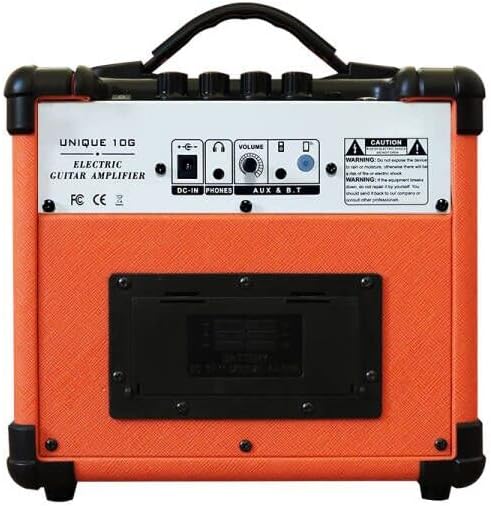
Figure 2: Rear Panel Connections of the Coolmusic 10G Amplifier.
This image shows the rear panel of the amplifier, detailing the DC-IN port, PHONES (headphone) output, AUX-IN port, and the MODE button for Bluetooth. It also shows the battery compartment cover.
- DC-IN: Power input for the included DC12V adapter.
- PHONES: 1/8" (3.5mm) headphone output jack for silent practice.
- AUX-IN: 1/8" (3.5mm) auxiliary input jack for connecting external audio sources (e.g., MP3 player, phone).
- MODE Button: Used to switch between AUX and Bluetooth modes.
- Battery Compartment: Located on the lower rear panel, holds 6 AA batteries.

Figure 3: Battery Compartment for 6 AA Batteries.
This image provides a close-up view of the battery compartment, showing where the 6 AA batteries are inserted to power the amplifier when not connected to the DC adapter.
6. Setup
6.1 Powering the Amplifier
- DC Power: Connect the included DC12V power adapter to the DC-IN port on the rear panel and plug it into a standard wall outlet. When the adapter is connected, battery power will be automatically cut off.
- Battery Power: For portable use, open the battery compartment on the rear panel and insert 6 AA batteries, ensuring correct polarity. Close the compartment securely.
6.2 Connecting a Guitar
Plug your electric guitar into the 1/4" INPUT jack on the front panel of the amplifier using a standard instrument cable.
6.3 Bluetooth Pairing

Figure 4: Bluetooth Connectivity for Wireless Audio Streaming.
This image illustrates the amplifier's Bluetooth capability, showing a smartphone screen with Bluetooth settings open, ready to pair with the amplifier for playing background music.
- Turn on the amplifier using the POWER button.
- Press the MODE button on the rear panel to switch to Bluetooth mode. The Status Light on the front panel will blink, indicating it's ready for pairing.
- On your mobile device (phone, tablet, etc.), enable Bluetooth and search for available devices.
- Select "Coolmusic 10G" from the list of devices.
- Once paired, the Status Light will stop blinking and remain solid. You can now play audio from your device through the amplifier.
6.4 Connecting Auxiliary Devices
To connect an external audio source via cable, use a 1/8" (3.5mm) audio cable to connect your device to the AUX-IN jack on the rear panel. Ensure the amplifier is in AUX mode by pressing the MODE button if necessary.
7. Operating Instructions
7.1 Basic Operation
- Power On: Press the POWER button on the front panel. The Status Light will illuminate.
- Power Off: Press the POWER button again to turn off the amplifier.
7.2 Adjusting Sound
- Volume: Rotate the VOLUME knob to increase or decrease the overall output level.
- Gain: Use the GAIN knob to control the input signal level and the amount of distortion. Higher gain settings produce more saturated, distorted tones.
- Bass: Adjust the BASS knob to control the low-end frequencies for a fuller or tighter sound.
- Treble: Adjust the TREBLE knob to control the high-end frequencies for brighter or warmer tones.
7.3 Switching Effects (Clean/Distortion)
Press the DIST./CLEAN button on the front panel to toggle between the amplifier's clean tone and its built-in distortion effect. The Status Light may change color or intensity to indicate the active mode (refer to specific product behavior if applicable, otherwise assume a simple toggle).
7.4 Using Headphones
For silent practice, plug your headphones into the PHONES jack on the rear panel. The main speaker output will be muted automatically.
7.5 Product Demonstration Videos
Coolmusic 10G Guitar Amp Overview
This video provides a general overview and demonstration of the Coolmusic 10G guitar amplifier's features and sound capabilities.
Electric Guitar Amp Sound Demo
This video showcases the sound quality and various tones achievable with the electric guitar amplifier, including clean and distorted sounds.
8. Maintenance
- Cleaning: Wipe the amplifier with a soft, dry cloth. Do not use abrasive cleaners, waxes, or solvents.
- Storage: When not in use for extended periods, store the amplifier in a cool, dry place. If using batteries, remove them to prevent leakage.
- Transportation: Use the integrated carrying handle for easy transport.

Figure 5: Portable Design with Carrying Handle and Dimensions.
This image highlights the compact and portable nature of the amplifier, featuring its carrying handle and indicating its dimensions (22.5cm x 21cm x 17.5cm) for easy transport.
9. Troubleshooting
| Problem | Possible Cause | Solution |
|---|---|---|
| No sound from amplifier. |
|
|
| Bluetooth not connecting. |
|
|
| Distorted or poor sound quality. |
|
|
10. Specifications
| Feature | Detail |
|---|---|
| Output Wattage | 10 Watts |
| Power Source | DC12V Adapter / 6 x AA Batteries |
| Product Dimensions | 22.5 x 21 x 17.5 cm |
| Item Weight | 2.98 kg |
| Connectivity | 1/4" Instrument Input, 1/8" AUX Input, Bluetooth |
| Effects | Clean, Distortion |
| Controls | Gain, Bass, Treble, Volume |
| Color | Orange |
11. Warranty and Support
Coolmusic products are manufactured to high-quality standards. For warranty information, technical support, or service inquiries, please contact your retailer or visit the official Coolmusic website. Please retain your proof of purchase for any warranty claims.