
NEBO NEB-LTN-1003
NEBO Galileo Air 1000 Collapsible Lantern User Manual
Model: NEB-LTN-1003
Brand: NEBO
Introduction
This manual provides comprehensive instructions for the NEBO Galileo Air 1000 Collapsible Lantern. This powerful and versatile device functions as both a 1000 lumen rechargeable lantern and a power bank, designed for various lighting needs and on-the-go charging. Please read this manual thoroughly before operating the device to ensure safe and optimal performance.
Key Features
- 1000 Lumen Output: Provides bright illumination for various environments.
- Collapsible Design: Easily collapses for compact storage and portability.
- Rechargeable Battery: Equipped with a built-in rechargeable battery for convenience.
- Integrated Power Bank: Features a USB-A output to charge or power other USB devices.
- Multiple Light Modes: Includes High, Medium, Low, Red, and Red Strobe settings.
- Durable Construction: Made from durable ABS plastic, designed to be dust and water resistant (IPX4 rating).
- Versatile Hanging Options: Features a sturdy hanging hook for overhead lighting.
Setup
Initial Charge
Before first use, fully charge your Galileo Air 1000 lantern. Connect the included USB charging cord to the USB-C input port located on the side of the lantern. The charging indicator light will show the charging status.

Figure 1: The NEBO Galileo Air 1000 lantern in its collapsed, compact form.
Expanding the Lantern
To expand the lantern for area lighting, gently pull the top section upwards until it is fully extended. The flexible silicone diffuser will stretch to reveal the full light source. To collapse, push the top section back down until it is compact.

Figure 2: The NEBO Galileo Air 1000 lantern fully expanded, showcasing its light-diffusing body.
Hanging and Placement
The lantern features a sturdy integrated hanging hook on its base, allowing it to be suspended for overhead illumination. It can also be placed on any flat surface for stable, ambient lighting. The base also includes attachment points for tethering or securing the lantern.

Figure 3: The lantern demonstrating its hanging capability, providing overhead light.
Operating Instructions
Power Button and Light Modes
The power button is located on the front of the lantern's base. Press the button to cycle through the various light modes:
- High (1000 lumens): Press once from OFF.
- Medium (500 lumens): Press again.
- Low (100 lumens): Press again.
- Red (50 lumens): Press and hold from OFF, or cycle through white modes and press again.
- Red Strobe (50 lumens): From Red mode, press again.
- OFF: Press the button after cycling through all modes, or press and hold the button from any mode.
The lantern will turn off after 8 seconds in any mode if no further button presses occur.
Power Bank Function
The Galileo Air 1000 can also function as a power bank. Open the protective cover on the side of the lantern to reveal the USB-A output port. Connect your device's charging cable to this port to begin charging. This feature is ideal for charging smartphones or other small electronic devices when away from a power source.
Maintenance
To ensure the longevity and optimal performance of your NEBO Galileo Air 1000 lantern, follow these maintenance guidelines:
- Cleaning: Wipe the lantern with a soft, damp cloth to remove dirt and debris. Avoid using harsh chemicals or abrasive cleaners.
- Storage: Store the lantern in a cool, dry place when not in use. For extended storage, ensure the battery is partially charged (around 50%) to preserve battery health.
- Water Resistance: The lantern has an IPX4 water-resistant rating, meaning it is protected against splashing water from any direction. It is not waterproof and should not be submerged in water.
- Battery Care: Recharge the battery regularly, even if not frequently used, to maintain its capacity. Avoid fully draining the battery repeatedly.
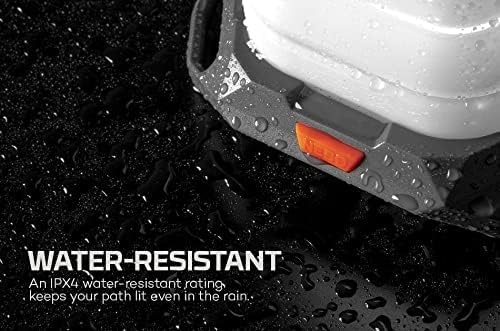
Figure 4: The lantern's water-resistant design, suitable for outdoor conditions.
Troubleshooting
| Problem | Possible Cause | Solution |
|---|---|---|
| Lantern does not turn on or light is dim. | Low battery charge. | Fully charge the lantern using the provided USB-C cable. |
| Lantern does not expand or collapse smoothly. | Debris or obstruction in the collapsible mechanism. | Gently inspect and clean the collapsible sections. Ensure no foreign objects are present. |
| Connected device is not charging. | Lantern battery is low; incorrect cable; device not compatible. | Ensure lantern is sufficiently charged. Use a compatible USB-A cable. Verify device compatibility. |
| Red light or strobe not activating. | Incorrect button sequence. | Refer to the "Operating Instructions" section for correct button presses to activate Red and Red Strobe modes. |
Specifications
| Attribute | Detail |
|---|---|
| Product Dimensions | 8"L x 3"W x 11"H (Expanded) |
| Item Weight | 13.1 Ounces |
| Brightness | 1000 Lumen (Max) |
| Battery Type | Lithium-Ion (1 included) |
| Power Source | Battery Powered |
| Light Source Type | Light Emitting Diode (LED) |
| Material | Acrylonitrile Butadiene Styrene (ABS), Polypropylene (PP) |
| Water Resistance Level | Not Water Resistant (IPX4 rated for splash resistance) |
| Model Number | NEB-LTN-1003 |
| UPC | 645397002130 |

Figure 5: Compact dimensions of the lantern.
Warranty and Support
The NEBO Galileo Air 1000 Collapsible Lantern is covered by a 1-year manufacturer's warranty. For warranty claims, technical support, or any product-related inquiries, please visit the official NEBO website or contact their customer service directly. You can find more information and support resources at the NEBO Store on Amazon.
Ask a question about this manual
Ask about setup, troubleshooting, compatibility, parts, safety, or missing instructions. Manuals+ will review the question and use this page’s manual context to help answer it.