
ENGINDOT MLR01
ENGiNDOT MLR01 Golf Rangefinder User Manual
Model: MLR01 | Brand: ENGiNDOT
Introduction
The ENGiNDOT MLR01 Golf Rangefinder is a high-precision laser rangefinder designed for accurate distance, speed, angle, and height measurements. Featuring 7X magnification and a measuring range of 5 to 900 yards, it is suitable for various applications including golf, hunting, and outdoor measurements. This manual provides detailed instructions for proper use and maintenance of your device.
What's in the Box

Figure 1: Package Contents. The image displays all items included in the ENGiNDOT MLR01 package: the rangefinder unit, a USB charging cable, a protective pouch, a hand strap, a durable carrying case, a cleaning cloth, and the user manual.
- 1 x ENGiNDOT MLR01 Rangefinder
- 1 x USB Charging Cable
- 1 x Pouch
- 1 x Hand Strap
- 1 x Durable Carrying Case
- 1 x User Manual
- 1 x Cleaning Cloth
Product Overview

Figure 2: Rangefinder Components. This diagram labels the key parts of the rangefinder, including the power/start button, mode/toggle button, diopter focus ring, monocular, laser projector, laser receptor, USB input, and charge indicator.
The MLR01 rangefinder features a compact design with clearly labeled components for ease of use. Key components include:
- Power On & Start Button: Used to power on the device and initiate measurements.
- Mode/Toggle Button: Used to switch between measurement modes and units.
- Diopter Focus Ring: Adjusts the eyepiece for clear vision.
- Monocular: The viewing lens.
- Laser Projector & Receptor: Emits and receives the laser for distance measurement.
- USB Input: For charging the internal battery.
- Charge Indicator: Shows battery status.
Setup
Charging the Battery

Figure 3: USB Charging. The rangefinder is shown connected to a power bank via its micro USB port for charging.
The MLR01 rangefinder is equipped with a 750mAh rechargeable lithium battery. Before first use, ensure the device is fully charged.
- Locate the micro USB port on the device.
- Connect the provided micro USB cable to the rangefinder and to any standard USB charging port (e.g., computer, wall adapter, power bank).
- The charge indicator will show the charging status. A full charge allows for over 30,000 measurements.
Power On/Off
Video 1: Turning On/Off and Unit Toggle. This video demonstrates how to power on and off the MLR01 rangefinder and how to toggle between measurement units (yards/meters, km/h).
To power on the device, press the Power On/Start button. The display will activate. To power off, press and hold the Power On/Start button, or the device will automatically shut off after a period of inactivity to conserve battery.
Operating Instructions
Adjusting the Eyepiece

Figure 4: Eyepiece Adjustment. The image highlights the 7X magnification and the rotating eyepiece adjuster for clear vision.
Rotate the diopter focus ring (eyepiece adjuster) until the display and target appear clear and sharp to your eye.
Changing Measurement Units
To switch between meters (m) and yards (Y), long-press the "MODE" button while the device is powered on. The unit displayed on the screen will change accordingly.
Measurement Modes
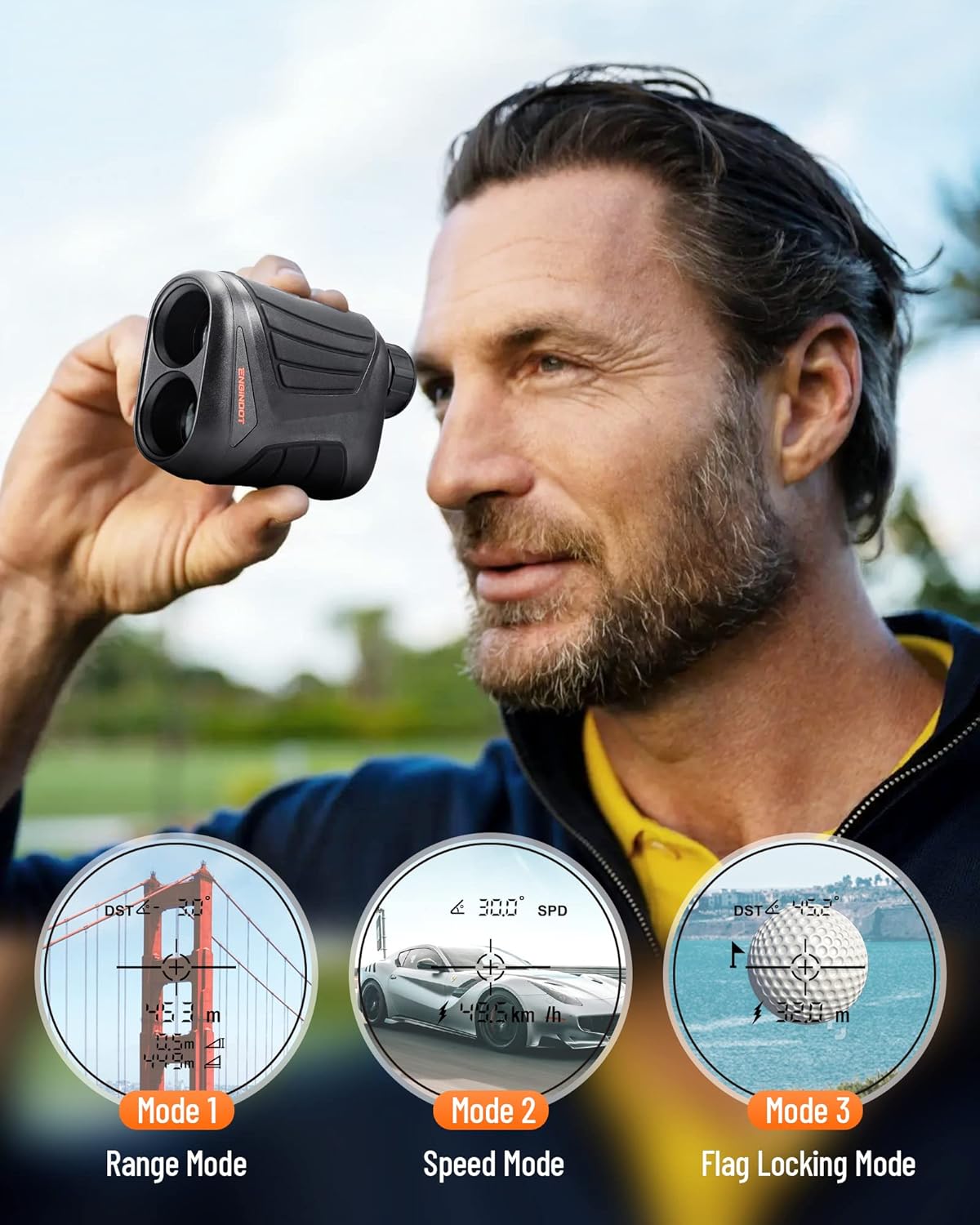
Figure 5: Measurement Modes. This image illustrates the three primary operating modes: Range Mode for distance and slope, Speed Mode for object velocity, and Flag Locking Mode for golf flagpoles.
The MLR01 offers three distinct measurement modes. Press the "MODE" button once to cycle through them:
- Range Mode (Mode 1):
Measures the straight-line distance to a target. This mode also calculates angle, horizontal distance, and vertical height, which is particularly useful for golf with slope compensation.

Figure 6: Range Mode Display. An example of the rangefinder's display showing distance, angle, and speed readings in a golf environment.
- Speed Mode (Mode 2):
Measures the speed of a moving object. Aim at the object and press the Power On/Start button to get a speed reading.
- Flag Locking Mode (Mode 3):
Designed for golf, this mode helps to lock onto the flagpole, ignoring background objects, and provides the distance to the flag. The device will vibrate slightly when the flag is successfully locked.
Applications

Figure 7: Versatile Applications. The rangefinder is depicted in use for golfing, hunting, general outdoor measurements, and shooting activities.
The MLR01 rangefinder is versatile and can be used in various professional and recreational settings, including:
- Golf
- Hunting
- Bow and Arrow
- Outdoor Measurement
- Shooting
Maintenance
Proper maintenance ensures the longevity and accuracy of your rangefinder.
- Cleaning: Use the provided cleaning cloth to gently wipe the lenses and body of the device. Do not use abrasive materials or chemical cleaners.
- Storage: Store the rangefinder in its durable carrying case when not in use to protect it from dust, moisture, and physical damage. Store in a cool, dry place.
- Battery Care: Recharge the battery regularly, even if not frequently used, to maintain battery health. Avoid fully discharging the battery for extended periods.
- Water Resistance: The device has an IP54 water-resistant rating, meaning it is protected from splashing water. Do not submerge the device in water.
Troubleshooting
| Problem | Possible Cause | Solution |
|---|---|---|
| Device does not power on. | Low or depleted battery. | Charge the device using the provided USB cable. |
| Inaccurate measurements. | Dirty lenses; unstable aiming; environmental factors (fog, heavy rain). | Clean lenses with the cleaning cloth. Ensure stable aiming. Avoid use in extreme weather conditions. |
| Display is blurry. | Diopter not adjusted correctly. | Rotate the diopter focus ring until the display is clear. |
| Cannot lock onto flag. | Obstructions; target too far; unsteady hand. | Ensure clear line of sight. Try again with a steady hand or use a tripod. |
Specifications

Figure 8: Product Dimensions. The image provides the physical dimensions of the rangefinder for reference.
| Model Name | MLR01 |
| Measuring Range | 5 to 900 yards |
| Magnification | 7X |
| Range Measure Accuracy | ±1 yard |
| Speed Measure Accuracy | ±5 km/h |
| Angle Measure Accuracy | ±1° |
| Battery Type | 750mAh Rechargeable Lithium Battery |
| Water Resistance Level | IP54 (Water Resistant) |
| Dimensions (L x W x H) | 4.72" x 1.69" x 2.95" |
| Item Weight | 12 ounces |
| Material | Plastic |
Warranty and Support
The ENGiNDOT MLR01 Golf Rangefinder comes with a 24-month warranty from the date of purchase. This warranty covers manufacturing defects and malfunctions under normal use.
For technical support, warranty claims, or any inquiries regarding your product, please contact ENGiNDOT customer service through the retailer where the product was purchased or visit the official ENGiNDOT website for contact information.
Important: Do not attempt to disassemble or repair the device yourself, as this will void the warranty and may cause damage or injury.
Related documentsMLR01

Ask a question about this manual
Ask about setup, troubleshooting, compatibility, parts, safety, or missing instructions. Manuals+ will review the question and use this page’s manual context to help answer it.