
1. Introduction
Thank you for choosing the hetaida No-Touch Forehead Thermometer. This device is designed for accurate and instant temperature readings for individuals of all ages, including adults, children, and infants. Its non-contact design ensures hygienic and convenient use. This manual provides essential information for proper operation and maintenance of your thermometer.
Intended Use: This infrared thermometer is intended for intermittent measurement of human body temperature from the forehead and for measuring object surface temperature.
2. Safety Information
- Do not immerse the thermometer in water or other liquids.
- Keep the device out of reach of children.
- Avoid dropping the thermometer or subjecting it to strong impacts.
- Do not use the thermometer if the operating temperature exceeds the specified range (15°C-40°C).
- Forehead temperature should not be used for direct comparison with ear, armpit, oral, or rectal temperatures due to different definition ranges.
3. Product Overview
The hetaida No-Touch Forehead Thermometer features a user-friendly design with clear controls and an LCD display.
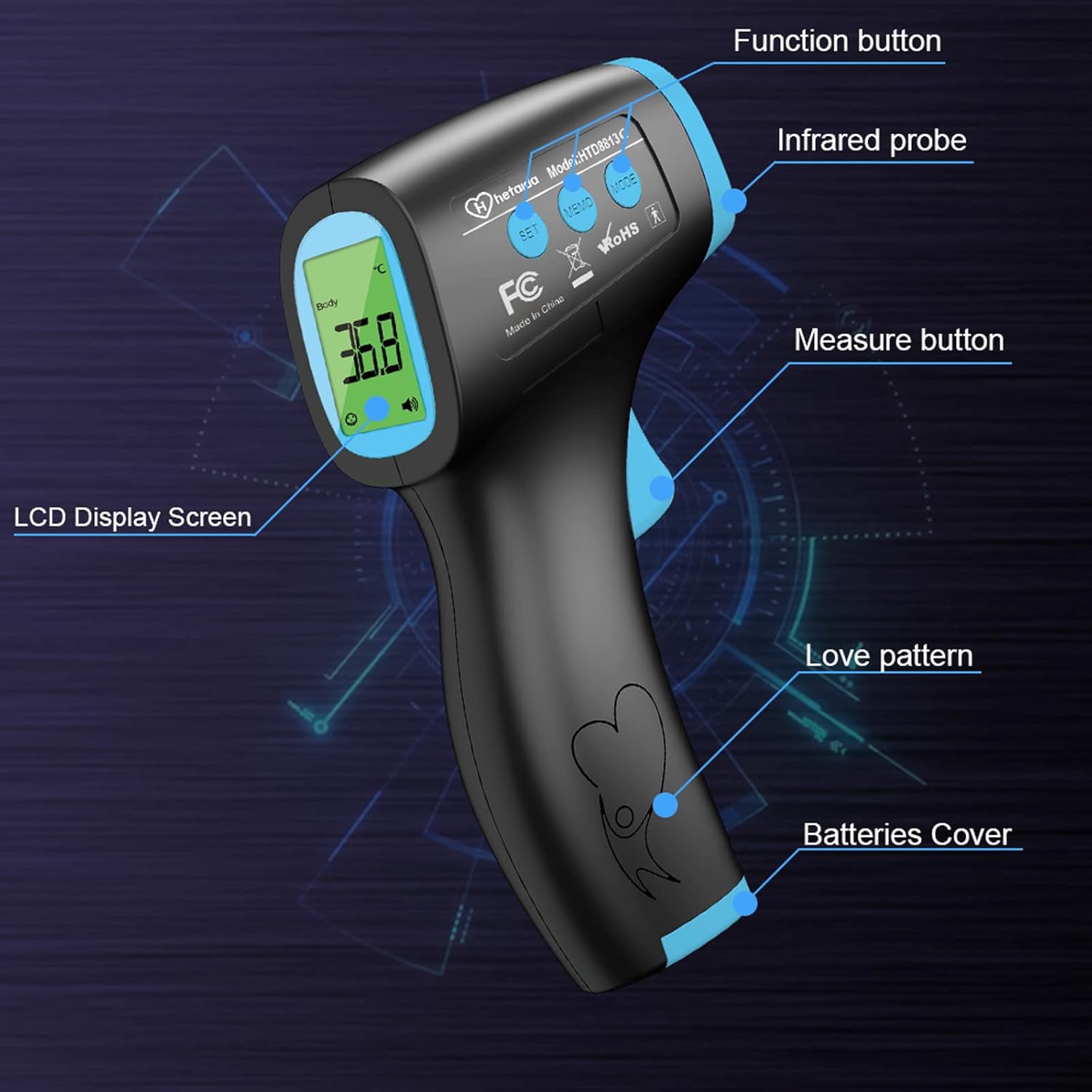
Figure 3.1: Thermometer Components (Function button, Infrared probe, Measure button, LCD Display Screen, Love pattern, Batteries Cover).

Figure 3.2: Detailed view of Thermometer Components (MODE Button, MEMO Button, SET Button, IR Sensor, ON/Scan Button, Battery Cover, Comfortable Grip).
What's Included:
- hetaida No-Touch Forehead Thermometer (Model HTD8813)
- AAA Batteries (x2)
- User Manual
- Quick User Guide

Figure 3.3: Thermometer and included AAA batteries.
4. Setup
4.1 Battery Installation
- Locate the battery cover at the bottom of the thermometer's handle.
- Slide the battery cover open.
- Insert two AAA batteries, ensuring the positive (+) and negative (-) poles are correctly aligned as indicated inside the compartment.
- Close the battery cover securely.

Figure 4.1: Steps for battery installation.
4.2 Acclimation
When moving the thermometer to a new environment with a different ambient temperature, allow it to acclimate to the room temperature for at least 30 minutes before use. This ensures accurate readings.
Video 4.1: Demonstrates how to get a more accurate forehead temperature, including acclimation and proper measurement technique.
5. Operating Instructions
5.1 Powering On/Off
- To power on, press the 'Measure' button. The thermometer will perform a self-test and display the last reading.
- The thermometer will automatically power off after 18 seconds of inactivity to save battery power.
5.2 Measurement Modes
The thermometer supports two measurement modes: Body mode and Object mode.
- Body Mode: For measuring human body temperature (adults, children, infants).
- Object Mode: For measuring the temperature of surfaces, liquids (e.g., baby milk, bath water), or room temperature.
To switch between modes, press the 'MODE' button.

Figure 5.1: Examples of Object Mode measurements (Room, Food, Milk).

Figure 5.2: Thermometer usage for Body Mode (adults and children) and Surface Mode (water, milk, chamber).
5.3 Taking a Measurement (Body Mode)
- Ensure the forehead is clean and clear of hair, sweat, or cosmetics.
- Point the thermometer at the center of the forehead, maintaining a distance of 1-5 cm (ideally about 1 cm).
- Press the 'Measure' button. The reading will appear on the LCD screen within 1 second.

Figure 5.3: Non-contact measurement with 1-second reading.

Figure 5.4: Recommended measurement distance of 1-5 cm.

Figure 5.5: Silent mode for undisturbed measurements.
5.4 Temperature Unit Switching (°C/°F)
To switch between Celsius (°C) and Fahrenheit (°F):
- Press and hold the 'SET' button to enter the setting mode.
- On the screen, it will show 'F1' for changing the unit.
- Press 'MODE' or 'MEMO' to toggle between °C and °F.
- Press 'SET' to confirm your selection.

Figure 5.6: Switching between Celsius and Fahrenheit.

Figure 5.7: Button sequence for unit conversion.
5.5 Fever Alarm and Backlight Indication
The LCD backlight changes color to indicate different temperature levels:
- Green: Normal temperature (35.5°C - 37.3°C / 95.9°F - 99.1°F)
- Yellow: Slight fever (37.4°C - 38.0°C / 99.3°F - 100.4°F)
- Red: High fever (38.1°C - 43.0°C / 100.6°F - 109.4°F)

Figure 5.8: Three-color backlight indication for temperature ranges.

Figure 5.9: Visual representation of temperature ranges and corresponding backlight colors.
5.6 Memory Function
The thermometer can store up to 50 sets of temperature data for query. To access memory, press the 'MEMO' button.

Figure 5.10: Storage of 50 temperature recordings.
6. Maintenance and Care
- Cleaning: Wipe the thermometer's surface with a soft, damp cloth. For disinfection, use an alcohol swab (70% isopropyl alcohol). Do not use abrasive cleaners or immerse the device in water.
- Storage: Store the thermometer in a cool, dry place, away from direct sunlight and extreme temperatures.
- Battery Replacement: Replace batteries when the low battery indicator appears on the display.
7. Troubleshooting
| Problem | Possible Cause | Solution |
|---|---|---|
Ask a question about this manualAsk about setup, troubleshooting, compatibility, parts, safety, or missing instructions. Manuals+ will review the question and use this page’s manual context to help answer it. |