
Introduction
Thank you for choosing the Sportech Digital Watch, model SP147. This manual provides detailed instructions for setting up, operating, and maintaining your watch. Please read this manual carefully to ensure proper use and to maximize the lifespan of your device.
The Sportech Digital Watch SP147 is designed for daily use, offering multiple functions including a digital display, LED night light, date, 12/24-hour format, alarm, 50m water resistance, and a chronograph.
Product Overview
Familiarize yourself with the watch's components and buttons before operation.

Image 0: Sportech Digital Watch SP147. A front view of the Sportech Digital Watch SP147, showcasing its digital display and overall design.

Image 1: Watch Buttons and Functions. This image displays the Sportech Digital Watch SP147 with its four primary control buttons clearly labeled: LIGHT (top left) for illumination, MODE (bottom left) for cycling through functions, START (top right) for initiating actions, and RESET (bottom right) for resetting or adjusting settings.
- LIGHT Button: Activates the LED backlight for visibility in low-light conditions.
- MODE Button: Cycles through different display modes such as Time, Date, Alarm, and Chronograph.
- START Button: Used to start/stop the chronograph, set values during adjustment, or switch between 12/24-hour modes.
- RESET Button: Used to reset the chronograph, confirm settings, or edit digits during time/date adjustment.
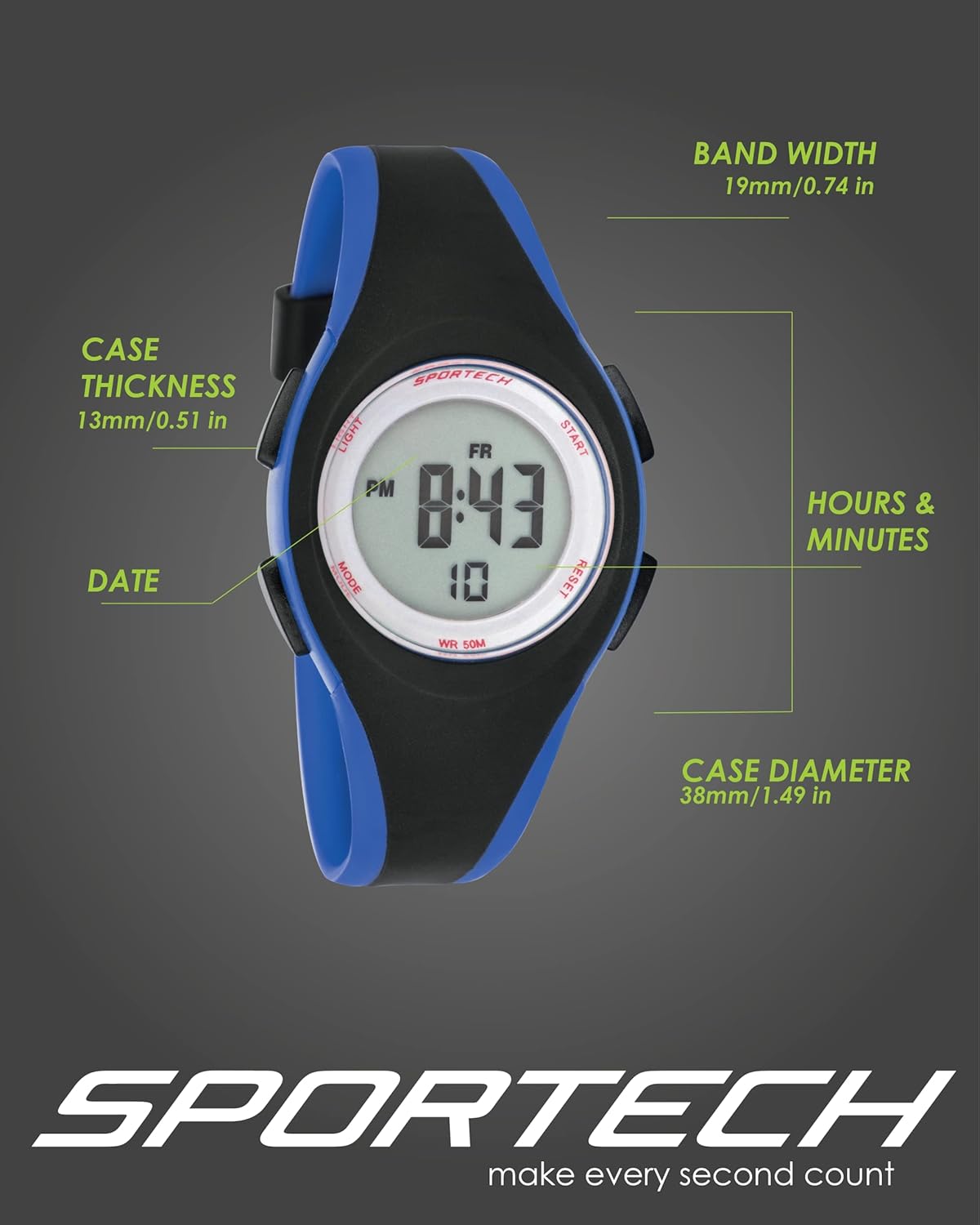
Image 2: Watch Dimensions. This image illustrates the physical dimensions of the Sportech Digital Watch SP147, highlighting the case thickness (13mm/0.51 in), band width (19mm/0.74 in), and case diameter (38mm/1.49 in).

Image 3: Rear View and Durability Features. This image shows the back of the Sportech Digital Watch SP147, emphasizing its stainless-steel case back and buckle for durability. It also indicates the watch's shock-resistant design.
Setup
Initial Power On and Time Setting
Your Sportech Digital Watch comes with a pre-installed battery. The first step is to set the correct time and date.
- From the normal time display, press the MODE button repeatedly until the seconds begin to flash. This indicates you are in time setting mode.
- Press the RESET button to cycle through the settings: Seconds → Hours → Minutes → Month → Date → Day of the Week.
- While a value is flashing, use the START button to increase the value. Hold the START button to advance rapidly.
- Once all desired settings are adjusted, press the MODE button to exit the setting mode and return to the normal time display.
12/24 Hour Format Selection
In the normal time display, press the START button to toggle between 12-hour (with AM/PM indicator) and 24-hour formats.
Operating Instructions
Using the Chronograph (Stopwatch)
- From the normal time display, press the MODE button once to enter Chronograph mode. The display will show "00:00:00".
- Press the START button to begin timing.
- Press the START button again to pause timing.
- Press the RESET button to clear the chronograph to "00:00:00".
- Press the MODE button to return to the normal time display.
Setting and Using the Alarm
- From the normal time display, press the MODE button twice to enter Alarm setting mode. The hour digits will flash.
- Press the START button to adjust the hour.
- Press the RESET button to switch to minute adjustment. The minute digits will flash.
- Press the START button to adjust the minutes.
- Press the MODE button to confirm the alarm time and exit setting mode.
- To turn the alarm ON/OFF, in Alarm mode, press the START button. An alarm icon will appear/disappear on the display.
Using the LED Night Light
Press the LIGHT button (top left) at any time to illuminate the display. The backlight will remain on for a few seconds.

Image 4: Daytime and Nightlight Modes. This image compares the display of the Sportech Digital Watch SP147 in standard daytime viewing mode with its illuminated nightlight mode, demonstrating enhanced visibility in dark conditions.
Water Resistance
The Sportech Digital Watch SP147 is rated for 50 meters (5 ATM) water resistance. This means it is suitable for:
- Daily splashes
- Rain
- Showering (brief exposure)
- Swimming (surface swimming)
Important Note:
- DO NOT press any buttons while the watch is wet or submerged. This can compromise the water seals.
- The watch is NOT suitable for diving, snorkeling, or high-pressure water activities (e.g., hot tubs, saunas, high-pressure washing).
- Exposure to hot water or steam can damage the seals and lead to water ingress.
- If condensation appears inside the watch, have it checked by a professional immediately.

Image 5: Water Resistance Demonstration. This image shows the Sportech Digital Watch SP147 partially submerged in water, visually representing its 50-meter water resistance capability for activities like swimming.
Maintenance
- Cleaning: Wipe the watch regularly with a soft, dry cloth. For stubborn dirt, a slightly damp cloth can be used, followed by immediate drying. Avoid harsh chemicals or abrasive cleaners.
- Battery Replacement: The watch uses 1 product-specific battery. When the display becomes dim or functions become erratic, it may be time to replace the battery. Battery replacement should ideally be performed by a qualified watch technician to ensure the water resistance seal is properly maintained.
- Storage: Store your watch in a cool, dry place away from direct sunlight and extreme temperatures when not in use.
- Avoid Impacts: While the watch is shock-resistant, excessive impacts can still cause damage. Handle with care.
Troubleshooting
| Problem | Possible Cause | Solution |
|---|---|---|
| Display is blank or dim. | Low or depleted battery. | Replace the battery. Consult a professional for battery replacement to maintain water resistance. |
| Time is incorrect or not advancing. | Time not set correctly; internal malfunction. | Re-set the time following the "Setup" instructions. If the problem persists, contact customer support. |
| Water or condensation inside the watch. | Water resistance compromised due to improper use (e.g., pressing buttons underwater, exposure to hot water/steam) or damaged seal. | Immediately stop using the watch. Take it to a professional watch repair service to prevent further damage. Refer to the "Water Resistance" section for proper usage guidelines. |
| Buttons are unresponsive. | Dirt/debris under buttons; internal issue. | Clean around the buttons. If the issue persists, contact customer support. |
Specifications
| Feature | Detail |
|---|---|
| Model Number | SP14703 |
| Brand | Sportech |
| Display Type | Digital |
| Functions | Time (12/24H), Date, Day, Alarm, Chronograph, LED Backlight |
| Water Resistance | 50 meters (5 ATM) |
| Case Diameter | 38 mm (1.49 in) |
| Case Thickness | 13 mm (0.51 in) |
| Band Width | 19 mm (0.74 in) |
| Band Length (Circumference) | 140mm to 190mm (6.29 in to 7.48 in) |
| Battery Type | 1 Product-specific battery |
| Case Material | Resin (Glass resistant) |
| Strap Material | High-quality durable PU |
| Back Case Material | Stainless Steel |
Warranty and Support
Sportech products are manufactured with attention to quality. For specific warranty information, please refer to the warranty card included with your purchase or visit the official Sportech website.
If you encounter any issues not covered in this manual or require further assistance, please contact Sportech customer support through their official channels. Please have your model number (SP14703) and purchase details ready when contacting support.


