
1. Introduction
The VSYSTO H7 4-channel truck dash camera system is designed to provide comprehensive surveillance and recording for various vehicles, including RVs, vans, commercial trucks, trailers, buses, campers, tractors, and motorhomes. This system enhances driving safety by offering a 360-degree panoramic view and continuous recording capabilities. It serves as a reliable tool for monitoring vehicle surroundings and documenting events on the road.
2. Product Overview
2.1 Package Contents
Verify that all components are present in the package:
- Monitor (7.0-inch HD IPS screen)
- Cameras (4 units: front, rear, left side, right side)
- Power cable
- 2.4G Wireless Remote Control
- IR Remote Control
- GPS Module
- Camera connection cables (6.6ft, 19.7ft, 19.7ft, 49ft)

Image 2.1: Complete VSYSTO H7 system components.
2.2 Key Features
- 4-Channel 1080P Recording: Simultaneous recording from four cameras (front, rear, left, right) in 1080P resolution for comprehensive coverage.
- 7.0-inch HD IPS Monitor: Provides clear real-time footage with a sun visor for improved visibility. Supports single, 2-way, 3-way, or 4-way split-screen display modes.
- Infrared (IR) Night Vision: Side and backup cameras are equipped with IR lights for enhanced visibility in low-light conditions.
- IPX7 Waterproof Cameras: All four external cameras are rated IPX7 for water resistance and designed to withstand various weather conditions (32℉~158℉).
- Dual Memory Card Support: Accommodates two 512GB memory cards (not included) for extended continuous recording.
- Loop Recording: Ensures continuous recording by overwriting the oldest footage when the memory card is full.
- Emergency Mode: Automatically protects important footage from accidental deletion during sudden impacts or events.
- 24-Hour Parking Mode: Offers continuous monitoring when parked with adjustable recording intervals and low-voltage protection (12V/24V systems) to prevent battery drain.
- GPS Module: Provides real-time tracking of location, speed, air pressure, altitude, and vehicle battery voltage, displayed on the monitor.
- Versatile Display Options: Automatic display switching when using turn signals or reversing, with distance grid lines for the rear camera.
- Wide Voltage Compatibility: Compatible with 9-32 Volt systems, suitable for 12V/24V vehicles.

Image 2.2: The 4-channel system provides 360-degree recording.
3. Installation Guide
3.1 Before Installation
Before beginning installation, ensure the vehicle's power is off. Plan the routing of all cables to avoid interference with vehicle operations and to protect them from damage. Test all components before permanent installation.
3.2 Wiring Diagram
Refer to the following diagram for proper connection of the monitor, cameras, GPS module, and power supply.

Image 3.1: VSYSTO H7 System Wiring Diagram.
3.3 Camera Placement
Mount cameras securely in positions that provide clear, unobstructed views. The system includes specific cables for different lengths (6.6ft for front, 19.7ft for sides, 49ft for rear) to accommodate large vehicles. Ensure the arrow on each camera indicates the top for correct image orientation.
- Front Camera: Typically mounted on the windshield or dashboard to capture forward view.
- Side Cameras: Mount on the left and right sides of the vehicle, often near mirrors, to cover blind spots.
- Rear Camera: Position at the back of the vehicle for a clear view during reversing and general rear monitoring.
3.4 Monitor Mounting
Mount the 7.0-inch monitor in a location that is easily visible to the driver but does not obstruct the view of the road. Ensure the mount is stable and secure.
3.5 Power Connection
Connect the power cable to a suitable 9-32V power source in your vehicle. The system includes low-voltage protection to prevent battery drain, with adjustable cut-off voltages for 12V and 24V systems.
4. Operating Instructions
4.1 Powering On/Off
The system typically powers on automatically when the vehicle ignition is turned on and powers off when the ignition is off. Manual power control may also be available via the monitor's buttons or remote control.
4.2 Display Modes
The monitor supports various display configurations:
- Single Full View: Displays one camera's feed across the entire screen.
- Split Screen (2/3/4-way): Divides the screen to show feeds from multiple cameras simultaneously.
You can switch display modes using the buttons on the monitor or the 2.4G wireless remote control. Connecting the camera's yellow wire to the vehicle's turn signal or reverse trigger wire enables automatic display switching when turning or reversing. Distance grid lines will appear when the rear camera is displayed.
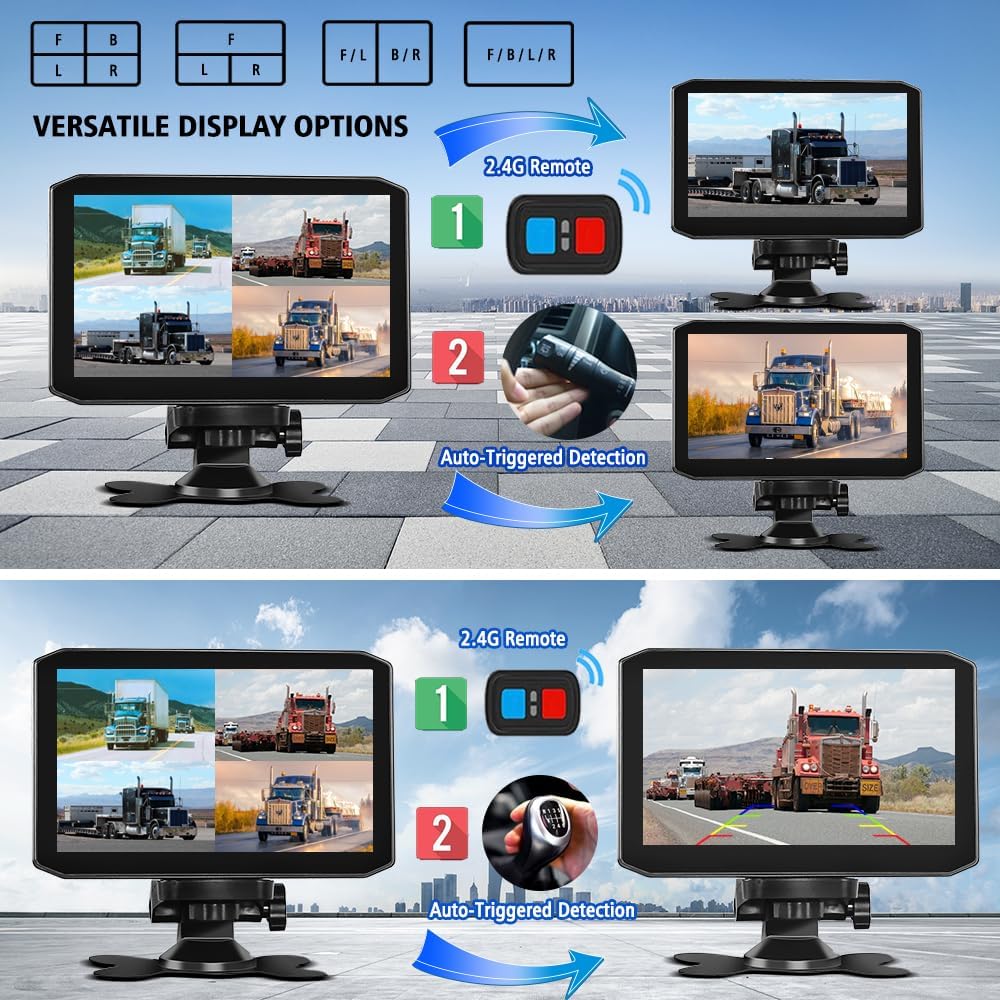
Image 4.1: Versatile Display Options.
4.3 Recording Functions
- Loop Recording: When the memory cards are full, the system automatically overwrites the oldest unlocked video files to ensure continuous recording.
- Emergency Recording: The G-sensor detects sudden impacts or collisions and automatically locks the current video file, preventing it from being overwritten.
- Parking Mode: Provides 24/7 surveillance when the vehicle is parked. Recording intervals can be adjusted. The low-voltage protection feature prevents the vehicle's battery from draining.
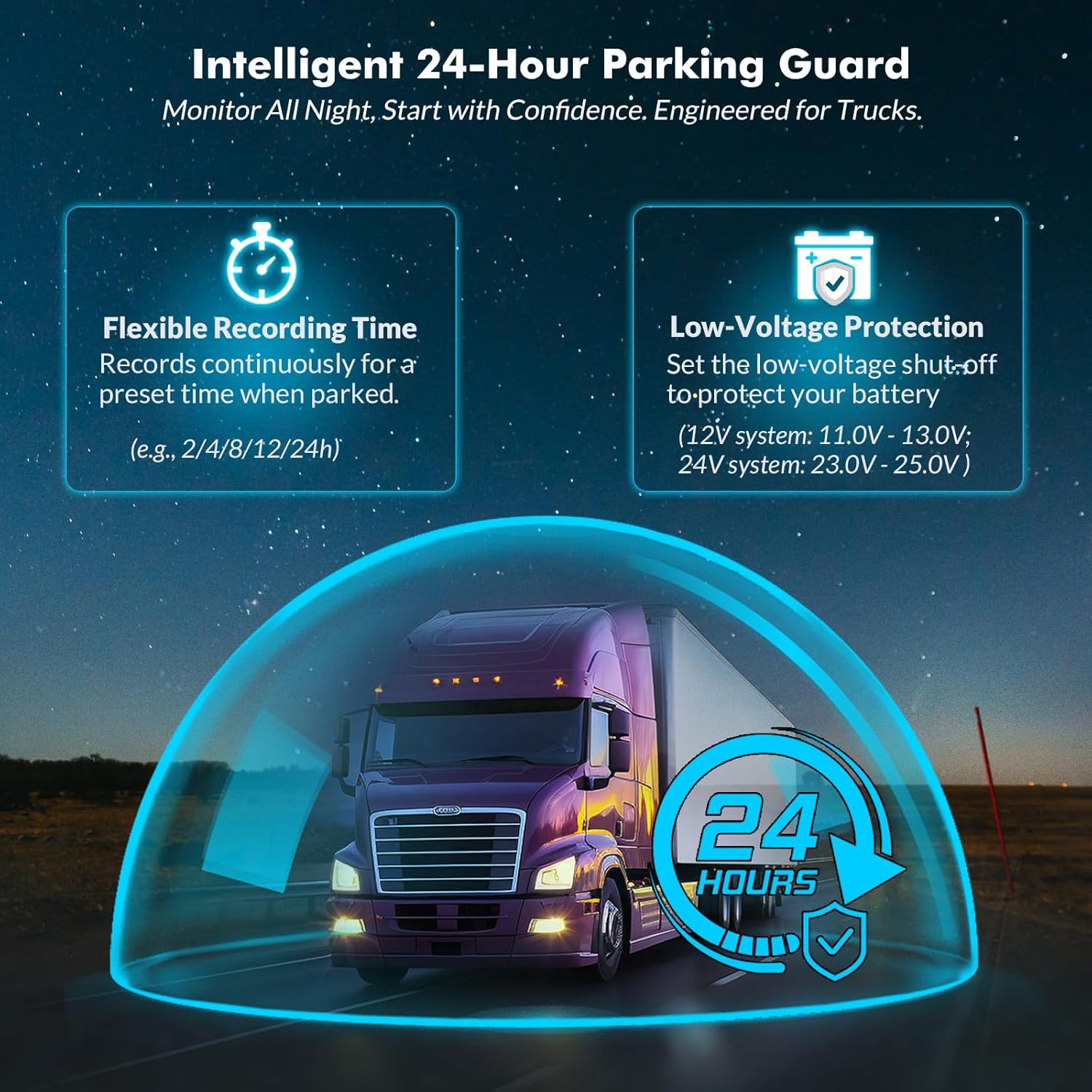
Image 4.2: Intelligent 24-Hour Parking Guard.
4.4 GPS Functionality
The integrated GPS module tracks and displays real-time data on the monitor, including:
- Date & Time
- Recording Status
- GPS Status (Latitude, Longitude)
- Speed
- Altitude
- Atmospheric Pressure
- Battery Voltage

Image 4.3: Real-time Metrics Display.
4.5 Remote Control Usage
The 2.4G wireless remote control allows for convenient manual switching between camera views and other functions without directly interacting with the monitor.
4.6 Memory Card Management
The system supports two memory cards, each up to 512GB. Ensure memory cards are inserted correctly. It is recommended to format new memory cards within the device before first use to ensure optimal performance. Regularly back up important footage.

Image 4.4: Dual Memory Card Slots.
5. Maintenance
Proper maintenance ensures the longevity and optimal performance of your VSYSTO H7 system.
- Cleaning: Use a soft, dry cloth to clean the monitor and camera lenses. Avoid abrasive cleaners or solvents.
- Cable Inspection: Periodically check all cables for wear, damage, or loose connections.
- Firmware Updates: Check the VSYSTO official website for any available firmware updates to ensure your system has the latest features and bug fixes.
- Storage: If the vehicle is to be stored for an extended period, consider removing the memory cards and storing the system in a cool, dry place.

Image 5.1: Cameras feature Infrared Night Vision and IPX7 Waterproof Design.
6. Troubleshooting
This section addresses common issues you might encounter with your VSYSTO H7 system.
| Problem | Possible Cause | Solution |
|---|---|---|
| System does not power on. | Loose power connection, vehicle power issue, faulty cable. | Check all power cable connections. Ensure vehicle ignition is on (if wired to ignition). Verify vehicle's power source is functional. |
| Monitor displays a blue screen or shuts down unexpectedly. | Power fluctuation, overheating, software issue. | Ensure stable power supply. Check for proper ventilation around the monitor. If issue persists, contact support for potential firmware updates or troubleshooting. |
| Cameras show no image or poor image quality. | Loose camera connection, dirty lens, incorrect camera orientation, camera malfunction. | Check camera cable connections. Clean camera lenses. Verify camera orientation (arrow pointing up). |
| Remote control is unresponsive. | Dead battery in remote, remote out of range, interference. | Replace remote control battery. Ensure remote is within operating range of the monitor. |
| GPS data is inaccurate or not displayed. | GPS module not connected, poor satellite signal, module malfunction. | Ensure GPS module is securely connected and has a clear view of the sky. Move vehicle to an open area if signal is weak. |
| Recording stops or files are corrupted. | Memory card full, faulty memory card, incorrect formatting. | Ensure sufficient space on memory cards. Format memory cards within the device. Try a different, high-quality memory card. |
7. Technical Specifications
| Feature | Specification |
|---|---|
| Model Number | H7 |
| Video Capture Resolution | 1080p (Full HD) |
| Number of Channels | 4 (Front, Rear, Left Side, Right Side) |
| Monitor Size | 7.0 inches HD IPS |
| Field of View | 170 Degrees (approx.) |
| Waterproof Rating (Cameras) | IPX7 |
| Operating Temperature | 32℉~158℉ (0℃~70℃) |
| Memory Card Support | 2 x 512GB (Max, not included) |
| Connectivity Technology | USB (for data transfer), Wireless (for remote) |
| Power Input | 9-32 Volt DC |
| Special Features | 4CH 1080P Simultaneous Video/Audio Recording, GPS Tracking, IR Night Vision, Low Voltage Protection, G-Sensor, Loop Recording, Parking Mode |
| Product Dimensions | 2.05 x 7.09 x 4.53 inches |
| Item Weight | 5.99 pounds |
8. Warranty and Support
VSYSTO products are designed for reliability and performance. For specific warranty details regarding your VSYSTO H7 system, please refer to the warranty information provided with your purchase or visit the official VSYSTO website.
For technical assistance, troubleshooting, or any product-related inquiries, please contact VSYSTO customer support. You can find contact information and additional resources on the VSYSTO Brand Store on Amazon or the official VSYSTO website.